-
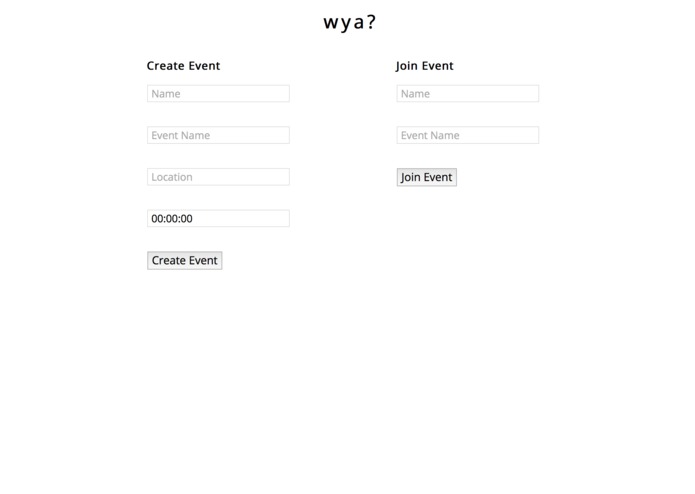
Event page - allows the creation or joining of a meeting event
-
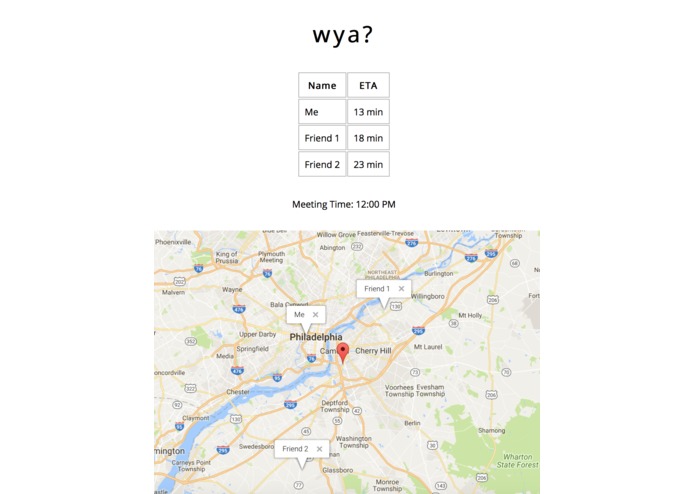
Landing page - the ETA and location of each meeting participant
Inspiration
All of us attend meetings almost every week of our lives. Some of us are early birds, who get to meetings first and wonder when everyone else will arrive. Others of us are always late, and want to know what the latest time we can leave home is without having a conspicuous arrival. We wanted to create a web app that allows such people to know exactly where they are relative to everyone else coming to a meeting, so that they have the correct expectations of the situation upon arrival. That is how the idea of WYA was born.
What it does
WYA allows a user to create a meeting event and set the location and time of the meeting. Other users who want to join the meeting can then provide the meeting id as well as their name. All of the users for each meeting then have their location and estimated time of arrival shown on a map that is updated real-time. This allows each meeting participant to see exactly where each person is and when they will arrive to the meeting.
How we built it
We used HTML5, and CSS3 to create the UI of our app. To store the event and user data, we created a database using Firebase. Javascript allowed us to connect everything in between.
Challenges we ran into / Things we learned
This project gave us our first exposure to databases, and it took a while to learn the relationship between the frontend and backend and how to access and modify data in the way that we needed for our app. We also used APIs (Firebase, Google Maps) that we had never used before, which took a long time to figure out how to implement.
What's next for WYA (Where You At)?
We would like to add features that help users more on their journey to their meeting, such as providing directions to the meeting location. The app also currently relies largely on the latitude and longitude coordinates of locations, and it would be more user-friendly to have the ability to search for nearby landmarks so that places have a human-readable name. We could also make the ability to add oneself to an event more secure, for example, by storing passwords in our database. The UI can also be improved by changing our login page into a series of pages, so that the space is more aesthetically pleasing.

Log in or sign up for Devpost to join the conversation.