
About the Project
💡 The Inspiration
I've always loved writing, but I've also been paranoid about privacy. Last semester, I was working on some personal journal entries and wanted to use an AI writing assistant to help me articulate my thoughts better. But then I hesitated—did I really want to upload my private thoughts to some company's servers?
That moment stuck with me. I realized there are so many situations where people need writing help but can't risk their privacy: therapists writing case notes, lawyers drafting sensitive documents, students working on personal essays, or anyone just journaling about their life.
That's when I discovered Chrome's built-in AI APIs, and everything clicked. What if we could have all the power of AI writing assistance without ever sending a single word outside your device? That's how this project was born.
🎯 What It Does
My writing tool is like having a personal editor who lives in your browser and never gossips about what you write.
Here's what it offers:
- Real-time Grammar & Style Suggestions: Catches typos, awkward phrasing, and suggests clearer alternatives as you type
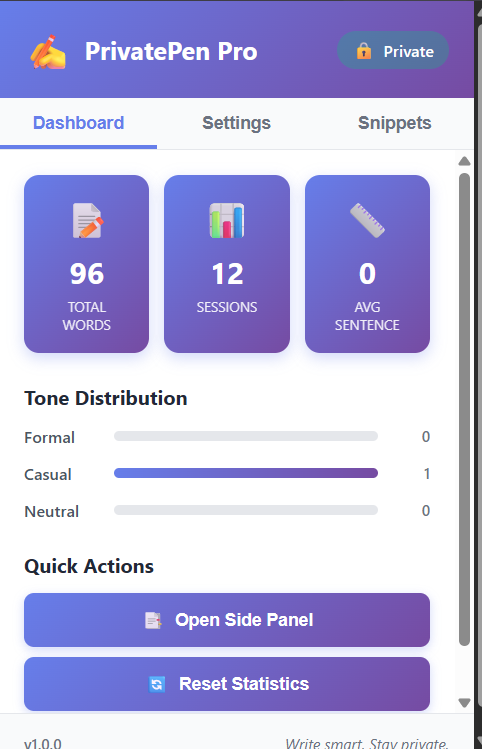
- Tone Analysis: Tells you if your writing sounds formal, casual, friendly, or professional—super helpful when you're not sure if an email sounds right
- Sentence Restructuring: Helps you rephrase complex sentences into clearer, more readable versions
- Privacy-First Design: Everything runs locally using Chrome's built-in AI. Your words never leave your device. Ever.
The best part? It works offline, responds instantly (no loading spinners!), and you never have to worry about subscription fees or data breaches.
🛠️ How I Built It
The Tech Stack:
- Chrome's built-in AI APIs (Prompt API for text generation)
- Vanilla JavaScript for the core logic (keeping it lightweight)
- HTML/CSS with a clean, distraction-free interface
- Chrome Extension manifest for easy browser integration
The Journey:
I started by diving into Chrome's AI documentation. Honestly, it was a bit overwhelming at first—built-in AI is still pretty new, and there weren't many tutorials out there. I spent the first weekend just experimenting with the Prompt API, figuring out how to craft prompts that would give me useful writing suggestions without being overly verbose.
The UI was another challenge. I wanted something that felt natural, almost invisible. I went through probably five different designs before settling on a sidebar approach that doesn't interrupt your writing flow. I used a minimalist color scheme (lots of whites and soft grays) because I didn't want the tool itself to be distracting.
For the grammar checking, I had to get creative with prompt engineering. Instead of asking the AI to "fix this text," I learned to give it more structured prompts like "Identify grammar issues in this text and suggest corrections with explanations." This gave much better, more educational results.
The tone analysis feature was actually the most fun to build. I created a simple system that analyzes word choice, sentence length, and punctuation to give you feedback like "This sounds a bit too formal for a friendly email" or "Great professional tone!"
🚧 Challenges I Faced
1. Working with Limited Documentation Built-in AI APIs are cutting-edge, which means Stack Overflow wasn't much help. I had to do a lot of trial and error, reading through GitHub issues and experimental docs. There were moments where I felt like I was flying blind.
2. Prompt Engineering is Hard Getting the AI to respond in consistent, useful formats took way more iterations than I expected. Sometimes it would give me a paragraph when I wanted a bullet list, or it would over-explain simple grammar rules. I ended up creating a library of tested prompts that work reliably.
3. Performance Optimization Running AI locally sounds great until you realize it can slow things down if you're not careful. I had to implement debouncing so the tool doesn't try to analyze every single keystroke. Finding that balance between responsiveness and performance was tricky.
4. Handling Edge Cases What happens when someone pastes 10,000 words? What if the AI response is incomplete? What about different languages? I spent a lot of time thinking through these scenarios and building in graceful fallbacks.
5. The Privacy Paradox Ironically, making something truly private meant I couldn't use analytics to understand how people use the tool. I had to rely on manual user testing with friends and family, which was slower but honestly more insightful.
📚 What I Learned
This project taught me that privacy doesn't have to mean compromising on features. For years, we've been told that powerful AI requires the cloud, but built-in APIs are proving that wrong.
I also learned a ton about:
- How to write effective prompts for language models
- The importance of UX in developer tools (nobody wants a cluttered writing interface!)
- Browser extension architecture and how to keep things secure
- The actual challenges people face with writing (it's not just grammar—it's confidence!)
Most importantly, I learned that constraints breed creativity. Working with local AI meant I couldn't just throw more compute power at problems—I had to be smart about when and how to use the AI.
🔮 What's Next
I'm excited to add:
- Multi-language support so this can help non-English writers too
- Writing statistics that show your progress over time (stored locally, of course)
- Custom style guides so you can teach the tool your preferred writing style
- Export options for popular formats (Google Docs, Notion, Markdown)
I genuinely believe that privacy-first AI tools are the future, and I hope this project inspires others to build with built-in APIs too.
Built with ❤️ and a healthy dose of privacy paranoia
