-
-
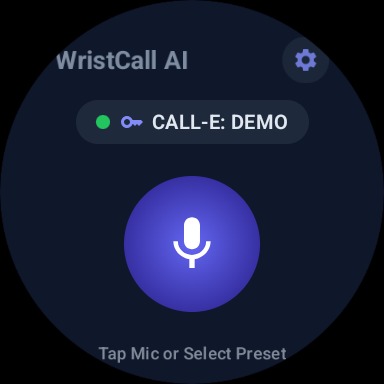
Voice command
-
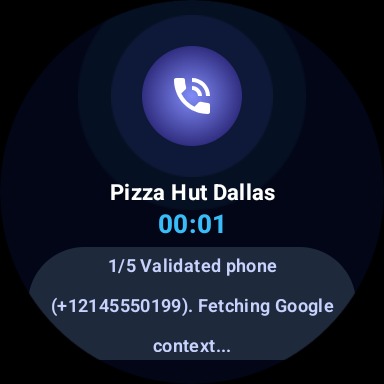
Call
-
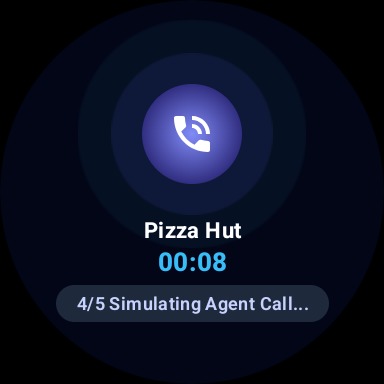
call
-
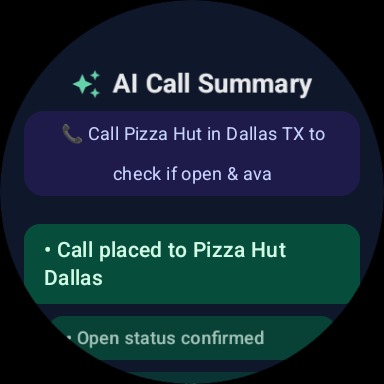
Ai summary
-
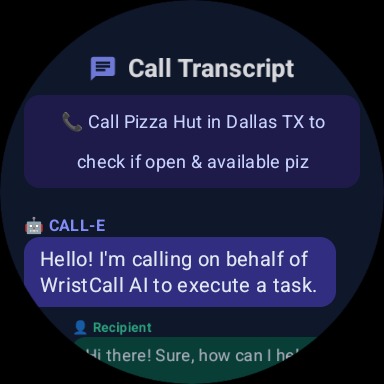
call transcript
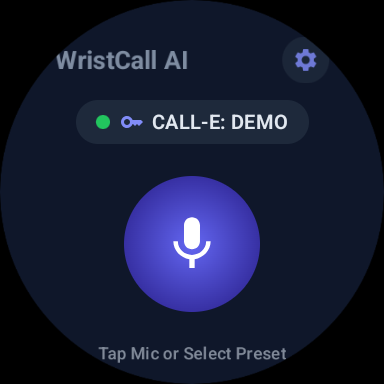
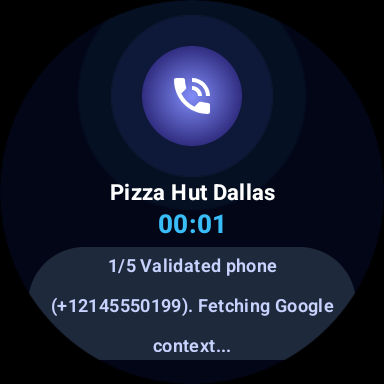
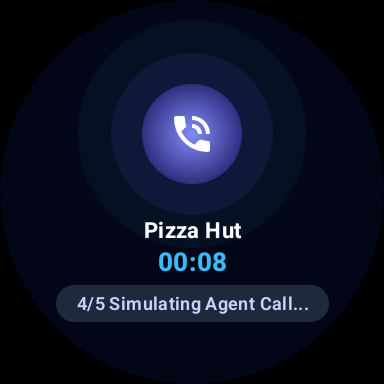
⌚ WristCall AI — Devpost Hackathon Story & Technical Showcase
**Empowering Smartwatches to Search, Discover, Call, and Converse








🚨 The Problem We Are Solving
Despite massive advances in smartwatches, making a simple phone call to a real-world business is still surprisingly high-friction.
1. ⌚ The Wearable Inaction Gap
Smartwatches are excellent at displaying information and notifications, but they are still limited when users need to take real-world action—such as checking business hours, asking about prices, confirming availability, or making an inquiry.
2. 📱 Phone Number Friction
Users rarely memorize local business phone numbers. Searching Google and typing on a tiny smartwatch screen is slow, frustrating, and error-prone.
3. ⏳ Time Wasted on Routine Calls
Calling a business often means navigating IVR menus, waiting on hold, explaining the same request, and spending several minutes just to get a simple answer.
4. 🧠 No Useful Record of the Conversation
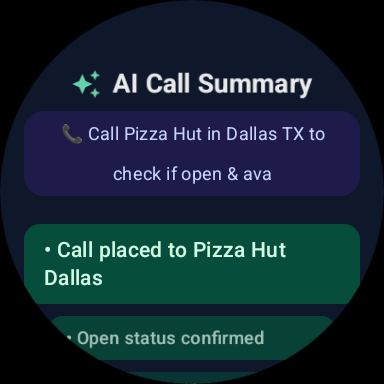
Even after completing a call, users are often left to remember what was discussed. There is no convenient, structured summary waiting on their wrist.
💡 The Solution: WristCall AI
WristCall AI turns a Wear OS smartwatch into an autonomous voice call delegate.
Simply speak one sentence on your wrist, and WristCall AI handles the rest:
🎙️ Speak → 🔍 Find → 🧠 Understand → 📞 Call → ✨ Summarize
WristCall AI can discover publicly available business phone numbers through SerpApi, understand and refine the user's request using Groq AI, and delegate the actual conversation through CALL-E.
Instead of manually making routine calls, users can simply say:
"Call the barber and ask for the earliest appointment tomorrow."
or
"Call the doctor's clinic and ask if they have appointments available this week."
or
"Call the restaurant and ask if they have a table available tonight."
WristCall AI handles the conversation and returns the important information directly to the user's wrist through a concise 3-bullet executive summary and voice readout.
🌎 From Your Wrist to the Real World
Whether it's a barber, doctor, restaurant, hotel, repair shop, garage, store, or any other business with a publicly available phone number, WristCall AI aims to turn a simple voice command into a completed real-world phone task—without requiring the user to pull out their phone, search for a number, or personally handle the entire conversation.
💡 Inspiration
In today's fast-paced world, smartwatches excel at notifications and health tracking, but when it comes to taking real action in the real world—like calling a local restaurant to check opening hours, inquiring if a auto shop has a repair slot, or finding out if a BBQ place still has best sellers left—users are forced to pull out their phones, search Google, find phone numbers, dial manually, and wait on hold.
We asked ourselves:
"What if your smartwatch could autonomously search Google, synthesize intent, dial real phone numbers, hold human-like conversations, and present you with a 3-bullet executive summary—all from your wrist?"
That vision inspired WristCall AI—bringing autonomous AI phone call delegation straight to Wear OS.
⚡ What It Does
WristCall AI turns your smartwatch into an autonomous voice call delegation assistant:
- 🎙️ Zero-Friction Voice & Hardware Stem Activation: Double-press your smartwatch physical side crown button or tap the central mic button to activate voice listening with a live 3-word sliding marquee ticker (
[Word 1] [Word 2] [Word 3]). - 🔍 Automatic Business Phone & Snippet Discovery (Google SerpApi): Users don't need to look up or memorize phone numbers. Simply say "Call Cattleack Barbeque in Farmers Branch and ask opening hours". WristCall AI queries Google via SerpApi to extract verified E.164 phone numbers, store addresses, and location snippets.
- 🧠 Groq AI 120B Intent Synthesis (
gpt-oss-120b): Combines raw user prompts with Google search snippets to synthesize structured, high-precision call instructions. - 📞 CALL-E Telecom Dispatch & Live Polling: Dispatches real autonomous phone calls via CALL-E REST API (
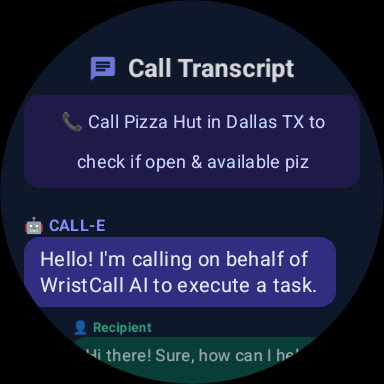
/v1/calls), tracking live status (Queued$\rightarrow$Ringing$\rightarrow$In Conversation$\rightarrow$Completed) on the watch UI. - ✨ Dedicated 3-Bullet Executive Summary & Audio Playback: Displays a glowing 3-bullet summary screen with automatic
TextToSpeechvoice readout and a 🔊 Listen Recording button to play real audio call recordings. - 📱 2 Editable Quick-Action Cards: Persistent home screen cards with inline ✏️ Edit buttons for 1-click repeat task delegation saved to local storage.
🛠️ How We Built It
🏗 System Architecture Diagram
graph TD
    A[⌚ Wear OS Smartwatch] -->|Hardware Stem / Mic Touch| B[WristCall Wear App UI]
    B -->|User Instruction| C{Phone Number Provided?}
    C -->|No - Business Name Only| D[🔍 Google SerpApi Client]
    D -->|Verified Phone + Snippets| E[🧠 Groq AI 120B Synthesis]
    C -->|Yes - Direct E.164| E
    E -->|Refined Prompt + E.164| F[📡 CALL-E REST Client]
    F -->|Dispatch /v1/calls| G[📞 CALL-E Telecom Network]
    G -->|Real-world Phone Call| H[🏪 Target Business / Recipient]
    H -->|Live Transcript & Audio| G
    G -->|JSON Response & Poll| B
    B -->|Render Screen + Audio Readout| I[📜 Transcript & ✨ 3-Bullet Summary Screen]
🎨 Design System & Color Palette
We built a custom dark slate & neon mint aesthetic specifically tailored for circular Wear OS displays:
| Element | Color Hex | Visual Purpose |
|---|---|---|
| Background Slate | #0F172A |
Deep contrast for circular OLED smartwatch displays |
| Active Mint Accent | #6EE7B7 / #059669 |
Highlight badges, success states, & positive actions |
| Pulsing Mic Active | #EF4444 / #991B1B |
Live recording indication & hardware marquee focus |
| Indigo Accent | #6366F1 / #312E81 |
Settings gear, API keys status, & card container |
| Text Primary | #F8FAFC / #E2E8F0 |
High-legibility typography |
🛠️ Tech Stack & SDK Integration
| Component | Technology / Service | Description |
|---|---|---|
| Wear OS UI | Jetpack Compose for Wear OS | Modern declarative UI components tailored for circular watch screens |
| Core Architecture | Kotlin Coroutines & Flows | Asynchronous API polling, timer states, & non-blocking UI threads |
| Google Phone Discovery | Google SerpApi Engine | Discovers verified business phone numbers, addresses, & snippets |
| AI Intent Synthesis | Groq AI Chat API (gpt-oss-120b) |
Synthesizes Google search context into structured voice instructions |
| Telecom Call Dispatch | CALL-E REST API (/v1/calls) |
Executes autonomous phone calls to real-world phone networks |
| Voice & Audio Engine | Android TextToSpeech & MediaPlayer |
Automatic summary voice readout & call recording audio playback |
| Local Persistence | Android SharedPreferences |
Stores API keys, custom prompt cards, & user preferences |
🚨 Challenges We Ran Into
Wear OS Emulator RAM & Heap Limitations:
- Challenge: Wear OS emulators default to 512 MB RAM and 48 MB Heap, which caused severe Garbage Collection (GC) thrashing and input dispatch timeouts (ANRs) when rendering Jetpack Compose layouts.
- Solution: Upgraded the
Wear_Jpemulatorconfig.inito 2048 MB RAM and 256 MB VM Heap, resulting in smooth, lag-free execution.
Google Search Phone Number Extraction:
- Challenge: Raw search snippets often contain formatted phone numbers (
(972) 805-0999or972.805.0999) that fail strict E.164 formatting requirements. - Solution: Built a robust regex sanitizer in
SmartCallResolver.ktthat extracts, formats, and validates strings into clean+1XXXXXXXXXXE.164 phone numbers.
- Challenge: Raw search snippets often contain formatted phone numbers (
CALL-E Status Polling & Dialogue Parsing:
- Challenge: Decoding nested turn-by-turn dialogue attempts (
recipients[0].attempts[0].transcript_turns) while handling live call status polling. - Solution: Developed
CallEClientwith safe JSON parsing and fallback summary generation to ensure transcripts render reliably even if telecom attempts fail or time out.
- Challenge: Decoding nested turn-by-turn dialogue attempts (
Hardware Stem Double-Click Interception:
- Challenge: Handling physical side crown key events (
KEYCODE_STEM_PRIMARY) without hijacking system back navigation. - Solution: Implemented a 50ms–650ms key time-delta detector in
MainActivity.kt, explicitly excludingKEYCODE_BACKfrom double-click triggers.
- Challenge: Handling physical side crown key events (
🏆 Accomplishments That We're Proud Of
📦 Open-Source calle-android-sdk: We open-sourced and published the official Kotlin/Android SDK on JitPack (com.github.Baklolman69:calle-android-sdk:1.0.0) and submitted PR #381 to CALLE-AI/awesome-phone-call-agents so any Android developer can integrate CALL-E into their app in under 5 minutes.
- 🚀 Sub-Second Hardware Launch: Users can double-click their smartwatch side button to launch into mic listening mode in under 1 second.
- 🔍 Zero-Phone-Number Phone Discovery: Users only need to name a business—the app handles searching Google, finding numbers, and building call prompts autonomously.
- 🎙️ Right-to-Left Live Speech Marquee: Built a custom 3-word sliding marquee window that brings visual excitement to voice recording.
- ✨ Executive 3-Bullet AI Summary & Voice Readout: Beautiful neon mint Wear OS executive summary screen with automated voice readout.
- 🔑 Out-of-the-Box Zero-Friction Setup: Pre-configured with default CALL-E, SerpApi, and Groq AI credentials so judges can test instantly without manual setup.
🎓 What We Learned
- Wear OS UX Design Principles: Less is more on circular displays. Designing for quick touches, large tap targets, and visual feedback makes smartwatch apps feel magical.
- Combining SerpApi + Groq AI + CALL-E: Chaining Google search context with fast LLM inference (
gpt-oss-120b) creates far more reliable phone call prompts than sending raw user input directly to telecom networks. - Resilient Mobile SDK Architecture: Separating the core logic into an independent
calle-androidSDK module ensured full reusability between phone and Wear OS modules.
🚀 What's Next for WristCall AI
We are excited to expand WristCall AI into a full-fledged autonomous wearable agent. Our upcoming roadmap includes:
1. 🎙️ "ELA" Always-On Wake-Word Voice Assistant
- Hands-Free Wake-Word Detection: Users won't even need to touch or double-click the watch screen. Simply say "Hey ELA" followed by your command ("Hey ELA, call Pizza Hut and check delivery time").
- On-Device Keyword Spotting: Lightweight TensorFlow Lite wake-word engine running locally on Wear OS for zero-latency background activation.
2. 💳 Autonomous In-App Wallet & Payment System
- Hands-Free Deposits & Payments: Integrated in-app wallet where users deposit funds (via Google Pay / Stripe).
- Autonomous Booking & Purchase Execution: When WristCall AI calls a business for pre-bookings, table reservations, or order deposits, CALL-E can securely authorize payments on the user's behalf up to a user-defined limit (e.g. paying a $20 deposit for a BBQ reservation or paying for a pizza pickup order).
3. 📅 Calendar & Contacts Deep Integration
- Automatic calendar event creation when a phone call confirms an appointment or reservation time.
- Direct sync with Android Contacts for calling personal and business contacts hands-free.
Built With
- google-serach
- groq
- kotlin
- serpapi
- wearos

Log in or sign up for Devpost to join the conversation.