Inspiration
Inspiration
The 2026 FIFA World Cup is the biggest sporting event in history — 48 teams, 104 matches, 16 host cities across the USA, Canada, and Mexico. As a football fan, I tried to plan a hypothetical trip and immediately hit a wall: Which city has my team's matches? What will flights, hotel, and tickets actually cost me? Where do I even start?
Most tools give you one piece of the puzzle. You search matches on one site, hotels on another, flights on a third — then manually add it up in a spreadsheet. I wanted to build something that does all of that for you, automatically, in a single conversation. That frustration became this project.
What it does
World Cup 2026 Fan Trip Planner is an AI agent that turns one natural-language message into a complete, personalised trip plan.
You tell it your favourite team, your departure city, and your budget. The agent autonomously chains four tools together — no manual steps required:
- 🍃 Queries MongoDB Atlas — finds your team's full match schedule from 50+ seeded matches across all groups and knockout rounds
- 🏟️ Fetches venue details — retrieves stadium info, average hotel costs by tier, daily food budget, airport code, and local tips for each host city
- 💰 Calculates a full budget — itemised breakdown of flights, hotel per night, match tickets, food, and miscellaneous transport in both USD and CAD
- ✈️ Synthesises a trip plan — combines all tool results into a readable, actionable itinerary with pro booking tips
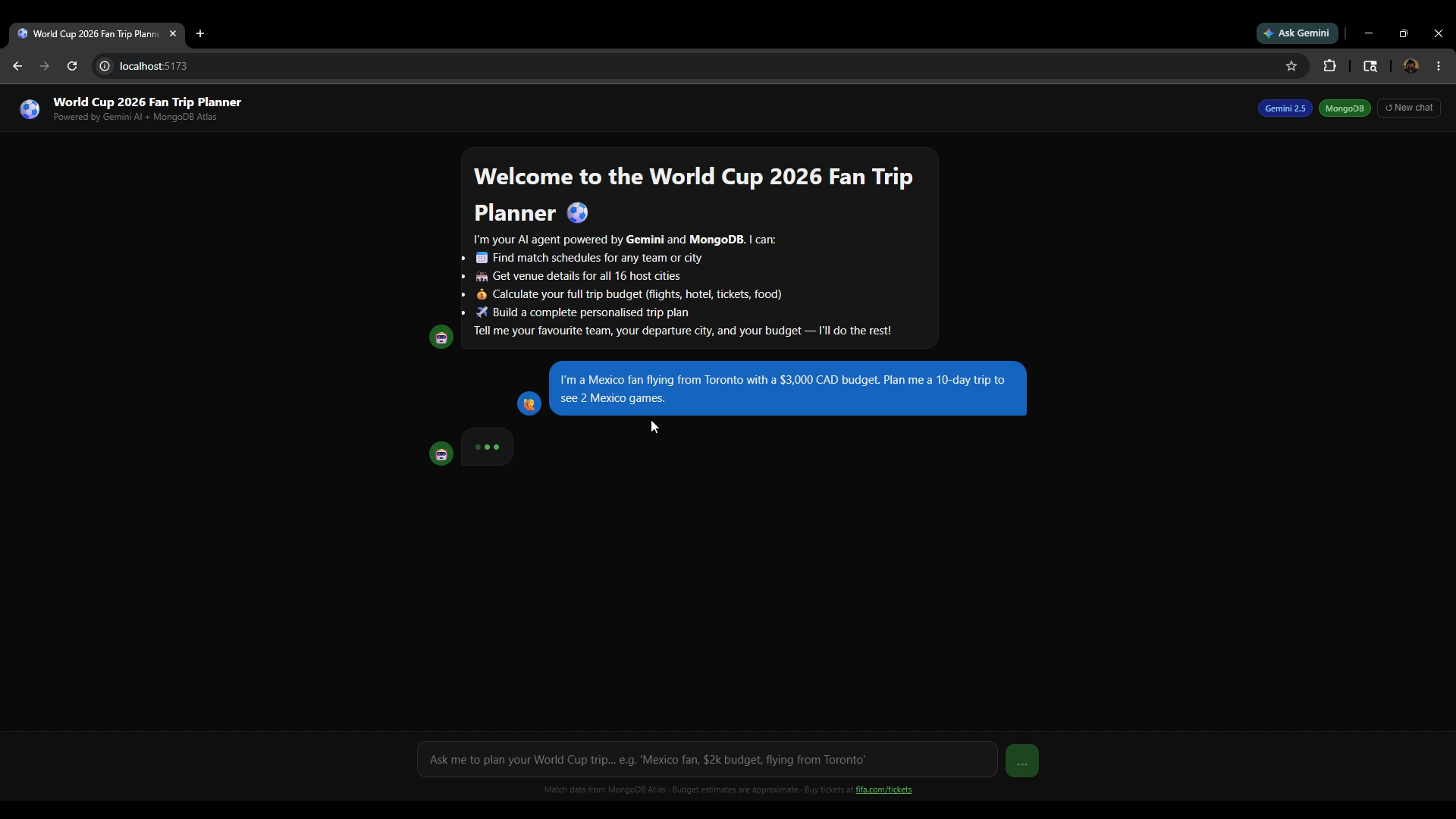
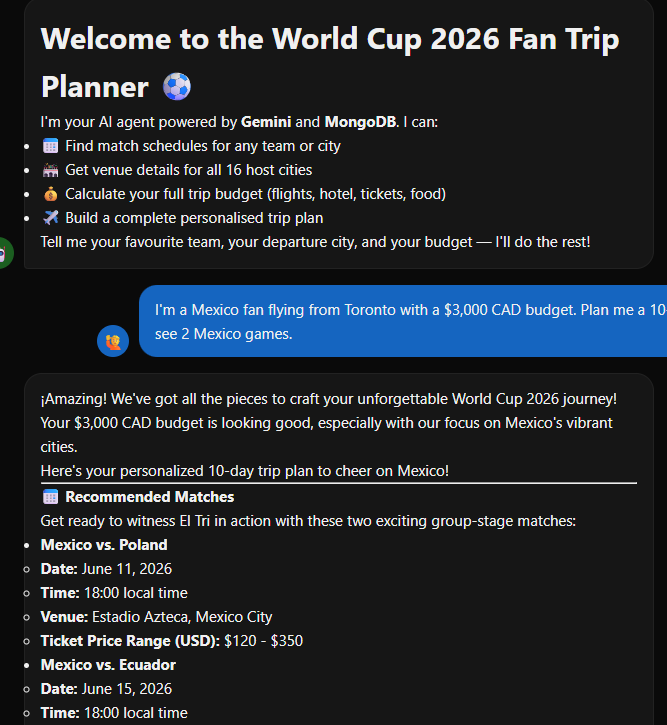
Example input: "I'm a Mexico fan flying from Toronto with a $3,000 CAD budget. Plan me a 10-day trip to see 2 Mexico games."
Output: Mexico's group stage schedule → best host city combo → hotel + flight + ticket cost breakdown → day-by-day itinerary → pro tips — all in one response.
This is not a chatbot that answers questions. It is an agent that accomplishes a task.
How we built it
Architecture
React Frontend (Vite + React 18) │ POST /api/chat Express Server — agent.js (agentic tool loop) │ │ │ MongoDB Atlas Budget Calculator Gemini 2.0 Flash 50+ matches flights/hotel/ Reasoning + 16 venues tickets/food tool orchestration
MongoDB Atlas — The Core Data Layer
MongoDB Atlas M0 (free tier, no credit card) stores all match and venue data. We seeded it with 50+ matches across all group stages and knockout rounds, and 16 host city venue documents containing stadium capacity, hotel costs by tier (budget/mid/luxury), daily food estimates, airport codes, and local tips. Queries are indexed on team name, city, stage, and date for fast lookup.
Gemini 2.0 Flash — The Agentic Brain
The agent runs a multi-turn tool-calling loop using the Google AI Studio free tier. Gemini decides which tools to call, in what order, and keeps iterating until it has enough data to produce a complete answer. A single fan query typically triggers 3–5 automatic tool calls before the final trip plan is returned.
Budget Calculator
A local tool with real cost data for all 16 host cities — round-trip flight estimates by departure city, hotel costs by accommodation tier, average match ticket prices by stage, and daily food budgets. Returns both USD and CAD totals.
Frontend
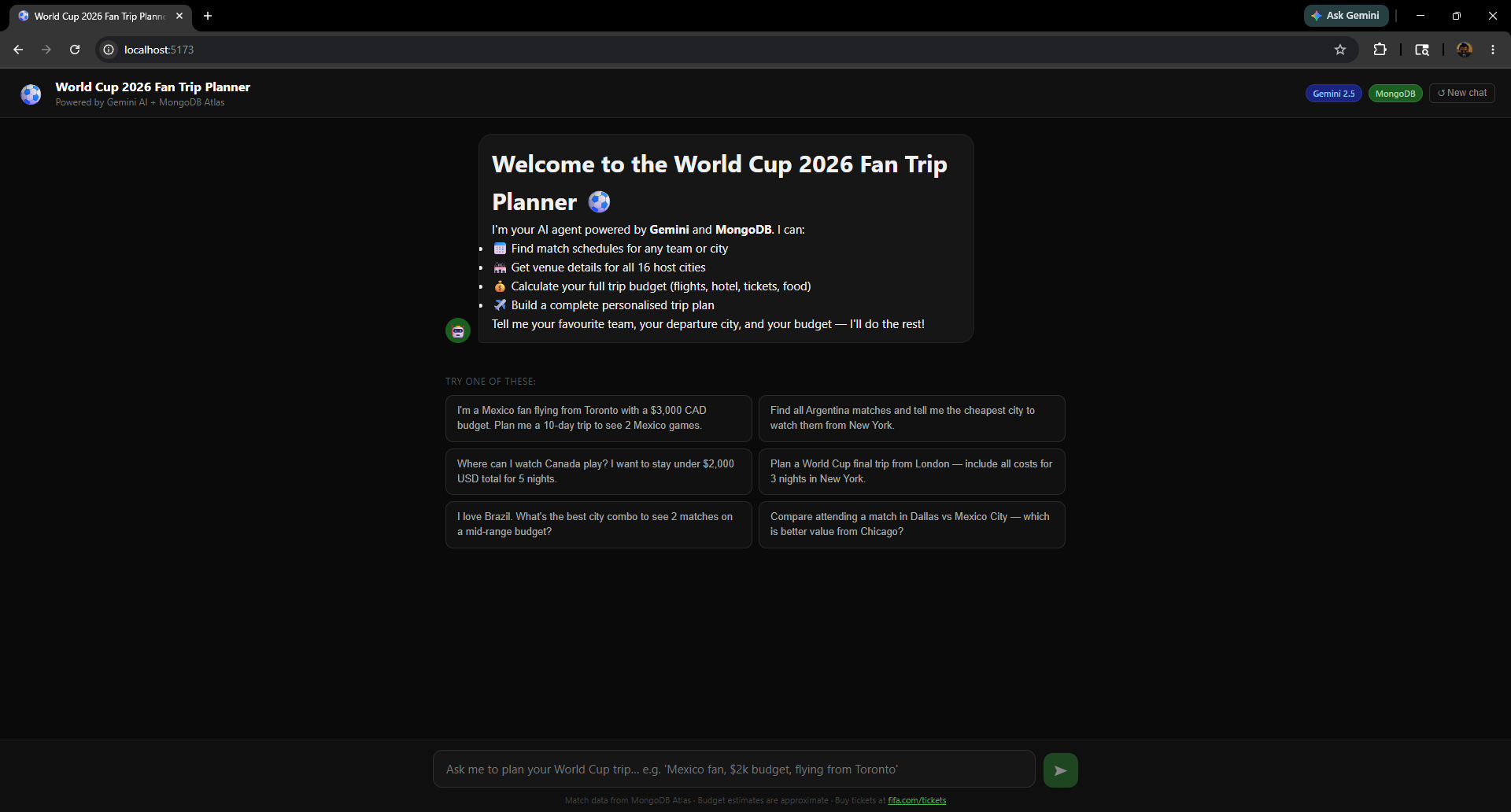
A dark-themed React chat interface with markdown rendering, six suggested starter prompts, and a typing indicator while the agent is working through its tool calls.
Challenges we ran into
Gemini API key confusion — Keys created in Google Cloud Console have a free tier limit of zero. Keys must be created specifically in Google AI Studio to get the 1,500 requests/day free quota. This distinction is not obvious and cost significant debugging time.
Agentic loop design — Getting Gemini to call multiple tools in the correct sequence required careful system prompt engineering. Without explicit ordering instructions, the model would sometimes skip the budget calculation step and answer from partial data. The fix was a detailed system prompt that defines the exact tool call order and makes budget calculation mandatory.
Model availability — gemini-1.5-flash returned a 404 on the v1beta endpoint, and
gemini-2.5-flash returned 503 errors due to high demand. Finding the right stable
free-tier model (gemini-2.0-flash) required trial and error.
MongoDB URI formatting — The querySrv ENOTFOUND error appeared when the Atlas
connection string was missing the 6-character cluster ID. Better error messages in the
seed script helped surface this faster.
Markdown rendering inside chat bubbles — The agent returns rich markdown with
headers, bullets, and nested lists. Getting bullet lists to render inside the bubble
without overflowing required switching from margin-left to padding-left on list
elements and setting overflow: hidden on the bubble container.
Accomplishments that we're proud of
- Built a true multi-step agent — not a chatbot, but a system that autonomously plans, calls tools, and synthesises results without any user guidance between steps
- $0 total cost — Gemini AI Studio free tier, MongoDB Atlas M0, and Render.com free hosting mean anyone can clone and run this without a credit card
- 50+ real matches seeded into MongoDB covering all 9 group stages, knockout rounds, semi-finals, and the final — with accurate venues, dates, and ticket price ranges
- A clean, production-quality UI that feels like a real consumer product, not a hackathon prototype
- The agent handles edge cases gracefully — tight budgets get redirected to cheaper cities, unknown teams return helpful suggestions, and all responses include actionable next steps
What we learned
- The real difference between a chatbot and an agent — an agent takes action and uses tools to accomplish a goal, not just generate text
- How to design a reliable agentic loop — prompt engineering for tool ordering, preventing hallucination of match data, and capping iteration depth to avoid infinite loops
- MongoDB Atlas is an excellent fit for sports data — the document model maps naturally to match records with nested venue objects, and the free M0 tier is genuinely production-capable for a project this size
- The practical difference between Google AI Studio keys vs Google Cloud Console keys for free tier access — a distinction that tripped us up and that we will save others from through the README
- How to build a full agentic system end-to-end in under a week: data modelling, tool design, agent orchestration, and a polished frontend
What's next for World Cup 2026 Fan Trip Planner Agent
- 🗺️ Interactive map view — visualise the fan's trip route across host cities on a map, with stadium markers and travel legs
- 🔴 Live match updates — integrate the FIFA official API to show real-time scores, lineup announcements, and ticket availability changes
- 👥 Group trip planner — support multiple fans traveling from different cities, finding the optimal meeting-point host city that minimises total group travel cost
- 📱 Mobile app — React Native version so fans can plan and check their itinerary on the go, with push notifications for match day reminders
- 🌐 Multilingual support — Spanish and French versions to serve Mexican and Canadian French-speaking fans in their native language
- 🎟️ Direct ticket availability — connect to the FIFA resale marketplace API to show real-time ticket availability and pricing inside the trip plan
- ☁️ Google Cloud Agent Builder migration — move the agent to Google Cloud Agent Builder with the official MongoDB Atlas MCP server for enterprise-grade scaling
Built With
- ai
- api
- atlas
- css3
- express.js
- gemini
- html5
- javascript
- mongodb
- node.js
- react
- render
- rest
- studio
- vite

Log in or sign up for Devpost to join the conversation.