-
-
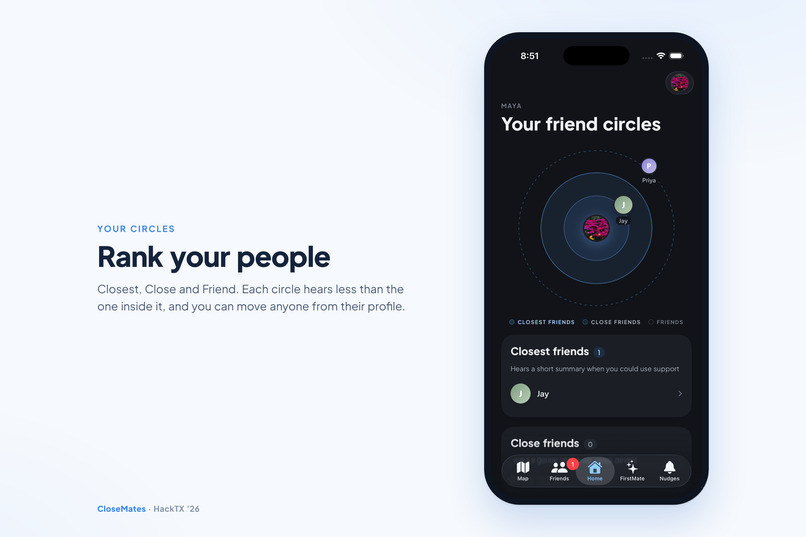
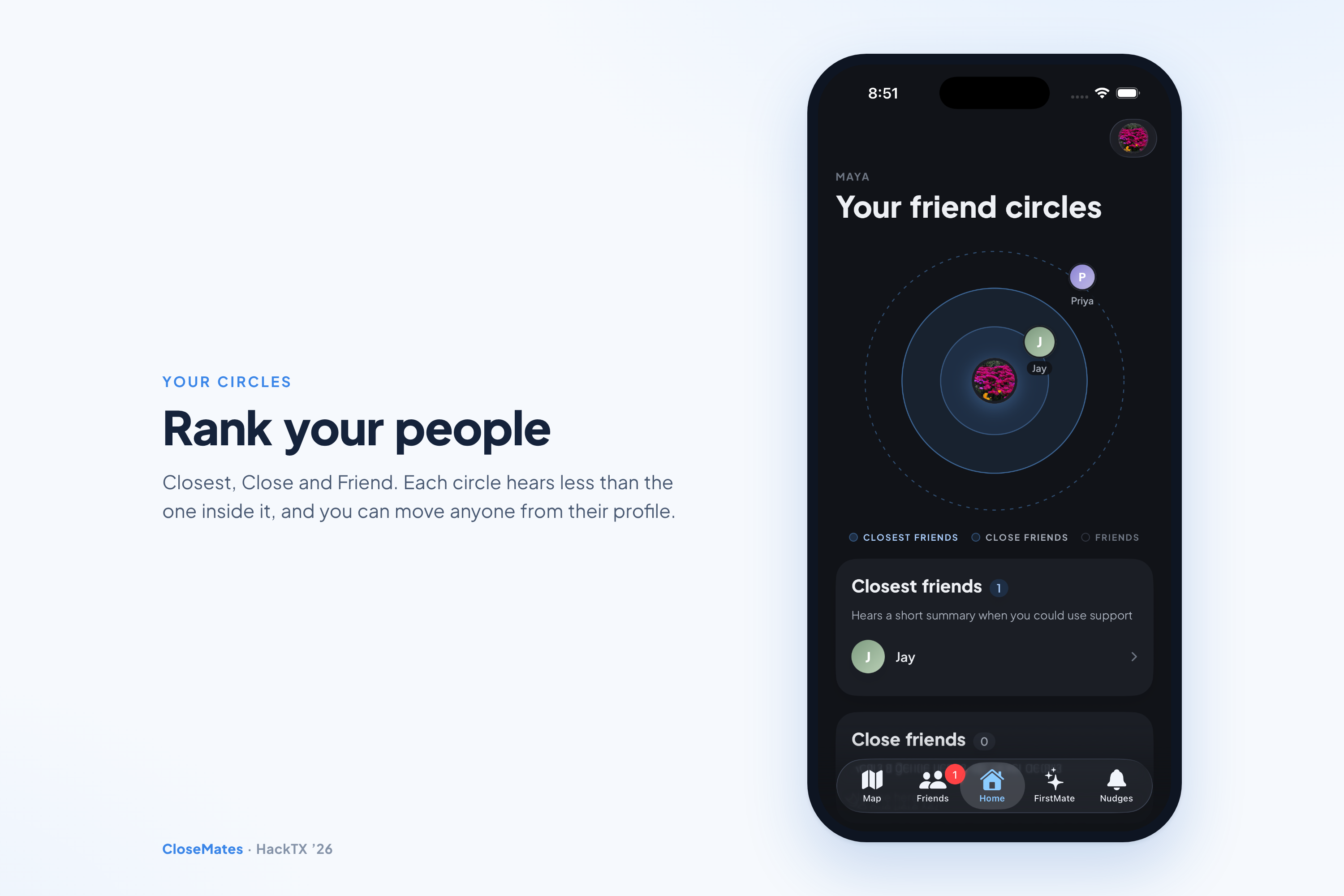
Rank your people. Closest, Close and Friend: each circle hears less than the one inside it.
-
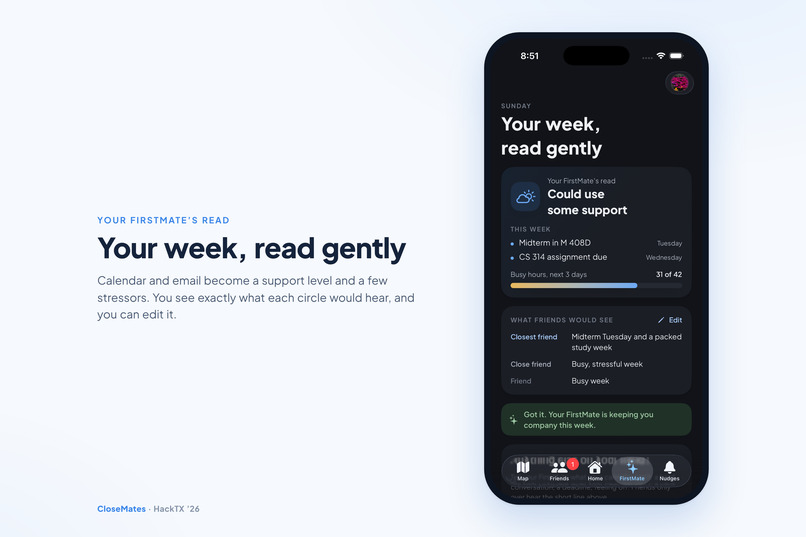
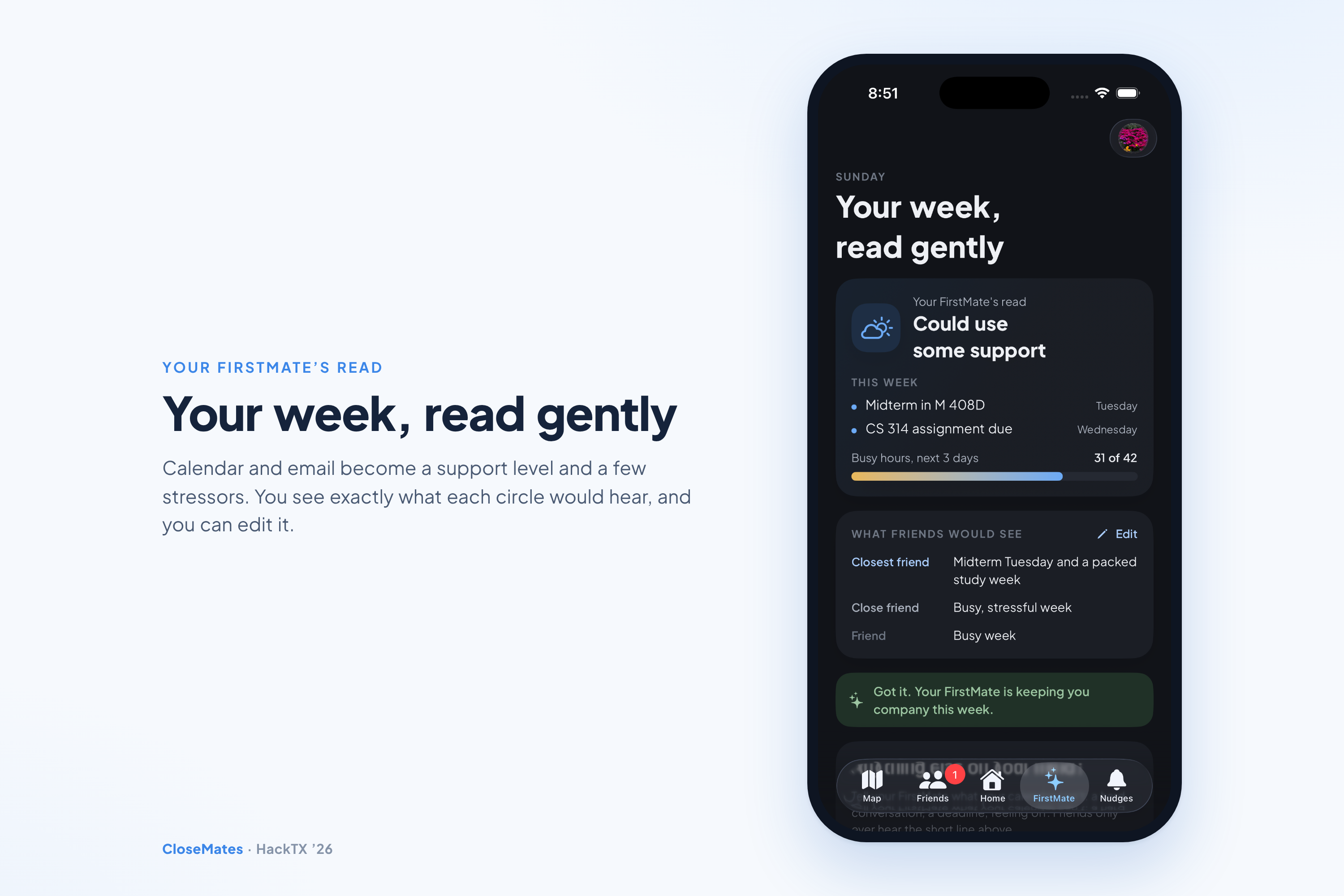
Your week, read gently. FirstMate turns calendar and email into a support level, and shows exactly what each circle would hear.
-
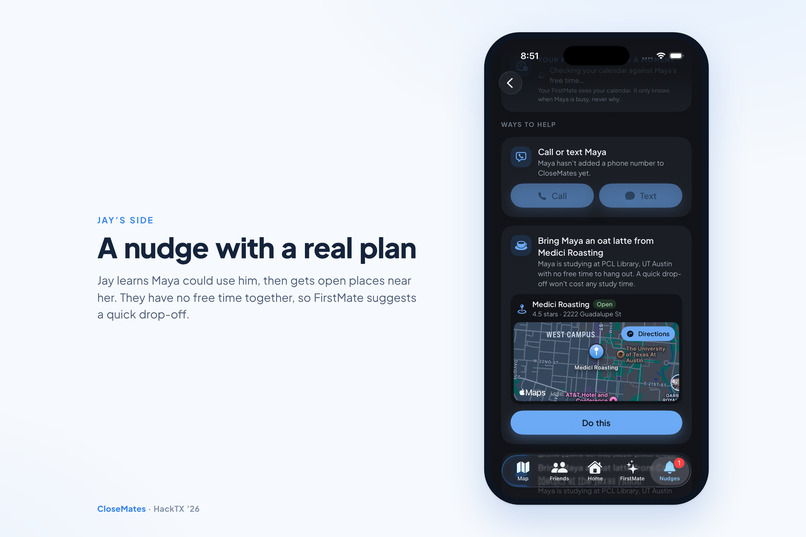
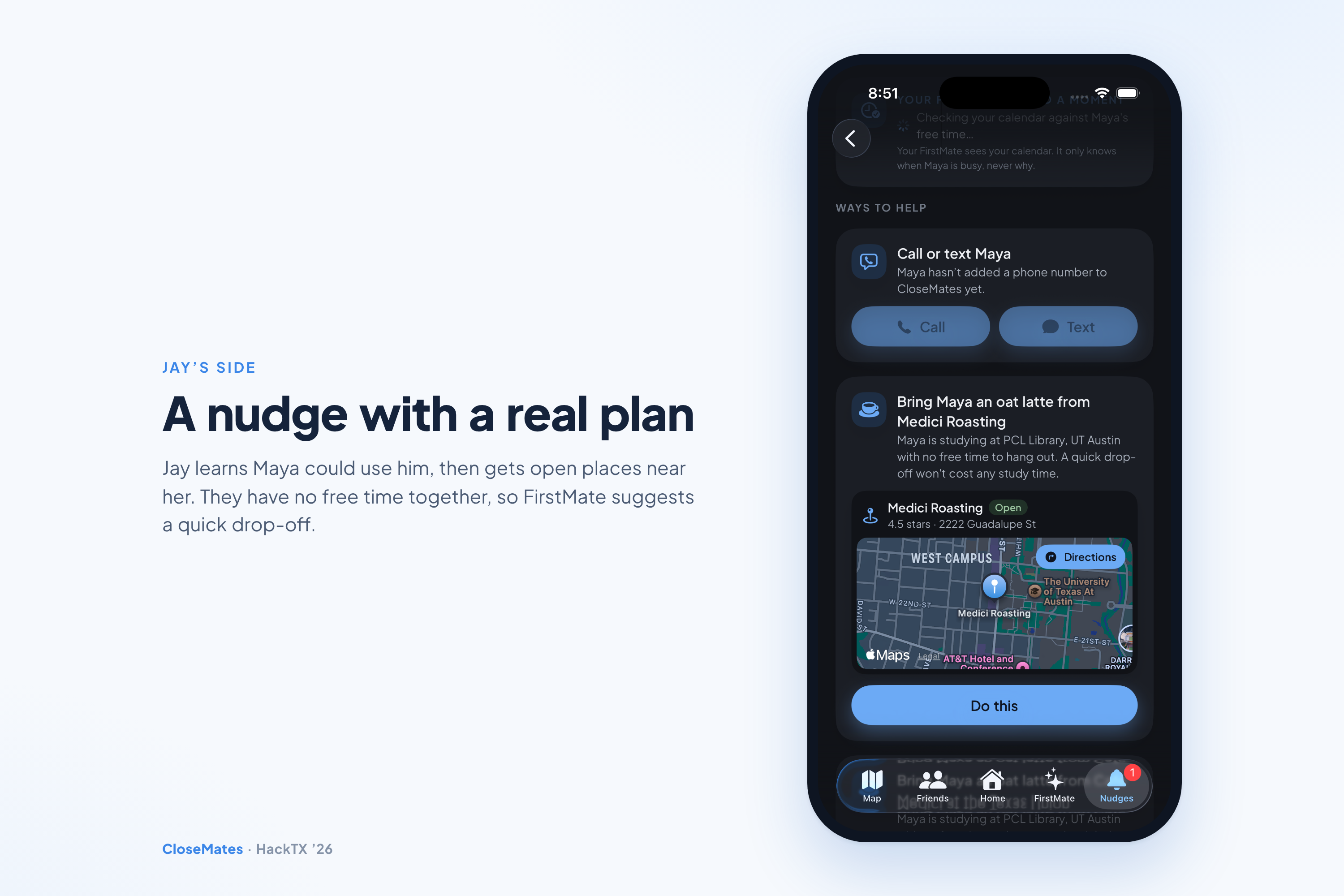
A nudge with a real plan. Jay learns Maya could use him and gets open places nearby. With no free time, FirstMate suggests a quick drop-off.
-
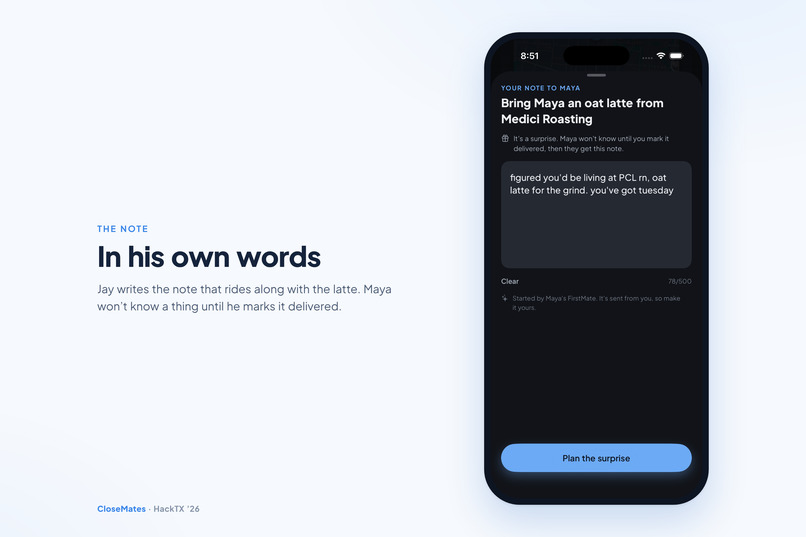
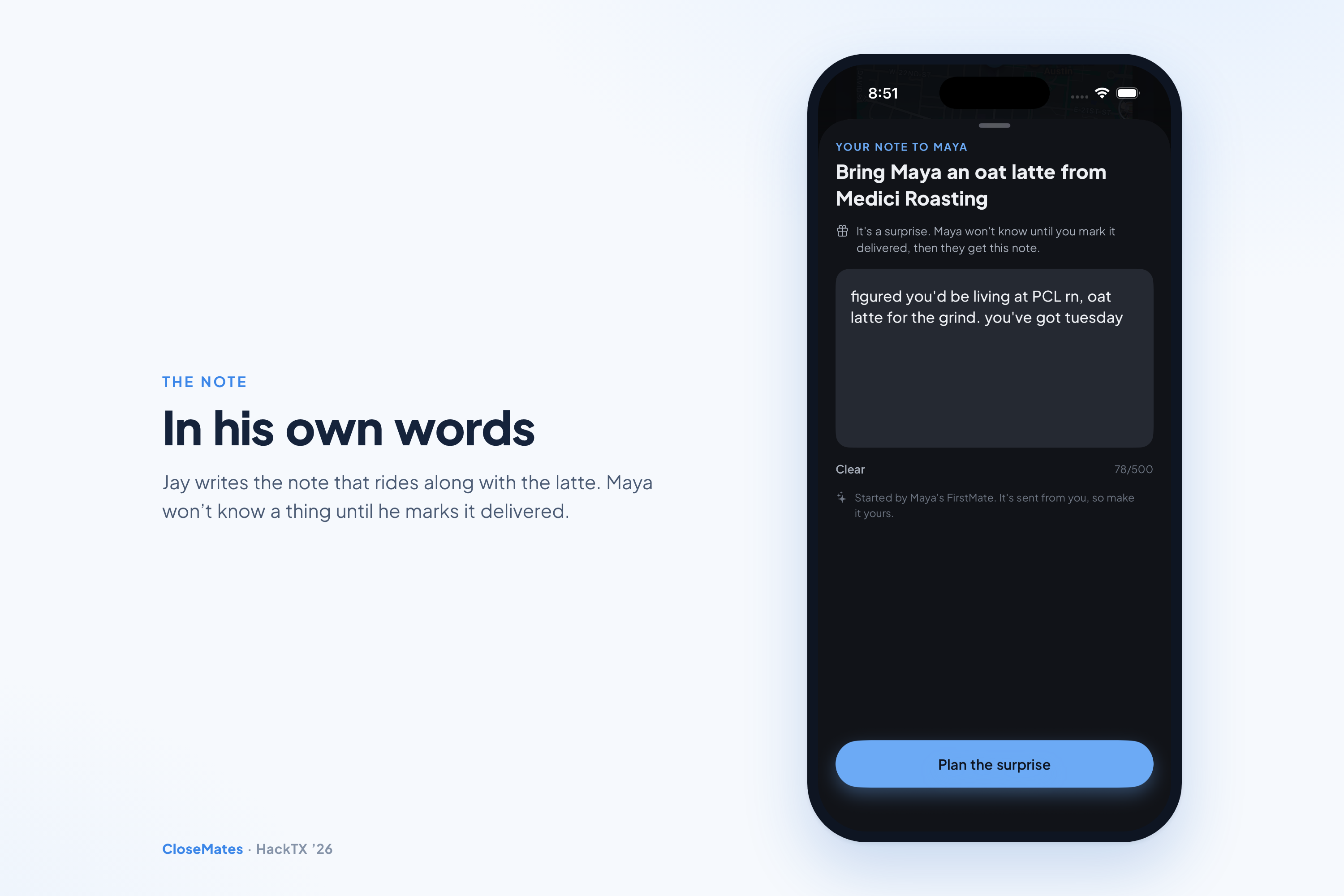
In his own words. Jay writes the note that rides along with the latte. Maya won't know until he marks it delivered.
-
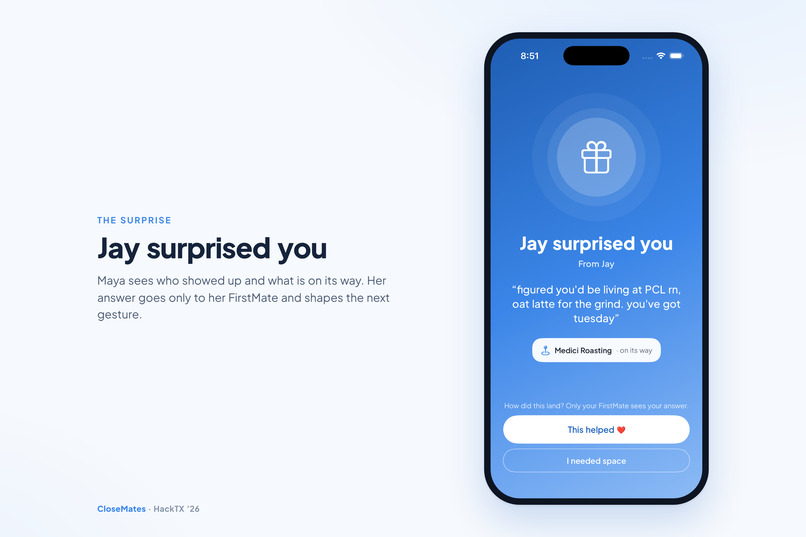
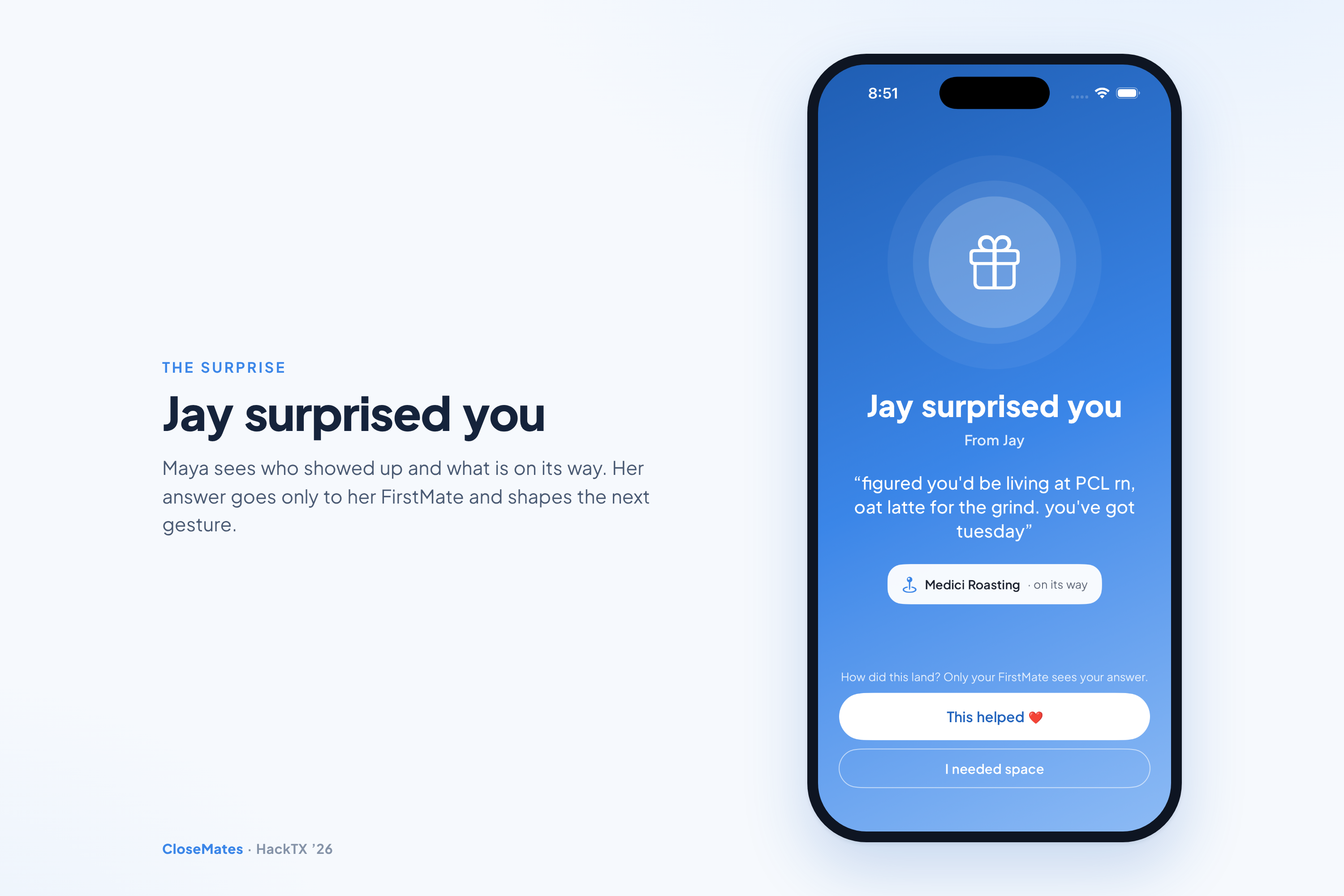
Jay surprised you. Maya sees who showed up, and her reaction goes only to her FirstMate.
-
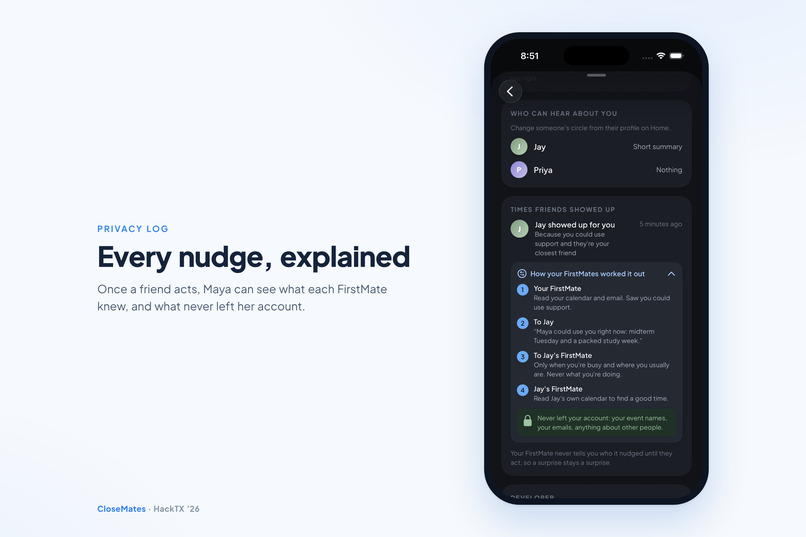
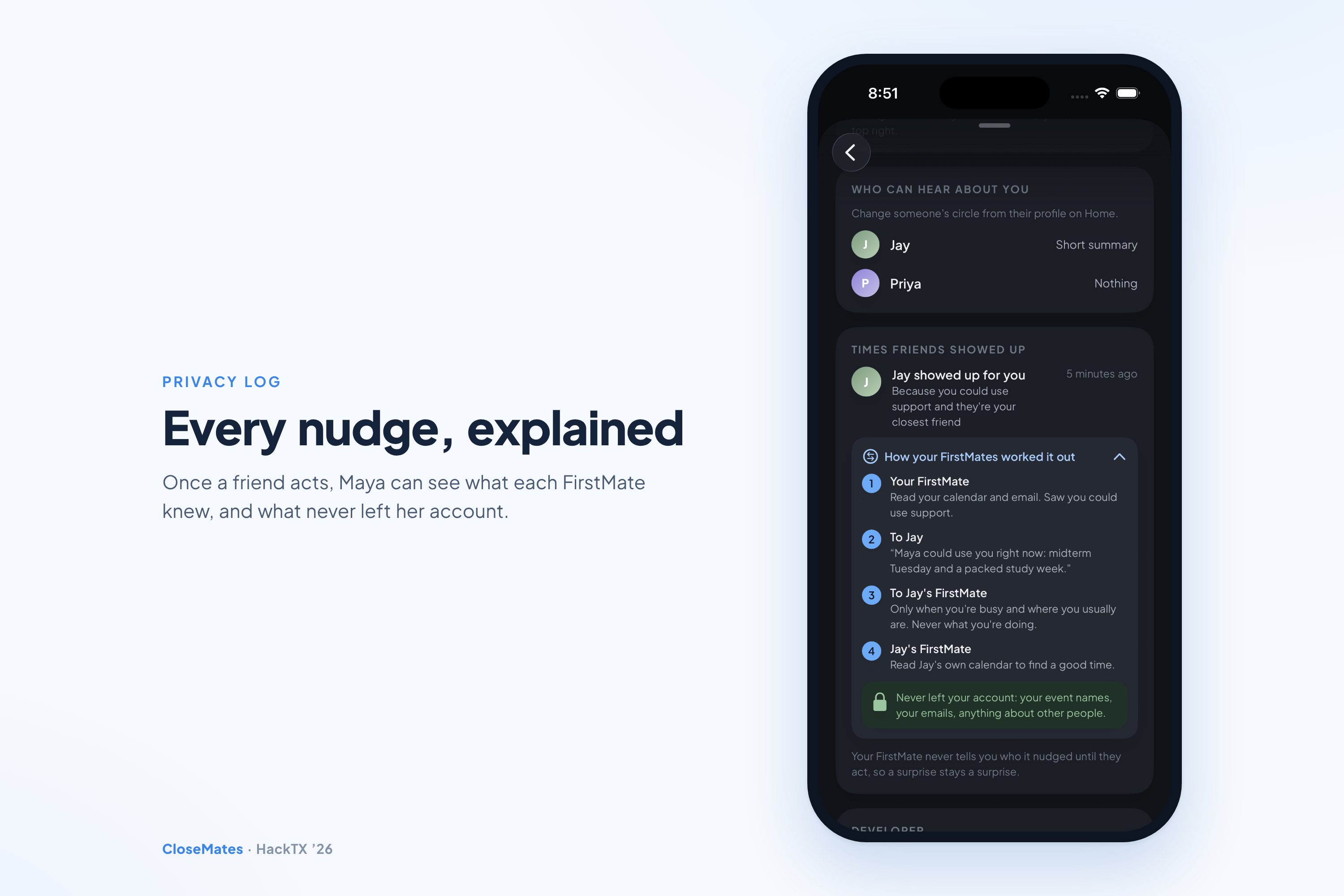
Every nudge, explained. Once a friend acts, Maya sees what each FirstMate knew and what never left her account.
-
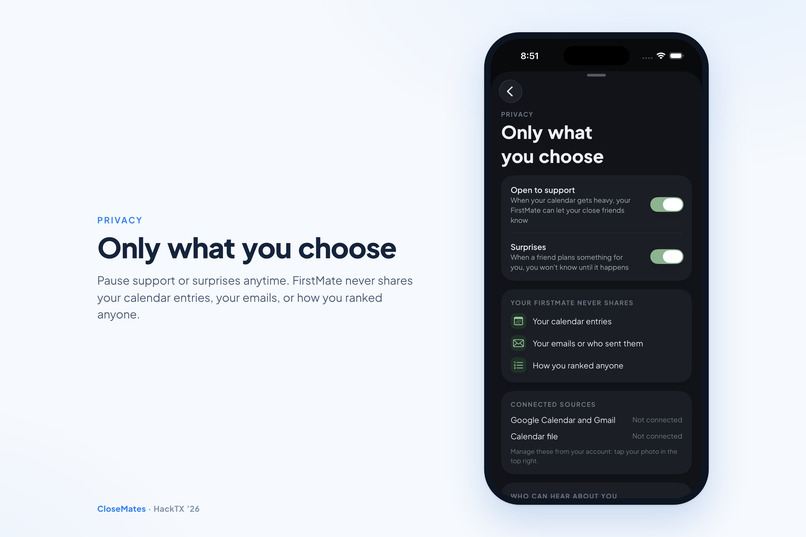
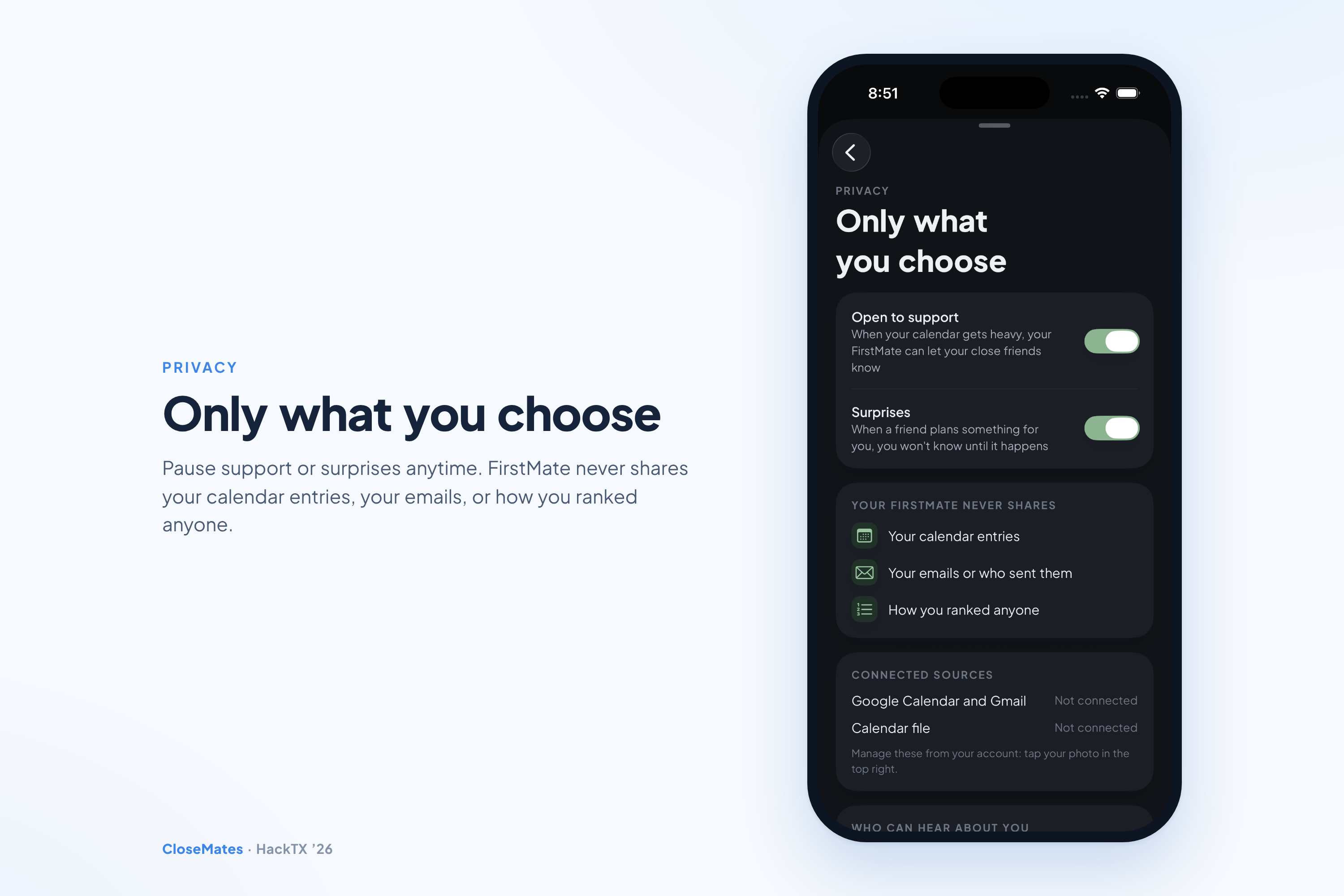
Only what you choose. Pause support or surprises anytime. FirstMate never shares your calendar, your emails, or how you ranked anyone.
-
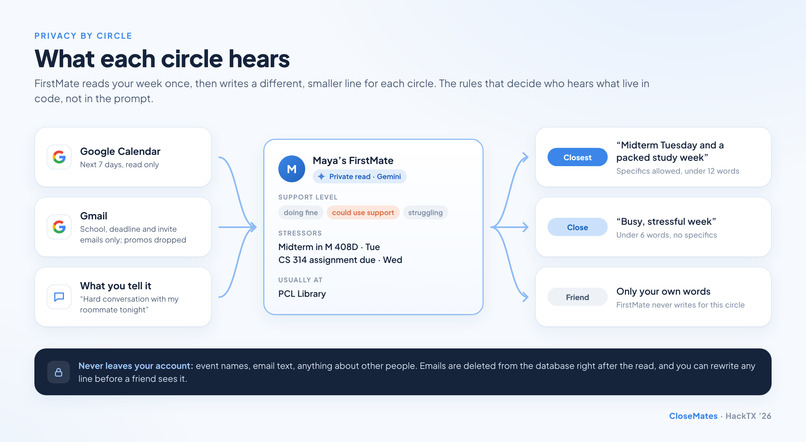
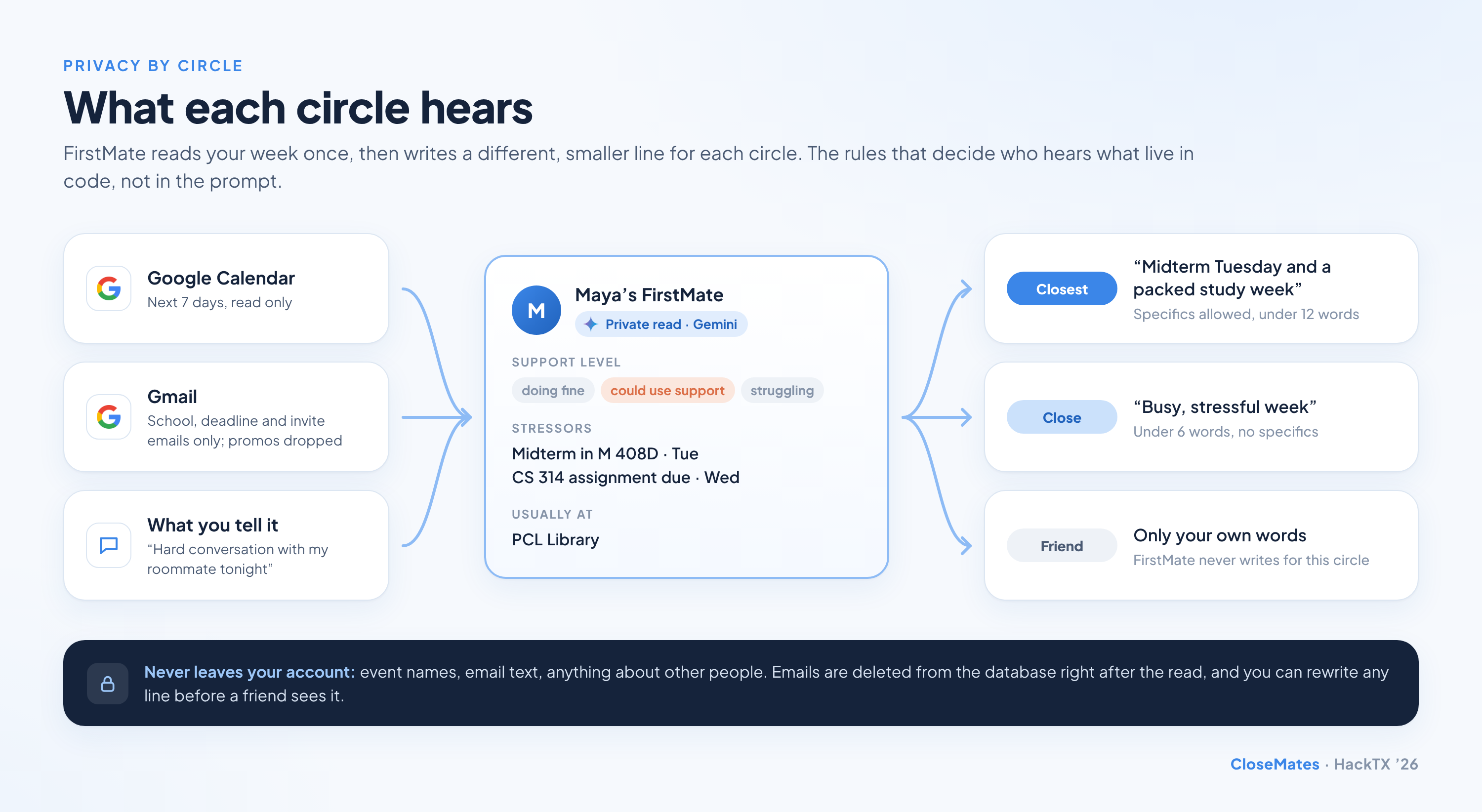
What each circle hears: one private read, three smaller lines, and nothing raw ever leaves your account.
-
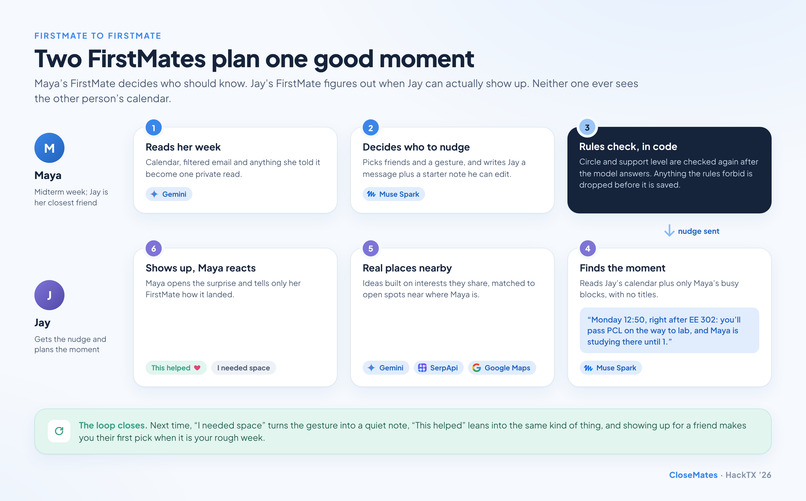
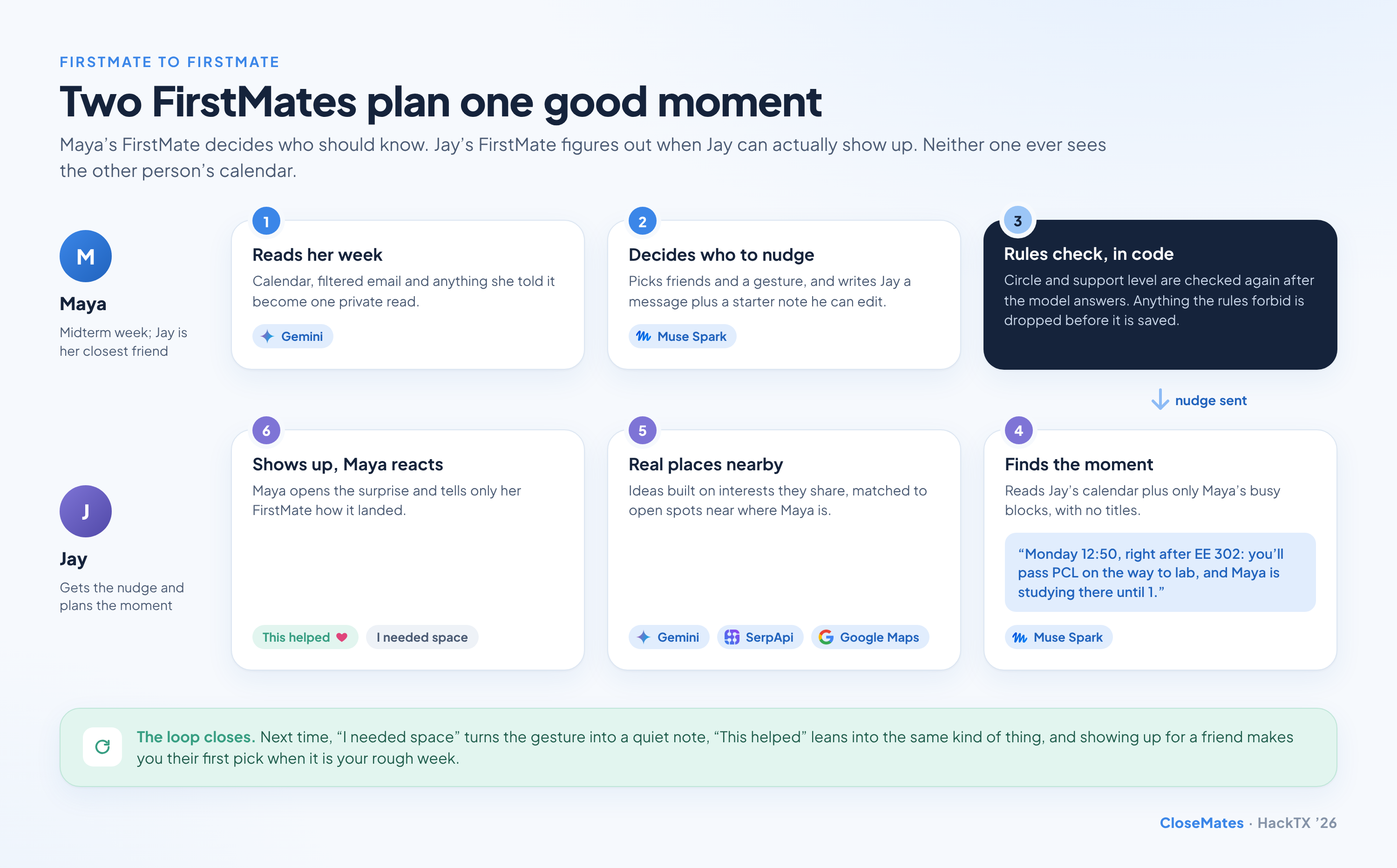
FirstMate to FirstMate: Maya's decides who should know, Jay's finds when he can show up, and neither sees the other's calendar.
-
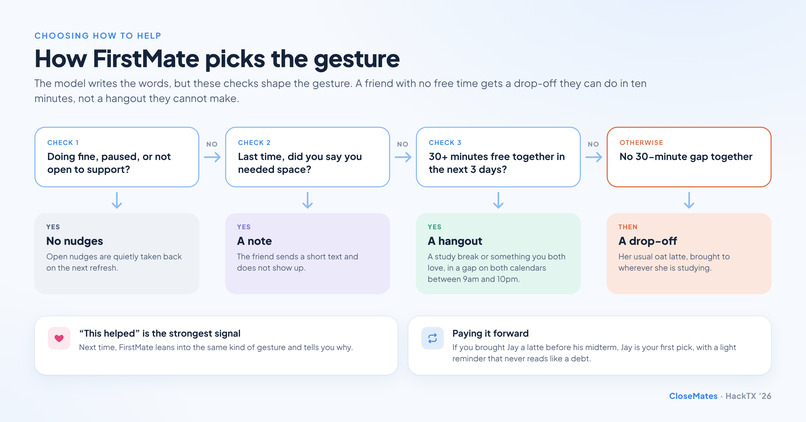
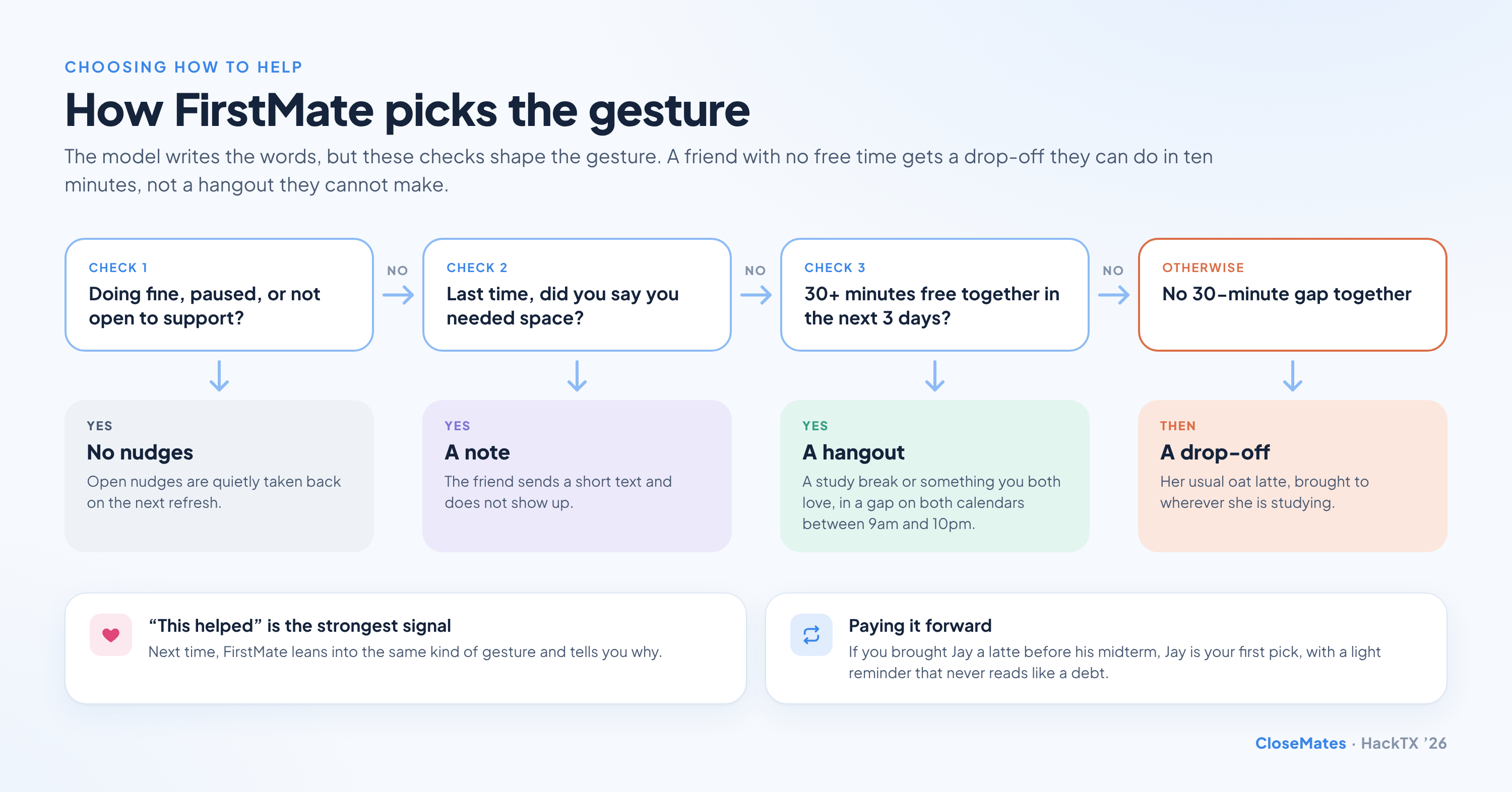
How FirstMate picks the gesture: doing fine means silence, needing space means a note, free time means a hangout, otherwise a drop-off.
Explore the code
github.com/sendtovishnu/hacktx26 →
A native SwiftUI app and a TypeScript server: the FirstMate prompts, the rules engine that decides who hears what, and the twin to twin moment planner.
CloseMates notices the hard week before you have to say it
The friends who would drop everything for you usually find out you had a rough week after it is over. Asking for help is awkward, and "how are you?" gets "good, busy" every time. Meanwhile the signs were sitting in your calendar the whole time: a midterm Tuesday, a CS assignment due Wednesday, six hours a day in the library.
CloseMates gives everyone a FirstMate, an AI twin that reads your week, decides privately whether you could use support, and quietly tells the people closest to you, with a concrete way to help that fits their own schedule. You never have to ask. Your friends never see your calendar or your email. And when someone shows up, it feels like their idea, because it was.
What each circle hears
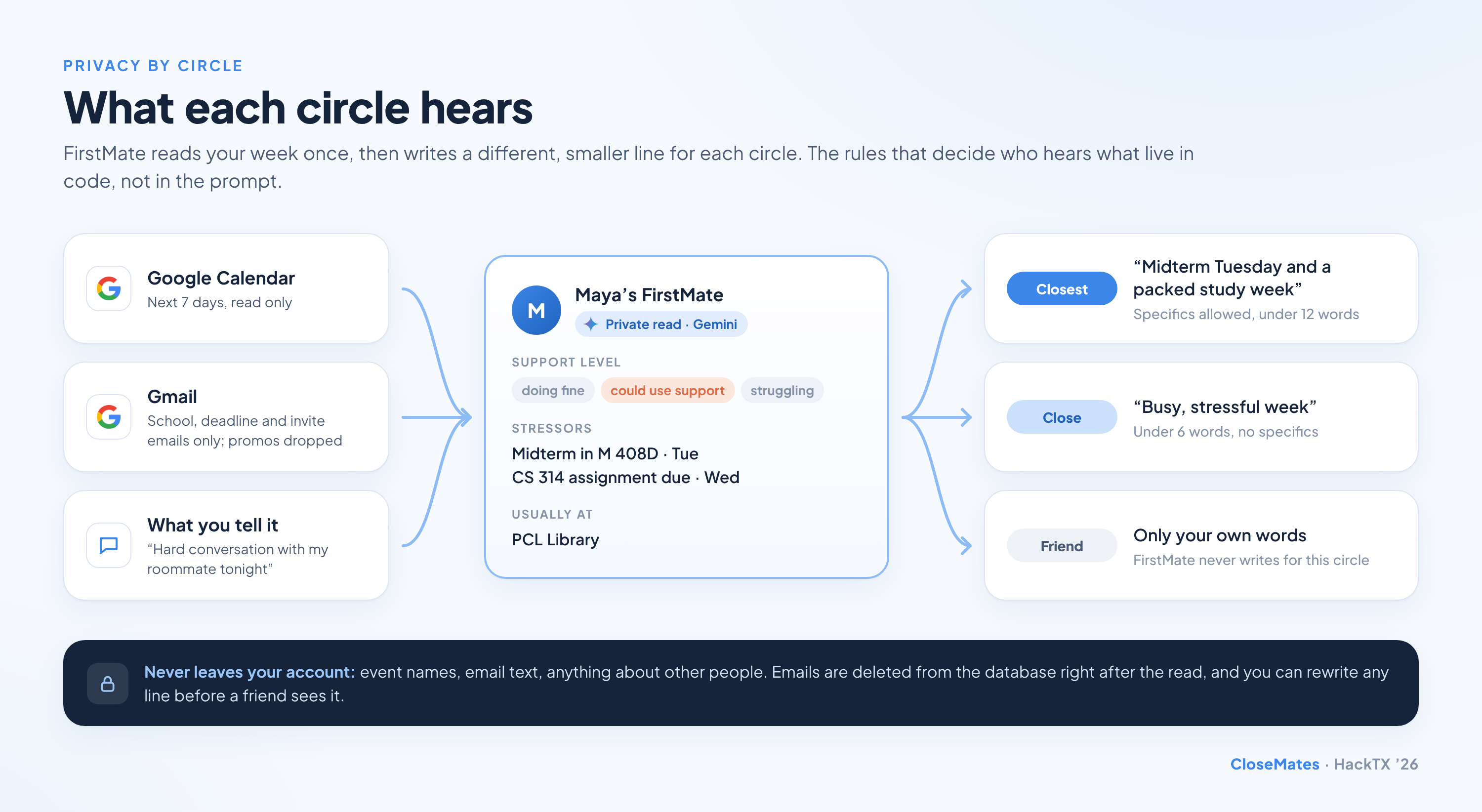
You rank your friends into three circles, and each circle hears less than the one before it. FirstMate writes a separate line for each circle, and the rules that decide who may be nudged run in code after the model answers, so a prompt can never talk its way past them.
| Closest | Close | Friend | |
|---|---|---|---|
| What they can hear | A specific line, under 12 words | A vague line, under 6 words | Only the line you wrote yourself, word for word |
| Example | "Midterm Tuesday and a packed study week" | "Busy, stressful week" | "rough week, would love a distraction" |
| Who writes it | FirstMate, and you can rewrite it | FirstMate, and you can rewrite it | You, always |
| Can be nudged | When you could use support | When you could use support | Only if you wrote a line |
FirstMate to FirstMate
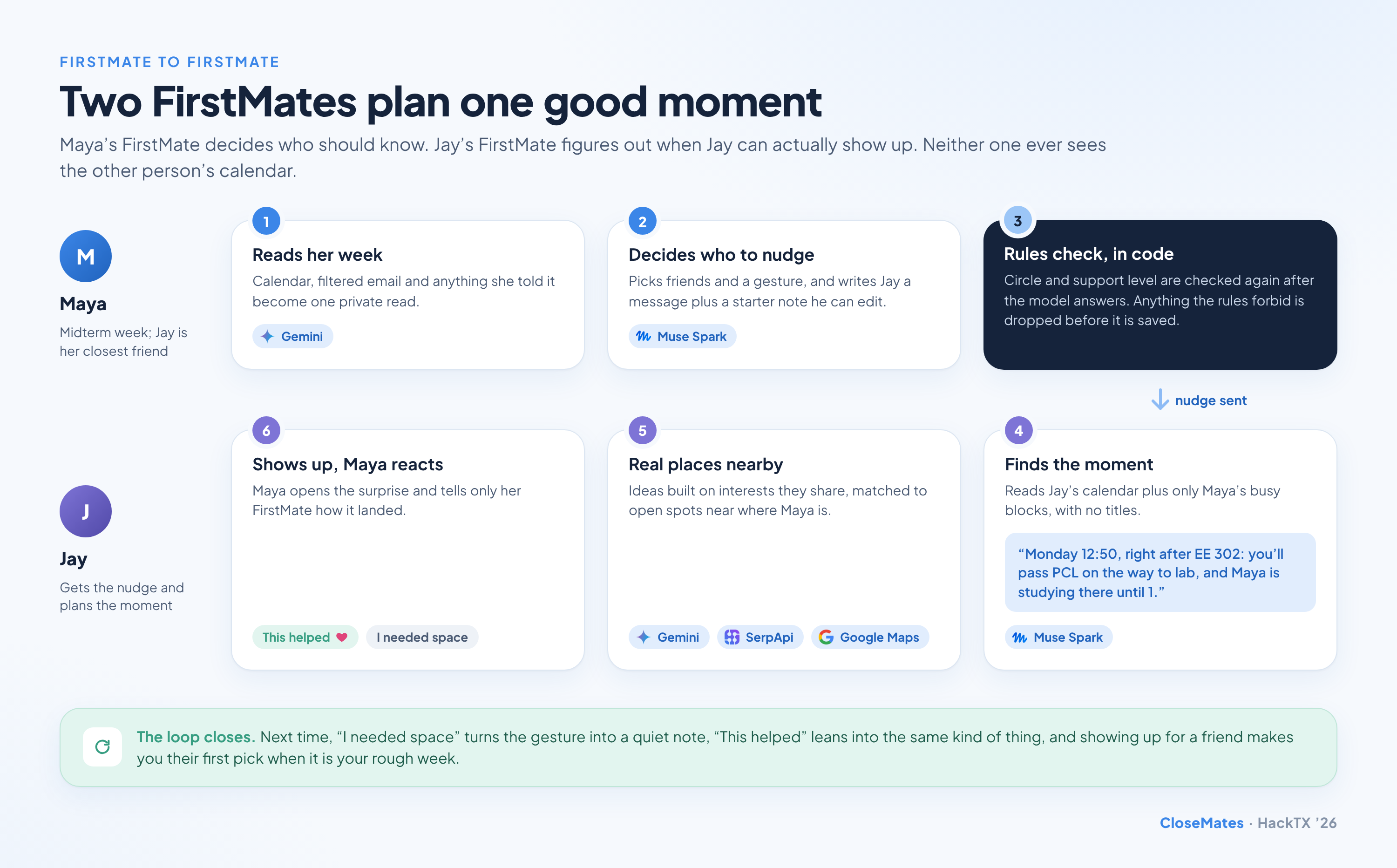
- Maya's FirstMate reads her week. Google Calendar for the next 7 days, Gmail filtered down to school, deadline and invite emails, and anything she typed in herself ("hard conversation with my roommate tonight"). The result is one private read: a support level, a few stressors and where she usually is. The emails are deleted from our database right after.
- It decides who should know. It picks friends, a gesture, a message for each friend and a casual starter note the friend can edit and send in their own words.
- The rules check it again, in code. Circle and support level are re-checked after the model answers, and anything the rules forbid is dropped before it is ever saved.
- Jay's FirstMate finds the moment. It reads Jay's own calendar plus only Maya's busy blocks, with no titles, and picks when Jay can realistically show up: "Monday 12:50, right after EE 302: you'll pass PCL on the way to lab, and Maya is studying there until 1."
- Real places, not vague ideas. Suggestions are built on the interests Maya and Jay share, then matched to real places that are open near Maya.
- Maya reacts, privately. She opens the surprise and taps "This helped" or "I needed space." Only her FirstMate sees the answer, and it shapes what happens next time.
How FirstMate picks the gesture
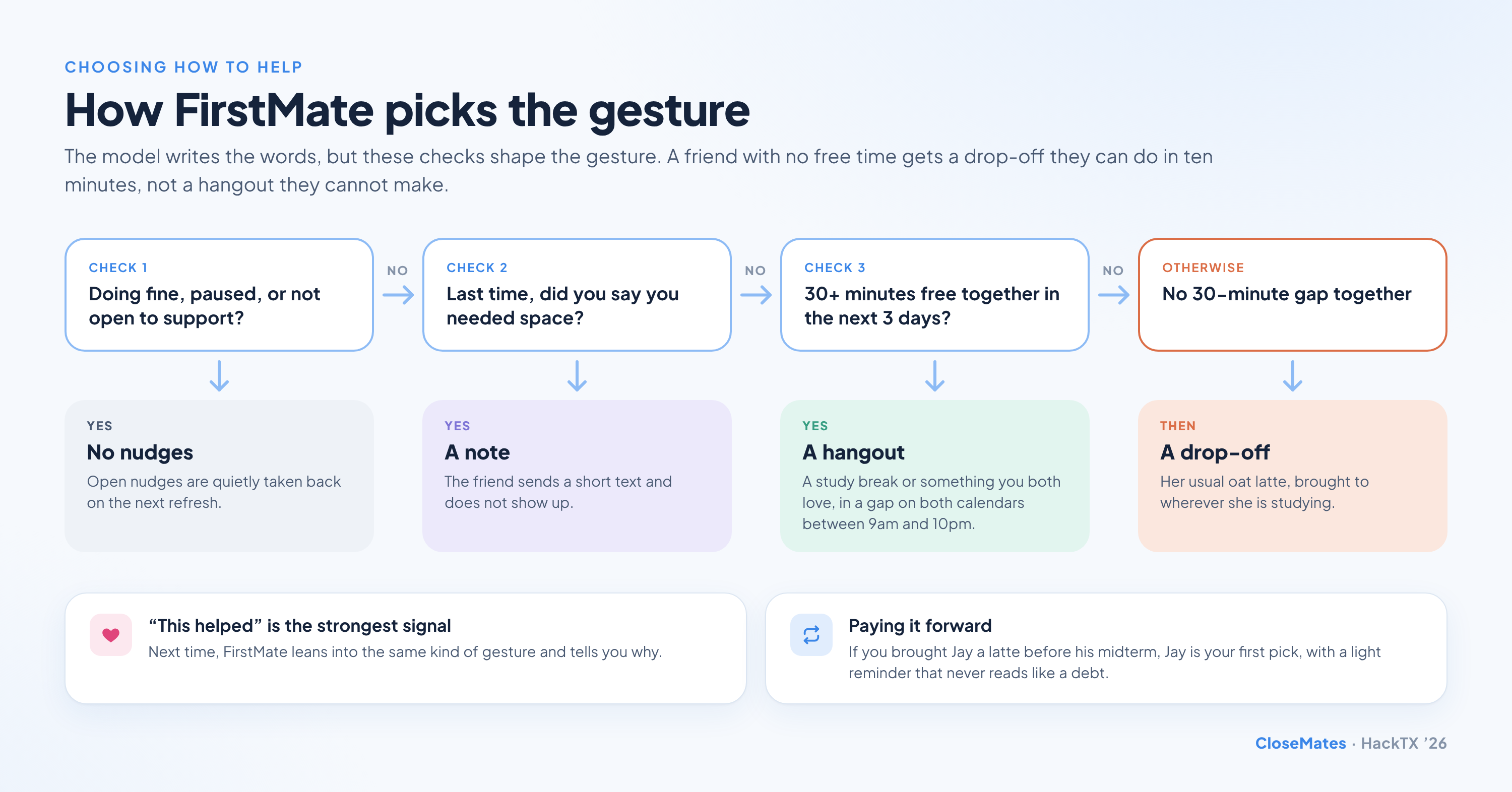
- Doing fine means silence. If your week looks fine, or you have paused CloseMates, FirstMate sends nothing, and any unopened nudge is quietly taken back on the next refresh.
- "I needed space" wins. If that was your answer last time, the next gesture is a short text, never someone at your door.
- Free time decides hangout or drop-off. We intersect both calendars from 9am to 10pm Austin time over the next 3 days. With 30 or more shared minutes, it suggests a hangout. With none, it suggests a drop-off the friend can do in ten minutes between classes, like Maya's usual oat latte.
- Paying it forward. If you brought Jay a latte before his midterm, Jay becomes your first pick when it is your turn, with a light reminder that never reads like a debt.
- A surprise stays a surprise. FirstMate never tells you who it nudged until they act. Your privacy log then explains exactly what each friend was told and why.
Inspiration
All three of us have had the week where everything lands at once, and all three of us have found out a friend was drowning only after it was over. The problem was never that people do not care. It is that asking feels like a burden, and noticing takes information your friends do not have. Your calendar already knows when you are about to have a hard week. We wanted to turn that knowledge into a friend showing up with coffee, without ever handing anyone your calendar.
What it does
- Rank your people. Add friends from your contacts or with a text or email invite, and put each one in a circle: Friend, Close friend or Closest friend. Each side picks their own circle for the other.
- Connect your week. Sign in with Google to share read-only Calendar and Gmail, upload an .ics file, or just tell your FirstMate what your calendar cannot see.
- Let FirstMate keep watch. Refresh your FirstMate and it reads your week, writes what each circle may hear, and lets you edit that wording before anyone sees it.
- Get nudged for a friend. When someone close to you could use support, a nudge tells you what is going on (at their circle's level of detail), when you can fit it in, and a few ideas with real places nearby. Edit the note and tap Do this.
- Open the surprise. The person you helped sees who showed up and what they brought, and tells their FirstMate how it landed.
- Hang out just for fun. Separate from hard weeks, plan a hangout from interests you share and times you are both actually free.
- Stay in control. A privacy log of every nudge, a pause switch, a map visible only to the circles you choose, and five accent themes with dark mode.
How we built it
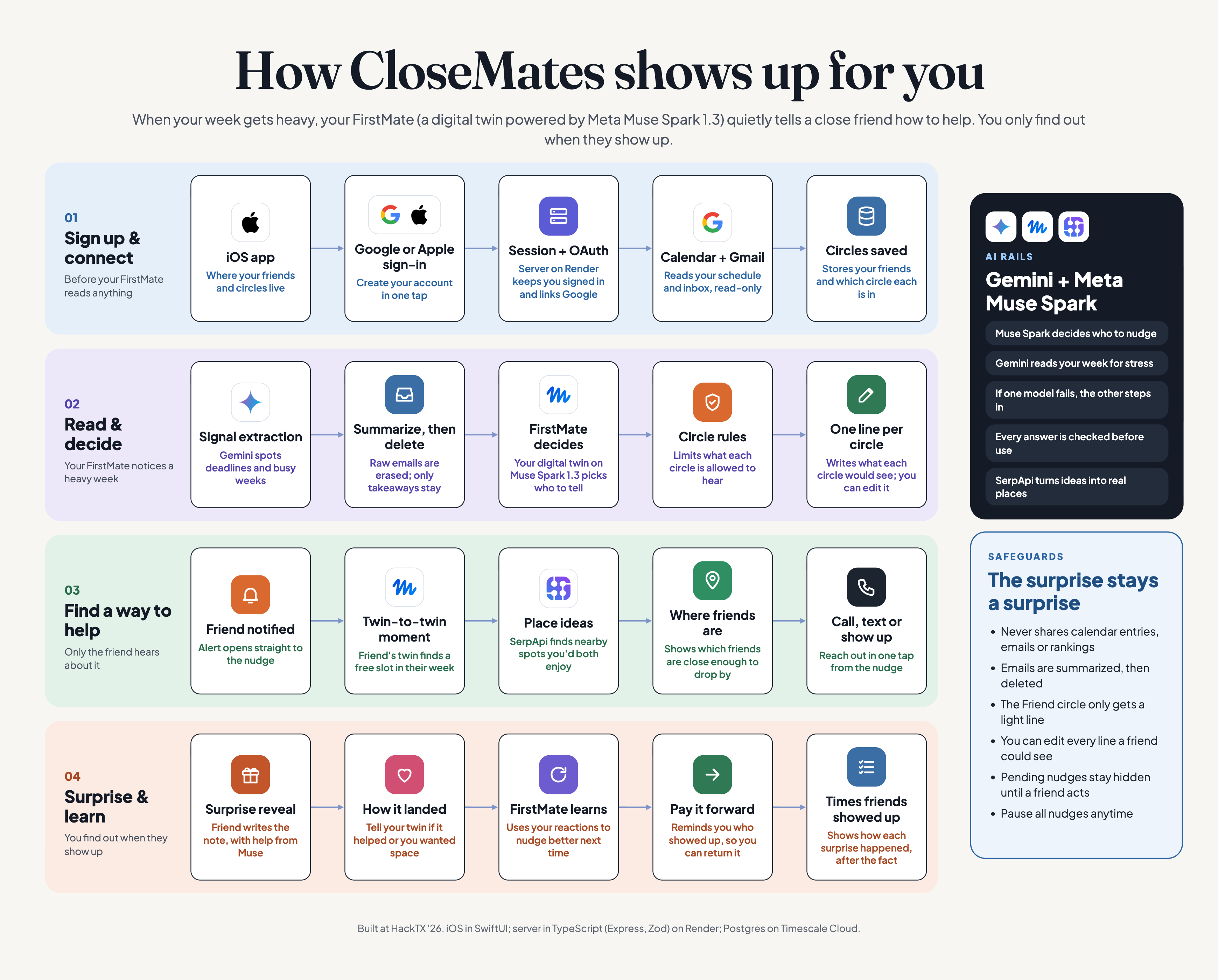
- iOS: native SwiftUI with a custom design system from our Figma file (Plus Jakarta Sans, five accent palettes, light and dark mode), Google Sign-In for read-only Calendar and Gmail, Contacts matching, CoreLocation at city-block accuracy, local notifications, and a full in-memory mock mode so the entire demo runs with no server.
- Backend: TypeScript and Express with 40+ routes, deployed on Render. Postgres on Timescale Cloud holds users, circles, events, signals, nudges, gestures and reactions.
- AI: Gemini Flash Lite reads the week and brainstorms ideas. Meta's Muse Spark decides nudges and plans the moment between two FirstMates. Every call asks for JSON, is validated with zod, tries its provider twice, falls back to the other provider, and finally to a safe default, so a model outage never breaks the app.
- Rules engine: plain TypeScript functions for shared free time across two calendars (with real Austin time zone math), who may be nudged at each circle and support level, and which gesture fits. They run after the model, not inside it.
- Places: SerpApi's Google Maps engine searches around the helped person's location and keeps only places that are open.
- Each fact is told once: every event, email and check-in is keyed, and a coverage table records which friend already heard about it, so refreshing never re-nudges anyone about old news.
Challenges we ran into
- Privacy that holds even when the model misbehaves. Telling a model "do not share specifics with close friends" is not a guarantee. We moved every permission decision into code that runs after the model, gave the Friend circle no AI writing at all, and only ever pass a friend's FirstMate busy blocks without titles.
- Speed under hackathon load. Our first Gemini model took over 70 seconds per call during the event. Switching to Flash Lite brought it to about 2 seconds, and moment planning now runs in the background so it is ready by the time a friend opens the nudge.
- Models are bad at weekdays. Given an ISO date, the models kept calling Tuesday a Wednesday. We now spell out the weekday next to every event in the prompt.
- Time zones. "Free between 9am and 10pm" has to mean the right time zone on both calendars, across daylight saving, with nothing in the next half hour.
- Venue Wi-Fi. The UT network blocked phones from reaching our laptops, so we added a Cloudflare tunnel and then moved the server to Render for the demo.
Accomplishments that we're proud of
- Two FirstMates negotiating a real moment for two real people, without either one seeing the other's calendar.
- A privacy model you can read in a single file, with a log that explains every nudge back to the person it was about.
- A feedback loop that actually changes behavior: "I needed space" really does turn the next gesture into a quiet note.
- An iOS app that feels calm and finished, with a full mock mode, one-command setup and a one-command demo reset.
What we learned
The AI part was the easy part. The hard parts were the questions around it: what is each person allowed to know, what happens when the model ignores an instruction, and how do you make help feel like a friend's idea instead of an app's. Answering those is what turned a calendar summarizer into something we would actually want on our own phones.
What's next for CloseMates
- Group support: let a FirstMate coordinate two or three friends so the same person does not get every nudge.
- More signals, still private: Canvas due dates and class schedules from school systems, read the same way as the calendar.
- On-device reads: move the first read onto the phone so raw calendar and email never leave it at all.
- TestFlight: get it into the hands of friend groups at UT Austin and other universities and learn which gestures actually help.
Built With
- cloudflare
- express.js
- gemini
- gmail-api
- google-calendar-api
- google-maps
- google-oauth
- meta-muse-spark
- node.js
- postgresql
- render
- serpapi
- swift
- swiftui
- timescale
- typescript
- zod


Log in or sign up for Devpost to join the conversation.