-
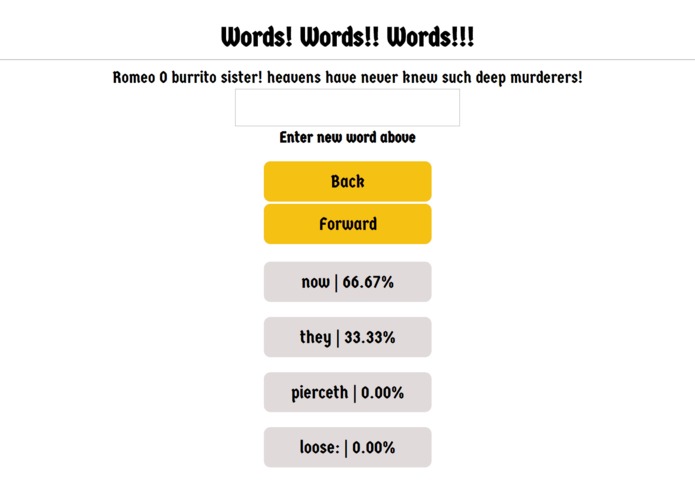
Screenshot of our app in action
Inspiration
The autocomplete function on our phones keybord was our main inspiration for the app idea. However, we knew that we wanted to use an API hosted on Google cloud for the back end, and we really wanted to try using new technologies, so this was a simple enough project where we could learn cloud computing for the first time.
What it does
It generates (somewhat meaningless) sentences that sound Shakespearean. Mostly for comic effect
How we built it
First, we used a webscraper to find all the text from all of Shakespeare's work. Then we built a Markov Chain model to find a list of suggested next words given a current word. Then we stores all of this data on a mongodb cluster. Then we built a Flask API to access data from this database. Then we deployed the flask API on Google cloud. Then we built a React frontend to interact with the API using http requests.
Challenges we ran into
We did not know how to deploy the API on Google cloud for a long time. We tried deploying it on an app engine first, but that didn't work because it wasn't able to access data from the database. Then we moved to a compute engine and that solution worked. Also react is a very disgusting framework to work with. We also struggled for a while with getting our API to run on the compute engine without having the ssh she'll open.
Accomplishments that we're proud of
Deploying our first ever API on Google Cloud (and all the learning that required). Using mongodb for the first time. Successfully making a full stack app (flask, mongo, react).
What we learned
All the work involved in making a full stack app.
What's next for WordsWordsWords
More authors!!!! And better UI design for mobile. Handling mixed content errors.
HOW TO TRY IT OUT
On chrome: click the link below (amanj120.github.io), and on the top right corner, click on the little shield and click "allow unsfae scripts". The reason for that is because the website is a https website, but we are using http requests.


Log in or sign up for Devpost to join the conversation.