Inspiration
It started with my younger sister.
She runs a small online store, posting product photos and personal pictures almost every day, and I'd watch her spend twenty, thirty minutes trying to get a single photo "right" fighting with cluttered backgrounds, dim lighting, and apps that either did too little or asked for a subscription just to remove a background. She'd send me photos asking, "can you fix this for me?" and I'd open up my desktop just to crop and brighten an image she needed in five minutes.
And that's when I thought that creating a tool like "wizi" will be very helpful to her. It's not just an abstract idea, but something I built because someone I love needed it, and I figured if she needed it, thousands of small business owners, students, and everyday people scrolling through their camera roll probably needed it too.
What It Does
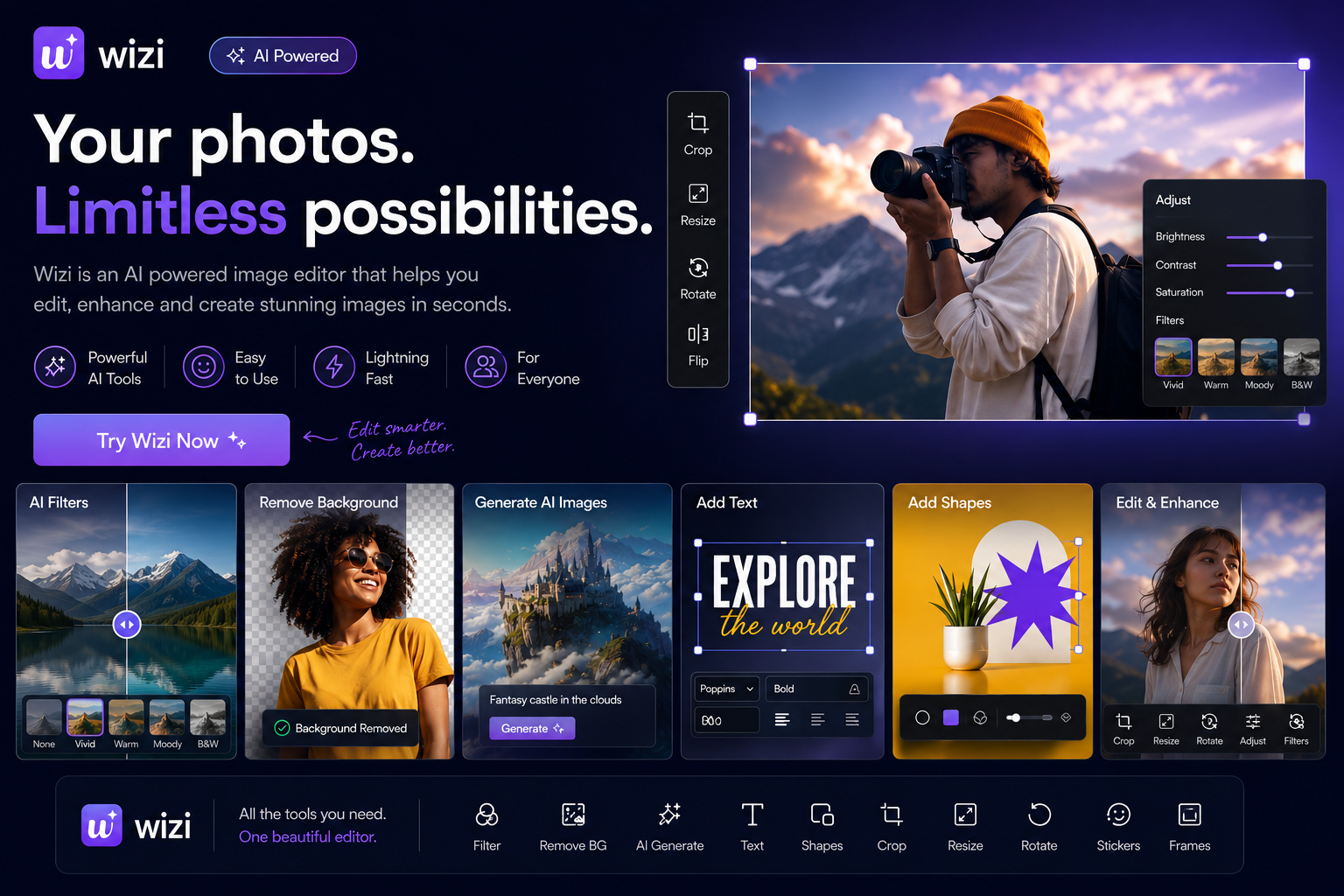
Wizi is an AI-powered photo editor that turns a rough, everyday photo into something polished, fast, and professional. Users can:
- Apply professional-grade filters and fine-tune lighting, color, contrast, and texture with precision sliders
- Add and style text, shapes, and overlay images with full creative control (fonts, colors, rotation, layering)
- Remove backgrounds instantly with a single tap. No manual masking, no selection tools, just a clean cutout in seconds
- Generate AI images directly inside the editor or using AI to edit your image. It's like turning a text prompt into a usable visual element without ever leaving the app
- Export the final composited image as a high-quality PNG or JPG, ready to post or send
Everything lives in one continuous canvas. No jumping between five different apps to filter, crop, remove a background, and add text. It's the full editing workflow my sister needed, built into one place.
How I Built It
Wizi is built on Vercel for the frontend and hosting, using a Next.js-based architecture for speed and easy deployment. While for the data persistence involving user accounts, saved projects, and editor state, I used AWS DynamoDB, giving the app a scalable, serverless database layer without the overhead of managing our own servers.
The editing engine itself runs on a hybrid canvas architecture: the base image and pixel-level effects (filters, sharpness, clarity, vignette, etc.) are processed directly on an HTML5 canvas, while text, shapes, and overlay layers exist as independently draggable, rotatable elements layered on top, giving users Photoshop-style flexibility without Photoshop-level complexity.
For the AI-powered features (background removal and AI image generation), I integrated dedicated AI APIs directly into the editing pipeline, so a user's request flows from button tap to processed result without leaving the canvas.
Challenges I Ran Into
The hardest part, by far, was getting the AI tools (background removal and AI image generation) to actually work inside an already complex layered canvas system, and it wasn't a smooth ride even with the right APIs in hand.
One of the most frustrating issues was the version ID mismatch. The background remover and AI image generation APIs kept failing because the version ID we were calling wasn't resolving correctly. Requests that looked correct on paper were silently failing or returning errors that didn't clearly explain why the version reference wasn't being accepted. Tracking this down meant carefully re-checking API documentation, testing different version identifiers one at a time, and adding much more detailed error logging just to see what the API was actually rejecting, since the front-end was only ever showing a generic failure message.
Beyond that, once the API calls finally started working, there was a second layer of difficulty: correctly compositing the results back into our canvas. Background removal meant handling asynchronous processing time (the user needed clear loading feedback without the canvas feeling frozen) and then correctly layering a transparent-background result into our existing stack without breaking the undo/redo history or the export pipeline. AI image generation brought its own challenge — turning a generated image into a true layer, something the user could drag, resize, rotate, and combine with everything else, rather than a static result just dropped onto the page. Both features had to behave exactly like every other layer type (same handles, same history tracking, same export behavior), which took real architectural rework. Also, linking the AWS Database as the authentication platform was real work too because I have never tried using AWS for such authentication before now. But after several tries, it worked.
Accomplishments I'm Proud Of
I'm proud that Wizi doesn't feel like a stitched-together collection of tools. It feels like one coherent editor, even though under the hood it's coordinating pixel-level canvas processing, layered DOM elements, and two separate AI services that gave us real trouble along the way. Getting past the version ID issue alone took persistence, and seeing the background remover finally return a clean, correctly composited cutout on the second working attempt was one of the most satisfying moments of the build.
I'm also proud of building something with a real person in mind from the start. Every decision, the one-tap background removal, the simple AI generation flow, the lack of confusing menus, traces back to thinking about what my sister would actually be able to use without frustration. That constraint made the product better, not smaller.
What I Learned
I learned that integrating AI features is rarely just "call an API and show the result" sometimes it's not even that simple, since something as small as a wrong version ID can silently break an entire feature with no clear explanation. I learned the value of detailed logging early, rather than trusting that an API failure will tell you what actually went wrong.
I also learned that making an AI result behave like a first-class citizen in your existing system with the same interactivity, history tracking, and export reliability as everything built before it is its own real engineering problem, separate from just getting the API to respond successfully.
And maybe most personally, I learned that some of the best product ideas don't come from market research, they come from paying attention to the people around you and the small frustrations they live with every day. My sister didn't ask me to build an app. She just needed help with a photo. Listening closely to that need, instead of designing in the abstract, shaped almost every decision we made including the patience to push through the technical setbacks until the tool actually worked the way she needed it to.
Built With
- amazon-web-services
- dynamodb
- next.js
- replicate
- vercel

Log in or sign up for Devpost to join the conversation.