-
-
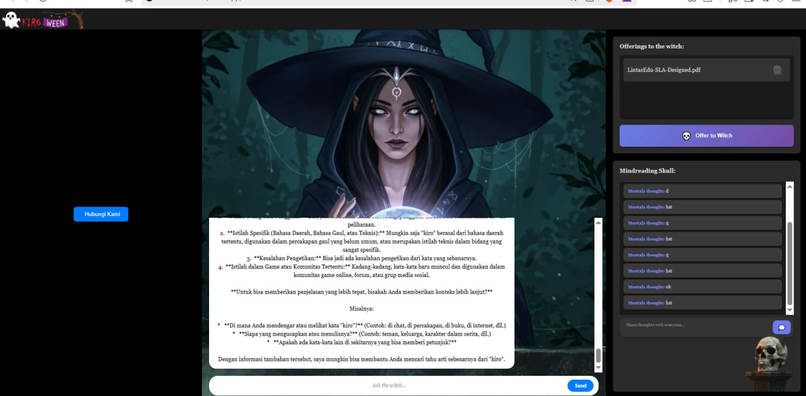
App Dashboard. click "hubungi Kami" to start vidcall.
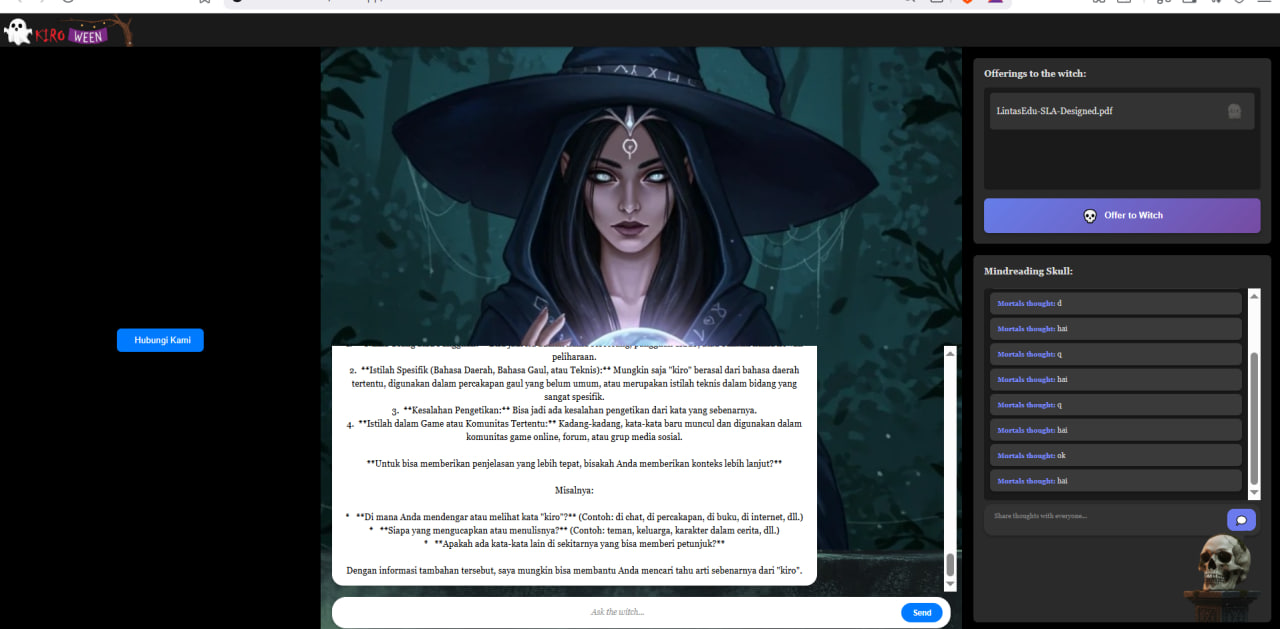
CPaaS Lintas Edu: Oracle of Hackathonia
Inspiration
In the mystical realm of hackathons, teams often struggle with fragmented communication - switching between video calls, document sharing, chat apps, and AI assistants. We envisioned a unified platform where all these tools converge in one magical interface. Inspired by the concept of an oracle that sees all and knows all, we created the "Oracle of Hackathonia" - a witch-themed AI assistant that brings together video communication, document context awareness, and collaborative intelligence.
The LintasEdu CPaaS platform provided the perfect foundation for real-time video communication, while Google Gemini's AI capabilities gave our oracle the power to understand and respond with context. We wanted to prove that modern web technologies could create a seamless, multi-client collaboration experience without the complexity of traditional frameworks.
What it does
Oracle of Hackathonia is a real-time, multi-client AI collaboration platform that combines:
Core Features:
- AI-Powered Chat: Converse with an AI "witch" powered by Google Gemini that provides context-aware responses
- Video Communication: Integrated LintasEdu SDK enables video calls directly within the interface
- Document Context: Upload PDFs and text files that the AI automatically reads and uses as context for responses
- Shared Thoughts: A collaborative space where all users can contribute thoughts visible to everyone and the AI
- Multi-Client Sync: Multiple users connect simultaneously, sharing the same chat history, documents, and thoughts
- Zero Page Reloads: WebSocket-based architecture ensures smooth experience without interrupting video calls
User Experience:
The interface features a mystical three-column layout:
- Left: Video call interface (LintasEdu SDK)
- Center: Mystical witch image with chat overlay
- Right: Document uploads and shared thoughts
All interactions happen in real-time with atmospheric music and Halloween-themed visuals creating an immersive experience.
How we built it
Technology Stack:
- Frontend: Vanilla JavaScript, HTML5, CSS3 (no frameworks)
- Backend: Python with combined HTTP + WebSocket server
- AI: Google Gemini API (gemini-2.5-flash-lite model)
- Video: LintasEdu CPaaS SDK
- PDF Processing: pypdf library for text extraction
- Real-time Communication: WebSocket for chat, HTTP polling for synchronization
Architecture:
Combined Server (
combined_server.py):- HTTP server (port 5000) handles file uploads, static files, and API endpoints
- WebSocket server (port 8765) manages real-time chat
- Both run in single process using threading + asyncio
Client Application (
clientapp/index.html):- Self-contained HTML with inline styles
- JavaScript handles WebSocket connections and HTTP polling
- Polls server every 2 seconds for shared thoughts and file updates
Data Persistence:
messages.json- Chat historyshared_thoughts.json- Collaborative thoughtsfile_context.json- Uploaded document metadatauploaded_files/- Original PDFs and extracted text
AI Context System:
- Extracts text from uploaded PDFs (up to 5000 chars per file)
- Includes last 10 shared thoughts in AI prompts
- Combines document context + thoughts + user message for intelligent responses
Development Process:
- Visual-first approach using reference images to guide development
- Checkpoint system for version control and rollback capability
- Iterative refinement through extensive testing and debugging
Challenges we ran into
1. The SDK Reset Battle (Biggest Challenge)
Problem: Every time the AI responded, the LintasEdu SDK iframe would reset, logging users out of video calls.
Attempts (8+ different approaches):
- Separated chat into isolated iframe
- Used Shadow DOM for SDK isolation
- Implemented Web Workers for background processing
- Tried Service Workers for caching
- Changed layout from grid to absolute positioning
- Used CSS containment properties
- Switched from HTTP to WebSocket for chat
Discovery: The "Reload site?" popup was actually from the external LintasEdu SDK's session protection, not our code. The solution was accepting this behavior and ensuring our architecture prevented actual page reloads.
2. WebSocket Connection Errors
Problem: Random page reloads and connection failures.
Root Cause: WebSocket server wasn't handling connection errors gracefully, causing EOFError: stream ends after 0 bytes.
Solution: Implemented comprehensive error handling with try-catch blocks, proper connection lifecycle management, and exponential backoff retry logic for API rate limits.
3. DOM Timing Issues
Problem: File upload button did nothing when clicked.
Root Cause: JavaScript executed before DOM elements loaded, and DOMContentLoaded listener was added after the event already fired.
Solution: Added proper initialization sequence checking document.readyState and wrapping all initialization in conditional logic.
4. PDF Text Extraction
Problem: Handling various PDF formats and encoding issues.
Challenges:
- Base64 encoding/decoding for file uploads
- Different PDF structures and encryption
- Memory management for large files
Solution: Implemented robust error handling, file size limits, and fallback messages for problematic PDFs.
5. Multi-Client Synchronization
Problem: Keeping multiple clients in sync without overwhelming the server.
Solution: HTTP polling every 2 seconds for thoughts and files, WebSocket for instant chat updates, server-side JSON files as single source of truth.
Accomplishments that we're proud of
Technical Achievements:
✅ Zero-Framework Frontend: Built entire UI with vanilla JavaScript, proving modern web APIs are powerful enough without React/Vue/Angular
✅ Combined Server Architecture: Successfully merged HTTP and WebSocket servers in one Python process using threading + asyncio
✅ Real-Time Multi-Client Sync: Multiple users can collaborate seamlessly with automatic synchronization
✅ PDF Intelligence: Automatic text extraction from PDFs and integration into AI context
✅ Stable Video Integration: Despite challenges, achieved stable LintasEdu SDK integration without page reloads during chat
✅ Production-Ready Code: Clean, documented, deployable application with environment configuration
User Experience:
✅ Immersive Theme: Created atmospheric Halloween/mystical experience with animations, music, and themed visuals
✅ Intuitive Interface: Three-column layout provides clear separation of concerns
✅ Visual Feedback: Animated file deletion with grabbing hand, fade-in chat bubbles, smooth transitions
✅ Accessibility: Contenteditable divs prevent browser form warnings, proper ARIA labels
Development Process:
✅ Visual-Driven Development: Used reference images to guide implementation, proving the power of visual communication
✅ Checkpoint System: Implemented version control strategy that enabled aggressive experimentation
✅ Comprehensive Documentation: Created README, workflow document, and inline code comments
What we learned
Technical Insights:
- WebSocket > HTTP for Real-Time: Eliminates page reload issues and provides instant updates
- Absolute Positioning > Grid for Isolation: Prevents layout changes from affecting other components
- Error Handling is Critical: Especially for WebSocket connections and external APIs
- Browser Policies Matter: Autoplay, CORS, and form submission behaviors require careful handling
- External SDKs Have Their Own Behavior: Can't always control everything, need to work around limitations
Development Strategies:
- Visual References Accelerate Development: Images communicate requirements better than lengthy descriptions
- Checkpoint Systems Prevent Disasters: Having rollback points enables experimentation without fear
- Iterative Refinement Works: Sometimes the 8th attempt is the one that works
- User Feedback is Gold: Clear, direct feedback ("NOT RUNNING AT ALL!") leads to faster solutions
- Simple Solutions Often Win: After trying complex approaches, simple absolute positioning solved the SDK reset issue
Collaboration Lessons:
- AI Assistants Need Clear Requirements: Visual mockups and specific error logs help AI understand problems
- Patience Pays Off: Multiple iterations and failed attempts eventually lead to working solutions
- Documentation Matters: Recording the journey helps others learn from our mistakes
LintasEdu CPaaS Integration:
- SDK is Powerful but Opinionated: Provides excellent video functionality but has built-in behaviors (like session warnings)
- Iframe Isolation is Essential: Keeps SDK separate from main application logic
- Testing is Crucial: Video call features need real-world testing with multiple clients
What's next for CPaaS Lintas Edu: Oracle of Hackathonia
Immediate Enhancements:
- User Authentication: Add login system to identify individual users in shared thoughts
- File Management: Allow users to organize uploaded documents into categories
- Chat History Search: Implement search functionality for past conversations
- Export Functionality: Download chat transcripts and shared thoughts as PDF/text
- Mobile Optimization: Improve responsive design for tablet and phone users
Advanced Features:
- Voice Input: Integrate speech-to-text for hands-free interaction with the oracle
- Multi-Language Support: Translate interface and AI responses to multiple languages
- Custom AI Personalities: Allow users to choose different oracle characters/themes
- Screen Sharing: Enhance LintasEdu SDK integration with screen sharing capabilities
- Whiteboard Integration: Add collaborative drawing/diagramming tools
Scalability Improvements:
- Database Integration: Replace JSON files with PostgreSQL/MongoDB for better performance
- Redis Caching: Implement caching layer for frequently accessed data
- Load Balancing: Support multiple server instances for high-traffic scenarios
- CDN Integration: Serve static assets from CDN for faster global access
- WebRTC Optimization: Fine-tune video quality based on network conditions
AI Enhancements:
- Context Memory: Implement long-term memory for the AI across sessions
- Proactive Suggestions: AI suggests relevant documents or thoughts based on conversation
- Sentiment Analysis: Detect team mood and adjust responses accordingly
- Code Understanding: Enhanced ability to read and explain code from uploaded files
- Multi-Modal Input: Support image uploads and analysis
Enterprise Features:
- Team Workspaces: Separate spaces for different projects/teams
- Admin Dashboard: Analytics on usage, popular topics, AI performance
- API Access: Allow third-party integrations
- Custom Branding: White-label solution for organizations
- Compliance Features: Data retention policies, audit logs, encryption
Community Building:
- Open Source Components: Release core architecture as open-source
- Plugin System: Allow developers to extend functionality
- Template Library: Pre-built oracle personalities and themes
- Developer Documentation: Comprehensive API and integration guides
Oracle of Hackathonia proves that Kiro, combined with powerful CPaaS platforms like LintasEdu and AI services like Google Gemini, can create sophisticated collaboration tools without complex frameworks. Our journey from concept to working application demonstrates the power of persistence, visual communication, and smart development strategies.
The mystical witch awaits your questions. 🎃✨
Built With
- gemini-api
- kiro
- lintasedusdk
- python

Log in or sign up for Devpost to join the conversation.