-
-
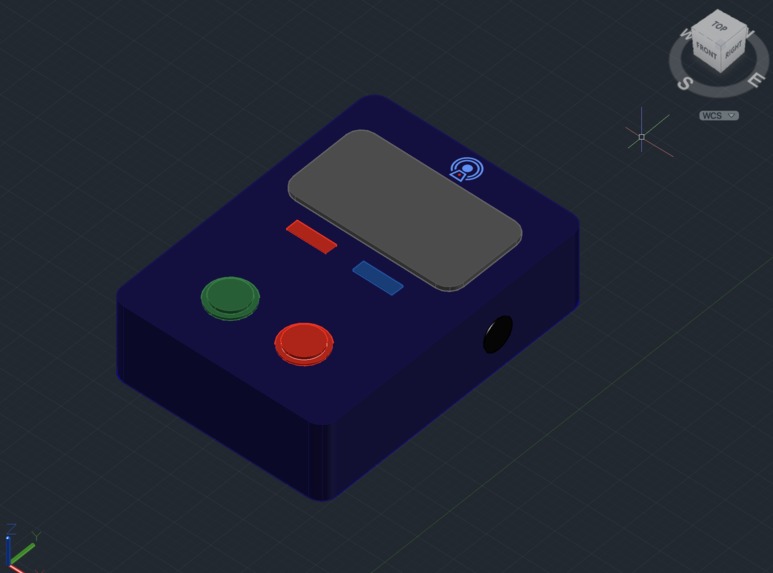
AutoCAD Model of WiSPR
-
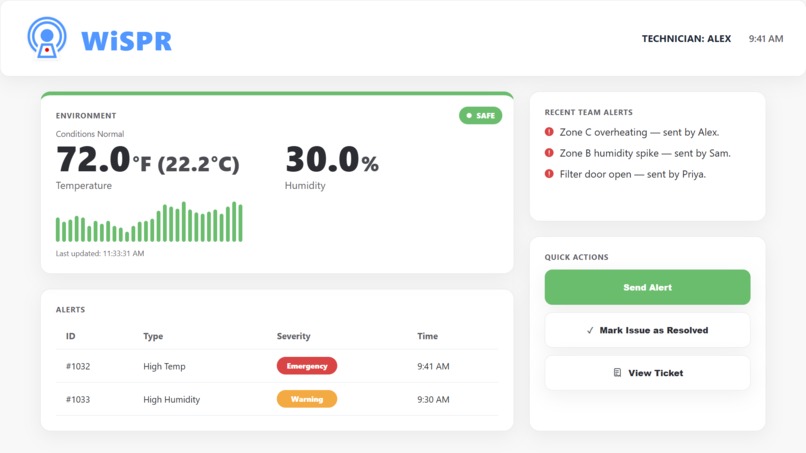
Website on Figma

Inspiration
As a technician, you often have to work long hours in harsh and noise-polluted environments. Communication becomes difficult, and detecting danger isn’t always possible when machinery and environmental sounds blur together. In these conditions, even small lapses in awareness can lead to serious risks. Our team wanted to create a safety solution that doesn’t depend on sound or visibility. That’s where our idea for WiSPR, or a Wireless Safety Pulse Relay system, began. We were inspired by the need for clear, reliable communication in the moments when it matters most.
What it does
In noisy or hazardous environments, technicians often face risks they can’t see or hear. WiSPR is a wearable badge that keeps you safe, whether you’re working alone or with a teammate. When you’re working solo, WiSPR uses a humidity and temperature sensor to detect dangerous conditions. If it senses risk, the badge vibrates, flashes an LED, and displays a warning. This gives you a subtle, immediate alert before danger strikes. When you’re working with a teammate, WiSPR becomes a silent communication system. Press the button, and your teammate’s badge responds with a unique vibration and LED pattern, letting them know if you’re okay, need help, or are in danger, all without a single word spoken. Every signal matters. Every pulse keeps you and your team safe. WiSPR transforms invisible risks into tactile and visual alerts. Coupled with a seamless ticket tracker interface, WiSPR ensures safety isn’t just an idea; it’s in every signal.
How we built it
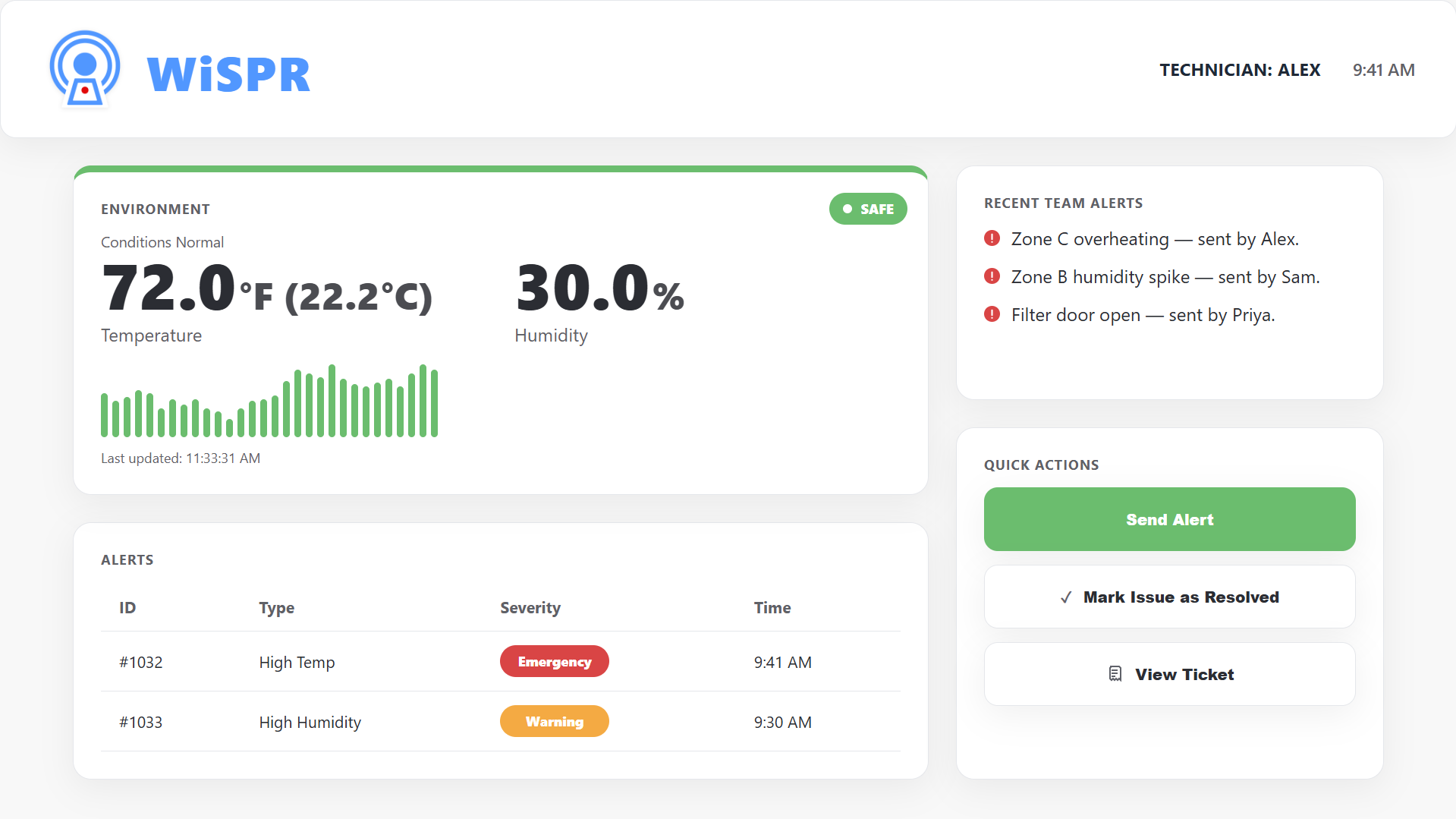
WiSPR was built using simple and affordable components to create a wearable safety system. At the core is an Arduino, which reads data from a DHT11 sensor to monitor temperature and humidity. An LCD screen displays the current readings, while LEDs and a buzzer provide visual and audio alerts for hazards or help requests. A button allows the wearer to send alerts, with short presses signaling assistance and long presses signaling hazards. The system also uses TX and RX pins to communicate between Arduinos, enabling teammates to receive alerts in real time. All hardware components were connected on a breadboard, and the software was programmed to automatically manage sensor readings, button inputs, alerts, and inter-device communication, making the system reliable, responsive, and ready for future expansions. Our team then worked on the design and front-end development of the WiSPR dashboard. This is the interface technicians would actually see in the field, via their laptops. We started with Figma, keeping it clean and easy to understand at a glance. Our main theme color is blue, which represents safety, clarity, and trust which ties into WiSPR’s role as a reliable communication system. Then, we used red and blue for the alerts, which are common color logics. We then built the dashboard in React, inside VS Code, using custom CSS to match the Figma design exactly. It updates live using simulated data for temperature and humidity, and automatically switches between Safe, Warning, and Emergency modes when thresholds are crossed for example, above our previously mentioned 30°C or 70% humidity triggers an emergency. Other features include sending and resolving alerts, viewing active tickets, and responsive behavior so it still looks clean on smaller screens. We also made an AutoCAD model to simulate how a WiSPR would look like.
Challenges we ran into
The sensors did not always read temperature or humidity accurately, and their placement sometimes affected the results. Wiring multiple components on the breadboard was tricky, and loose connections often caused unexpected issues. Buttons occasionally misbehaved when pressed too quickly, and managing the timing for LEDs, buzzers, and the LCD display required precision to ensure no alerts were missed. Establishing reliable communication between Arduinos was also essential to prevent false alerts and ensure accurate status updates on the LCD. During the creation of the AutoCAD model, it was challenging to create proper extrusions and determine the right dimensions. We wanted the badge to be small enough to wear comfortably, yet large enough to hold all essential components such as the Arduino, sensors, and LEDs. Balancing functionality with wearability took multiple iterations and design adjustments. Learning Figma, React, and VS Code from scratch also came with a steep learning curve. We encountered frequent coding errors, and debugging was often a tedious process. However, with persistence and plenty of YouTube tutorials, we overcame these challenges and turned our ideas into a working product.
Accomplishments that we're proud of
We're proud of bringing WiSPR from concept to reality in a short amount of time, especially since the majority of our team are beginners. Our team successfully integrated hardware and software components, combining a temperature and humidity sensor, LEDs, and button controls to create a functional prototype that enhances safety through tactile and visual alerts. We’re also proud of designing a detailed 3D AutoCAD model that balanced ergonomics with internal space requirements, making the badge both wearable and practical. Alongside the hardware, we created a Figma prototype to visualize the user interface and designed a website using React, CSS, and JavaScript to showcase WiSPR’s ticketing system and functionality.
What we learned
Throughout the development of WiSPR, we learned how to interface DHT11 sensors with Arduino to measure temperature and humidity, and how to program LEDs and buzzers to create distinct alert patterns. We implemented short and long button presses to trigger different signals and established basic communication between two Arduinos for team-based alerts. We also learned to use an LCD display to show real-time data and system status while managing local and remote hazard logic separately. During the process, we discovered the importance of debouncing buttons, handling timing for multiple components, and troubleshooting wiring issues to ensure reliable sensor readings. Beyond hardware, we integrated all components into a cohesive system, modeled the prototype using AutoCAD, designed the interface in Figma, and built a responsive website using JavaScript, React, and CSS to present our project.
What's next for WiSPR - Wireless Safety Pulse Relay
In the future, WiSPR could be upgraded with wireless communication like Bluetooth or Wi-Fi, allowing team members to stay connected over longer distances without wires. It could also integrate with a mobile or web app to display live readings and alerts, making it easier to monitor safety in real time. Additional sensors, such as gas, motion, or heart rate monitors, could be added to detect more types of hazards. WiSPR could also log data to analyze patterns and even use simple AI to predict dangers and customize alerts based on the situation. These improvements would make WiSPR smarter, more connected, and even safer for everyone.
Built With
- arduino
- autocad
- c++
- css
- figma
- javascript
- react


Log in or sign up for Devpost to join the conversation.