-
-
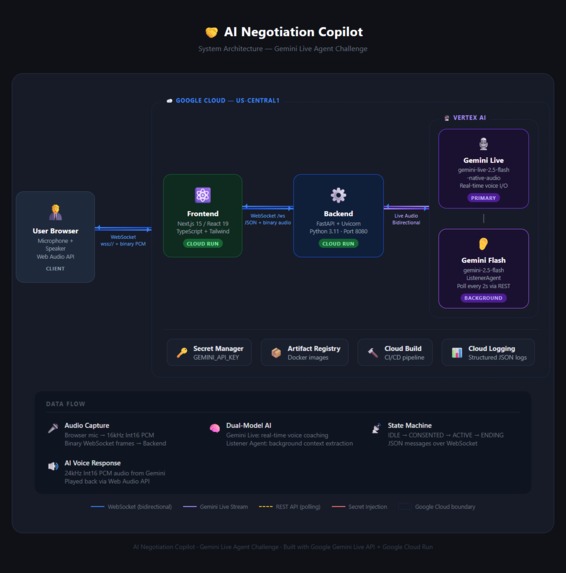
Architecture diagram image
**AI Negotiation Copilot — Project Story**
The Inspiration
A few months ago, I was helping a friend buy a used car. He had done zero research, the seller clearly knew it, and by the end of the conversation my friend had paid $3,000 more than he should have. He wasn't dumb — he was just unprepared. The other guy had done this a hundred times. He hadn't. That stuck with me. Negotiation is one of those skills that only gets better through experience — but most of us only negotiate something big a handful of times in our lives. A salary. A car. A house. You're going in cold against someone who does this every week. I wanted to fix that. Not with a course or a book — with something that sits in your pocket during the actual negotiation and coaches you in real time. When I discovered the Gemini Live API and saw what it could do with real-time audio, I thought: this is the thing that makes that possible. So I built it.
What It Does
The AI Negotiation Copilot is a live coaching tool that runs quietly in the background while you negotiate. You open the app, start a session, and it listens to the conversation through your microphone. It transcribes both sides, figures out what's being discussed, pulls live market data to tell you whether the price being floated is fair, and coaches you on what to do next. There are two ways to interact with it during a live session: Advice Mode — tap a button and the AI gives you a strategic read on what just happened. What's the other side doing? Should you hold firm or move? What's your next line? Command Mode — push and hold to ask it a direct question. "Is he bluffing?" "What's a fair counter?" It responds with voice, fast, while the conversation is still live. At the end, it wraps up with a summary: how much you saved, what tactics the other side used, and how effective you were.
How I Built It
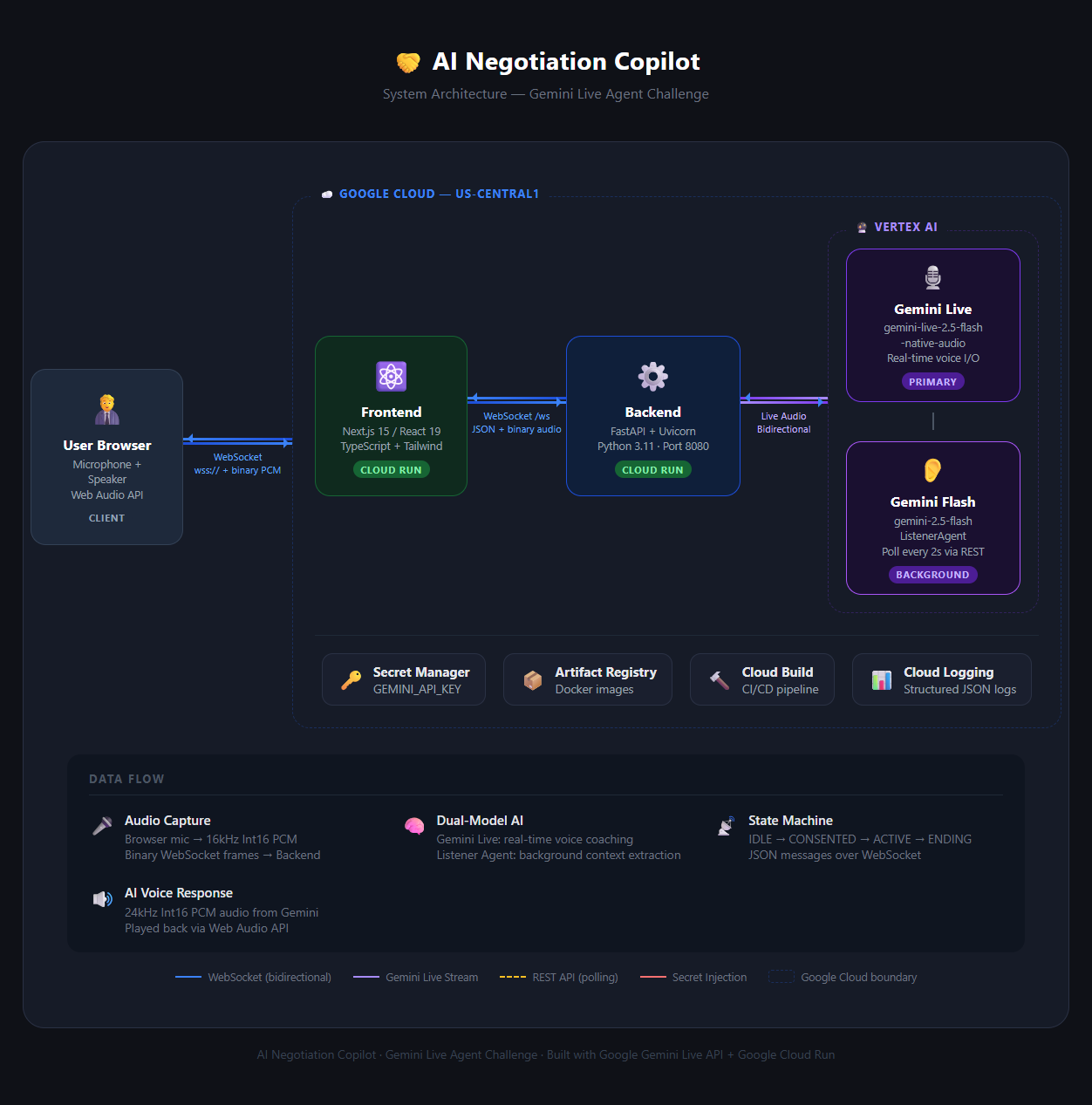
The core challenge was this: one AI model can't do everything well at the same time. If Gemini Live is busy having a conversation with you, it can't also be deeply analyzing the negotiation in the background. So I split the work across two models running simultaneously. Gemini Live is the voice you hear — it responds to your questions, gives advice, and holds the coaching conversation. Gemini 2.0 Flash runs silently behind the scenes as what I call the ListenerAgent. Every ten seconds, it analyzes the last 30 seconds of conversation audio, extracts the important stuff — prices mentioned, sentiment, pressure tactics, leverage points — and quietly feeds that intel into the Live session. So when you ask the AI "is this offer fair?", it's not guessing. It already knows that the seller opened at $950, that comparable listings are sitting at $830, and that the seller just used finality language to pressure you. That was the real breakthrough. The AI's advice stops being generic and starts being grounded in exactly what's happening in the room. The frontend is built in Next.js 15 with React 19 and TypeScript. Getting audio right was honestly the messiest part of the whole project — browsers capture at 48kHz, Gemini Live expects 16kHz PCM, and the Web Audio API's built-in resampling introduced enough artifacts that I had to write a custom AudioWorklet processor with proper downsampling. There's also a whole consent and state machine flow to make sure audio capture only starts when the user explicitly says go. The backend is FastAPI running on Python, connected to Gemini via WebSockets. Binary frames carry the audio (low latency), JSON text frames carry all the control messages (easy to debug). Gemini Live sessions would sometimes drop randomly after 5–10 minutes — turned out there's an undocumented timeout behavior in the API — so I built automatic reconnection with exponential backoff that seamlessly migrates to a fallback model without the user ever noticing. The biggest UX lesson: people need to know what the AI is doing at every moment. When there's a 2-second processing delay and no visual feedback, users get disoriented. I added clear state indicators — connecting, listening, thinking, speaking — and it completely changed how the app felt to use. Latency was the other big fight. Early versions had 5–7 second delays between when you spoke and when the AI responded. That's unusable in a real negotiation. Through a combination of smaller audio chunks, streaming responses, and background threading for market research, I got it down to 1.5–2 seconds. It now feels like talking to someone who's actually paying attention.
The Challenges That Humbled Me
Audio is a nightmare. Browser audio APIs, resampling, sample rate mismatches, playback needing a user gesture before it can start — I underestimated all of it. The custom AudioWorklet took two full days to get right. Real-time and reliable don't naturally coexist. Race conditions in WebSocket message ordering caused bugs that were nearly impossible to reproduce. I eventually solved it with sequence numbers and acknowledgments, but it took a while to even figure out that was the problem. Generic advice is useless in a live negotiation. Early versions would say things like "that seems high, you might want to negotiate." Not helpful. The shift to grounded, specific advice — "that $28,000 offer is 12% above market average for a 2020 Honda Civic with 45k miles, counter at $24,800" — required getting the full extraction-and-research pipeline working properly, not just the conversational layer. Privacy matters more than I initially thought. Recording conversations is serious. I implemented an explicit consent flow, clear visual indicators whenever the mic is active, and zero audio storage — everything is processed in real time and discarded. These weren't afterthoughts; I built them in from the start.
What Makes It Actually Usable
A lot of AI demos are impressive but fall apart in the real world. This one is designed to work during an actual car purchase on your phone. Mobile-responsive UI, low enough latency that it doesn't disrupt the conversation, voice responses so you're not staring at a screen while talking to someone. The two-mode design came from thinking about what you actually need in a live negotiation. You don't want a paragraph of reasoning when someone just made you an offer and is waiting for your response. Command Mode gives you one clear sentence: "Counter at $23,500 and mention the CarFax shows previous damage." Advice Mode is for when you have a few seconds to breathe and want to understand the full picture. Most people negotiate badly not because they're not smart, but because they've never done it enough times to build intuition. This project exists to give anyone access to the kind of coaching that usually only comes with years of experience — right when they need it most.
Built With
- audioworklet-backend:-python-3.11+
- docker
- docker-external-apis:-google-search-api-(market-research)-testing:-vitest-+-fast-check-(frontend)
- fastapi
- gemini-2.0-flash
- gemini-2.0-flash-(background-analysis)-infrastructure:-google-cloud-run
- google-cloud-run
- google-gemini-live-api
- google-genai-sdk
- google-genai-sdk-ai:-gemini-live-api-(real-time-voice)
- google-search-api
- next.js
- python
- react
- react-19
- tailwindcss
- typescript
- uvicorn
- vitest
- web-audio-api
- websockets

Log in or sign up for Devpost to join the conversation.