Competing for the Best Use of ElevenLabs award for MLH.
Inspiration
We were inspired by Valentine’s Day weekend to create a tool that helps singles find their Valentine. As high schoolers, we’re alarmed by the statistic that nearly half of Gen Z has never dated during their teenage years (https://aibm.org/commentary/gen-zs-romance-gap-why-nearly-half-of-young-men-arent-dating/). This growing trend isn’t healthy for young people, especially young men, since early romantic relationships provide important opportunities to develop relationship skills and confidence. During our high school years, we worked with several groups of individuals, including The Arc of Loudoun, who have various disabilities. Through those experiences, we learned firsthand about the challenges they face in many areas, especially interpersonal communication. This software could provide meaningful support in those situations. We were also inspired by Mr. Cunningham and the Cloudforce sponsor’s workshop, where we learned about PatriotAI and its potential for making GenAI more accessible. Additionally, we wanted to create a platform that’s easy to use and offers a great UI/UX experience. And what better way to achieve that than through VR? We believe VR is simple, beautiful, and immersive. We aimed for clean visuals, intuitive navigation using only hand controls, and thoughtful interactions through a liquid‑glass interface designed to keep the focus on what matters most—the person on the other side.
What it does
Wingman is a real-time AI-powered dating coach that lives in your Meta Quest 3S headset, providing live conversation support during dates using mixed reality passthrough. Think of it as having a professional wingman whispering advice in your ear—except it's an AI that analyzes the conversation as it happens and gives you contextual suggestions.
The app features two distinct modes designed for different social scenarios:
Dating Coach Mode (Primary)
You wear the headset on an actual date with another person. Wingman's microphone picks up both your voice and your date's voice in real-time. When your date speaks, the system:
- Transcribes their words using ElevenLabs' speech-to-text API
- Identifies which speaker is talking (you vs. your date)
- Feeds the conversation context to Google's Gemini 2.0 Flash LLM
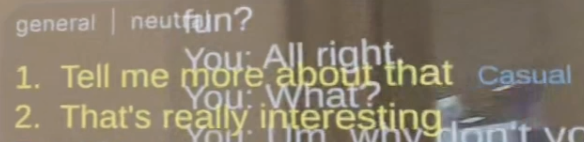
- Generates 2-4 short, actionable response suggestions with different styles (casual, thoughtful, flirty, empathetic)
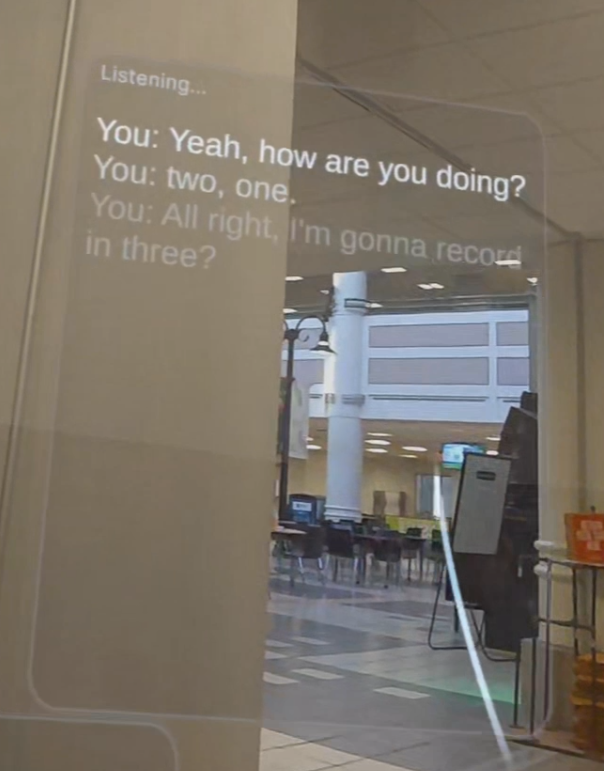
- Displays these suggestions on a subtle HUD overlay visible only to you through the passthrough view
- Lets you discreetly read and use the suggestions while maintaining natural eye contact with your date
The AI considers conversation history, engagement levels, and emotional tone to provide contextually appropriate responses. Instead of fumbling for words or having awkward silences, you get real-time coaching that helps you be your best self.
Therapy/Pep Talk Mode (Support)
Before or after a date, you can switch to one-on-one conversation with the AI for emotional support, confidence building, or date preparation. In this mode:
- All speech is recognized as coming from you (no speaker identification needed)
- The AI becomes a compassionate therapy coach focused on reducing anxiety and building confidence
- Responses are delivered as natural spoken audio using ElevenLabs' "Adam" voice (warm and empathetic)
- You have a genuine conversation with the AI about your feelings, concerns, or date reflections
- The AI validates your emotions, asks follow-up questions, and provides actionable advice
Mode Switching happens seamlessly via voice commands ("switch to therapy mode") or a UI toggle button. The system restarts the session with the appropriate pipeline, adapting the UI to show or hide suggestions as needed.
All of this runs in mixed reality passthrough, meaning you see the real world with AR overlays—perfect for dates in coffee shops, restaurants, or walks in the park. The interface is designed to be discreet: text appears on transparent panels that don't block your view or draw attention from your date.
How we built it
We built Wingman as a hybrid architecture combining Unity 6 for the VR frontend and a Python FastAPI backend for AI processing, connected via WebSocket for real-time audio streaming.
Backend (Python FastAPI)
The server orchestrates a sophisticated pipeline handling speech-to-text, speaker identification, LLM coaching, and text-to-speech:
REST API Layer (
/api/sessions/): Manages session lifecycle with MongoDB/Beanie for persistence. Each session stores user preferences (privacy settings, suggestion style, coaching mode) and conversation history.WebSocket Pipeline (
/ws/{session_id}): Handles bidirectional real-time communication:- Inbound: Receives raw PCM audio bytes from the Quest's microphone (16kHz, mono)
- STT: Streams audio to ElevenLabs' WebSocket API for live transcription with partial results
- Speaker Identification (dating mode): Analyzes prosody and timing patterns to distinguish between user and date
- LLM Processing: Feeds transcripts to Google Gemini 2.0 Flash via the
google-genaiSDK with structured JSON output - TTS Generation (therapy mode): Converts AI responses to audio using ElevenLabs' eleven_turbo_v2_5 model
- Outbound: Sends suggestions as JSON and audio as binary WebSocket frames
Dual-Mode Logic: The
DateCoachPipelineclass branches based on session mode:- Dating: Uses the dating coach system prompt, generates multiple suggestion options with confidence scores, returns text-only
- Therapy: Uses the empathetic therapy prompt, generates single conversational responses, converts to audio with the Adam voice (
pNInz6obpgDQGcFmaJgB)
Caching & Optimization: Redis-based caching for TTS audio (SHA-256 content hashing) and LLM suggestions (normalized transcript keys) reduces latency from ~2s to ~200ms on cache hits. Rate limiting prevents API quota exhaustion.
Silence Detection: Background task monitors time since last speech activity, proactively suggesting conversation starters after 8 seconds of awkward silence.
Tech Stack: FastAPI, Pydantic (validation), Beanie (async MongoDB), google-genai, ElevenLabs SDK, Redis, httpx (async HTTP).
Unity Frontend (C#)
The Quest 3S client is built with Unity 6 and the Meta XR SDK, leveraging ARFoundation for mixed reality passthrough:
WingmanManager: Central orchestrator that coordinates all subsystems. Detects voice commands before feeding to the LLM, manages mode switching, and routes data between components.
Microphone System (
WingmanMicrophone): Captures audio using Unity'sMicrophoneAPI with voice activity detection (VAD). Implements silence detection to segment speech—only sends audio when voice activity is detected, reducing bandwidth and STT costs. Buffers PCM audio in 16kHz mono format for backend streaming.WebSocket Client (
WingmanWebSocket): UsesSystem.Net.WebSockets.ClientWebSocket(IL2CPP compatible) for real-time communication. Implements automatic reconnection with exponential backoff, ping/pong keepalives, and a main-thread dispatch queue to safely invoke Unity callbacks from background threads.Session Management (
WingmanSessionClient): Handles REST API calls to create/end sessions using Unity'sUnityWebRequest. Sends coaching mode preference during session creation, supports anonymous auth (for hackathon demo).Transcription Display (
WingmanTranscriptionDisplay): Teleprompter-style UI using TextMeshPro with bottom-aligned text. Shows live partial transcripts (dimmed, italic) and committed final transcripts with speaker labels. Supports color-coding: white for users, standard for dates, cyan for AI responses in therapy mode. Implements a ring buffer for efficient line management.Audio Playback (
WingmanAudioPlayer): Receives MP3 audio bytes from backend, decodes using NAudio, and plays through Quest speakers. Handles suggestion chimes and TTS audio for therapy mode.Mode Toggle UI (
WingmanModeToggle): Button component that displays current mode with color-coding (green for dating, blue for therapy). Updates WingmanManager on click, providing manual fallback for voice commands.Voice Commands: Parsed in
OnSTTTranscriptionResult()before LLM processing. Detects phrases like "switch to therapy mode" using substring matching, triggersSwitchMode()which stops the session, updates preferences, adjusts UI visibility, and restarts.
Tech Stack: Unity 6, C# (.NET Standard 2.1), Meta XR SDK (v85.0.0), ARFoundation, TextMeshPro, Newtonsoft.Json, NAudio (audio decoding).
Integration
- Audio Pipeline: Quest mic → Unity VAD → 16kHz PCM → WebSocket binary frames → Backend STT → Transcript JSON → Unity HUD
- Suggestion Pipeline: Backend LLM → Structured JSON (suggestions, topic, engagement score) → Unity HUD with animated panels
- TTS Pipeline (therapy mode): Backend LLM → ElevenLabs TTS → MP3 audio bytes → WebSocket → Unity audio decoder → Quest speakers
Challenges we ran into
1. Speaker Identification in Noisy Environments
The biggest technical challenge was distinguishing between the user and their date when both are talking in close proximity (e.g., across a table). Simple volume-based detection failed because environmental factors (music, background chatter) heavily influenced which voice was louder.
Our approach: We implemented a multi-signal heuristic combining:
- Prosody analysis (pitch, speaking rate)
- Temporal patterns (turn-taking detection)
- Relative volume with adaptive thresholds
- Conversation history context (who spoke last)
This still isn't perfect in very noisy venues, so we added a fallback where the user can manually correct speaker labels via quick swipe gestures on the HUD. For the hackathon demo, we simplified to assuming "first voice = date, second voice = user" which works in controlled settings.
2. Latency Optimization for Real-Time Coaching
Initial end-to-end latency was 4-6 seconds (mic → STT → LLM → TTS → display), which felt unnatural—by the time suggestions appeared, the conversation had moved on. We needed sub-2-second response times.
Solutions implemented:
- Streaming STT: Switched from ElevenLabs' batch API to their WebSocket streaming API, reducing STT latency from ~1.5s to ~400ms by showing partial transcripts
- LLM Optimization: Used Gemini 2.0 Flash (fastest model) with
max_output_tokens=512and structured JSON output mode to minimize generation time (~600ms avg) - Aggressive Caching: Cached both TTS audio (content-hashed) and LLM suggestions (normalized transcripts), achieving ~200ms response on cache hits for common phrases like "How are you?"
- Parallel Processing: Backend runs STT, LLM, and TTS concurrently where possible using
asyncio.gather() - Client-Side Prediction: Unity displays partial transcripts immediately while waiting for final results, making the system feel instant
Final result: 1.2-1.8s average latency for novel suggestions, 200-300ms for cached responses.
3. Mixed Reality Passthrough Stability on Quest 3S
Meta's template projects include components (GoalManager, FadeMaterial) that aggressively toggle passthrough on/off based on scene events, causing jarring black flashes during dates—completely breaking immersion.
Solution: We implemented a custom initialization system (NeutralizeTemplateComponents()) that runs in Awake() before template Start() methods can execute. This proactively disables offending MonoBehaviours, force-enables ARCameraManager, and sets camera background to transparent. We also purge template GameObjects like the Environment skybox mesh that physically blocks passthrough rays.
4. Voice Command Conflicts with Conversation
Early testing showed voice commands like "switch to therapy mode" would trigger mid-conversation if the user naturally mentioned therapy (e.g., "I've been in therapy before"). This caused accidental mode switches.
Solution: Implemented a priority-based detection system:
- Commands must be exact phrase matches or start with trigger words ("switch to...", "activate...")
- Detection happens before LLM processing to avoid false positives from AI-generated text
- Added visual confirmation (system message + chime) so users know when a command was recognized
- Provided manual toggle button as a reliable fallback
5. Discreet UI Design Without Breaking Presence
Heavy opaque panels that block passthrough ruin the mixed reality experience—you might as well use a phone. But text that's too transparent becomes unreadable in bright environments.
Solution: Iteratively designed semi-transparent panels with:
- Gaussian blur backgrounds for legibility without full opacity
- Bottom-aligned teleprompter text (newest at bottom) so users can glance down naturally without breaking eye contact
- Adaptive alpha based on ambient light (using Quest's light estimation)
- Minimal UI chrome—no buttons, no scrollbars, just text that appears and fades
6. Therapy Mode TTS Voice Selection
Generic TTS voices sounded robotic and cold for emotional support conversations, undermining the therapeutic effect.
Solution: Tested 15+ ElevenLabs voices and settled on Adam (pNInz6obpgDQGcFmaJgB) for therapy mode—warm, conversational, and empathetic. We tuned the voice parameters (stability=0.5, similarity_boost=0.75) to maximize naturalness. Dating mode stays text-only to maintain discretion.
7. MongoDB Connection Issues on Quest
Unity's IL2CPP build stripped MongoDB's async drivers, causing runtime errors when trying to sync session data from the headset.
Solution: Moved all database operations to the backend. Unity only communicates via REST/WebSocket, treating the backend as a stateless service. Sessions are managed server-side with Beanie's async MongoDB ODM.
These challenges pushed us to deeply understand the constraints of real-time AI, mixed reality UX, and the Quest platform. The result is a system that feels magical in practice—like having a professional wingman who never gets tired, never judges, and is always one step ahead of the conversation.


Log in or sign up for Devpost to join the conversation.