Inspiration
Every time I downloaded a CLI tool on Windows, I'd unzip it, open a terminal, cd to some directory, and then start using it. Meanwhile, VS Code, Git Bash, and Windows Terminal all have "Open Here" in the right-click menu — zero friction.
I looked at Kilo's Windows experience and realized: there's nothing bridging Explorer and the CLI. A new user downloads the zip, double-clicks kilo.exe... and then what? They have to know to open a terminal, navigate to a project, and type kilo. That's a leaky funnel.
The question became: what if the first time you run Kilo, it just asks you — one click — and you're integrated into Windows forever?
What it does
Two paths to the same outcome:
First-launch prompt — The very first time kilo runs on Windows, before the TUI loads:
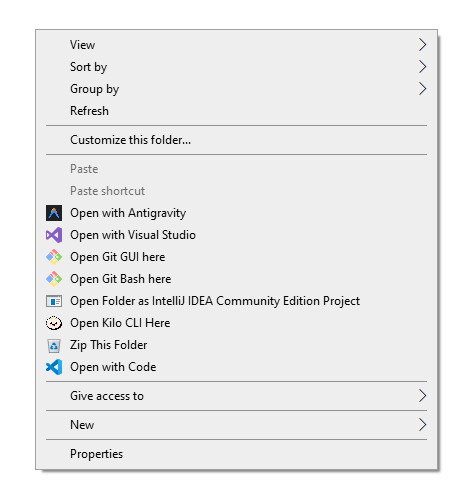
After installation, right-clicking any folder, folder background, or drive in Explorer shows "Open Kilo CLI Here" with the Kilo icon. Clicking it launches Kilo scoped to that directory.
How I built it The implementation follows Kilo's existing architecture patterns exactly:
Zod schemas for all types (RegistryTarget, InstallResult, RegistryCommand) Pure-function engine — buildCommands() returns command arrays without executing, making everything testable on any platform reg.exe via Bun.$ — no FFI, no native dependencies, just the Windows registry CLI that ships with every Windows install HKCU registry keys — per-user, no admin elevation required, safe for corporate lockdown machines Lazy await import() — zero overhead on non-Windows platforms; the module isn't even loaded unless you're on Windows Flag file persistence — a simple .context-menu-offered timestamp file tracks whether the prompt has been shown The architecture mirrors the Governed Agent Protocol (PR #505) — additive code in a self-contained module, minimal surgical edits to existing files, and comprehensive tests.
Challenges Registry quoting — Windows registry values with spaces and special characters (%V, %1) require careful escaping. The reg add command has its own quoting rules that differ from both PowerShell and cmd.exe. Getting the command string to survive Bun's shell interpolation and reg.exe's parser required building a buildCommands() function that could be tested in isolation.
First-launch detection — The prompt needs to appear exactly once, at the right time, without blocking the TUI. It had to handle edge cases: what if the context menu is already installed manually? What if the user cancels? What if the data directory doesn't exist yet? The solution was a simple flag file checked in the middleware layer, before any command handler runs.
Cross-platform testing — The pure-function buildCommands() approach meant all 31 tests run on any platform (Linux CI included), even though the actual registry operations only work on Windows. The test suite validates command generation, schema validation, and flag file logic without touching the registry.
What I learned The best features are invisible. This entire feature is ~566 lines of code, but from the user's perspective it's one prompt and then it Just Works™. The ratio of implementation complexity to user-perceived simplicity is the metric that matters.
Built With
- bun
- registry
- typescript
- windows
- yargs

Log in or sign up for Devpost to join the conversation.