-
-
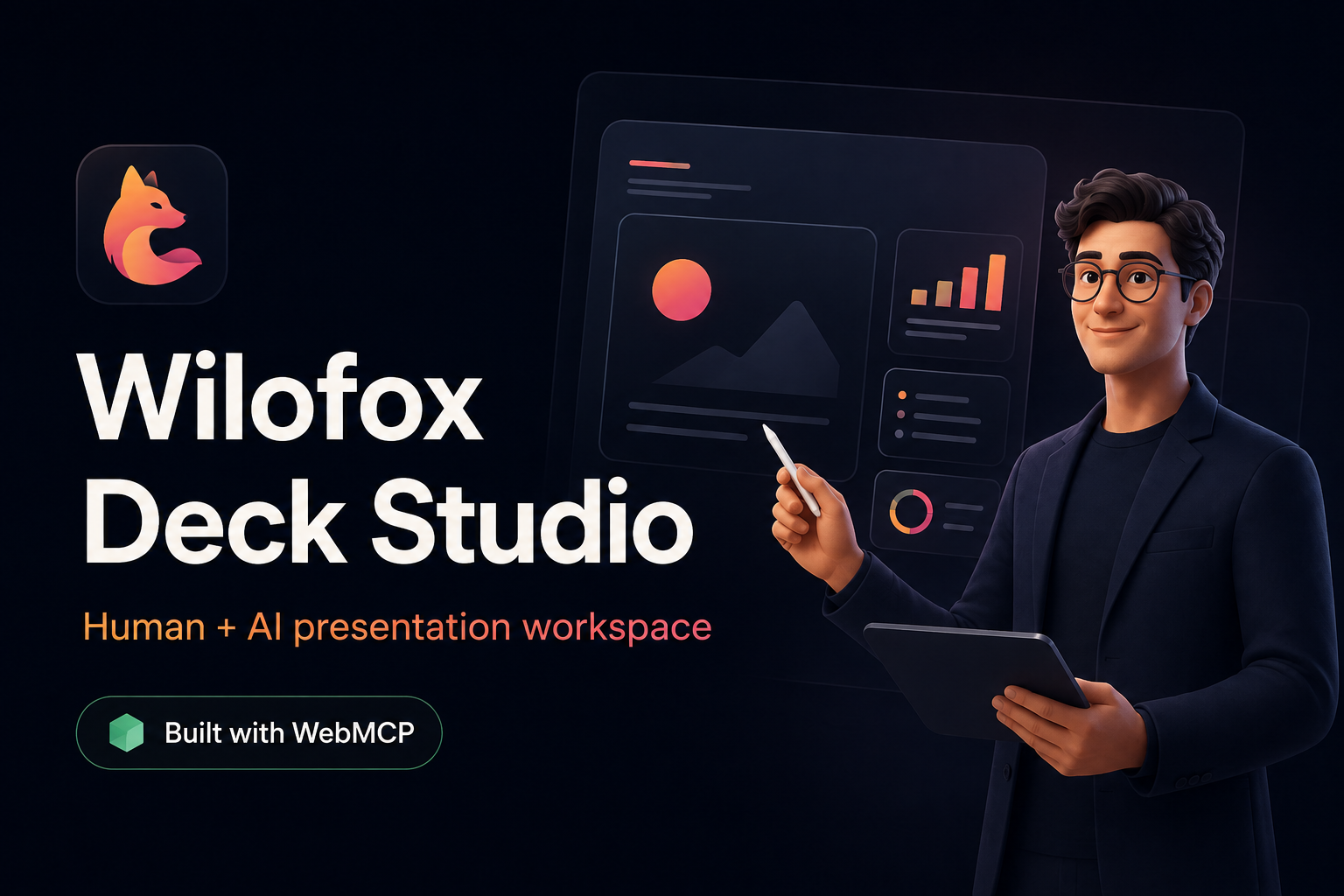
Wilofox Deck Studio: a human-and-AI workspace for creating and presenting visual lessons with WebMCP.
-
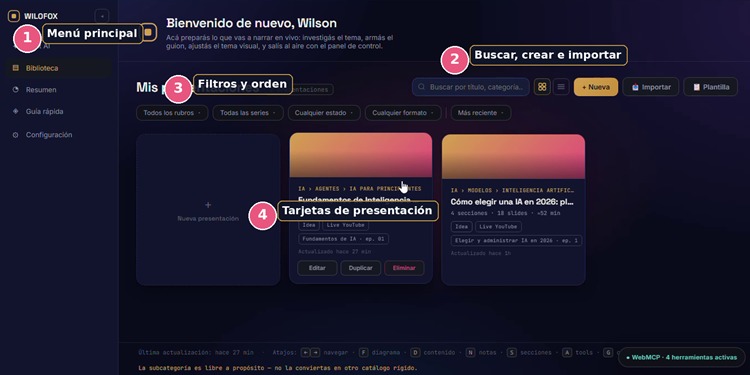
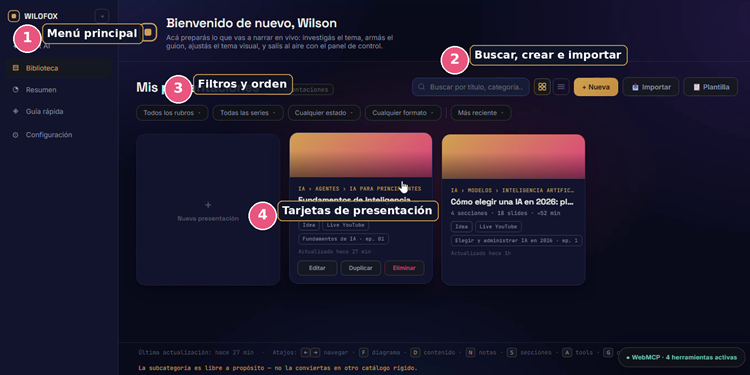
Organize, search, create, and import presentation decks from one visual library.
-
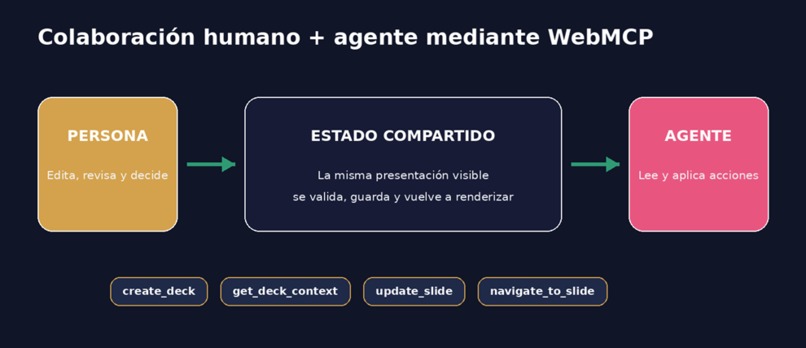
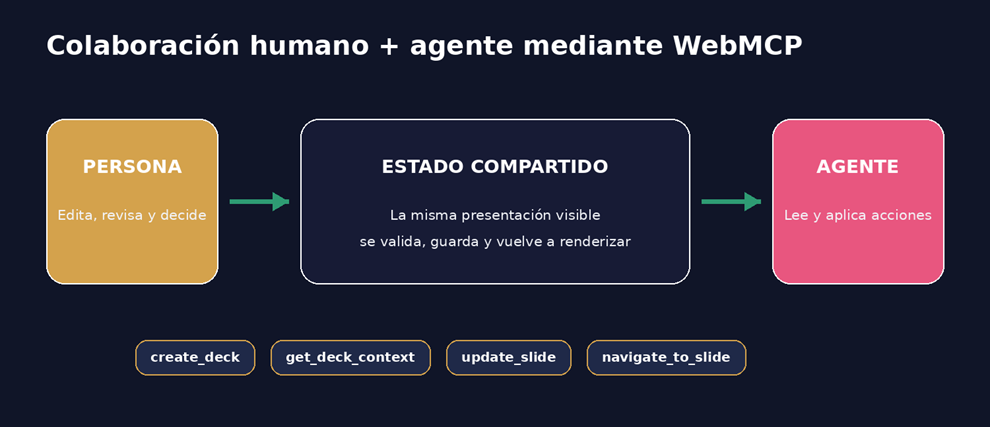
WebMCP connects people and AI agents through shared state and four structured presentation tools.
-
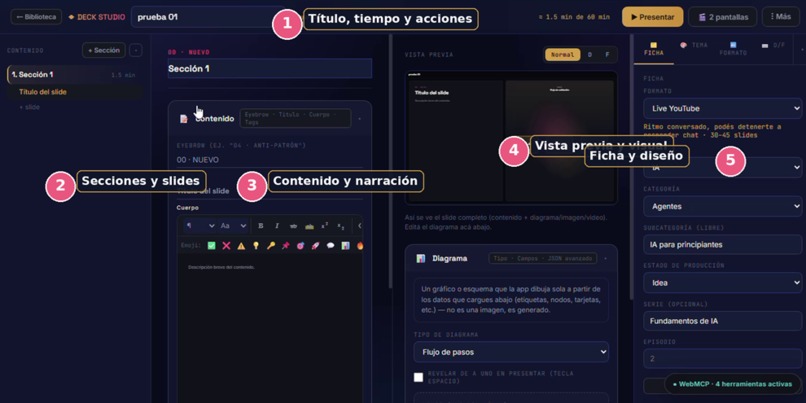
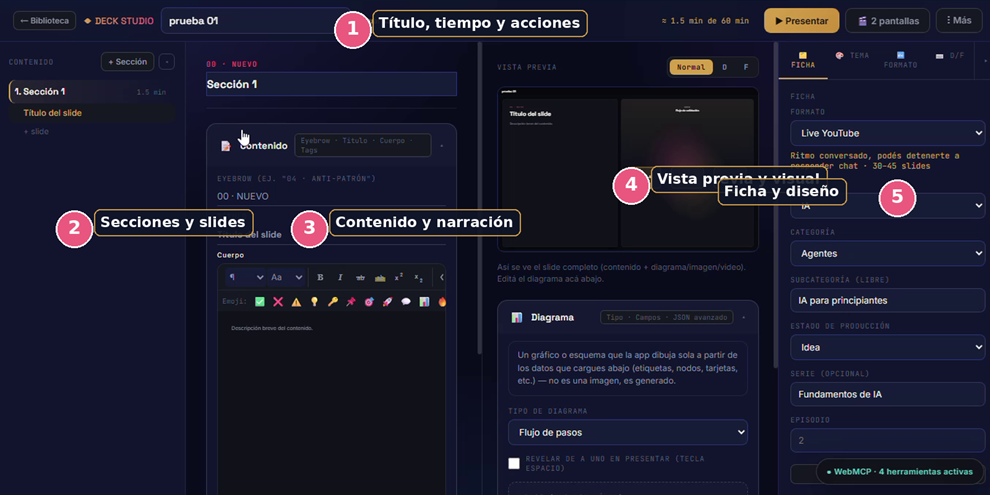
Build structured presentations with sections, content, speaker notes, diagrams, and live previews.
-
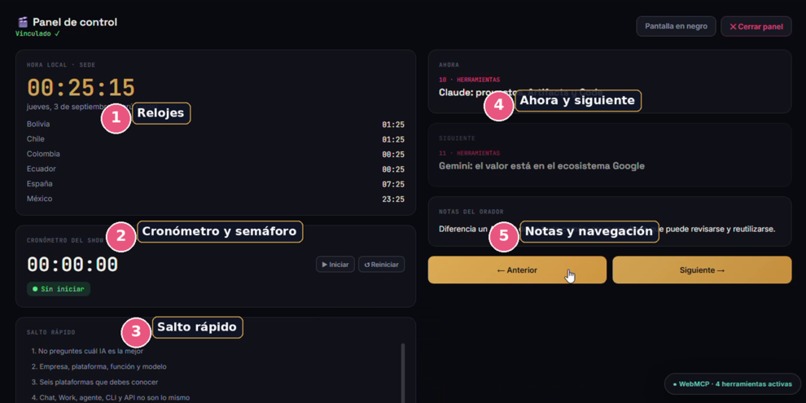
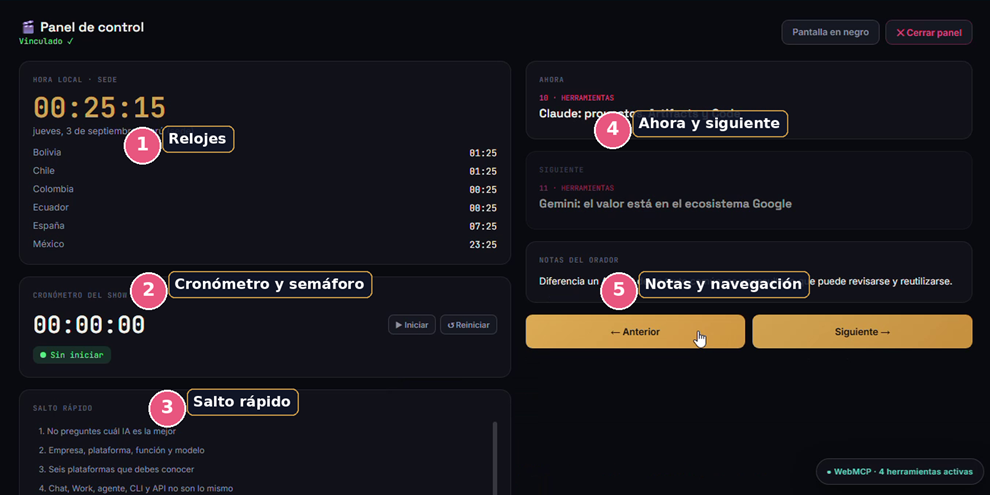
Control the live session with timers, speaker notes, quick navigation, and a separate audience view.
-
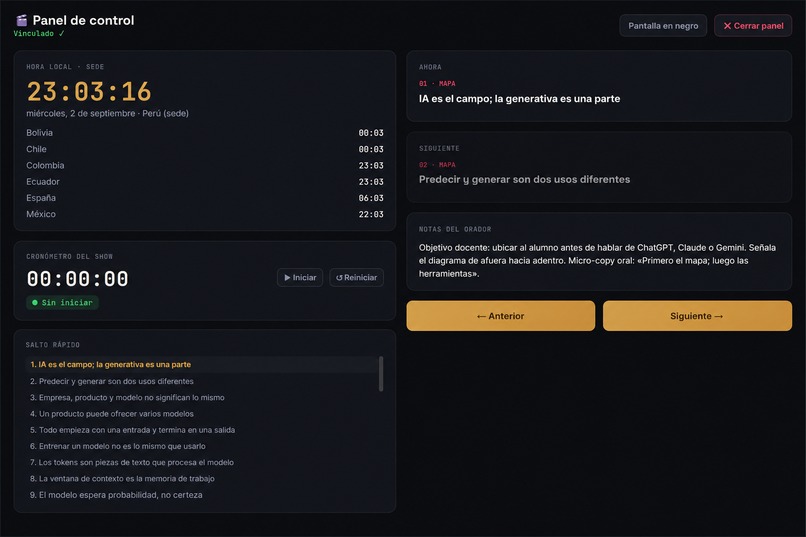
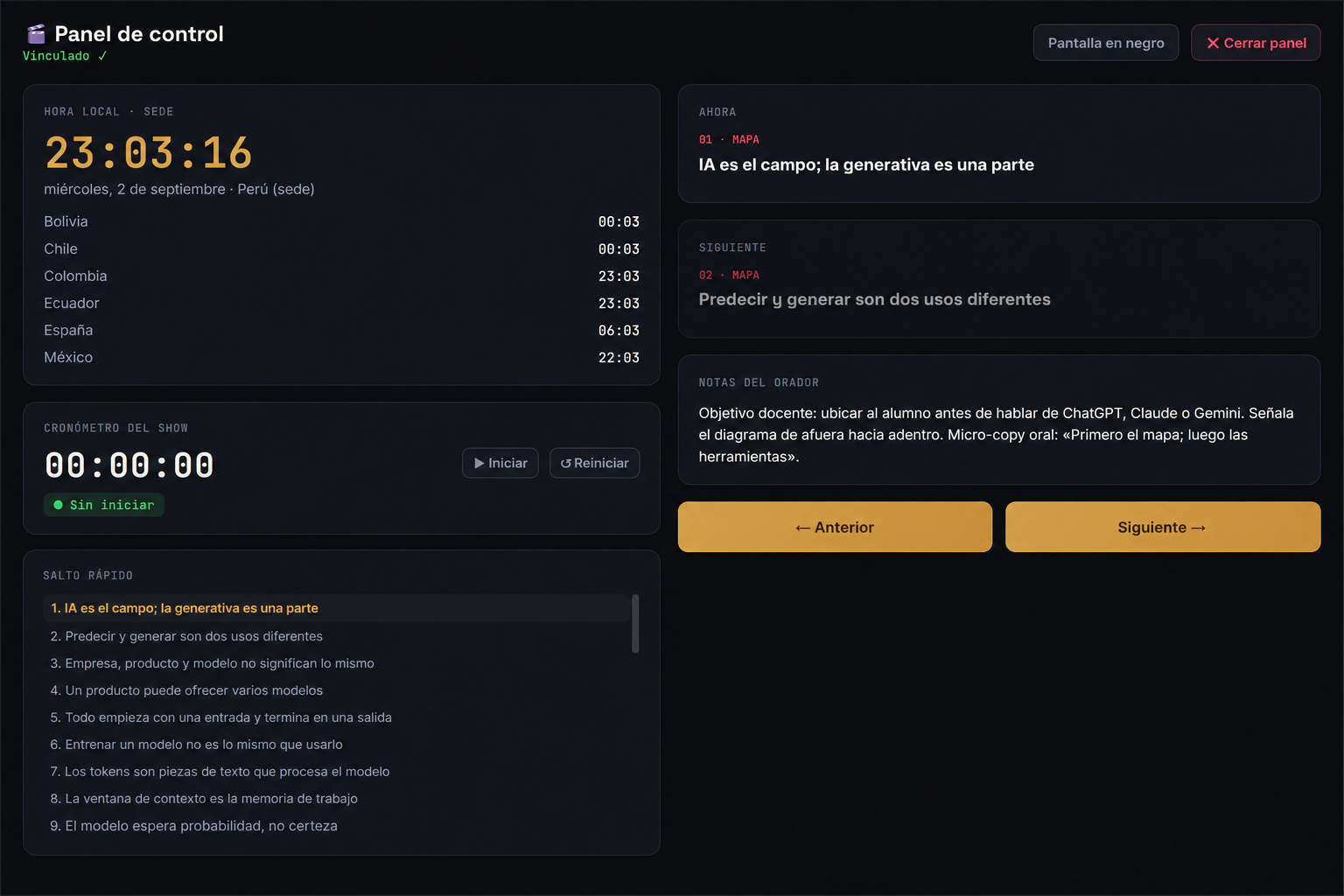
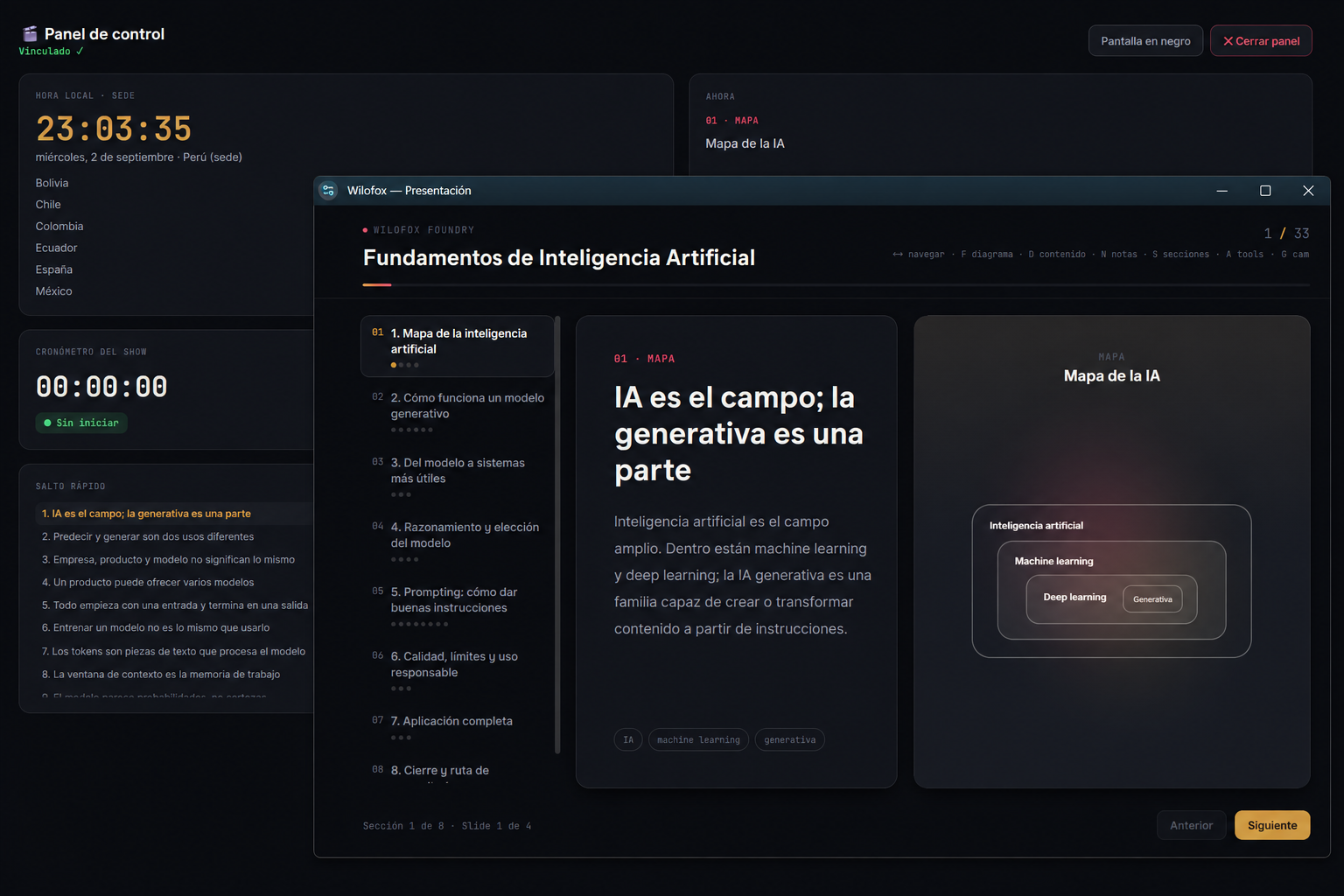
Presenter control panel with slide navigation, speaker notes, timer, and blackout controls.
-
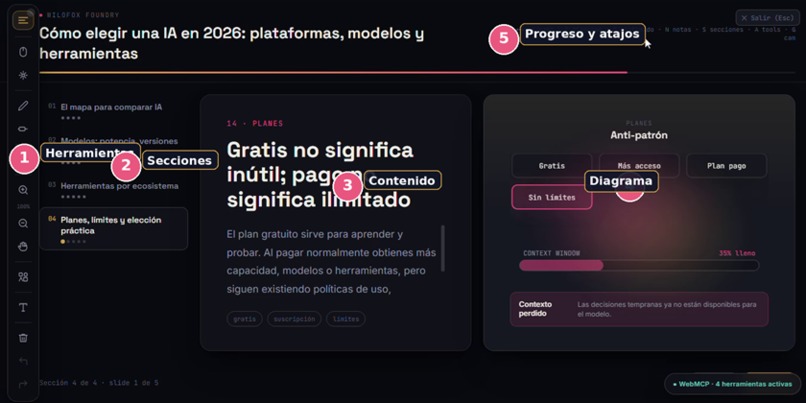
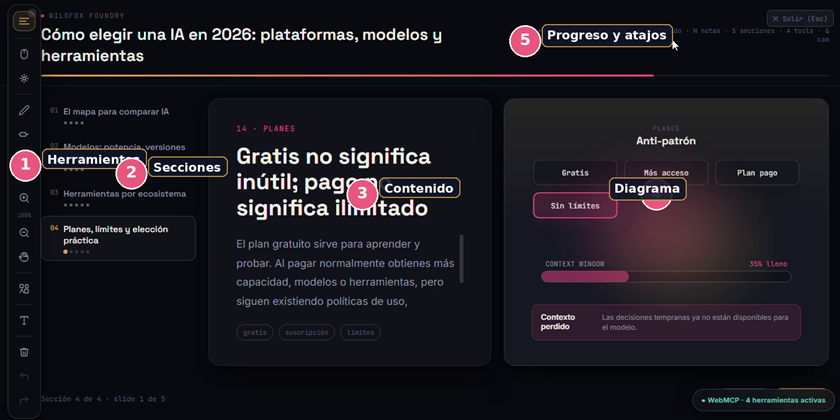
Present lessons progressively with visual diagrams, navigation shortcuts, and annotation tools.
-
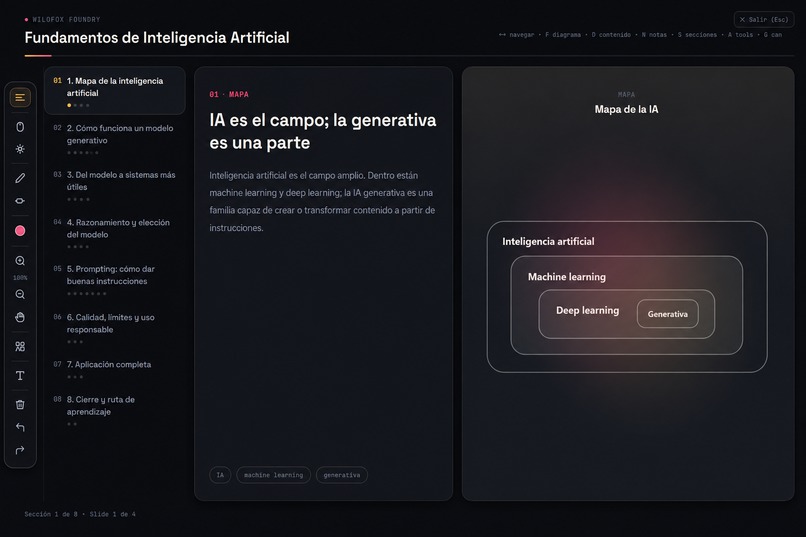
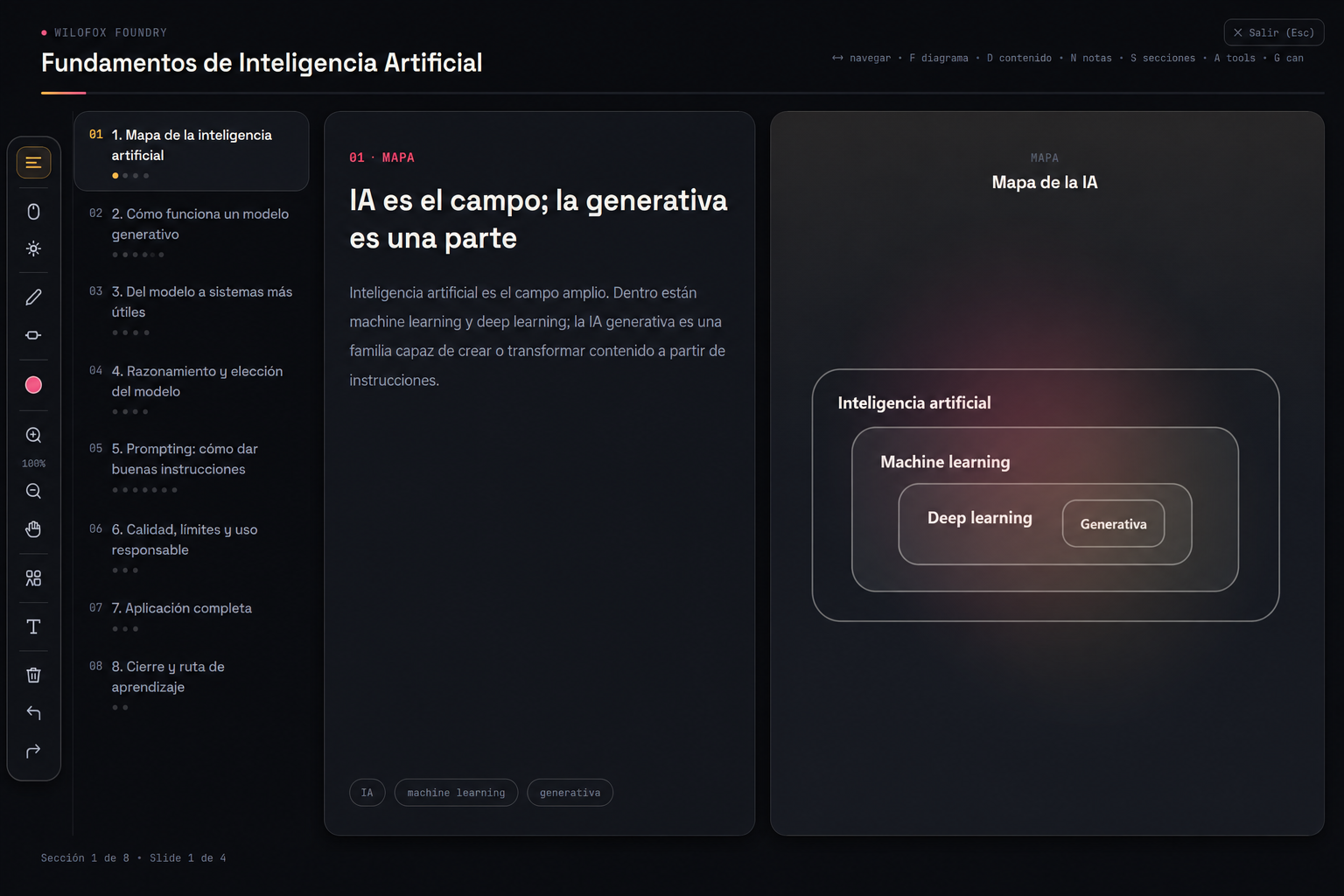
Audience presentation mode with progressive navigation, visual diagrams, and annotation tools.
-
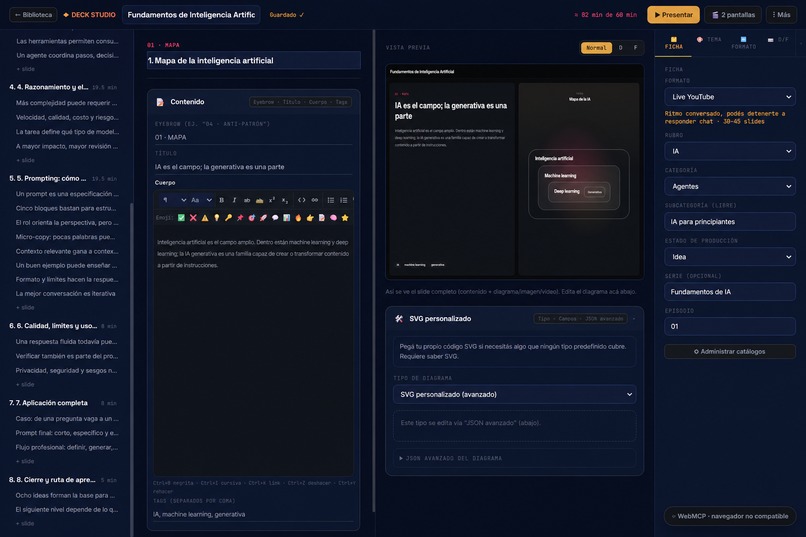
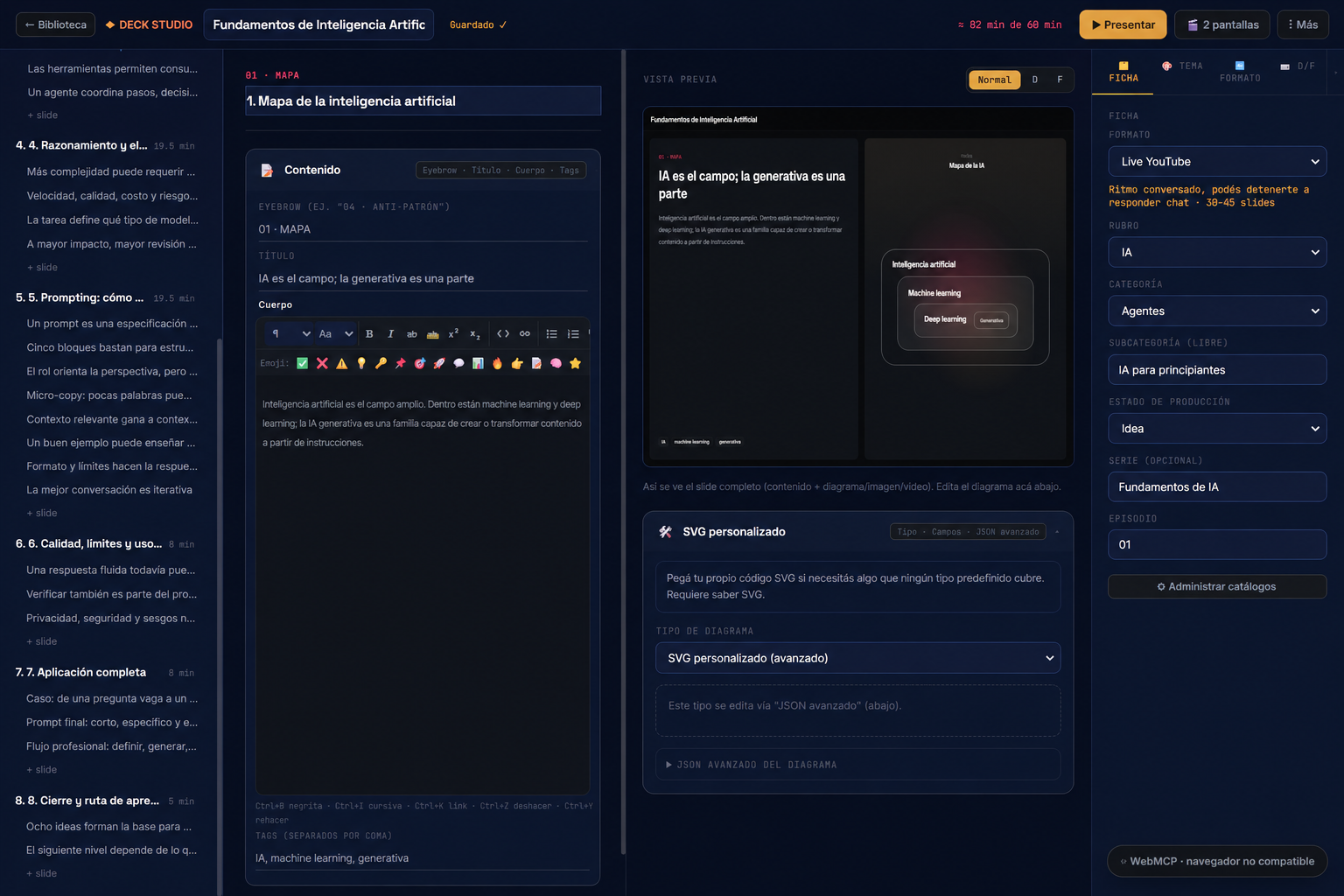
Build complete lessons with structured content, live previews, diagrams, and presentation settings.
-
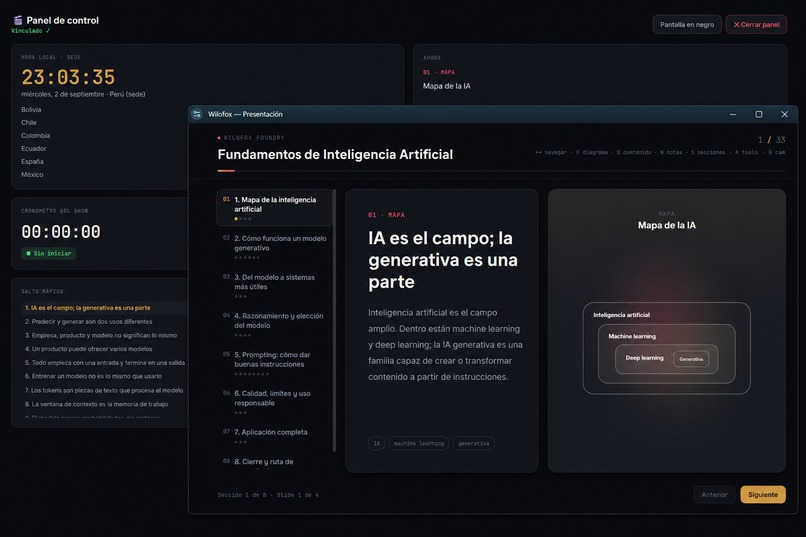
Two-screen workflow: presenter controls and audience view stay synchronized in real time.
Inspiration
Wilofox Deck Studio began with a problem I experienced personally—and one that many educators, trainers, content creators, consultants, and live-stream presenters likely share.
Existing tools allowed me to design slides, but I could not find one workspace that supported the complete reality of presenting: organizing a lesson, preparing visual content, writing speaker notes, controlling time, managing multiple screens, seeing what comes next, and annotating ideas live without interrupting the flow.
I wanted the creative flexibility of a visual design tool, but shaped around how people actually teach and communicate. I needed to prepare everything in the browser, operate the presentation from a separate control screen, keep the audience view clean, and use pointers, highlights, drawings, and shapes while explaining.
That personal need became Wilofox Deck Studio.
When I discovered WebMCP, I saw a natural extension of the original vision: the workspace could become a shared environment where a person and an AI agent collaborate on the same presentation—not through a disconnected chatbot, but through structured actions connected to the real product.
What it does
Wilofox Deck Studio is a browser-based workspace for creating and delivering structured, interactive presentations.
It is designed for educators, content creators, trainers, professionals, and live-stream presenters who need more than a traditional sequence of static slides.
Users can:
- Create presentations from scratch, start from built-in examples, or import structured JSON.
- Organize content into sections and progressively ordered slides.
- Search, filter, categorize, duplicate, and manage presentations from a visual library.
- Combine written content with diagrams, images, videos, code, and embedded web resources.
- Add speaker notes and estimated presentation time.
- Configure formats, categories, series, production status, themes, typography, and colors.
- Preview content and visual resources while editing.
- Present using a single screen or a separate presenter-control window.
- See the current slide, upcoming slide, speaker notes, reference clocks, timer, and timing status.
- Navigate progressively or jump directly to a specific part of the presentation.
- Use a laser pointer, pen, highlighter, colors, arrows, rectangles, and other shapes during a live explanation.
- Zoom, pan, isolate the content or diagram, undo annotations, and temporarily black out the audience screen.
- Reserve an interface area for a camera or chat in an OBS composition.
- Export and reuse presentation content in formats such as JSON, HTML, PDF, and PowerPoint.
The result is a workflow that connects preparation, editing, rehearsal, presentation, and live interaction within one coherent experience.
How WebMCP is used
WebMCP adds a structured agent layer to the existing presentation workflow.
Wilofox exposes four tools:
create_deckcreates a complete, editable presentation from structured input.get_deck_contextreads the current presentation state, including changes made manually by the user.update_slideupdates one targeted slide while preserving the rest of the deck.navigate_to_slidemoves the shared interface to a requested slide for review or presentation.
These tools allow a compatible AI agent to understand and operate Wilofox without guessing where to click or attempting to interpret a complex editor only through pixels.
The agent works with the same presentation state that the person can see and edit. There is no hidden agent-only copy. When a tool changes a slide or creates a deck, the result is validated, stored, rendered in the interface, and immediately available for human review.
The user remains in control: every result can be inspected, edited manually, presented, exported, or replaced.
Why WebMCP is a strong fit
A presentation editor contains many controls, panels, fields, and possible actions. Asking an agent to operate that environment through visual guessing would be fragile and imprecise.
WebMCP gives Wilofox a small, explicit set of meaningful capabilities with structured and bounded inputs. This makes agent behavior easier to understand, safer to execute, and more closely aligned with the user’s intention.
A practical workflow can look like this:
- The agent creates a structured lesson.
- The educator reviews it and manually adjusts the content.
- The agent reads the latest shared state.
- The educator asks it to improve only one specific slide.
- The updated result appears inside the same editor.
- The person makes the final teaching and design decisions.
This kind of collaboration would otherwise require copying content repeatedly between a chatbot and a presentation tool, manually reconstructing context, and risking the loss of previous edits.
Human and agent collaboration
Wilofox is designed around a simple principle: the agent contributes speed and structured assistance, while the person contributes judgment, subject knowledge, creativity, and final control.
The shared presentation is the source of truth.
Manual edits and agent actions use the same state, rendering, validation, and persistence flow. This prevents the agent experience from becoming a parallel prototype disconnected from the real application.
For educators and presenters, this means less time transferring information between tools and more time reviewing, refining, and communicating ideas effectively.
How I built it
Wilofox Deck Studio is built with HTML, CSS, and vanilla JavaScript using a portable single-file application architecture.
It runs directly in the browser without requiring a traditional backend. Presentation data and configuration are stored locally using IndexedDB, supporting a local-first workflow.
The application includes:
- A presentation library and filtering system.
- A structured slide editor.
- Visual diagram generators.
- A presentation runtime.
- Live annotation tools.
- Multi-window presenter controls.
- Import and export workflows.
- Local state and persistence management.
WebMCP was implemented through document.modelContext.registerTool().
Each tool includes:
- A clear name and description.
- An explicit JSON Schema.
- Bounded and validated inputs.
- Targeted execution behavior.
- Reuse of the application’s existing state and persistence functions.
- Visible results rendered through the normal interface.
WebMCP support is implemented as a progressive enhancement. Browsers without WebMCP can still use the complete manual presentation experience.
What was added during the WebMCP Challenge
Wilofox Deck Studio existed before the challenge as a human-operated presentation workspace.
During the challenge, I meaningfully extended it with an agent-accessible collaboration layer by:
- Registering four structured WebMCP tools.
- Defining explicit schemas and bounded tool inputs.
- Connecting agent actions to the application’s real state.
- Preserving manual changes during targeted agent updates.
- Reusing the existing rendering and persistence workflow.
- Maintaining compatibility with browsers that do not support WebMCP.
- Adding documentation, testing instructions, examples, and visual explanations of the human-agent workflow.
The WebMCP implementation is therefore not a separate demonstration attached to the product. It extends the way the existing application can be operated.
Challenges
The main technical challenge was maintaining one reliable source of truth across multiple experiences:
- The editor.
- The presentation window.
- The presenter-control window.
- IndexedDB persistence.
- Manual user actions.
- WebMCP agent actions.
An agent update had to preserve work already completed by the user. Improving one slide should not replace the entire presentation, remove unrelated content, or create a disconnected version.
Another challenge was integrating WebMCP without breaking the portable single-file architecture. I wanted to add agent capabilities while keeping the application usable as a complete presentation studio in any supported browser.
Designing the tool boundary also required restraint. Instead of exposing every internal function, I selected four actions that represent useful, understandable, and testable collaboration.
Accomplishments that I am proud of
I transformed a tool originally created for my own teaching and streaming needs into a complete collaborative workspace for people and AI agents.
Wilofox now brings together:
- Structured lesson creation.
- Visual presentation design.
- Progressive navigation.
- Speaker support.
- Live annotations.
- Multi-screen control.
- OBS-oriented presentation layouts.
- Local persistence.
- Import and export workflows.
- Structured WebMCP actions.
I am especially proud that WebMCP operates through the real product workflow. Agent-created and agent-updated content appears in the same editor used by the person and remains available for continued editing and presentation.
The project demonstrates that an agent-native web experience can remain understandable, visible, and human-controlled.
What I learned
Building Wilofox taught me that an agent-native website is not simply a normal application with an AI chat panel added to it.
A useful agent experience requires the application to:
- Communicate its capabilities clearly.
- Expose meaningful and bounded actions.
- Validate structured inputs.
- Preserve the latest shared context.
- Make every result visible to the user.
- Reuse the product’s real business logic.
- Keep the person in control of consequential decisions.
I also learned that fewer, well-designed tools can be more valuable than exposing a large number of low-level actions.
WebMCP provides a practical foundation for this relationship. It allows an agent to act with greater precision while the user continues making the creative, educational, and presentation decisions.
Potential impact
Wilofox can help educators and presenters produce clearer and more interactive learning experiences without assembling several disconnected applications.
Its multi-screen controls and live annotation tools are especially relevant for online classes, workshops, webinars, product demonstrations, consulting sessions, and live streams.
The same workflow can serve multiple fields because the presentation structure, visual resources, categories, and delivery format remain configurable.
By combining a human-controlled presentation environment with structured agent assistance, Wilofox can reduce preparation time while improving consistency, clarity, and audience engagement.
What’s next
The next steps for Wilofox Deck Studio include:
- Agent-assisted diagram and visual generation.
- Accessibility and readability reviews.
- Adaptation of existing lessons for different audiences and formats.
- Multilingual presentation workflows.
- Cloud synchronization and collaborative editing.
- Additional WebMCP tools for themes, speaker notes, diagrams, rehearsal, and accessibility.
- More templates for education, business, training, and content creation.
- Deeper integration with the Wilofox and Wilson Academy educational ecosystem.
Direct generative-AI integration inside the application is part of this future roadmap. Today, users can prepare researched content with an external AI using Wilofox’s JSON structure and then import it into the application.
My long-term goal is to make Wilofox a complete environment where anyone can transform an idea into an interactive visual experience and present it confidently on the web, in a classroom, or during a live stream—with an AI agent working alongside them while human judgment remains in control.
Built With
- chatgpt
- codex
- css3
- html5
- indexeddb
- javascript
- webmcp


Log in or sign up for Devpost to join the conversation.