Inspiration
Home routers often show a technical list of connected devices, but that list can be difficult to understand. A device may appear only as an IP address, MAC address, or manufacturer name, leaving the user unsure whether it belongs to them.
I wanted to build a small, local-first tool that helps ordinary users notice changes in their home network without uploading private network information to the cloud.
What it does
WiFi Sentinel is a Windows command-line application that detects devices on the user's current private home network.
It combines two discovery methods:
- Windows Neighbor Cache, accessed through the read-only
Get-NetNeighborcommand - Optional Nmap host discovery using only
-sn, without port, service, or operating-system scanning
Detected devices are identified by normalized MAC address and stored locally in SQLite. Users can mark devices as trusted, unknown, or ignored and assign understandable names such as “Home router” or “Robot vacuum.”
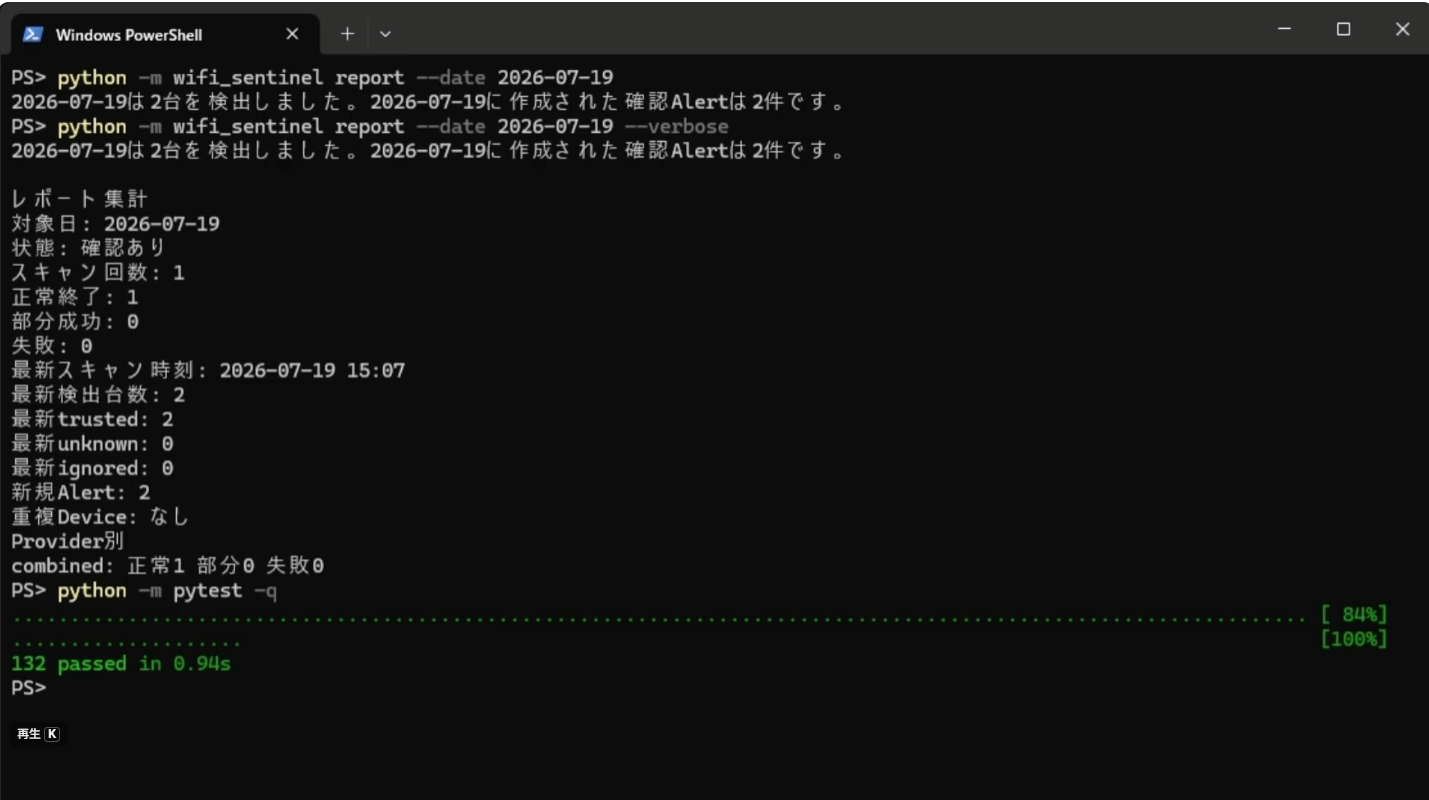
WiFi Sentinel also converts technical scan history into a short human-readable daily report. For example:
Today, only two trusted devices were detected. No new devices or scan errors were found.
The report is generated deterministically from the local database. It does not use an external AI API, upload network data, or start a new scan.
How I built it
I built WiFi Sentinel with Python 3.12, SQLite, PowerShell, Nmap, pytest, Ruff, and mypy.
The application separates domain logic, discovery providers, persistence, application services, and the CLI. Windows and Nmap discovery results can be run independently or combined. Combined discovery merges devices by normalized MAC address while preserving provider-specific observations.
Safety restrictions are part of the implementation:
- Only the active RFC1918 private network can be scanned
- The scan range is limited to a maximum of 254 hosts
- Users cannot enter an arbitrary CIDR
- Nmap is restricted to
-snhost discovery - No port scanning or packet capture
- No automatic device blocking
- No cloud telemetry
- No automatic installation of external tools
I used Codex and GPT-5.6 throughout Build Week to design the architecture, implement features, review safety boundaries, create tests, debug real Windows behavior, and validate the application against an actual home network.
Challenges I faced
The first Windows Neighbor Cache scan returned zero final candidates, even though raw entries were present. Rather than weakening the filters without evidence, I added typed diagnostics that showed exactly where entries were excluded.
The diagnostics revealed that two valid private IPv4 entries with valid MAC addresses were rejected by their neighbor state. I then added Nmap as an optional, tightly restricted discovery provider instead of silently changing the Windows rules.
Another challenge was avoiding misleading security claims. An unknown device is not automatically an intruder, and a scan that finds no unknown devices does not prove that a network is safe. The CLI and daily report therefore describe only what was actually observed.
Accomplishments that I am proud of
- Implemented Windows, Nmap, and combined discovery providers
- Completed a real Nmap host-discovery test without administrator elevation
- Added local device registration and duplicate-alert prevention
- Added a human-readable daily report that opens SQLite in read-only mode
- Verified that report generation does not change the database
- Reached 132 passing automated tests
- Passed Ruff and mypy checks
- Preserved a clean Git history with feature, test, and documentation commits
- Kept all network and device information on the local Windows computer
What I learned
The most important lesson was that security software should clearly separate observation from judgment.
A MAC address, manufacturer name, or unknown status can help a user investigate a device, but it cannot identify a person or prove unauthorized access. Good diagnostics and careful language are as important as detection itself.
I also learned that a useful tool does not always need more features. Turning raw technical history into one short, trustworthy sentence made WiFi Sentinel much easier to understand.
What's next
Future versions could add optional scheduled scans and local Windows notifications while preserving the same local-first and non-blocking safety model.
For this Build Week version, I focused on a reliable core: safe discovery, local history, device registration, transparent diagnostics, and a report that helps a human understand what happened.
