-
-
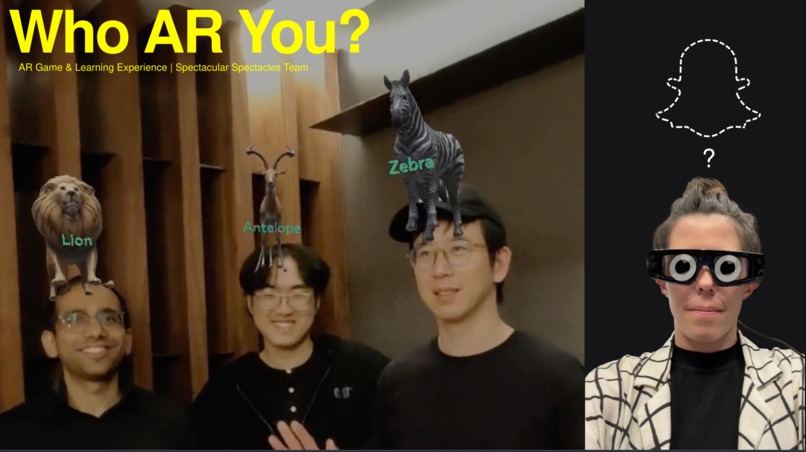
Who AR You : Party AR game for Snap Spectacles 2024

Inspiration
We love social party games like Heads Up! and 20 Questions, and we wanted to bring that fun, collaborative energy into an immersive AR game. Using your body and space, especially with Spectacles, to literally "wear" your mystery character felt like a natural evolution. We imagined a world where games aren't confined to screens, but live in your environment. It is also a helpful learning game for families and kids.
What it does
Who AR You? is a multiplayer augmented reality party game. One player is assigned a mystery character from a chosen category (e.g., animals, celebrities, food). The twist? The character floats above their head, so everyone except them can see it!
The guesser asks yes-or-no questions to the "game master" to figure out their identity. Each correct answer allows them to ask another question—wrong answers mean waiting for the next turn. The game ends when the guesser correctly identifies their character.
How we built it
We used Lens Studio to create a multiplayer AR experience with character models, synced gameplay, and intuitive interactions. The Spectacles' hand tracking and scene understanding features helped us anchor character models above heads and allow for soft press interactions using hands to "press" invisible buttons in space.
Key features include:
- AR character assignment using scene placement and head bounding
- A custom-built soft press system for hand-based input
- Multiplayer state sync and role differentiation (Guesser vs Spectators)
- Visual UI to display characters and guide game flow
Challenges we ran into
Multiplayer & Synchronization
Problem: Pairing different characters with players in Multiplayer mode
Solution: Getting familiar with the Sync Kit and leveraging its entity-based syncing system
Function Lifecycle Understanding
Problem: Figuring out what functions are called automatically
Solution: Investigated Lens Studio lifecycle methods like onAwake and onStart, and used event listeners effectively
Generative AI Models
Problem: Needed custom models to place above player heads
Solution: Used Gen AI plugin in Lens Studio to create high-quality assets quickly and autonomously
Button Pinch Input
Problem: We needed a natural way to press buttons in mid-air using just hand tracking
Solution: We utilized Pinch Button component and interactor finger objects to fire on pinch events and advance game logic
Custom Animation & Feedback
Problem: We wanted to provide subtle visual feedback without distracting players
Solution: Built smooth transitions using tweening functions, soft resets, and visual cues for interaction zones
Accomplishments that we're proud of
- Building a fully multiplayer, AR-native party game from scratch
- Creating reliable and intuitive hand-based interaction with no physical controllers
- Designing a game loop that encourages collaboration and laughter
What we learned
- Deep understanding of Lens Studio’s scripting lifecycle and interaction systems
- How to use colliders and transforms for meaningful, playful AR input
- Ways to keep multiplayer experiences responsive and in sync across devices
What's next for Who AR You? by Spectacular Suspects
- Add more categories and custom character packs
- Polish the UI and animations for broader audience use
- Introduce timed rounds and scoring for competitive play
- Explore Snap’s APIs for voice or gesture input enhancements
- Test in live party settings to gather real-world feedback
Built With
- animation
- co-located-world
- connected-lenses
- head-binding
- lens-studio
- snap
- snap-interaction-kit
- spectacles
- sync-kit
- typescript


Log in or sign up for Devpost to join the conversation.