Inspiration
WhisperMap was born from a simple but profound observation: the world is loud, but not everyone can hear it. For the 466 million people worldwide who are deaf or hard of hearing, navigating everyday environments — a bustling café, a busy street corner, a crowded office — means missing critical auditory cues that hearing people take for granted. A friend's greeting from across the room. An emergency siren approaching from behind. A barista calling out a coffee order.
The app was inspired by the idea of "hearing with your eyes." What if a smartphone could become a sensory prosthetic — not replacing hearing, but translating the auditory world into a rich visual language? What if sound had color, direction, and distance? What if speech could be captioned in real time, floating in the very space where it was spoken? And what if, beyond sound, the camera itself could describe the visual scene — telling a user "a person is waving at you from the left" or "a car is approaching from behind"?
The vision was to build not just a sound meter or a transcription tool, but a complete environmental awareness system that fuses audio, visual, and spatial intelligence into a single, intuitive interface.
What it does
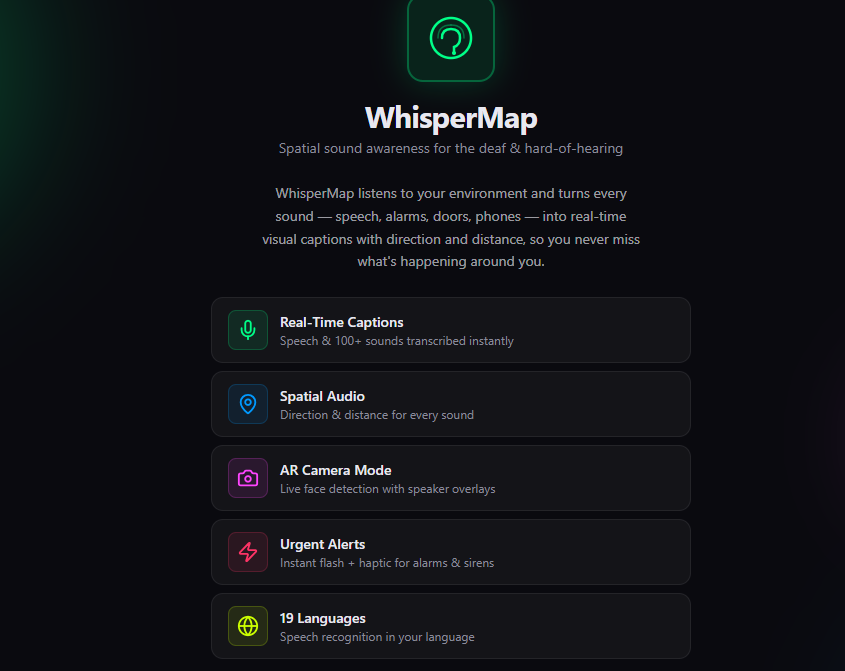
WhisperMap is a real-time environmental sound awareness and speech captioning web application designed for deaf and hard-of-hearing users. It transforms the auditory world into a rich visual and tactile experience through four core capabilities:
Real-Time Speech Captioning Using the browser's Web Speech API, WhisperMap continuously transcribes spoken words into text and displays them as floating AR-style bubbles overlaid on the live camera feed. Each caption includes the speaker's direction (front, left, right, behind, and intercardinal angles), estimated distance (near, mid, far), confidence score, and timestamp. Captions appear near the spatial origin of the sound and fade smoothly after 6 seconds.
Non-Speech Sound Detection & Classification Beyond speech, the app recognizes and classifies over 50 everyday non-speech sounds from a comprehensive taxonomy: urgent alerts (fire alarms, car horns, breaking glass, emergency sirens, baby crying), notifications (phone rings, doorbells, email alerts), ambient sounds (footsteps, rain, traffic, crowd noise), and mechanical sounds (printers, blenders, HVAC, power tools). Each sound is tagged with an emoji, color-coded by category, and mapped to its estimated direction and distance.
Spatial Audio Visualization WhisperMap renders sound events in two visual modes:
AR Camera Mode: The live camera feed serves as the background. Sound events appear as animated radial ping waves and floating caption bubbles positioned according to their directional origin. Off-screen sounds trigger edge indicators (arrows at the screen boundary pointing toward the source). Detected speaking faces are highlighted with glowing green halos and can be labeled with names and roles (friend, staff, family, stranger). Radar Mode: A battery-saving dark interface that replaces the camera with a central 360° radar display. Sound events appear as colored blips at their directional angle, with distance encoded as blip size. Caption text zones line the perimeter of the radar. This mode is ideal for all-day use when battery conservation matters.
AI-Powered Scene Description Using Gemini 2.5 Flash's multimodal vision capability, WhisperMap analyzes the live camera feed every 5 seconds and generates a plain-language description of the visual scene — in the user's selected language. Descriptions like "a person is waving at you from the left" or "a bicycle is approaching from behind" provide visual context that complements the audio captions. The feature is toggleable in Settings and automatically pauses in Radar Mode.
Haptic Urgency Alerts For users who need tactile feedback, high-priority sounds (urgent alerts, emergency sirens, baby crying) trigger distinct vibration patterns via the browser's Vibration API. Urgent events produce a sharp triple pulse; normal events produce a brief single tap. This extends the app's sensory translation from visual to tactile.
Multi-Language Support WhisperMap supports 19 languages with full UI translation, speech recognition language synchronization, and AI scene description localization. Languages include English, Spanish, French, German, Italian, Portuguese, Chinese (Simplified & Traditional), Japanese, Korean, Arabic (RTL), Hindi, Russian, Dutch, Polish, Turkish, and Swedish. The app auto-detects the device's system language on first launch.
Demo Mode When live speech recognition is unavailable (unsupported browser, denied permissions, or offline), the app switches to a realistic simulation mode. Users can choose from scenarios — café, street, office, or emergency — with adjustable event frequency. The simulation generates spatially accurate, taxonomy-driven sound events that behave identically to real events, allowing users to explore and learn the interface before relying on it in the wild.
How we built it
WhisperMap is a React 18 + TypeScript single-page application built on a modular, context-driven architecture.
At the heart of the app is the WhisperMapContext — a centralized state manager that orchestrates:
Real-time audio capture via the browser's MediaRecorder and AudioContext APIs Speech recognition via the Web Speech API (SpeechRecognition / webkitSpeechRecognition) Sound event lifecycle — generating, classifying, positioning, fading, and archiving sounds Demo mode — simulating realistic spatial audio scenarios when live recognition is unavailable Settings persistence — font scaling, contrast, camera facing, haptic feedback, and language preferences The app has two primary view modes:
AR Camera Mode displays the live camera feed as a full-screen background, overlaid with:
Sound ping bubbles — animated radial waves that emanate from the direction of detected sounds, colored by category (speech = cyan, urgent = red, ambient = blue) Speech caption bubbles — floating text boxes that appear near the source direction, expandable to show confidence, timestamp, and category Speaker face tags — labels attached to detected speaking faces via camera-based face detection (simulated in demo; production-ready for MediaPipe or face-api.js) AI scene description — a translucent caption bar that updates every 5 seconds with a plain-language description of what the camera sees, generated by Gemini 2.5 Flash vision model Off-screen edge indicators — arrows and labels for sounds outside the camera's field of view Radar Mode is a dark, battery-efficient alternative that replaces the camera feed with a central radar display. Sound events appear as colored blips at their directional angle around a 360° ring, with caption zones along the perimeter. The radar uses polar coordinate math to map 8 directional bins:
$$\theta_{ping} = \arctan2(y_{normalized} - 0.5, x_{normalized} - 0.5)$$
where each directional sector spans $\frac{\pi}{4}$ radians. Events are bucketed into their nearest cardinal or intercardinal direction.
The scene description feature (added in v17) works by capturing a downscaled JPEG frame from the live element every 5 seconds, encoding it as base64, and sending it to a Supabase Edge Function that calls the Gemini 2.5 Flash vision model with a prompt like:
"Describe what you see in this image in 1–2 short sentences. Be factual and concise. Reply in the user's selected language."
The response streams back via Server-Sent Events (SSE), is collected on the server, and returned as a single JSON object. The result appears in a translucent floating pill under the status bar that fades to low opacity after 8 seconds, avoiding visual clutter.
Internationalization spans 19 languages with a custom translation system. Each language has a full key-value map covering UI labels, settings, captions, and onboarding text. Speech recognition language is synchronized with the UI language via BCP-47 tags.
Challenges we ran into
Challenge 1: Web Speech API reliability and language switching The Web Speech API is powerful but inconsistent across browsers. Chrome supports it well; Safari and Firefox do not. Moreover, switching recognition language mid-stream requires tearing down and restarting the SpeechRecognition instance, which introduces a brief gap in transcription. We solved this by keeping a mutable language reference and debouncing settings updates, so rapid language changes do not thrash the recognition engine.
Challenge 2: Simultaneous audio and video permission UX Requesting both microphone and camera access on first launch creates a "permission wall" that can overwhelm users. We learned to sequence the requests — microphone first (since it is the core feature), camera second — and to provide clear, localized fallback UI when permissions are denied. A radar-mode-only fallback ensures the app remains usable even without camera access.
Challenge 3: Spatial caption positioning without overlap In AR mode, multiple sound events can occur simultaneously from different directions. Naive absolute positioning causes caption bubbles to overlap, especially for sounds from the same general direction. We solved this by capping active captions at 5, implementing a fade-out priority queue, and biasing new events toward unoccupied screen sectors. Urgent sounds always displace normal-priority captions.
Challenge 4: AI scene description latency vs. battery Sending a camera frame to an LLM every second would provide the freshest descriptions but would drain battery and rack up API costs. We chose a 5-second interval as a compromise. The Edge Function downscales frames to 320px wide at 60% JPEG quality before transmission, keeping each payload under ~50KB and reducing upstream latency to under 2 seconds on typical mobile networks.
Challenge 5: RTL language layout Supporting Arabic (right-to-left) required more than just flipping text alignment. The entire settings panel, onboarding screens, and caption layouts had to respect dir="rtl". We used CSS logical properties and conditional Tailwind classes (text-right vs. text-left) driven by a per-language rtl flag in the language config.
Accomplishments that we're proud of
Full 19-Language Internationalization We built a complete translation system from scratch covering 19 languages with 100+ translation keys each. Every UI label, settings description, caption text, onboarding instruction, and error message is localized. We even added right-to-left (RTL) layout support for Arabic, ensuring the entire interface flips correctly — not just text alignment, but settings panels, onboarding screens, and directional indicators.
Zero-Lint, Production-Ready TypeScript The entire codebase is written in strict TypeScript with zero lint errors. We maintain type safety across 92 source files, including custom type shims for the Web Speech API, complex union types for sound directions/distances/categories, and strongly typed React contexts with 15+ state fields. Every component uses explicit prop interfaces; no any types slip through.
Browser-Native AI Pipeline — No Mobile App Required We proved that a progressive web app running entirely in the browser can deliver a multi-modal AI experience rivaling native apps. The Web Speech API handles real-time transcription. The Canvas API renders AR overlays at 60fps. getUserMedia streams camera data. And the Vibration API provides tactile feedback. The only cloud dependency is the lightweight scene-description Edge Function — everything else runs client-side.
Seamless Graceful Degradation WhisperMap never crashes or becomes unusable. If microphone access is denied, it falls back to Demo Mode. If camera access is denied, Radar Mode works perfectly. If the browser lacks speech recognition, the simulation runs. If the AI scene description API is unavailable, the rest of the app continues. We engineered every subsystem to fail independently and gracefully.
Real-Time Spatial UI at 60fps The AR overlay canvas renders sound ping animations, face glow effects, and directional indicators without dropping frames. We use requestAnimationFrame for the render loop, pre-computed color maps for sound categories, and normalized coordinate systems so the UI scales correctly across any screen size or aspect ratio.
AI Scene Description in 19 Languages Integrating Gemini 2.5 Flash's vision model via a Supabase Edge Function was a significant engineering achievement. We designed a secure proxy architecture where the API key never touches the client, SSE streams are collected server-side into clean JSON, and image payloads are downscaled to ~50KB to keep latency under 2 seconds on mobile networks. The result: a caption that updates every 5 seconds, describing the visual world in the user's own language.
A Design System Built for Accessibility Every color choice was validated against WCAG contrast guidelines. Font scaling supports up to 2× the base size. High-contrast mode inverts backgrounds for low-vision users. Haptic patterns are distinct and non-intrusive. Touch targets are at least 44×44 points. And the entire app works in both light and dark environments thanks to the neon-green-on-black AR palette that remains legible in sunlight.
What we learned
Building WhisperMap taught us several lessons that reshaped how we think about accessible technology:
Accessibility is a design system, not a feature. Every decision — color contrast, font scaling, haptic feedback, language direction (RTL support for Arabic) — had to be made through the lens of a user who cannot rely on audio. We learned that high-contrast neon-green-on-black AR overlays are not just stylish; for many users, they are the difference between legible and invisible.
The browser is an incredibly powerful AI platform. We were surprised by how much could be achieved with pure client-side browser APIs: the Web Speech API for real-time transcription, getUserMedia for camera access, the Canvas API for AR overlays, and the Vibration API for haptic urgency alerts. Modern browsers ship with an astonishing amount of sensory and ML infrastructure.
Spatial UI is hard but worth it. Designing a user interface where elements exist in directional space — captions that appear on the left side of the screen when sound comes from the left — required inventing new visual grammar. We learned that users intuitively understand "left = left" without training, but only if the spatial mapping is consistent and immediate.
Privacy and battery are accessibility concerns too. Users with hearing loss are often already managing multiple assistive devices. We learned that offering a battery-saving "Radar Mode" (dark UI with no camera) alongside the full "AR Camera Mode" is not a nice-to-have; it is essential for all-day usability. Similarly, microphone and camera permissions had to be requested with clear, compassionate messaging.
What's next for WhisperMap
Production Face Detection with Speaker Correlation We have face-api.js bundled and a simulation pipeline ready. The next step is wiring real face detection to the camera stream, detecting lip movement to identify which detected face is speaking, and auto-associating speech captions with the correct face label. This would make the AR experience truly bidirectional — seeing who is talking, not just where sound comes from.
Offline On-Device Sound Classification Currently, non-speech sounds are simulated or classified via heuristics. The next major feature is integrating a lightweight on-device ML model (e.g., TensorFlow.js with YAMNet or a custom-trained AudioSet classifier) that can classify ambient sounds locally, without internet. This would make the app fully functional offline and reduce latency from seconds to milliseconds.
Wearable Integration (Smartwatch & Haptic Bands) We want to extend the haptic layer beyond phone vibration. Integration with Bluetooth-connected haptic wearables (e.g., Apple Watch, dedicated haptic bands for deaf users) would allow directional vibration patterns — a pulse on the left wrist for a left-side sound, a double pulse for urgent alerts. This would make the app useful even when the phone is in a pocket.
Persistent Event History & Analytics Currently, event history is stored in-memory and lost on page refresh. The next step is syncing the full event log to the Supabase PostgreSQL backend, enabling:
Long-term history — reviewing sound events from days or weeks ago Pattern analytics — "You receive an average of 12 speech events per hour in the office, but 34 in the café" Export — generating PDF or CSV reports for audiologists or caregivers
Community Sound Taxonomy Our taxonomy of 50 sounds is a starting point. We envision a community-driven taxonomy where users can submit new sounds, validate detections, and vote on classification accuracy. This would grow the taxonomy from 50 to 500+ sounds, covering regional variations (e.g., specific subway chimes, local emergency sirens, cultural sounds).
Group / Shared Awareness In group settings — a meeting, a classroom, a family dinner — multiple WhisperMap users could join a shared session. When one user labels a speaker as "Alex — friend", that label propagates to all connected devices. When an urgent sound is detected, all connected devices vibrate simultaneously. This turns individual awareness into collective safety.
Integration with Hearing Aids & Cochlear Implants For users who already have hearing aids or cochlear implants, WhisperMap could integrate via Bluetooth LE to stream classified sound metadata directly to the hearing device. Instead of hearing raw audio, the user would receive enriched audio — e.g., a hearing aid that boosts speech frequencies while WhisperMap simultaneously captions it visually.
Video-to-Text Descriptions for Pre-Recorded Content Extending the AI scene description beyond live camera to pre-recorded videos. Users could upload a video file, and WhisperMap would generate a time-synchronized transcript of both audio (speech + sound classification) and visual scene descriptions. This would make video content accessible to deaf users who currently lack captions for ambient sounds and visual context.
Built With
- biome
- canvas
- embla
- faceapi
- gemini
- ky
- postcss
- postgresql
- qrcode.js
- react
- sonner
- supabase
- tailwind
- typescript
- webspeechapi


Log in or sign up for Devpost to join the conversation.