-
-
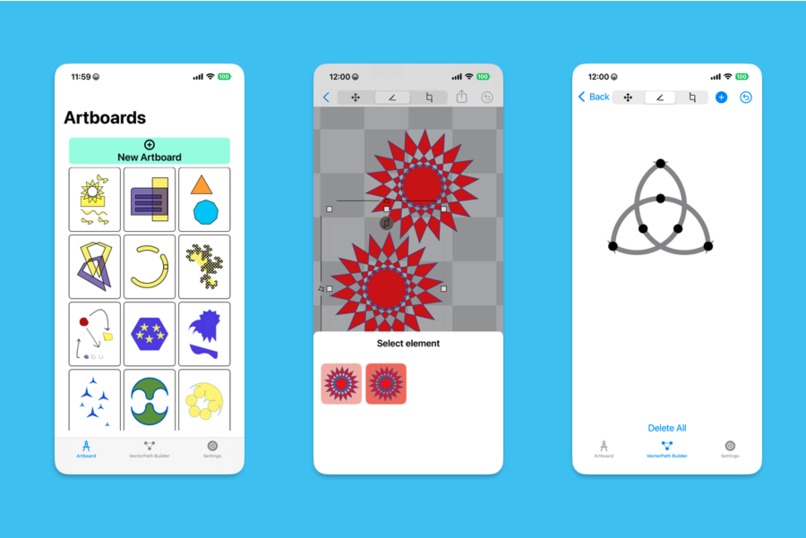
Screenshots
Inspiration
When Apple introduced SwiftUI to the public back in 2019, i felt a spark of interest in building apps for myself again. I have been working full-time as an iOS developer for many years, but most of my time was spent working on projects for my employers. I decided to dive into learning SwiftUI to make something for me.
I began streaming my learning process on Twitch in 2020, and tried to stick to a regular schedule to hold myself accountable. As is often the case, I found that I needed a project to help keep me motivated. The Twitch platform is heavily focused on gaming, and I leaned into using SwiftUI to try recreating game UI for the games that I played on stream. I published my projects on Github for others to use.
I quickly noticed repeating patterns and shapes that were used in several different games. This led to building a SwiftUI package for making shapes that could be reused in my game UI project, and others. (https://github.com/nutterfi/Shapes).
When Shipaton 2024 was announced, I had an idea for a coloring book app that would use my Shapes library to provide patterns. The timing was unfortunate though and I was not able to ship that year. The project evolved to instead become a vector drawing app. Shipaton 2025 reignited my commitment to shipping, and I'm happy to announce that the app is now available on the App Store!
What it does
Pistachio is a vector drawing application designed for iOS. It provides several tools for creating vector images that can be saved and exported to multiple formats.
Each project is stored as an "artboard", and comes with editing tools that are found in similar applications:
- Rotation, resizing, shear transformations
- Stroke and fill styling, including dash patterns, EOFill
- Path operations to interact with other paths
- Undo/redo history
Pistachio comes with several shape templates, each with variable parameters that can be edited and stored as presets. These shapes can be combined with other shapes in a number of ways.
How I built it
The app is written in Swift. I used the SwiftUI framework to build out the application UI, SwiftData to manage data persistence, and RevenueCat to manage payments. I needed a few UIKit features (e.g. multi-finger tap gestures), which I wrapped in custom UIGestureRepresentable types.
Challenges I ran into
This app started as an exploration of what I could do with the new Apple frameworks, and so I began with developing features as my primary focus. As a result of this, my app architecture suffered a bit. I was so interested in what I could build and only slightly concerned with how it was all going to work together. By the time I settled on my feature set, I had amassed quite a bit of tech debt.
I also experienced many challenges related to scope creep. I wanted to include ALL THE THINGS. My feature roadmap kept growing and growing. Ultimately I made peace with the fact that if I was ever going to publish, I needed to save some of these features for future releases.
A great deal of bugs were related to affine transformations, especially as it related to relative paths. I was a bit stubborn here because I wanted to truly understand what was happening, so my iterative process did not involve AI tools, and this slowed me down considerably.
Accomplishments that I'm proud of
I streamed most of my development process. There were a few developer sessions where I needed to turn the camera off and hyperfocus. But the main draw to streaming was to keep me accountable to my regular viewers. It was an enjoyable process because I was able to share the wins as well as the pain points.
I learned a bit about SwiftData, and how fickle it can be. What worked on iOS18 ended up crashing on iOS26. Had a couple of expedited reviews due to that added stress.
What I learned
- SwiftUI app development is fun and it is also aggravating.
- Stick to one feature branch at a time.
- Related: I will forget about my git stashes.
What's next for Pistachio
Some of the planned features for future updates include the following:
- CloudKit Support (currently only local saves)
- Layer support - add layers to artboards to help organize your work
- Color gradient support, including SVG export
- More shape templates
- iOS 26 UI compatibility
- Snap to grid enhancements
- Tools for user custom shape templates
- Alternate Export options
- Filtered Search
Built With
- revenuecat
- swift
- swiftdata
- swiftui


Log in or sign up for Devpost to join the conversation.