-
-
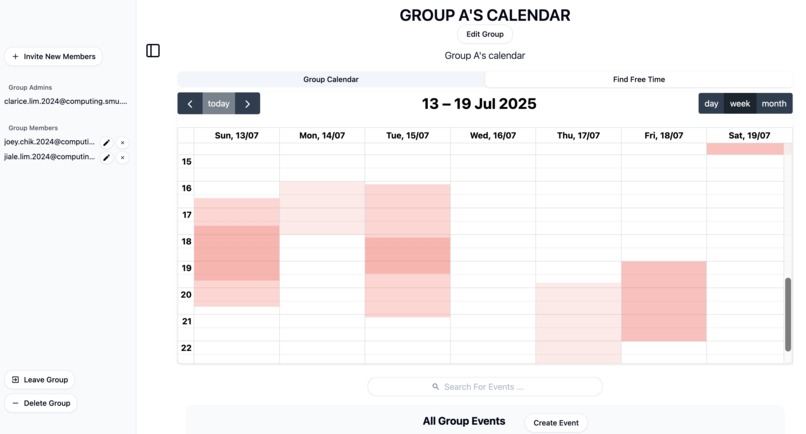
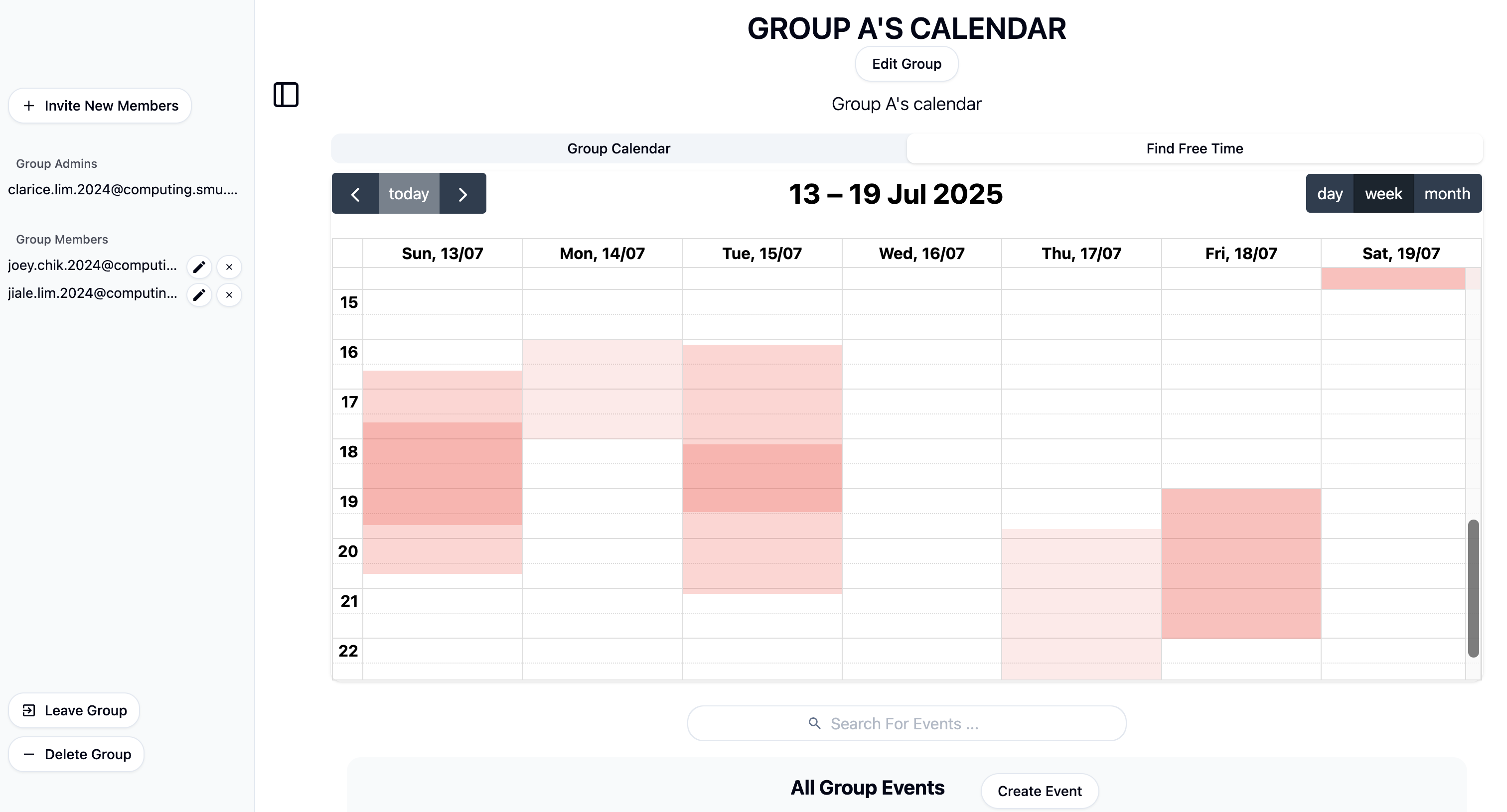
A group admin's Find-Free-Timeslots View
-
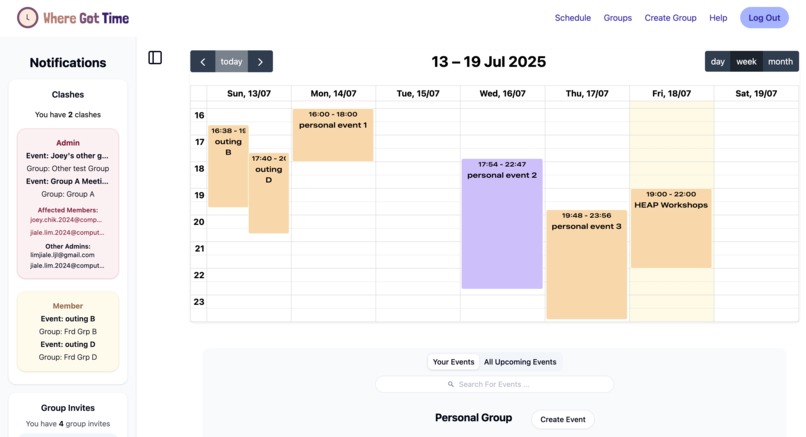
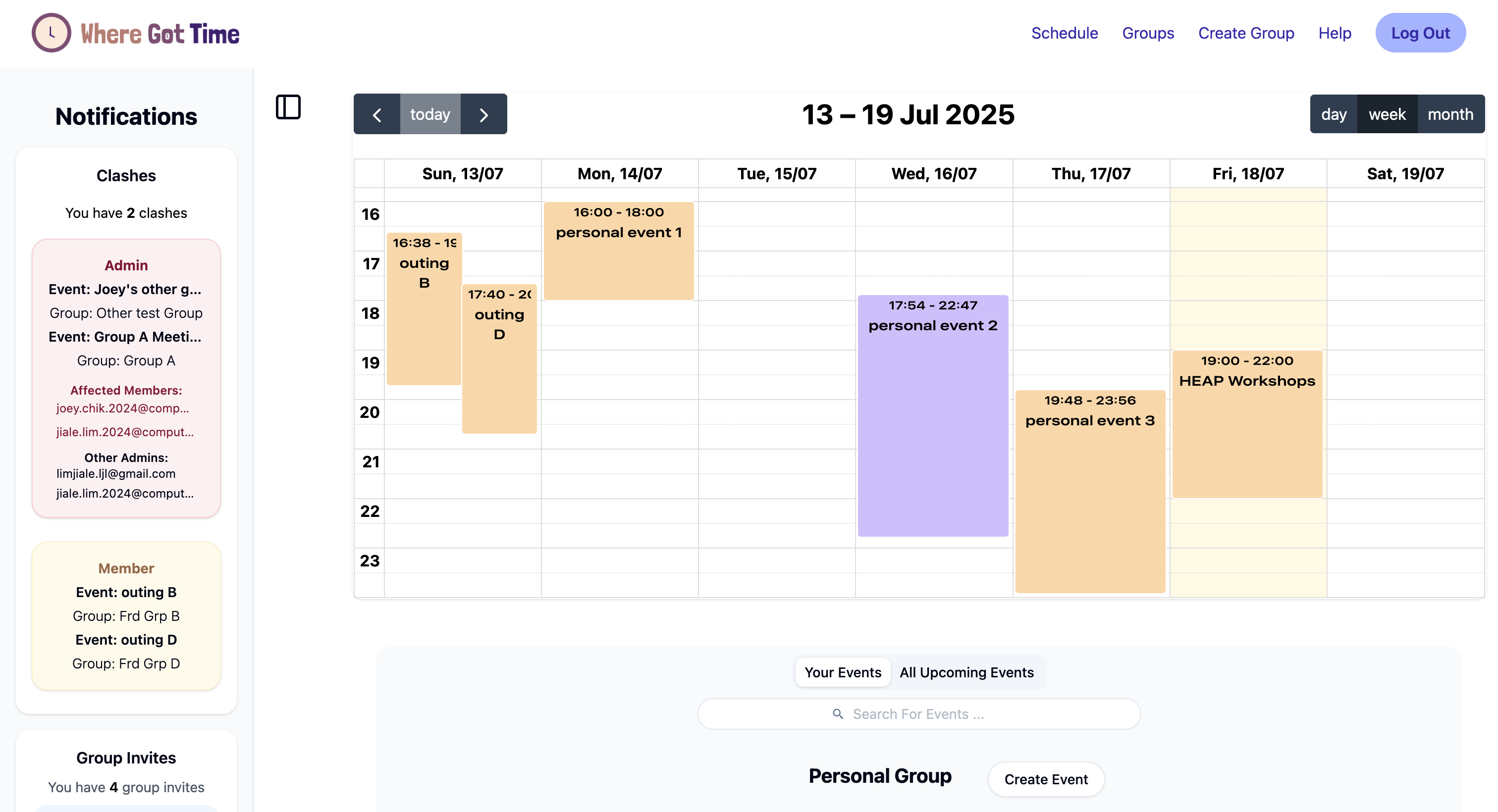
A user's Overall Calendar View
-
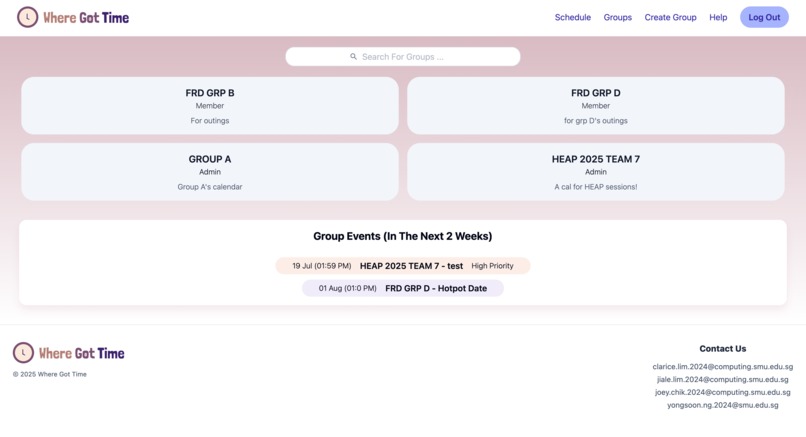
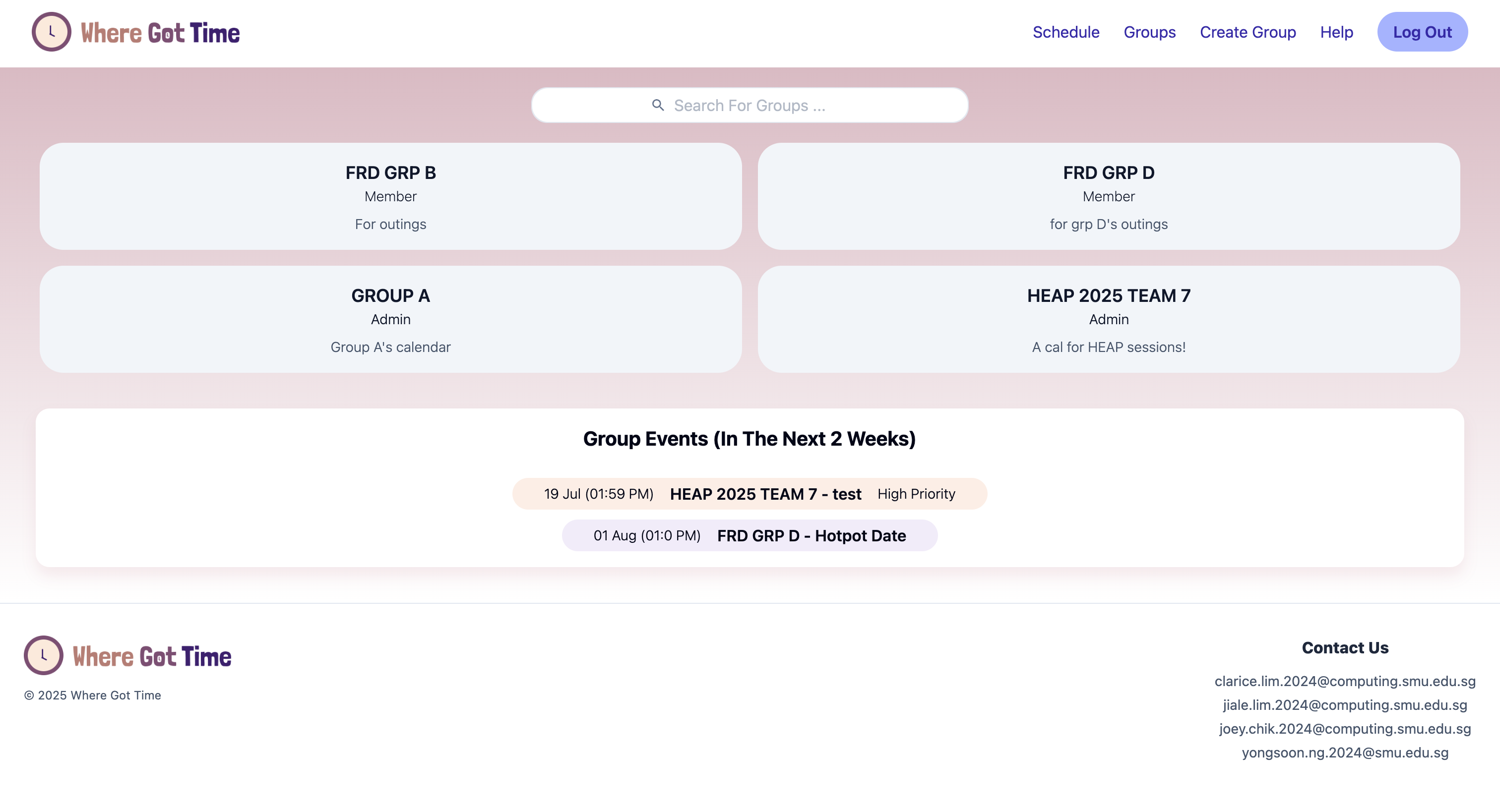
A user's Groups section
Inspiration
It started with a learning journey we had to attend for one of our mods. Both our prof and TAs struggled to find time when the trip had to be shifted at the last minute. Numerous phone calls had to be made to each and every classmate to find new time. So we thought, what if we had something to do that for us?
What it does
WhereGotTime is a next-gen scheduling app which simplifies group coordination with powerful admin tools and intelligent time management. Users can create groups and invite their friends to join them!
With such user based-access, admins can push high-priority events that group members can’t remove, which they can find time for by using our unique gradient view calendar. It scales dynamically with the group's size, visually highlighting busy slots of each member across all their groups. To prevent foul play and protect privacy of users, we put a secure system in place such that invited members have to accept the invite from their main drawer page before they can be successfully added into the group.
Additionally, we decided to take a unique approach to scheduling events by allowing users to choose the importance of events by labeling them as high priority or low. Sometimes certain events should place precedence over others, and WhereGotTime reflects this clearly in its calendars for our users by colour coding events based on priority levels. Users are also able to work with recurring events, having the liberty to choose the type of recurrence down to different days of the week! Moreover, real-time clash detection of high priority events ensures smooth scheduling by instantly notifying affected both group members and admins of conflicts.
How we built it
We made use of node.js and express.js as the backend to handle business logic, as well as react.js for the frontend.
Frontend:
The Frontend code also used React Query to handle the states and refetch data, so that users need not refresh the page constantly. We built it so that certain components can be interacted with keyboard shortcuts as well (eg, ctrl + B to open and close drawers). Lots of data validation was also done on Frontend, including checking for the creation of strong passwords as well as checks for valid user emails on sign-up. Heavy data validation was also carried out many aspects of the project, such as the creation of events (eg, not being able to create events where the end is earlier than the start), and the creation of groups (eg, imposing a max 50 member limit and mandating minimally 1 other member to create a group). Lastly, most update portions have data prefilled in to enhance user experience. There are many more cool details as such, which you can test out in the project for yourself!
To ensure a safe authentication process, we utilised Supabase Auth's JWTs for user authentication and authorization for sign-ups and sign-ins across the Frontend (FE) and Backend (BE). All users would need to verify their emails after signing up before being able to sign-in for the first time.
Backend:
On the BE, we also made use of the JWTs in our middleware to check for authorization of the user in accessing endpoints in the admin-only routes. As the admin status is not just tied to the user, but also to a specific group (i.e. you can be an admin of one group but a member in another), we could not simply use the JWT to verify a user's admin status. Hence, we made 2 middlewares to resolve this issue. The first auth middleware verifies, decodes, extracts, and stores the users information (email) inside the request (req.email) for ease of use for the next endpoint or middleware. The next middleware (mCheckAdmin) then takes in both the user's email from the decoded JWT from the auth middleware, and the group's unique ID to verify the user's admin status via an API call to Supabase. All admin endpoints are protected by this middleware, so non-admins of the group can never access it.
Route illustration:
Member route:
Auth middleware > endpoint
Admin route:
Auth middleware > mCheckAdmin middleware > endpoint
*actual implementation can be checked out in our Github Repo under backend > middleware
We also wrote some of our BE functions directly on supabase and made a remote procedure call (RPC) from BE instead in order to leverage the fact that Postgres functions implicitly has transactions. This is so as to maintain data integrity with business logic that would've otherwise required multiple separate API calls for multiple CRUD functions.
We set up our database on Supabase, using Postgres under-the-hood. We decided to deploy WhereGotTime on Netlify, leveraging its simple and robust CI/CD integration. By linking our deployment pipeline to the main branch on GitHub, any changes pushed to the repository are automatically built and deployed, ensuring the live site is always up to date with the latest commits.
Challenges we ran into and takeaways from it
Overall:
As it was all our first times working on a full scale project, it was difficult to tell what we needed on both the Frontend (FE) and Backend (BE). This resulted in lots of irrelevant data being returned in the BE, or too many endpoints being made which FE had to then compile. However, we persevered and managed to find a rhythm where the team was in sync. We realised that frequent communication was key in anticipating the needs and wants of both sides for each part of the project.
This solution also resolved our issues in terms of the vastly different pacing on both ends. At times, one end was far ahead of the other, and other times vice versa. We soon learned to test parts of the project using hard-coded data first while waiting for the other end to catch up, which really helped in reducing idle time and achieving effective time management.
RRULE Nightmare:
Both ends struggled with RRULE (a js library for dealing with recurring events), so we decided to make a separate section for this ;-;. For the FE, we needed to design the UI so that it matched the format (RRULE string) we needed to pass to the BE.
As for BE, we had trouble with the clashes feature, especially that of recurring events'. We first had to figure out how the RRULE was stored in the database (which was in the form of a string). Then, we not only had to navigate through working with it on the BE, but also the logic for clashing events of different recurrence types as well. It took a while, but after numerous nights of 3am tears and sacrifice to the coding gods, we finally managed to overcome this technical difficulty, which you can see the solution of on our Github repo!
What we learned
We learned that learning was not just about addition to pre-existing knowledge, but also consisted of lots of deconstruction as well. There were times where we had to redo parts of WhereGotTime throughout the summer which we already spent hours on, just to fix the flow and logic of the web app. But everything felt worth it when we saw the end product of our project.
Accomplishments that we're proud of
The fact that we managed to make a pretty sick project, that in our bold opinion is better than google calendar and microsoft 365. More importantly, the fact that we managed to adapt to each other's working styles over time, which makes it a lot easier to communicate and understand what each of us are trying to get at.
And of course, WhereGotTime itself!!
What's next for WhereGotTime
- Responsive Web Design (only optimised for tablet and above as of now)
- Out-of-app notifications (looking to expand notifications to a Telegram Chatbot, or via email using our own SMTP server)
Built With
- cicd
- css
- express.js
- node.js
- postgresql
- react
- react.js
- supabase
- tailwind
- vite


Log in or sign up for Devpost to join the conversation.