-
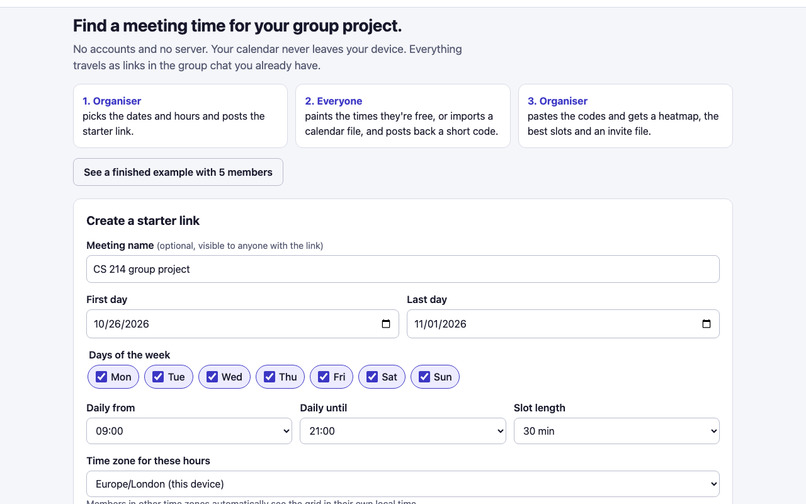
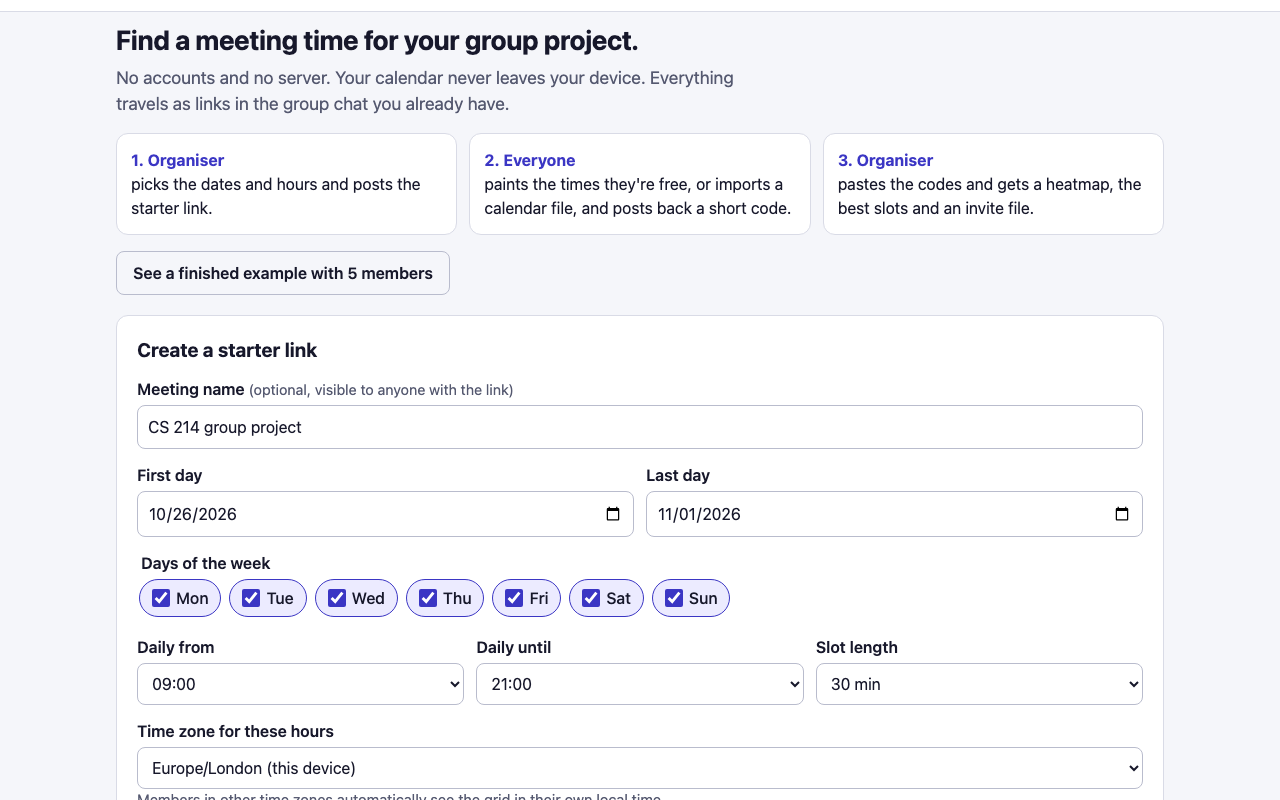
The organiser picks dates, daily hours, slot length and time zone. No account needed.
-
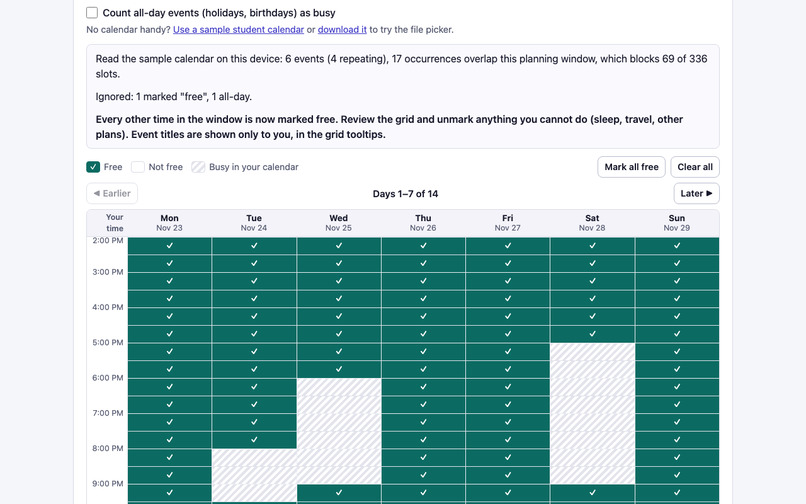
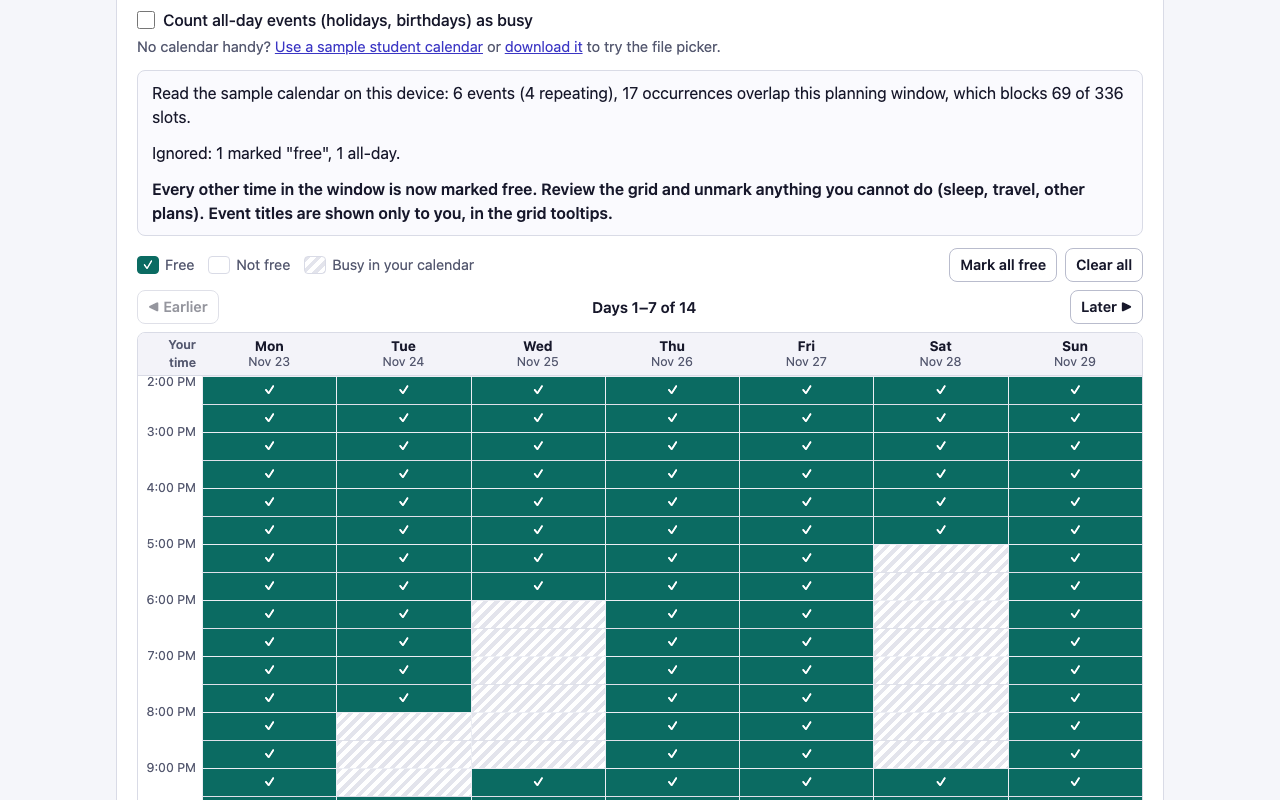
A member's .ics calendar is parsed on their own device; repeating, cancelled and moved events become busy cells they can review.
-
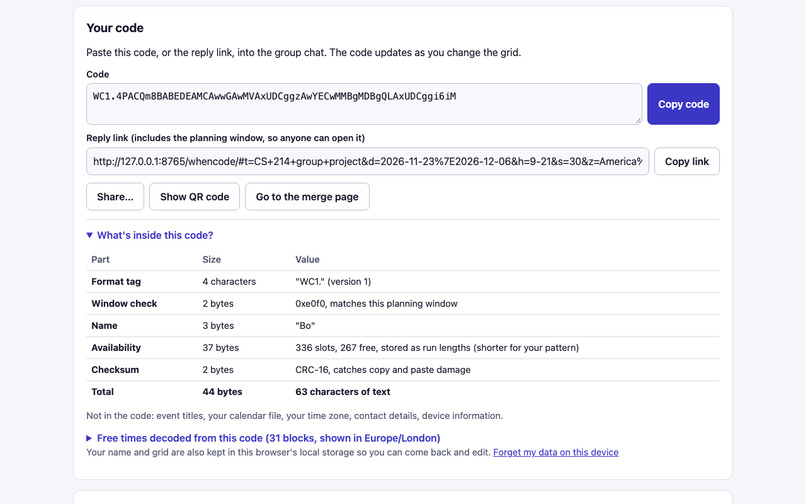
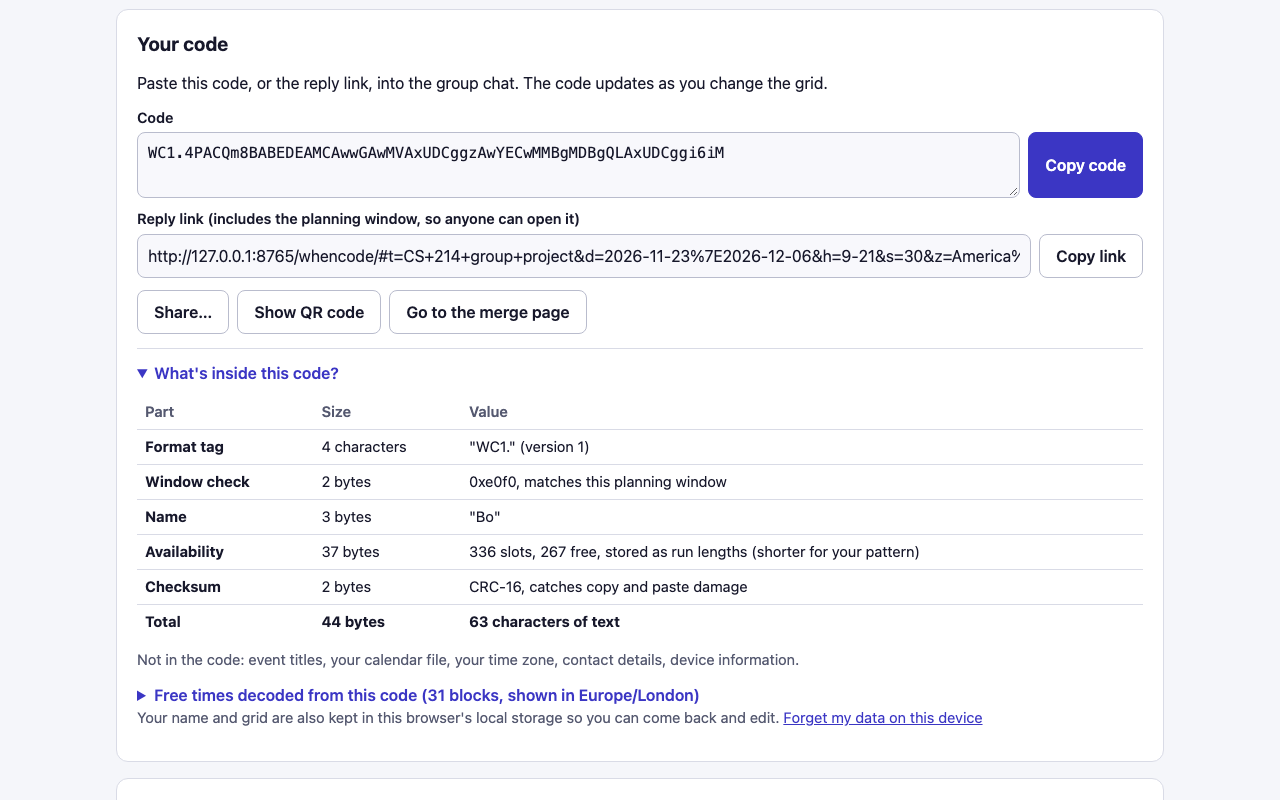
The share code decoded byte by byte: a name, a window check, one bit per slot and a checksum, and nothing else.
-
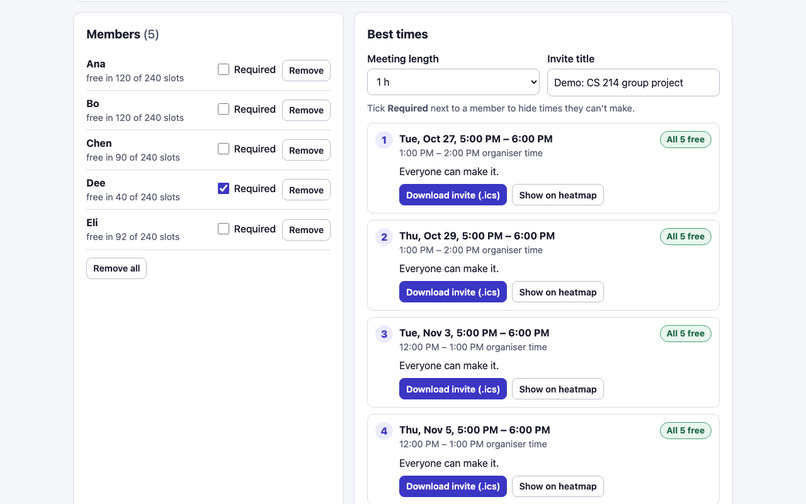
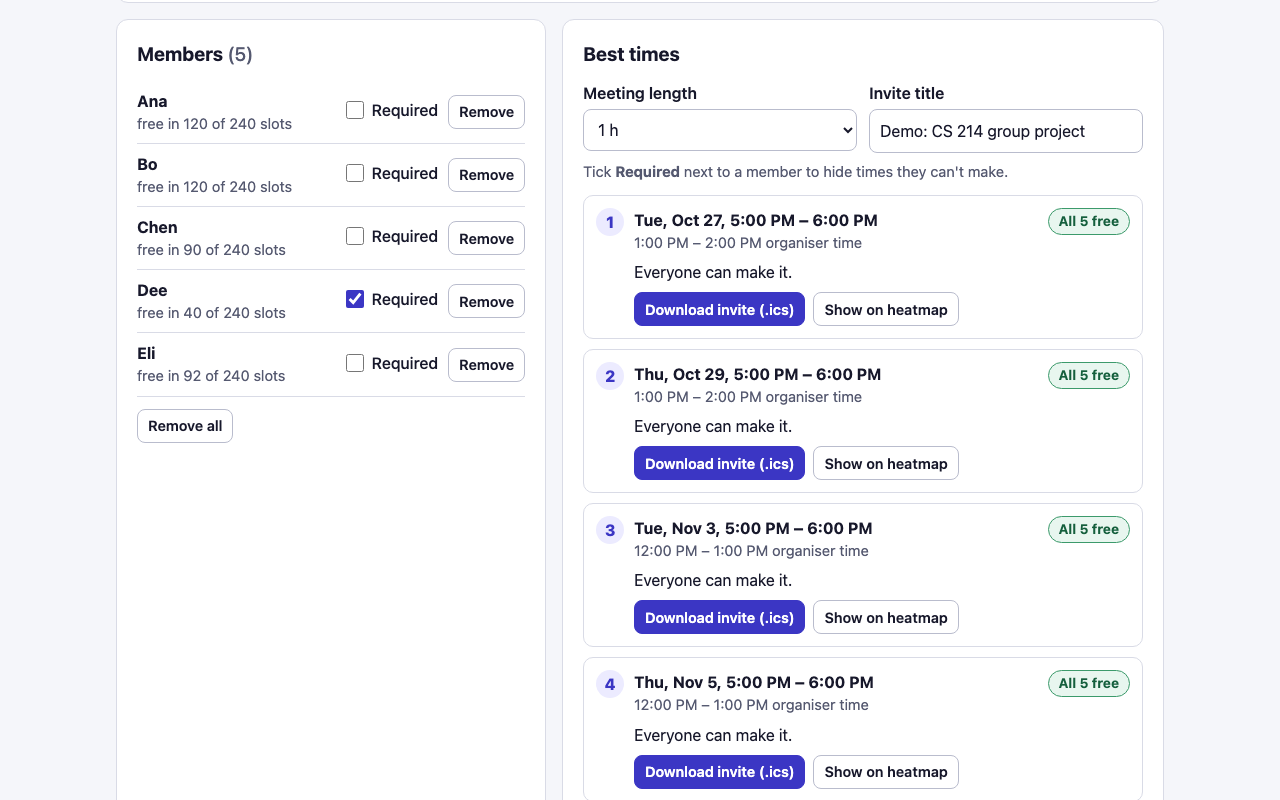
The merge view lists members with "Required" toggles, and the best 1-hour slots with who can't make it.
-
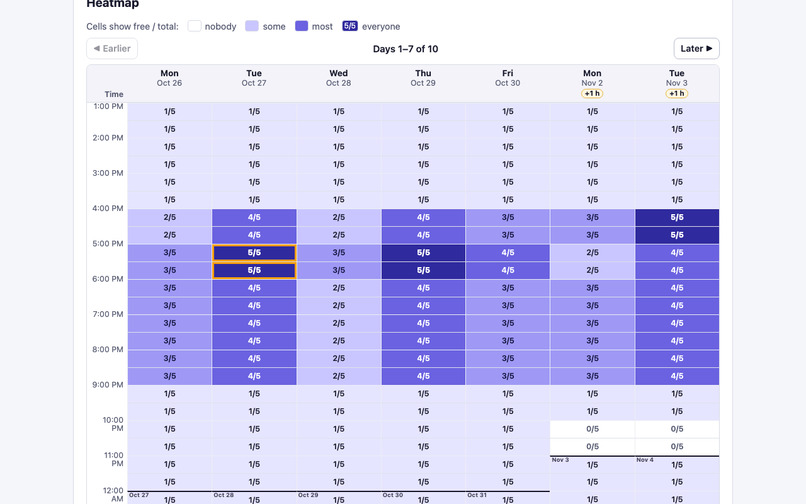
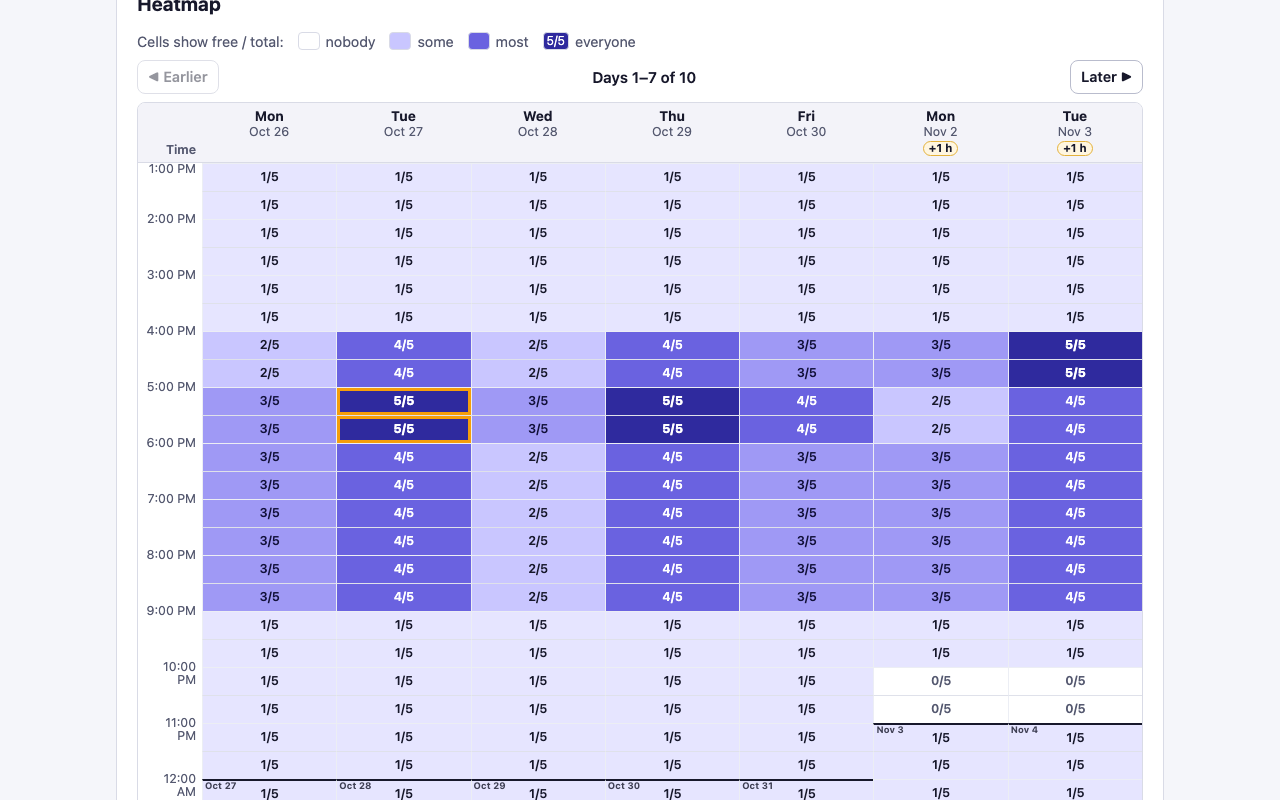
The heatmap shows free/total as text in every cell, not colour alone; "+1 h" badges mark a daylight-saving change.
Try it
- Live demo: https://bowen1314.github.io/whencode/ (the "See a finished example with 5 members" button shows a merged result immediately)
- Demo video (2 min 38 s, captioned, no audio): https://github.com/Bowen1314/whencode/blob/main/demo/demo.mp4
- Source code: https://github.com/Bowen1314/whencode
- Setup: none. Open the live demo in any modern browser; no account or install.
Inspiration / the problem
Group projects mix students from different classes, part-time jobs and sometimes time zones. Finding one hour that works usually means:
- a long group-chat thread;
- a poll site where someone paints availability by hand;
- a tool that wants a calendar connected through an account.
Published research shows that scheduling is a common obstacle. A study of opt-in study groups in a 1,000+ student introductory engineering and computer science course at UC Berkeley, run online during COVID (477 students consented to the research) found that 48.5% of students named scheduling group meetings as a challenge they faced. This was despite the matching system already prioritising availability (Kohli et al., SIGCSE 2023, arXiv:2202.07439, section 3.4).
The convenient options have a privacy cost. Calendar sync means granting a site access to your calendar. Google Calendar's "Find a time" works only when others share their calendar with you or are in your organisation, which rarely holds for a student team (Google help).
What it does
WhenCode is a single static web page with three steps. Everything travels as links in the group chat the team already uses.
- The organiser creates a starter link. They choose the date range, weekdays, daily hours, slot length and time zone. The page produces the link, a ready-to-paste chat message and a QR code.
- Each member adds availability. They can paint the grid with mouse, touch or keyboard. Or they can import an .ics export of their own calendar, which is parsed in the browser and never uploaded:
- repeating events (RRULE), cancelled occurrences (EXDATE) and moved occurrences (RECURRENCE-ID) are expanded with ical.js;
- "show as free", cancelled and (by default) all-day events are skipped;
- busy times appear as hatched cells the member can override; event titles show only on their own screen.
The member then gets a short code such as WC1.4PACQm8BAA4…. A "What's inside this code?" panel decodes it byte by byte and lists the free times it contains. The member can see that it holds only their name and one bit per slot.
- The organiser merges. They paste the codes, the reply links, or the whole chat log, and get:
- a heatmap with "free/total" written in every cell;
- a ranked list of the best slots for the chosen meeting length, showing who can't make it and how long the same people stay free;
- Required toggles for members;
- a downloadable .ics invite for the chosen slot.
A code that a chat app cut off, or one made for a different planning window, is rejected with a specific reason.
Time zones are handled correctly. Members see the grid in their own local time. If a daylight-saving change hits one zone but not the other during the window, that day gets a visible "+1 h"/"−1 h" badge, and every cell's accessible label carries the exact local and organiser time. For example, the EU and US change clocks a week apart.
Intended users
Student group-project teams: classmates who share a group chat but not a calendar system, organisation or account.
How we built it
- Plain HTML, CSS and JavaScript ES modules, with no framework and no build step, hosted as static files on GitHub Pages.
- Slots are absolute instants. The organiser's daily hours are converted to UTC with the browser's own
Intltime zone data, with a documented DST rule:- a skipped wall time yields no slot;
- a repeated wall time yields one slot, at its first occurrence.
Every member's bitmap indexes the same list of instants, so time zones only change the labels.
- Code format:
WC1.+ base64url of the parts below. Measured sizes with an 8-character name and 9:00–21:00 daily hours: 51 characters for a week of 30-minute slots, at most 135 for two weeks of 15-minute slots or four weeks of 30-minute slots, and 247 for four weeks of 15-minute slots. Realistic block-shaped availability is often shorter (30–48 characters for one week in the demo data).
Parts, in order:
- window fingerprint: 2 bytes
- name: 1 + n bytes
- encoding flag: 1 byte
- availability, one bit per slot or run lengths if shorter: varies
CRC-16: 2 bytes
- Calendar import: ical.js (MPL-2.0, vendored unmodified) handles recurrence. Our code resolves time zones in this order:
a VTIMEZONE in the file;
otherwise the browser's IANA database;
otherwise the member's own zone, with a visible warning.
- Privacy is enforced and tested. A strict Content Security Policy (
default-src 'none'; connect-src 'none'; script-src 'self') means page code cannot send data anywhere. All data lives in the URL fragment (after#), which browsers never send to the server. A service worker makes the page work offline after the first visit. - Accessibility:
- Privacy is enforced and tested. A strict Content Security Policy (
the grid is an ARIA grid with roving tabindex: arrows move, Space toggles, Shift+arrow paints, and changes are announced in a live region;
free cells carry a ✓ and calendar-busy cells a hatch pattern, so colour is never the only signal;
heatmap cells show counts as text;
the layout works at 375 px phone width.
- Testing (all run during the event):
13 Node unit tests with hard-coded UTC instants. They cover DST gaps and overlaps; London (three different offsets in one window) and Kolkata (+5:30) labels; codec round-trips and rejection of damaged codes; .ics recurrence edge cases; ranking; and an invite that ical.js must parse back to the same instants.
9 Playwright end-to-end tests in Chromium, using real per-browser time zones:
- a London member paints, a Kolkata member imports a calendar file, and a New York organiser merges a pasted chat log, ranks slots, requires a member and downloads the invite;
- the merged link reopens in a Tokyo browser;
- no request leaves the origin, CSP refuses
fetch()to another host, and there are zero CSP violations; - the full flow works offline;
- keyboard-only use;
- axe-core reports zero serious or critical issues on all three views;
- phone width with no horizontal scroll.
All 9 pass locally and against the live GitHub Pages URL.
Challenges we ran into
- Daylight saving inside the window. A window from late October to early November contains the EU change (Oct 25) and the US change (Nov 1), so a London member is 5, then 4, then 5 hours ahead of New York within two weeks. We kept slots as fixed instants and showed the shift instead of hiding it. The tests use hard-coded expected instants rather than recomputing them with the same
Intlcalls the app uses. - Real-world .ics files. Exceptions must be grouped by UID. Without that, ical.js attaches every override in the file to every recurring event. ical.js also silently treats an unknown TZID as floating time, so we read the TZID ourselves and fall back to the browser's IANA database.
- Making "no network" checkable. A claim like "we don't upload anything" is easy to make. A CSP plus a test that sees
fetch()refused, with the violated directive reported, is evidence a judge can rerun. - Small details:
- Chromium's
Intllists only legacy zone names such as "Asia/Calcutta", so we add the modern names; - the heatmap's visible "3/5" text had to be part of each cell's accessible name (WCAG 2.5.3), which axe-core caught.
- Chromium's
Accomplishments that we're proud of
- The calendar import is real (recurrence, exceptions, time zones), and the calendar still never leaves the device.
- The share code is small and fully inspectable, and damaged codes are caught rather than silently merged.
- Every claim in this write-up comes from a measurement or a test that runs against the live site.
What we learned
- Time zone bugs hide in the weeks when only one region changes its clocks.
- A privacy promise is more convincing when it is enforced by the browser and verified by a test.
- Designing for keyboard and screen-reader users improved the mouse experience too: the live readout under the grid helps everyone.
Limitations (stated plainly)
- Manual collection. Someone has to gather codes from the chat; there are no live updates or notifications.
- Codes are readable by anyone who has them. They show that person's free/busy for the window. Codes are not signed, so names are not verified. A later code with the same name replaces the earlier one, and the page says so.
- Code length grows with the window: up to 247 characters for four weeks of 15-minute slots. The planner caps windows at 31 days and 2,016 slots.
- Import scope. Only
.icsfiles are supported, not live feeds or OAuth. Unknown time zone names are read as the member's own zone, with a warning. All-day events are ignored unless opted in. - DST rule. If the daily hours include a repeated hour (for example 1:00–2:00 on a fall-back night), only its first occurrence is offered.
- Testing gaps. Tested in Chromium only; Safari and Firefox were not tested. No user testing has been done yet, so we make no claim that students prefer it.
What's next
- Try it with real student teams and measure time to agreement against a chat thread.
- Test in Safari and Firefox, and on iOS and Android screen readers.
- Add an optional "merge chain" where each reply link carries the earlier codes, so the last person's link holds everyone.
- Offer a printable or shareable image of the final heatmap.
Prior art and what is different
- When2meet: no sign-up and paint-a-grid, but responses are stored on its server.
- Crab Fit: open source, no account, time-zone aware, but events are stored on its server and deleted after 3 months of inactivity.
- Doodle: participants need no account; organisers now need one to finish creating an event.
- LettuceMeet: offers Google sign-in to see your calendar while filling in.
- Calendar "find a time" features: these need a shared calendar system.
WhenCode's difference:
- no server and no account at all;
- calendar import from a local file that never leaves the device;
- a share code that contains only a bitmap and a name.
The trade-off is manual collection and no live updates. We did not find another tool that works this way, but that does not prove none exists.
Event window, credits and AI assistance
- Built during LaunchPad Hacks (October 16 – November 20, 2026). All code was written during the event, starting October 24, 2026.
- Libraries:
- ical.js 2.2.1 (MPL-2.0);
- qrcode-generator 2.0.4 (MIT);
- test-only: Playwright (Apache-2.0) and axe-core (MPL-2.0).
- Research cited: Kohli et al., SIGCSE 2023 (CC BY).
- All demo and sample data is synthetic.
- Built with an AI coding assistant (Claude); design decisions, testing and write-up reviewed by the author.
Built With
- axe-core
- css3
- github
- html5
- ical.js
- icalendar
- intl-api
- javascript
- playwright
- qrcode-generator
- service-worker

Log in or sign up for Devpost to join the conversation.