Contact Phone Number: 9258608500
Inspiration
Most navigation platforms answer one question: What is the fastest way to get there? For wheelchair users and people using canes or other mobility aids, that is not enough.
A route that appears accessible on a standard map may contain a steep incline, broken pavement, an unmarked curb, construction, or an obstacle that makes it unsafe or impossible to use. Accessibility information is often incomplete, outdated, or limited to whether a building has an accessible entrance. It rarely captures the conditions someone encounters throughout an entire journey.
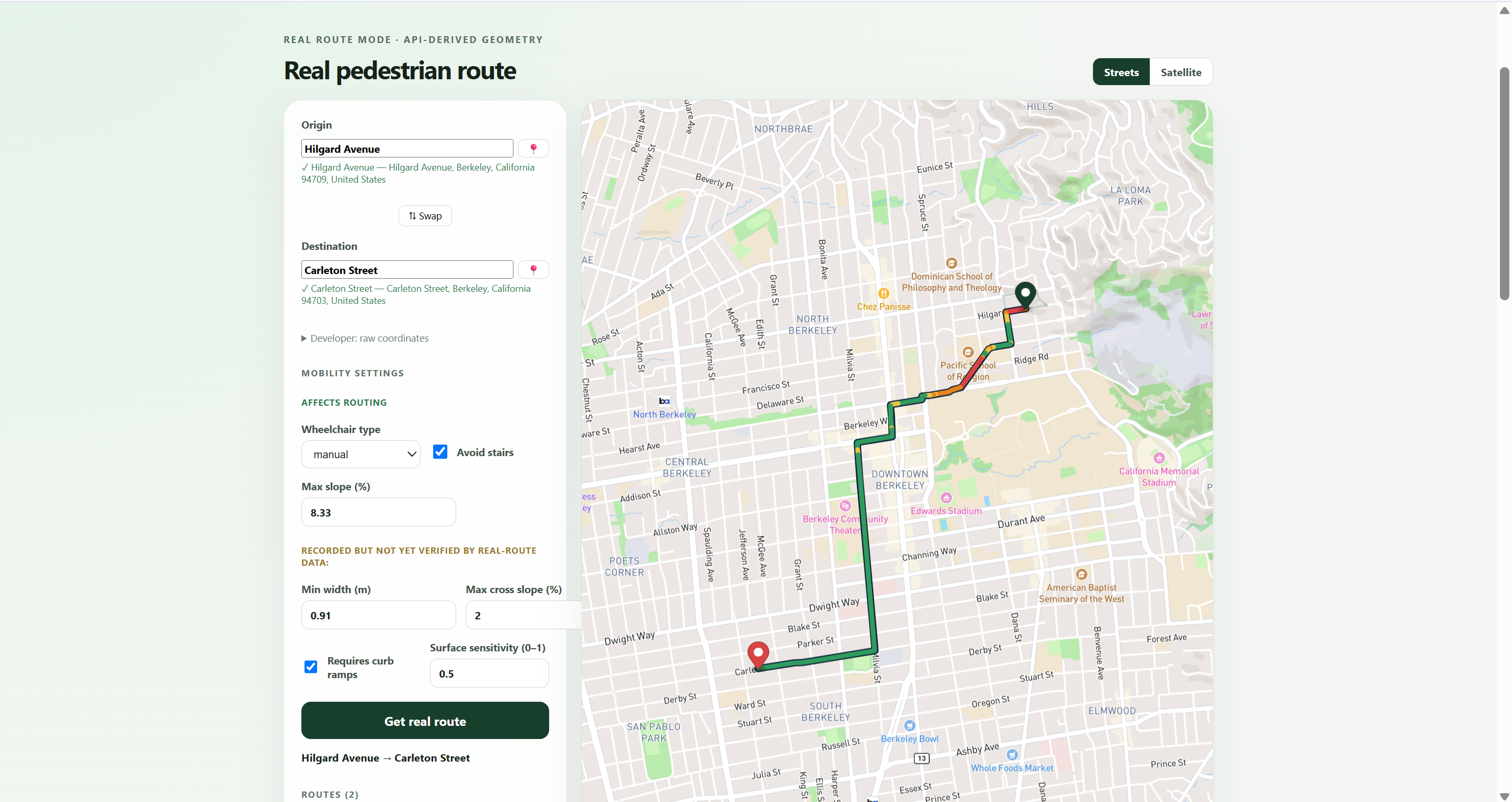
We created WheelWay to build a living accessibility layer for the physical world. WheelWay combines real-time environmental sensing, topographical mapping, accessibility-aware routing, and voice alerts to help users understand not only where a path goes, but whether they can safely navigate it.
What it Does
WheelWay is an accessibility-focused navigation and mapping system designed to identify environmental barriers that traditional maps overlook.
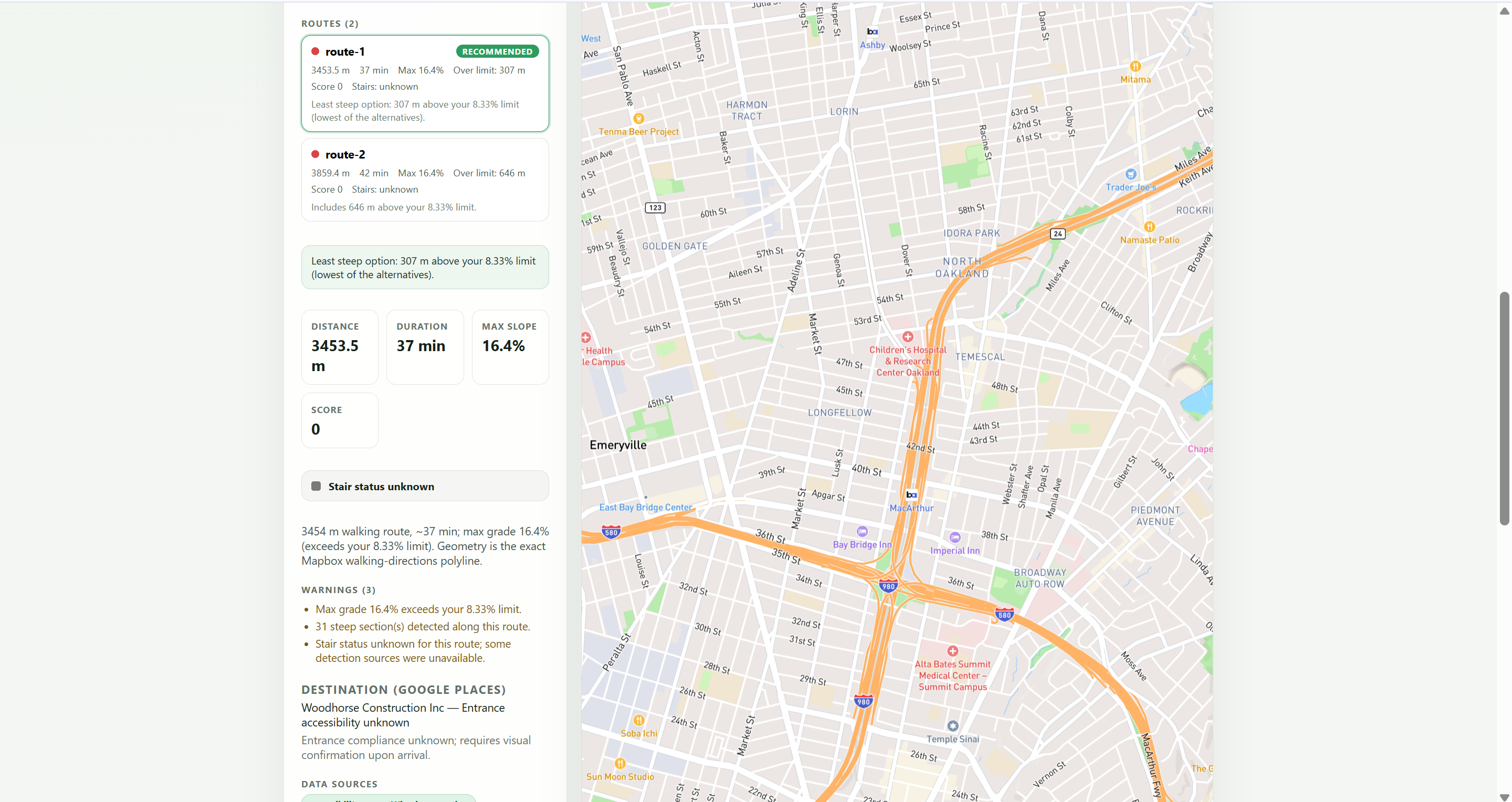
The platform: Displays routes on an immersive 3D accessibility map Models elevation, slopes, curbs, surface conditions, and obstacles Compares routes using accessibility factors rather than distance alone Receives environmental observations from a Raspberry Pi camera system Uses camera-based depth analysis to estimate nearby hazards Sends observations to a backend that updates route and map conditions Provides spoken warnings when a meaningful obstacle is detected Maintains a continuously evolving digital shadow of the environment
Instead of treating accessibility as a static label, WheelWay treats it as a changing property of a route. A ramp may exist but be blocked. A sidewalk may technically be accessible but have a dangerous slope. A route that worked yesterday may be affected by construction today. WheelWay is designed to capture those differences.
How we built it
We divided WheelWay into four connected layers: Environmental sensing Backend intelligence Accessibility-aware routing User-facing visualization Environmental Sensing
We developed a portable hardware prototype using a Raspberry Pi and camera that can eventually be mounted to a wheelchair, cane, or other mobility device. Rather than relying only on an ultrasonic sensor, our camera pipeline uses visual depth analysis to estimate the relative distance and structure of objects in the user's path.
Frames can be processed to identify hazards such as: Objects blocking a walkway Sudden changes in terrain Curbs or drop-offs Narrow passages Uneven or potentially unsafe surfaces The hardware system is designed to transmit structured observations rather than continuously uploading unnecessary raw video.
Backend and Event Pipeline Our backend receives observations from the camera system and converts them into accessibility events. Each event can include: Obstacle type Estimated distance Severity Confidence Position Timestamp Associated route session
The backend manages active routes, evaluates incoming hazards, and determines whether an event should update the map, affect route safety, or trigger an immediate alert. We also designed the system to support external mapping, enrichment, and agent-based services so camera observations can be combined with existing geographic information.
Accessibility-Aware Routing Traditional route planners primarily optimize for distance or travel time.
WheelWay evaluates routes using factors that have a greater impact on mobility.
A route can be represented using the following accessibility cost function: [C(r)=w_dD(r)+w_sS(r)+w_oO(r)+w_cC(r)+w_uU(r)]
Where:
(D(r)) represents distance (S(r)) represents slope difficulty (O(r)) represents detected obstacles (C(r)) represents curb or crossing barriers (U(r)) represents uncertainty caused by missing or outdated data
The weights can eventually be personalized because accessibility is not identical for every user. A manual wheelchair user, power wheelchair user, and person using a cane may each need a different route. We built the route selection and validation logic rather than relying entirely on a standard directions response.
3D Mapping and Interface The frontend presents the environment as a full-screen, interactive 3D map. Routes appear as continuous paths aligned with the street and sidewalk environment. Elevation and terrain visualization help communicate inclines and changes in topography, while accessibility conditions can be displayed directly on the route.
We intentionally removed developer diagnostics from the primary interface so the application remains focused on the user's journey. Hardware events and system logs remain available through the backend terminal, while the main interface displays only information that is useful to the person navigating.
Voice Alerts When WheelWay detects an urgent hazard, it can generate a spoken warning such as: Obstacle ahead. Move slightly left. The voice system prioritizes immediate, actionable information instead of overwhelming the user with every sensor reading. Alerts are tied to route and obstacle events so the system does not repeatedly announce irrelevant information.
What Makes WheelWay Different WheelWay is not simply another map with accessible locations pinned onto it. Its key difference is the feedback loop between the physical environment and the digital map: A user moves through the environment. The camera observes the route ahead. Depth and environmental analysis identify possible hazards. The backend evaluates the observation. The map and route state are updated. The user receives a visual or spoken warning. Future route decisions can account for the new information.
This transforms accessibility mapping from a one-time data collection problem into a continuously updated system.
WheelWay combines three forms of accessibility information that are usually separated:
Existing geographic and infrastructure data Topographical and route-level analysis Real-time observations from people actively navigating the environment
Challenges we ran into
Hardware Limitations
One of our largest challenges was running a continuous camera pipeline on limited Raspberry Pi hardware.
High-resolution video introduces latency, consumes significant processing power, and can make real-time feedback difficult.
We had to think carefully about:
Frame rate Image resolution Model size Network usage On-device versus backend processing Power and Thermal Management
The Raspberry Pi, camera, and additional hardware components created power and heat constraints. Attempting to power too many components directly from the board risked instability, overheating, and camera failures. This forced us to simplify the prototype, prioritize the camera pipeline, and design the system so that additional components could later use a separate regulated power source.
Turning Visual Data Into Useful Alerts Detecting an object is not the same as understanding whether it is dangerous. A bench beside the route may be irrelevant, while a small object directly in front of a wheelchair could be critical. We structured the system around distance, location, severity, confidence, and route context rather than announcing every detection.
Building Realistic Terrain Visualization We had to align routes with real pathways, prevent route lines from crossing through buildings, and distinguish decorative elevation effects from meaningful topographical information.Many public mapping datasets do not include detailed information about: Curb height Surface quality Temporary construction Sidewalk obstructions Whether an accessible path is currently blocked
This limitation became one of the strongest arguments for WheelWay's real-time and community-generated approach.
Accomplishments that we're proud of
We are proud that we created an end-to-end architecture rather than a static design mockup.
During the hackathon, we built:
A full-screen 3D accessibility mapping interface Accessibility-aware route visualization A route-session and event-based backend A working voice-alert pipeline External mapping and enrichment integrations A Raspberry Pi camera prototype A camera-derived depth and obstacle-analysis pipeline A real-time communication structure connecting hardware observations to the application
We are especially proud that WheelWay approaches accessibility as infrastructure rather than as an optional feature.
What we learned
We learned that accessible navigation cannot be solved with a single model, sensor, or API.
It requires coordination between computer vision, geospatial data, routing algorithms, hardware systems, interface design, and the lived experiences of disabled users.
We also learned to distinguish between what is technically detectable and what is actually useful.
A successful accessibility system should not simply produce more data. It must convert environmental information into clear decisions and timely warnings.
Most importantly, we learned that accessibility is dynamic.
A route is not permanently accessible or inaccessible. Its usability depends on the user, the terrain, temporary conditions, and the environment at that moment.
What's next for WheelWay
Our next step is to strengthen the real-time camera-to-map loop and test it in outdoor environments.
Future development includes:
Improving on-device depth estimation and obstacle classification Adding curb, ramp, pothole, and surface-material detection Personalizing route scoring for different mobility needs Collecting data from multiple WheelWay devices Creating confidence and verification systems for community observations Detecting when temporary hazards have been removed Expanding into indoor accessibility mapping Partnering with universities, cities, and disability organizations Evaluating the system with wheelchair users and people with other mobility needs
Our long-term vision is for WheelWay to become a shared, continuously updated accessibility network that allows people to navigate with more information, independence, and confidence.
Built With
- computer-vision
- css
- deepgram
- fastapi
- fetch.ai
- git
- github
- google-maps-platform
- html
- javascript
- mapbox-apis
- mapbox-gl-js
- monocular-depth-estimation
- python
- raspberry-pi
- raspberry-pi-camera
- react
- redis
- rest-apis
- vite

Log in or sign up for Devpost to join the conversation.