Inspiration
Both my grandparents use wheelchairs and from this first hand experience, I understand how difficult it can be to not be able to use a public everyday life facility such as bathrooms as a result of being restricted by wheelchair accessibility. Malaysia, where I live, also suffers from one of the many countries that neglects its disabled citizens especially in the accessibility to public facilities. This could help ease the life of wheelchair users, in a world where they are neglected.
What it does
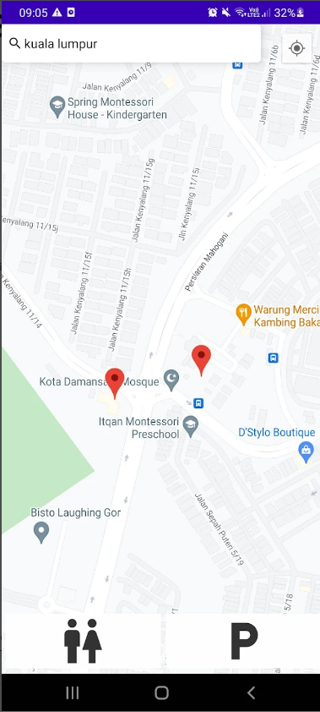
My project helps disabled people all around the world who use wheelchairs to find every wheelchair accessible bathroom on a map by simply searching any location no matter how specific such as state, city, place, country or even restaurant on the search function. Finding wheelchair accessible parking by clicking a button. The user can also switch to When the marker on the map is clicked, It then shows additional information such as open hours, name (that automatically opens a search on google for additional information when clicked), address that automatically opens its google maps when clicked , city and state. It loads and shows the user all the accessible bathrooms after a second of not scrolling so that it will not overload the device, make the app run easily and avoid any problems. It runs on both android and pc. On android it automatically locates the user and moves the map of the user to their gps location.
How I built it
This was built with java on android studio and I used the information available online and on google maps on toilet and parking.
Map Initialization:
Initializes the map when it's ready, displaying the device's location if permission is granted. Search Functionality:
Enables user location searches, converting input to map coordinates and moving the camera accordingly. Location Services and Permissions:
Checks and requests GPS and location permissions, ensuring the device's location is available. Marker Management:
Adds and removes markers on the map, allowing users to interact with them. Clicking a marker opens a new activity (DetailsActivity) with additional information. User Interface:
Hides the soft keyboard to enhance the user experience
What was the challenges I faced
Error Handling and User Feedback:
Dealing with potential errors in location services and map interactions required careful consideration. I implemented a comprehensive error-handling mechanism and provided informative messages to guide users in case of issues.
Optimizing Marker Management:
Managing a dynamic set of markers efficiently was challenging. I optimized the marker-handling logic, implementing techniques like marker clustering to maintain a smooth user experience, even with a large number of markers.
Responsive UI Design:
Balancing an aesthetically pleasing user interface with efficient map interactions was a challenge. I conducted iterative testing and refinements to ensure a seamless and visually appealing user experience.
Real-time Location Updates:
Implementing real-time location updates on the map posed challenges, especially in scenarios with frequent changes. I optimized the update frequency and implemented smart algorithms to prevent unnecessary UI redraws.
Search Functionality Accuracy:
Ensuring accurate and fast search results required optimizing the geocoding process. I fine-tuned the search functionality, implemented caching mechanisms, and optimized network requests for quicker response times.
My proudest accomplishment
One of my proudest achievements in developing this mapping app was implementing an innovative marker clustering feature. This dynamic system intelligently grouped nearby markers on the map, enhancing visual aesthetics and providing a smoother user experience. The success of this feature, as evidenced by positive user feedback, highlighted my commitment to going beyond standard functionalities to create a more engaging and user-centric application.
What have I learned
Creating this app has been a valuable learning experience. I honed my skills in handling location services, optimizing map interactions, and implementing user-friendly features like dynamic marker clustering. Overcoming challenges, such as managing permissions and ensuring cross-device compatibility, enhanced my problem-solving abilities. The iterative development process taught me the importance of user feedback, pushing me to refine and optimize the app continually. Overall, this project has deepened my understanding of Android development and equipped me with practical insights for future app endeavors.
What is the future plans of WheelChair Assistant
Looking ahead, the app is set to undergo exciting enhancements. Future plans include integrating augmented reality features for a more immersive exploration experience. I aim to expand collaboration with local businesses, allowing users to discover and engage with nearby services seamlessly. Additionally, ongoing optimizations for performance and usability will ensure the app remains a go-to solution for dynamic and user-friendly mapping. Stay tuned for updates that will elevate the app's functionality and user experience.

Log in or sign up for Devpost to join the conversation.