-
-
Audio Transcription
-
Lark Bot
Track: Smart Sales Helper
Project Story: smart-crm
About the Project
smart-crm is an AI-powered sales assistant designed to enhance sales interactions and optimize workflows. It leverages real-time audio recognition to analyze conversations and provide actionable insights.
Deployment can be found here: http://167.172.84.17:3000/
Inspiration
The inspiration for smart-crm came from observing the challenges salespeople face in managing customer interactions and follow-ups. The need for a tool that could provide real-time assistance and actionable insights was evident. By combining AI with CRM, we aimed to create a solution that could transform sales processes, making them more efficient and effective.
What We Learned
Throughout the development of smart-crm, we learned a great deal about natural language processing, real-time audio analysis, and the intricacies of sales interactions. Understanding the nuances of conversations and how to extract meaningful insights was a significant learning curve. Additionally, we discovered the importance of user-friendly design and intuitive interaction for ensuring the tool's adoption and effectiveness.
Building the Project
Building smart-crm involved several key steps:
- Conceptualization: Defining the features and functionalities that would make smart-crm a valuable tool for salespeople.
- Development: Leveraging AI and machine learning to utilise algorithms capable of real-time audio recognition and analysis. Technologies used for developing real-time audio transcription include Google Cloud Speech, ffmpeg and Ngrok. Google's Gemini Flash 1.5 LLM was used to generate narrative recommendations, insights and answers from user inputs.
- Integration: Ensuring seamless integration with popular communication platforms like Zoom to facilitate easy adoption. FastAPI, Lark Bot were used for the backend server to relay generated response from Gemini over to the user on Lark chat.
- Testing: Conducting extensive testing to refine generated AI responses and improve the accuracy of recommendations and insights using prompt engineering.
Challenges Faced
The journey to build smart-crm was not without challenges:
- Real-Time Processing: Developing and designing systems that could process and analyze audio data in real-time was a significant technical challenge.
- Natural Language Understanding: Ensuring the system could accurately understand and respond to natural language commands required extensive fine-tuning.
- User Experience: Designing an intuitive user interface that salespeople could easily navigate and interact with was crucial for the project's success.
Key Features
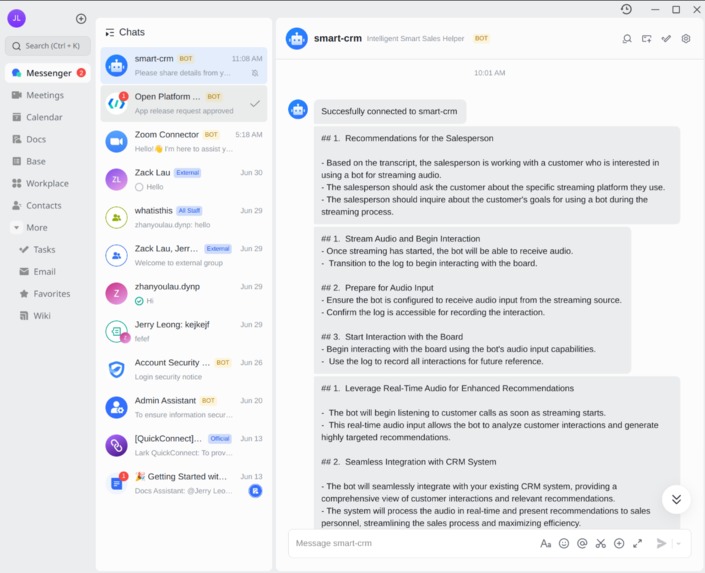
- Narrative Recommendations:smart-crm provides real-time recommendations based on the conversation's content. It identifies customer needs, pain points, and interests, suggesting relevant products, services, or information to the salesperson.
- Actionable Insights: Beyond live recommendations, smart-crm summarizes conversations, analyzes customer behaviour, and generates to-do lists for efficient follow-up. This includes identifying potential customer resources and suggesting relevant communication strategies.
- User-Friendly Instructions: Salespeople can interact with smart-crm by asking for help, requesting summaries, and generating to-do lists. The system understands natural language commands for intuitive usage.
Setting Up smart-crm
- Set up Lark access: Join this Lark organisation to have access to the bot: https://xfmuck6tn0q.sg.larksuite.com/invite/d39NMQoqtalg1?join=1&team_name=whatisthis
- Configure using Lark Account: Configure smart-crm stream using email address.
Setup for Zoom
- Start a Zoom Meeting: Begin a meeting as the host.
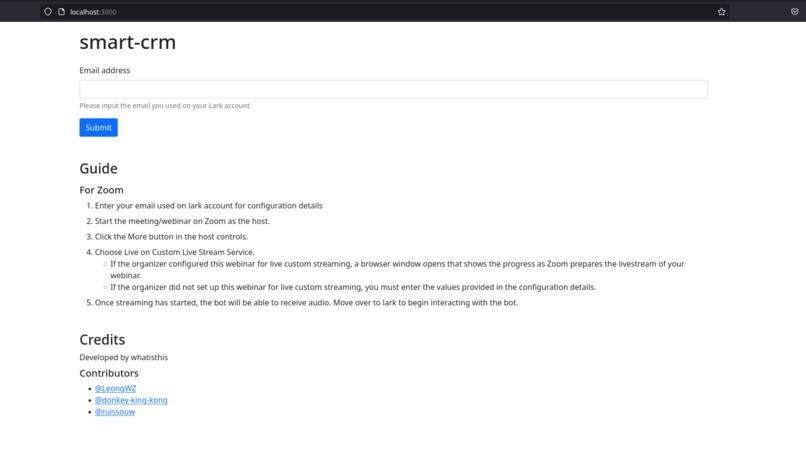
- Configure Live Stream: In the host controls, click "More" and select "Choose Live on Custom Live Stream Service." Enter details from the smart-crm webpage.
Setup for OBS
- Click Settings and then click Stream
- On the "Service" field, select Custom...
- Paste the Streaming Key to the "Stream Key" field
- Paste the RTMP URL provided to the "Server" field
Using smart-crm During Calls
- Start Streaming: Once streaming starts, smart-crm receives audio and begins analyzing the conversation, after which it sends its responses to the user via Lark private chat.
- Real-Time Assistance: You can interact with smart-crm on by asking for help or requesting summaries and to-do lists.
- Actionable Insights: smart-crm will provide real-time narrative recommendations and generate to-do lists for efficient follow-up.
Benefits of smart-crm
- Improved Sales Strategy: Insights from customer interactions help optimize sales approaches and make knowledgeable decisions.
- Streamlined Operations: Automation of tasks like to-do list generation and conversation summarization enhances efficiency.
- Managerial Insights: smart-crm provides valuable insights for understanding customer needs and building user personas.
Built With
- digitalocean
- express.js
- fastapi
- gemini
- google-speech
- lark
- python
- typescript


Log in or sign up for Devpost to join the conversation.