Inspiration
What it does
How we built it
Challenges we ran into
Accomplishments that we're proud of
What we learned
What's next for Untitled
Inspiration
Group chats and busy WhatsApp threads have a real problem: the one message that actually matters — a direct question, a deadline, an urgent ask — looks exactly like the hundred routine messages around it. We wanted to build something that watches for those moments and surfaces them, without asking people to change how they use WhatsApp at all.
What it does
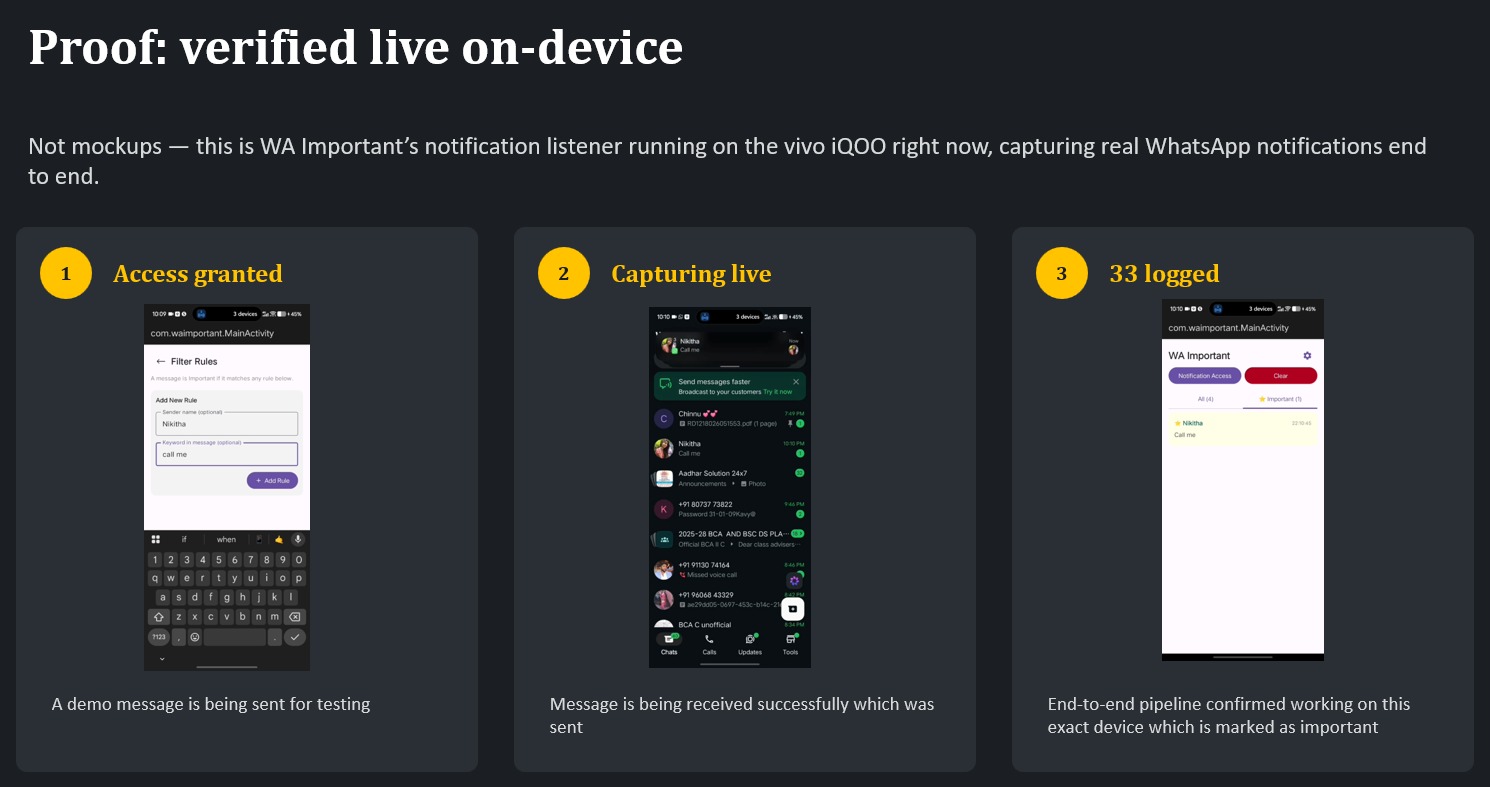
WA Important runs quietly in the background on Android, reads WhatsApp notifications as they arrive, scores each one against priority contacts, keywords, and @mentions, and re-surfaces anything important as a distinct, unmissable notification — plus a dedicated feed. No WhatsApp API, no automation of the account, no server required for the core loop. Everything happens on-device.
How we built it
We split the work by layer: one person owned notification capture and platform survival (the NotificationListenerService, the foreground service, and making it actually stay alive on a vivo iQOO), and the other owned the rule engine, local storage, and UI (Room database, scoring logic, Jetpack Compose screens). We agreed on a shared data contract — WhatsAppMessage and ScoredMessage — up front, so both halves could be built in parallel and merged without friction. We used Antigravity as our AI-assisted IDE and worked in small, testable steps: get the project scaffolded and building, then capture notifications, then keep the service alive in the background, then wire in scoring and UI.
Challenges we ran into
The single biggest challenge had nothing to do with our own logic — it was getting a NotificationListenerService to reliably bind and survive on real hardware. We chased a missing MainActivity that the editor showed as saved but never actually persisted to disk, a manifest that silently reverted mid-build, and a vivo/OriginOS battery manager that kills background services unless autostart and battery optimization are explicitly whitelisted. We eventually learned to verify every file change directly from the terminal instead of trusting the IDE's summary, and to write critical files straight to disk via PowerShell when the editor's save kept failing. By the end, we'd confirmed the service was correctly registered and bound at the OS level, with one final piece — the foreground notification actually firing — still being debugged live.
Accomplishments that we're proud of
We built a real, working notification-capture pipeline from scratch in two days, on real hardware, not a simulator — including OEM-specific hardening that most weekend projects skip entirely. We also came out of this with a genuinely reusable debugging discipline: verify from the terminal, not the editor; rebuild clean when in doubt; check the compiled artifact, not just the source. That mattered as much as any single line of code.
What we learned
AI coding assistants can move fast, but their summaries aren't ground truth — "I saved the file" and "the file is on disk" are two different claims, and only the second one matters. We also learned a lot about how deep Android's permission and service-binding model goes, and how much OEM-specific behavior (vivo's OriginOS especially) sits between "the code is correct" and "the feature actually works on a phone in someone's pocket."
What's next for WA Important
Finish and verify the foreground service's notification firing reliably across reboots and idle periods, then layer in the features we scoped but didn't have time for: a feedback loop that refines scoring over time, cross-device sync so the important-message feed matches on a laptop's WhatsApp Web, and eventually an on-device NLP model — run on the iQOO's NPU — that understands context rather than just matching keywords.
Built With
- kotlin


Log in or sign up for Devpost to join the conversation.