Inspiration
Food tracking is useful, but it often takes too much manual effort. We wanted to make nutrition awareness as quick as taking a photo. What Am I Eating? was inspired by the idea that AI vision can help people better understand meals in the moment without searching databases, weighing ingredients, or typing everything by hand.
What it does
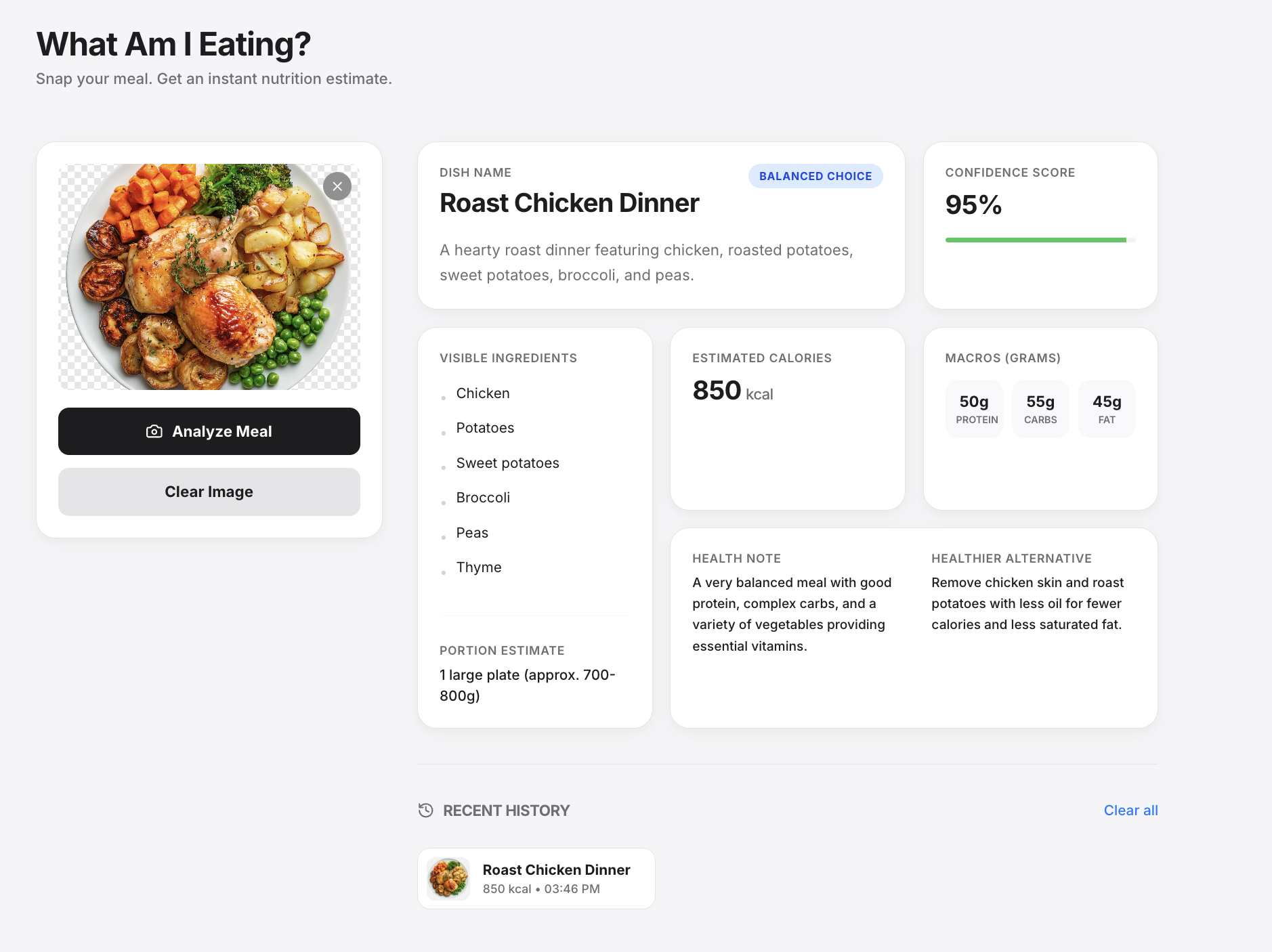
What Am I Eating? lets users upload or drag-and-drop a meal photo and get an instant AI-powered nutrition estimate. The app identifies the dish, lists visible ingredients, estimates portion size, calories, protein, carbs, and fat, and gives a confidence score. It also labels the meal as healthy, balanced, or indulgent, then provides a short health note and a healthier alternative.
The app also keeps a recent meal history in the browser so users can revisit previous analyses.
How we built it
We built the frontend with React, TypeScript, Vite, and Tailwind CSS. The interface includes image upload, drag-and-drop support, animated result cards, error states, and a local recent-history view using localStorage.
For the AI analysis, the frontend sends the uploaded image as base64 data to a server-side /api/analyze endpoint. That endpoint is implemented as a Vercel Serverless Function and uses the Gemini API through @google/genai. We configured Gemini to return structured JSON using a response schema so the UI can reliably render dish details, calories, macros, ingredients, confidence, and health notes.
We kept the Gemini API key on the server so it is not exposed in the client bundle.
Challenges we ran into
One challenge was getting AI output into a predictable structure. Nutrition estimates need multiple fields, and free-form model responses are hard to render safely. We solved this by using Gemini’s structured JSON response schema and normalizing the result on the backend.
Another challenge was handling real-world image inputs. Users might upload non-food images, unclear meals, or images where portion size is hard to estimate. We added an is_food field, confidence score, fallback values, and user-friendly error handling.
We also had to think about deployment. A static frontend alone cannot safely call Gemini with a private API key, so we added a Vercel serverless API route to keep secrets server-side.
Accomplishments that we're proud of
We are proud that the app feels simple while doing a lot behind the scenes: upload a photo, click analyze, and get a clean nutrition breakdown in seconds.
We are also proud of the structured AI integration. Instead of just displaying raw AI text, the app turns the response into a polished nutrition card with dish identity, ingredients, calories, macros, confidence, and health guidance.
The recent-history feature is another useful touch because it makes the MVP feel more like a real food-awareness tool rather than a one-off demo.
What we learned
We learned how to combine a modern React frontend with a serverless AI backend. We also learned the importance of structured model outputs when building AI-powered applications that need reliable UI rendering.
We learned that AI nutrition estimates should be presented carefully. The app includes confidence scoring and a disclaimer because meal analysis from an image is useful for awareness, but it is still approximate and not medical advice.
What's next for What Am I Eating?
Next, we would like to improve accuracy by letting users adjust portion sizes after the AI estimate. We would also add daily nutrition summaries, saved meal logs across devices, barcode or label scanning, and user goals such as protein targets or calorie ranges.
Longer term, the app could support multi-meal tracking, personalized suggestions, allergy-aware alternatives, and integrations with health or fitness platforms.
Built With
- browser-localstorage
- gemini-api
- google/genai
- lucide-react
- motion
- node.js
- npm
- react
- tailwind-css
- typescript
- vercel
- vercel-serverless-functions
- vite

Log in or sign up for Devpost to join the conversation.