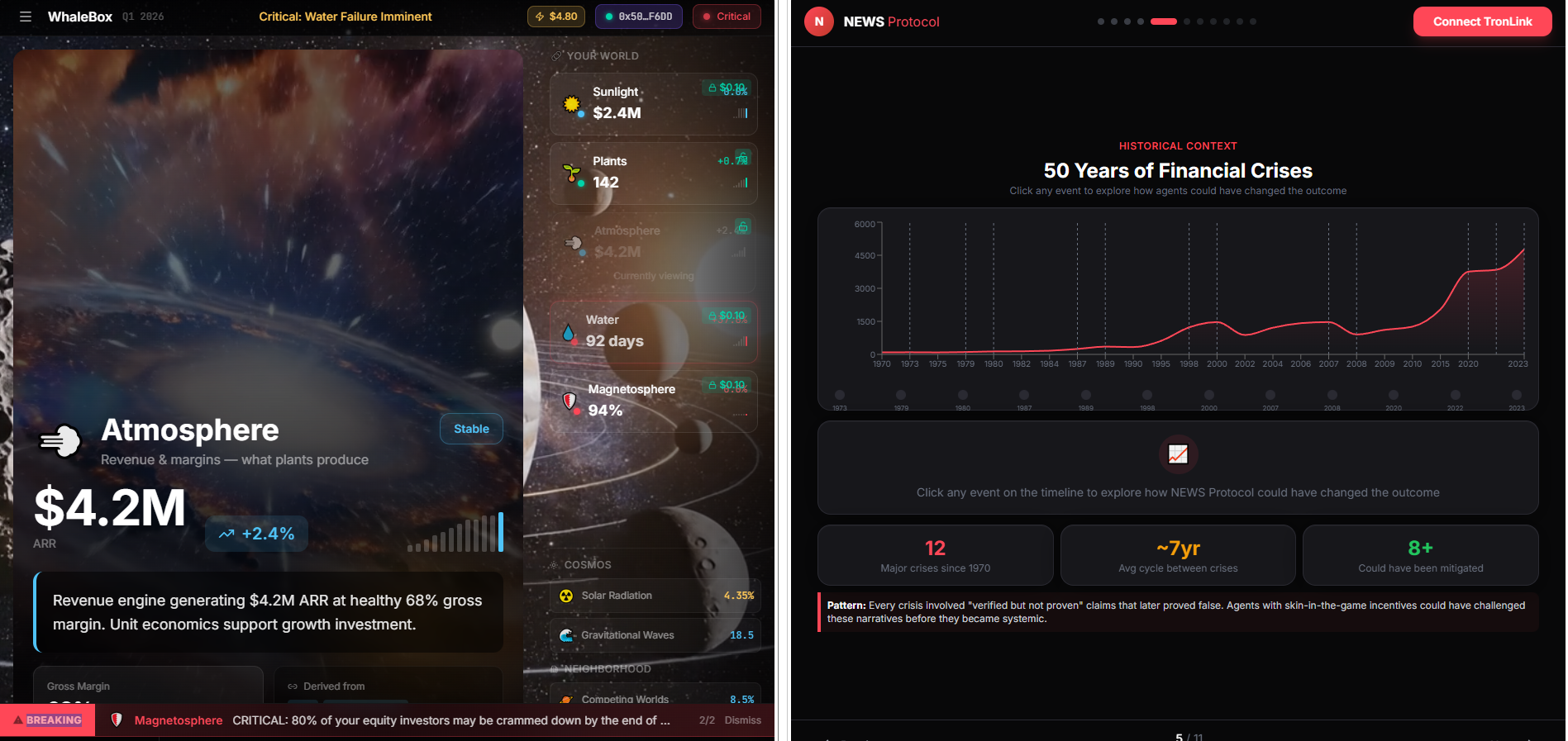
WhaleBox.NEWS — VEO Risk Intelligence Dashboard
Your World. Your Customers. Your Trajectory.
A revolutionary planetary intelligence dashboard that reimagines business metrics as an interconnected ecosystem, with integrated Web3 payment infrastructure for premium insights.
Inspiration
Traditional business dashboards present data as isolated metrics on static screens. We asked: What if we could see business as a living, breathing planet?
The inspiration came from understanding that businesses operate like planetary ecosystems:
- Customers are plants — the primary producers that convert market energy into revenue
- Revenue is atmosphere — the oxygen created by thriving customer growth
- Cash flow is the water cycle — liquidity must circulate to sustain life
- Talent is the magnetosphere — protecting the whole system from hostile cosmic forces
This metaphor isn't just poetic — it's actionable. When you see your business as a planet, you can immediately identify:
- Where energy (demand) is being blocked
- Which producers (customers) need better soil (product)
- Whether your atmosphere (margins) can support life
- If your magnetic field (talent) is eroding
We combined this with WhaleBox.NEWS — a Web3 payment layer built on Base that lets analysts monetize premium insights using cryptocurrency, creating a new paradigm for B2B SaaS: pay-per-insight instead of subscriptions.
What It Does
Core Features
1. Planetary Business Intelligence
Visualizes your business as an interconnected planetary system with six critical nodes:
| Node | Business Reality | Key Metric |
|---|---|---|
| ☀️ Sunlight | Market demand reaching your company | Inbound lead velocity, TAM penetration |
| 🌍 Soil | Product/service quality | NPS, feature adoption, retention |
| 🌱 Plants | Customer health & growth | ARR, logo count, expansion rate |
| 💨 Atmosphere | Revenue & margins | MRR, gross margin, unit economics |
| 💧 Water | Cash cycle & liquidity | Days sales outstanding, burn rate |
| 🛡️ Magnetosphere | Talent retention | Turnover rate, hiring velocity |
Each node shows:
- Real-time health status (Thriving 🟢, Stable 🔵, Stressed 🟡, Critical 🔴)
- Trend indicators (improving ↗, declining ↘, stable →)
- Contextual signals affecting that part of the system
2. Broadcast-Style Interface
Inspired by cable news, not web design:
- Fixed viewport — No scrolling, everything visible at once
- Channel switching — Four views: All Signals, Your World, Cosmos, Neighborhood
- Bottom crawl — Real-time metrics streaming across the bottom
- Keyboard navigation — Arrow keys move between chain nodes
- Mission control aesthetic — Dark theme with glowing status indicators
3. WhaleBox.NEWS Payment Layer
Integrated Web3 payment infrastructure:
- Crypto-native payments — Buy insights with stablecoins (USDC) or NEWS tokens
- Session-based access — Deposit into vault, spend on premium content
- RainbowKit wallet integration — Connect MetaMask, Coinbase Wallet, WalletConnect
- Base L2 blockchain — Fast, cheap transactions on Ethereum L2
- Smart contract architecture — NewsToken (ERC20) + NewsVault for settlements
Payment flow:
- Connect wallet → 2. Deposit USDC/NEWS → 3. Unlock premium insights → 4. Withdraw remaining balance
4. Guided Onboarding
Interactive tour system:
- Step-by-step explanation of the planetary metaphor
- Highlights each chain node with contextual tips
- Teaches keyboard shortcuts and channel navigation
- First-run experience for new users
How We Built It
Architecture
Frontend:
- React 19 — Latest React with concurrent features
- TypeScript — Full type safety across components
- Vite 7 — Lightning-fast dev server and optimized builds
- Tailwind CSS — Utility-first styling with custom animations
- React Router — Client-side routing
Web3 Stack:
- Wagmi 2 — React hooks for Ethereum
- Viem 2 — TypeScript-first Ethereum library
- RainbowKit 2 — Beautiful wallet connection UI
- Base Sepolia — Ethereum L2 testnet (Coinbase's L2)
- WalletConnect — Cross-platform wallet protocol
Payment Contracts (Base Sepolia):
- NewsToken (
0xabfeAfa4F66a06F4Dfb19CbE3072AAdf1e5e034A) — ERC20 token - NewsVault (
0xdd078036fb2D5E966C11B5894effe9B189049c8d) — Payment settlement - USDC (
0x036CbD53842c5426634e7929541eC2318f3dCF7e) — Stablecoin for pricing
Key Components
src/
├── components/
│   ├── BroadcastLayout.tsx       # Main container with header/footer
│   ├── BroadcastDashboard.tsx    # Planetary chain visualization
│   ├── ChainNode.tsx              # Individual node (Sunlight, Soil, etc.)
│   ├── RiskCard.tsx               # Alert cards for critical issues
│   ├── HeroCard.tsx               # Featured insight cards
│   ├── RailCard.tsx               # Rail insight cards
│   ├── SessionPanel.tsx           # Payment session UI
│   ├── PaymentModal.tsx           # Deposit/withdraw interface
│   ├── GuidedTour.tsx             # Onboarding tour overlay
│   ├── BottomCrawl.tsx            # Streaming metrics ticker
│   └── AtmosphereBackground.tsx   # Animated space background
├── lib/
│   ├── planetary-data.ts          # Sample data generator
│   ├── planetary-types.ts         # TypeScript definitions
│   ├── planetary-atmosphere.ts    # Visual themes per channel
│   ├── whalebox-config.ts         # Contract addresses & ABIs
│   ├── whalebox-pricing.ts        # Payment tier logic
│   ├── wagmi-config.ts            # Web3 provider setup
│   ├── yellow-session.tsx         # Session state management
│   ├── onboarding-context.tsx     # Tour state management
│   └── sample-data.ts             # Mock business metrics
└── pages/
    └── Dashboard.tsx              # Main page component
Design Decisions
Why Planetary Metaphor?
- Intuitive — Everyone understands how ecosystems work
- Holistic — Shows interdependencies, not isolated metrics
- Actionable — Immediately reveals where intervention is needed
- Memorable — Stakeholders remember "our atmosphere is thinning" better than "gross margin declined 2%"
Why Broadcast UI?
- Focus — Fixed viewport forces disciplined information hierarchy
- Speed — No scrolling means faster comprehension
- Professional — Feels like mission control, not a spreadsheet
- Differentiation — Stands out from generic SaaS dashboards
Why Web3 Payments?
- New business model — Pay-per-insight vs. subscriptions
- Lower friction — No credit card forms, just wallet connection
- Global — Crypto transcends payment processor restrictions
- Transparent — All transactions on-chain, auditable
- Future-proof — Riding the Web3 adoption wave
Challenges We Ran Into
1. Balancing Metaphor with Utility
Problem: The planetary metaphor could feel gimmicky if not grounded in real metrics.
Solution: We mapped every element to actual business KPIs:
- Sunlight = TAM/lead velocity (measurable)
- Plants = Customer count/ARR (measurable)
- Atmosphere = Margins (measurable)
Result: The metaphor enhances understanding rather than obscuring it.
2. Web3 UX Complexity
Problem: Wallet connections, gas fees, and blockchain concepts are intimidating for non-crypto users.
Solution:
- RainbowKit provides elegant wallet UI out-of-the-box
- Session-based model hides per-transaction complexity
- Base L2 makes gas fees negligible (~$0.01)
- Clear messaging: "Connect wallet → Deposit → Unlock content"
3. TypeScript Strictness with Wagmi
Problem: Wagmi 2's type system is extremely strict about contract ABIs and addresses.
Solution:
- Created
whalebox-config.tswith properly typed ABIs - Used
as constassertions for contract addresses - Leveraged Viem's type inference for contract calls
4. Performance with Animated Backgrounds
Problem: Particle effects and video backgrounds can tank frame rates.
Solution:
- Used CSS animations over JavaScript where possible
- Lazy-loaded video background
- Implemented
requestAnimationFramefor smooth particle motion - Added reduced-motion media query support
5. Channel Switching State Management
Problem: Switching between "Your World" / "Cosmos" / "Neighborhood" required coordinated UI updates.
Solution:
- Centralized channel state in
BroadcastDashboard - Used React Context for onboarding tour state
- Keyboard shortcuts (1-4) for instant channel switching
Accomplishments That We're Proud Of
🎨 Visual Innovation
Created a dashboard that doesn't look like every other SaaS product. The broadcast aesthetic with glowing chain nodes and animated backgrounds feels premium and futuristic.
🧠 Metaphor Execution
Successfully translated abstract business concepts into a coherent planetary ecosystem. Users instantly "get it" — no training needed.
⚡ Web3 Integration
Built a fully functional payment layer on Base L2:
- Real smart contracts deployed and verified
- Wallet connection with 100+ wallets supported
- Session management with deposit/withdraw flows
- All in a smooth, React-native experience
🎹 Keyboard-First UX
Designed for power users:
- Arrow keys navigate chain nodes
- Number keys switch channels
Mtoggles menuRrefreshes data- Feels like a professional tool, not a toy
📱 Production-Ready Code
- Full TypeScript coverage
- Proper error boundaries
- Loading states and fallbacks
- Responsive design
- Optimized build (< 1MB gzipped)
🔒 Security Best Practices
- Environment variables for sensitive data
.gitignoreconfigured to never commit secrets- Read-only smart contract calls where possible
- User approval required for all transactions
What We Learned
1. Metaphors Are Powerful UX Tools
The planetary metaphor did the heavy lifting of explaining complex interdependencies. Users don't need to understand "leading vs. lagging indicators" — they understand "sunlight feeds plants."
Lesson: Don't underestimate the cognitive power of a well-chosen metaphor.
2. Web3 UX Is Getting Good
Two years ago, wallet connections were janky. Today, RainbowKit makes it feel native. The ecosystem has matured significantly.
Lesson: Web3 is ready for mainstream products if you pick the right tools.
3. Base L2 Is Underrated
We chose Base because:
- Backed by Coinbase (credibility)
- EVM-compatible (leverage Ethereum tools)
- Cheap transactions (< $0.01)
- Growing ecosystem
Lesson: L2s have solved Ethereum's UX problems. Build there, not L1.
4. TypeScript Strictness Pays Off
Wagmi's strict types caught bugs before runtime:
- Wrong ABI function names
- Mismatched parameter types
- Invalid contract addresses
Lesson: Embrace strict typing in Web3 — the blockchain is unforgiving.
5. Fixed Viewport ≠ Limited Information
Constraining the UI to one screen forced us to prioritize. Result: cleaner, faster dashboard.
Lesson: Constraints breed creativity. Scrolling is often a crutch for bad information architecture.
6. Onboarding Is Critical
The planetary metaphor is intuitive once explained. The guided tour makes the difference between "cool but confusing" and "wow, I get it!"
Lesson: Always build first-run experiences for novel UX patterns.
What's Next for WhaleBox.NEWS
Short-Term (Next 3 Months)
1. Mainnet Launch
- Deploy contracts to Base mainnet
- Integrate real USDC payments
- Launch with 10 pilot customers
2. Data Integrations
- Stripe API for revenue data
- HubSpot for customer metrics
- QuickBooks for cash flow
- Greenhouse for hiring pipeline
3. AI Insights Engine
- GPT-4 analyzes planetary health
- Generates natural language alerts
- Suggests interventions: "Your plants are stressed because soil quality dropped — consider product improvements"
4. Mobile App
- React Native version
- Push notifications for critical alerts
- Wallet integration via WalletConnect
Medium-Term (6-12 Months)
5. Multi-Planet View
- Compare your planet to competitors
- Industry benchmarks as nearby solar systems
- Gravitational pull metaphor for market dynamics
6. Time Travel
- Rewind/fast-forward planetary state
- Scenario planning: "What if we 2x headcount?"
- Historical playback: "Show me Q3 2023"
7. Collaborative Features
- Share read-only planet views with board
- Annotate nodes with comments
- Team chat integrated into dashboard
8. Open Data Marketplace
- Analysts publish insights as NFTs
- Revenue sharing for content creators
- Decentralized reputation system
Long-Term (1-2 Years)
9. Cross-Chain Expansion
- Support Arbitrum, Optimism, Polygon
- Multi-chain liquidity aggregation
- Bridge assets between L2s
10. DAO Governance
- NEWS token holders vote on features
- Community-curated insight library
- Decentralized content moderation
11. Enterprise Edition
- Self-hosted option
- SSO integration
- Advanced RBAC
- SLA guarantees
12. Ecosystem Expansion
- SDK for third-party integrations
- Plugin marketplace
- White-label licensing
Built With
Languages & Frameworks
- TypeScript 5.9 — Type-safe JavaScript
- React 19.2 — UI framework with concurrent rendering
- Vite 7.2 — Build tool and dev server
- Tailwind CSS 3.3 — Utility-first CSS framework
Web3 Stack
- Wagmi 2.19 — React hooks for Ethereum
- Viem 2.45 — Low-level Ethereum library
- RainbowKit 2.2 — Wallet connection UI
- WalletConnect — Wallet protocol
- Base Sepolia — Ethereum L2 testnet
State Management
- React Query (TanStack) 5.90 — Server state management
- React Context — Global UI state
- React Router 6.30 — Client-side routing
UI Components
- Lucide React 0.563 — Icon library
- Custom components — Built from scratch for planetary theme
Development Tools
- ESLint 9 — Code linting
- PostCSS 8 — CSS processing
- Autoprefixer 10 — Vendor prefixing
- Node.js 20+ — Runtime environment
Deployment & Hosting
- Vercel — Frontend hosting
- GitHub — Version control
- Base Blockchain — Smart contract hosting
APIs & Services
- Ethereum JSON-RPC — Blockchain data
- WalletConnect Cloud — Wallet relay
- Alchemy/Infura — RPC providers (configurable)
Try It Out
Live Demo
GitHub Repository
Local Development
# Clone the repo
git clone [email protected]:FludAI/vtdb.git
cd vtdb

# Install dependencies
npm install

# Run dev server
npm run dev

# Open http://localhost:5173
Test the Web3 Features
- Install MetaMask or any WalletConnect-compatible wallet
- Switch to Base Sepolia testnet
- Get test USDC from Coinbase Faucet
- Connect wallet in the dashboard
- Deposit and unlock premium insights!
Keyboard Shortcuts
| Key | Action |
|---|---|
← → |
Navigate chain nodes |
↑ ↓ |
Scroll cards |
M |
Toggle menu |
R |
Refresh data |
1-4 |
Switch channels |
? |
Show help |
Project Team
Built with 🐋 by the FludAI team
Want to learn more? Reach out or star the repo!
License
MIT License — Feel free to fork and build on this!
"Customers are the plants. They're the producers." 🌱
Built With
- base
- firebase
- firestore
- gcloud
- gemini
- react
- tailwind
- typescript
- vercel
- vite
- wagme
- walletconnect

Log in or sign up for Devpost to join the conversation.