
Aura: shopping that knows what you already own
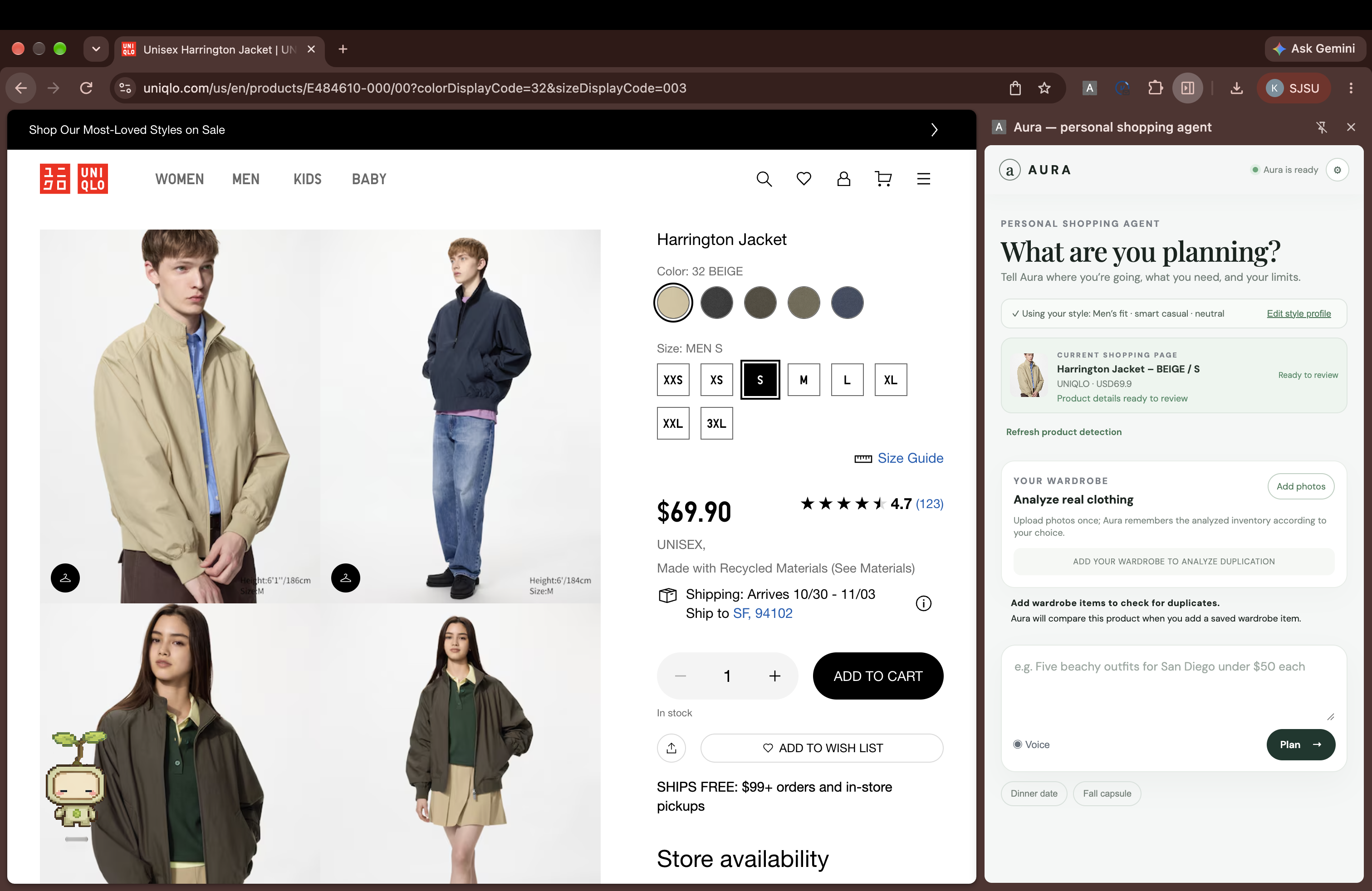
Most shopping apps optimize for showing more products. Aura is designed to help someone make one good purchase decision. Imagine you have a last min trip and very less time to plan. Finding tops, pants, skirts and shoes all individually first from thousands of websites and then combining them to make it into one outfit that you love. Sounds like a big hassle. Aura does not only this but also remembers your current wardrobe, instead of being just a shopping assistant it makes smart decisions by considering what all you already have and then gives you the best choices for you to pick from. For example:
A user can say:
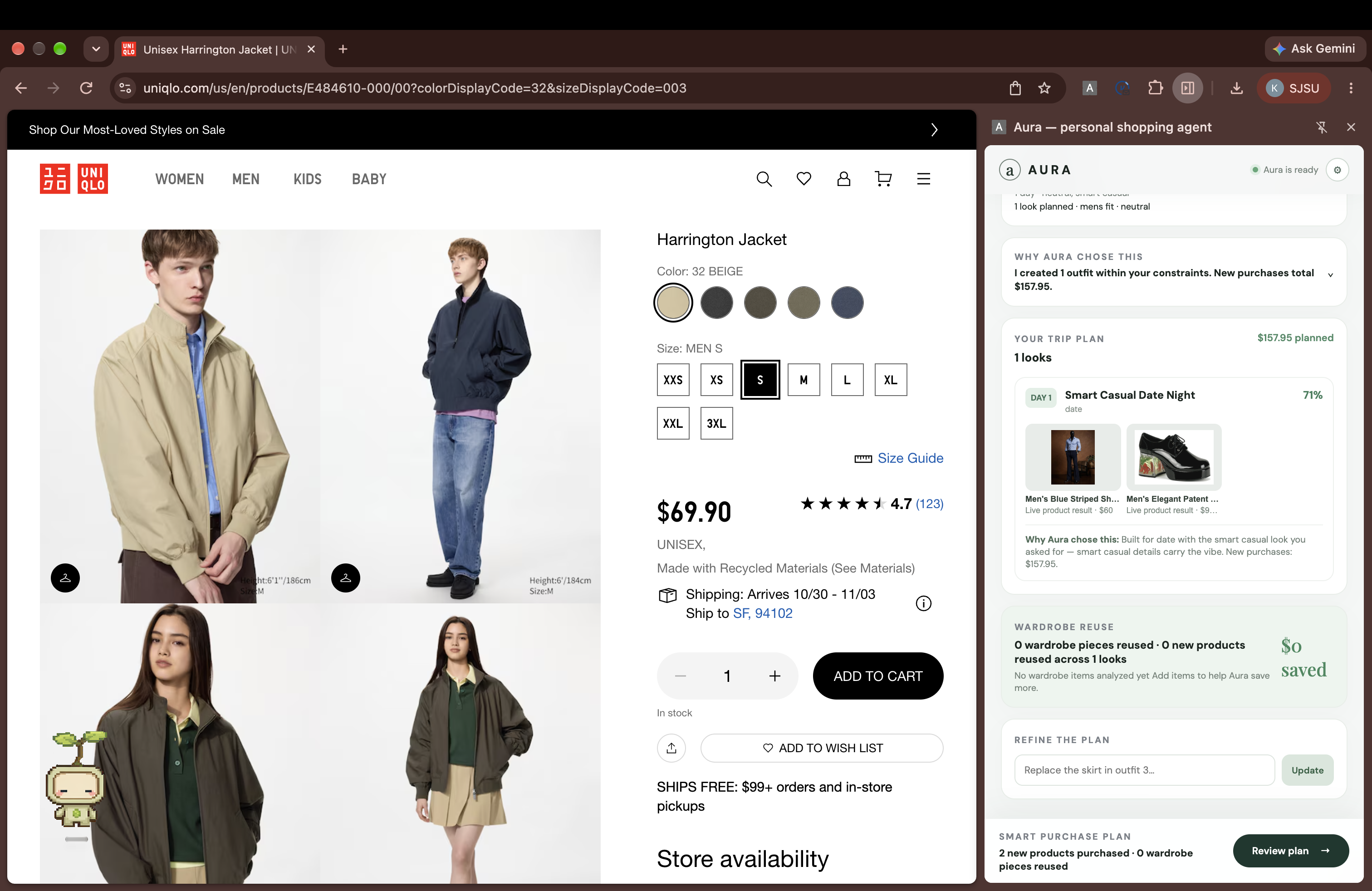
“Build me one date-night outfit under $100 with a top, bottom, and shoes.”
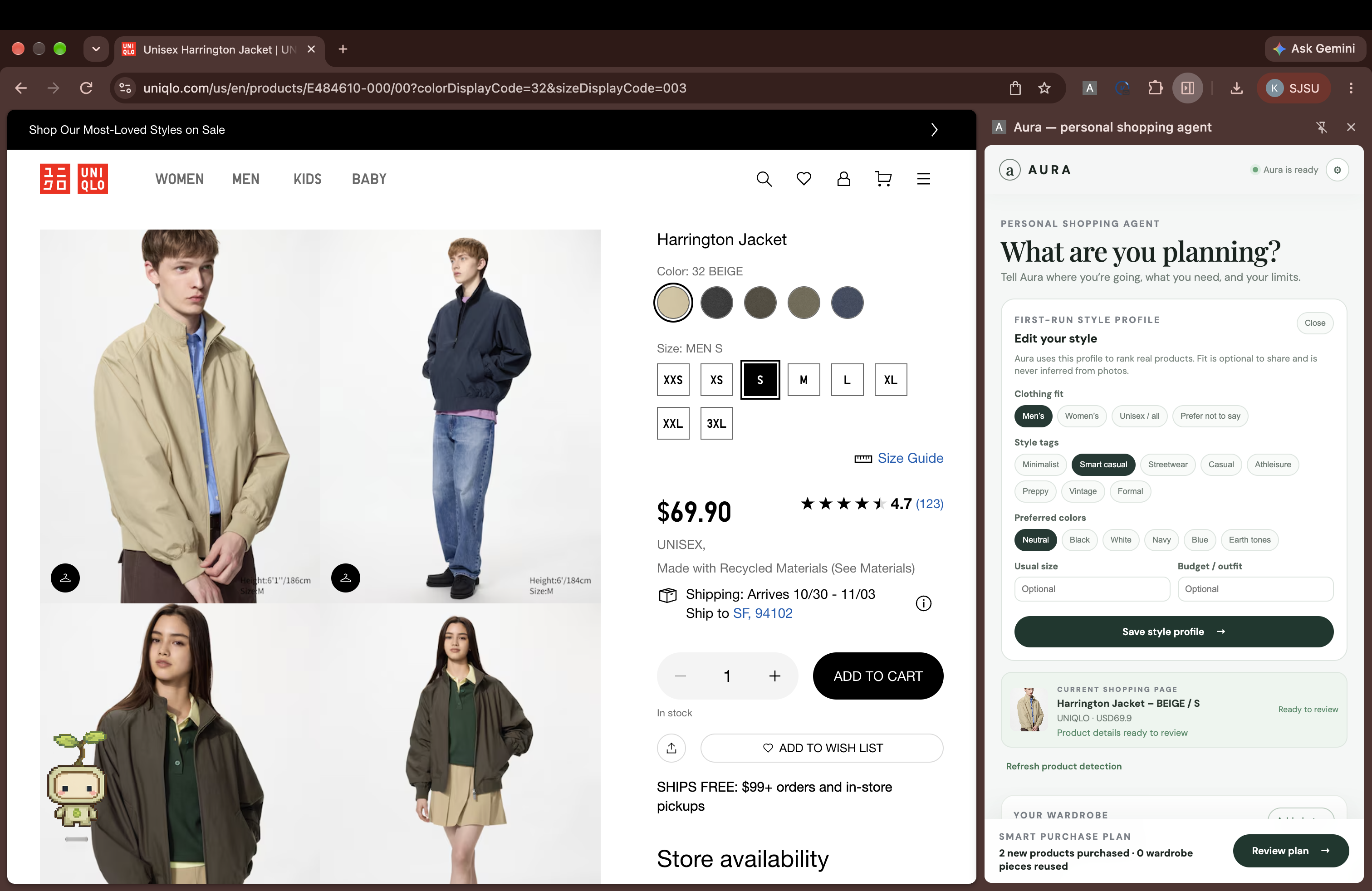
Aura uses the shopper’s style profile and saved wardrobe to determine what they already have, finds only the missing pieces from live shopping data, and builds a complete outfit within the total budget.
It does not simply generate outfit text. It must satisfy actual constraints:
- every required clothing category must be present;
- existing wardrobe pieces should be reused when possible;
- new products must match the shopper’s style and fit preferences;
- duplicate purchases should be avoided;
- the combined price of every new item must stay within the budget;
- incomplete or invalid recommendations must be rejected.
The result is a transparent purchase plan showing what to reuse, what to buy, the total cost, the products’ sources, and why each item was selected.
How Aura works
Aura runs as a Chrome extension while the user shops.
A one-time wardrobe setup uses vision analysis to turn clothing photos into structured inventory such as pants, tops, outerwear, shoes, colors, and footwear subtypes. Users control what is remembered and can remove items at any time. Aura also stores a style profile containing preferences such as fit, colors, and aesthetic.
When the user makes a request:
- The request is interpreted according to the user’s occasion, style, required categories, and budget.
- Fetch/uAgents coordinates separate style, search, and budget responsibilities.
- Apify retrieves live shopping results with product names, images, prices, and sources.
- Aura combines those products with the user’s wardrobe.
- A deterministic validation layer checks category completeness, compatibility, duplication, stale product data, and total purchase cost.
- Only a valid plan is shown to the user.
Aura also understands the active shopping page through product metadata such as JSON-LD, OpenGraph data, and visible page information. This lets the agent evaluate the item the user is already looking at instead of treating every product as an isolated search result.
Voice is not a separate demo mode. Cartesia converts the user’s speech into the same planning request used by typed input, and Aura speaks the completed recommendation back.
Why this required real engineering
The hard part was not asking an LLM to suggest clothes. The hard part was preventing the agent from confidently producing a bad shopping decision.
An outfit is not valid just because the individual products sound good. Aura has to reason over a combination of wardrobe items and live products while enforcing hard constraints. We separated flexible AI reasoning from deterministic checks so the system can reject an outfit that is over budget, incomplete, incompatible, or redundant.
This architecture also lets Aura explain its decisions instead of returning an unexplained recommendation.
Privacy and user control
Wardrobe memory is consent-based. Users can use clothing temporarily, remember it for future sessions, edit it, or delete it. Aura keeps structured wardrobe information needed for recommendations and does not retain the original wardrobe photos after analysis.
What Aura enables
Aura turns shopping from endless browsing into a personalized, budget-aware decision. It helps people buy fewer duplicate items, make better use of what they own, and understand exactly why a purchase is recommended.
The same system can extend to travel packing, occasion shopping, returns, price changes, and sustainable purchasing.
Sponsor Integrations
Visa — Reimagining Shopping with AI
Aura turns a natural-language shopping request into a personalized, budget-aware purchase plan. It combines a shopper’s style profile and wardrobe with live retailer products, avoids duplicate purchases, and validates the total cost of every new item before showing a recommendation.
Visa APIs were not provided for this challenge, so Aura does not claim direct Visa payment processing or checkout. No payment-card information is collected or stored.
Fetch.ai / uAgents
Fetch.ai/uAgents coordinates Aura’s local agent workflow through separate orchestration, style, search, and budget responsibilities. The agents interpret requests, find products, reuse wardrobe items, enforce constraints, and trigger replanning when a proposed outfit is incomplete or over budget.
Apify
Apify retrieves live shopping results with product names, prices, images, retailers, and URLs. Aura normalizes and validates the results before displaying them. Google Shopping redirects and incomplete products are rejected rather than fabricated.
Cartesia
Cartesia Ink-Whisper converts voice requests into text, and Cartesia Sonic reads completed recommendations aloud. Voice requests use the same planning flow as typed requests.
Fetch.ai
Fetch.ai powers the agent workflow. The system uses:
- Orchestrator Agent
- Search Agent
- Style Agent
- Budget and Constraint Agent
These agents create outfits, check constraints, identify violations, and trigger replanning.
Apify
Apify retrieves real product data. The backend normalizes the scraped results into the shared Product schema before agents use them. If Apify fails, the system uses fallback product data from fallback-data/products.json.
Visa Reimagining Shopping Track
Aura addresses Visa’s Reimagining Shopping challenge by using generative AI to make product discovery, personalization, budget planning, and checkout more seamless.
Visa does not provide a proprietary API for this challenge, so Aura demonstrates a secure simulated checkout flow. The system calculates only unique products that the user needs to purchase, shows the total cost and reasoning, and never stores raw payment-card information.
Setup
- Clone the repository.
- Create a
.envfile using.env.example. - Install frontend and backend dependencies.
- Start the FastAPI backend.
- Start the React frontend.
- Open the local frontend URL.
ENVIORNMENT VARIABLES:
OPENAI_API_KEY= ANTHROPIC_API_KEY= APIFY_API_TOKEN= CARTESIA_API_KEY=
APIs and Services Used
- Apify API — retrieves live product data from online retailers.
- OpenAI or Anthropic Vision API — analyzes wardrobe photos and identifies clothing attributes.
- Cartesia API — provides speech-to-text and text-to-speech for voice interaction.
- Fetch.ai uAgents — coordinates the planning, style, budget, and replanning agents.
- FastAPI — connects the Chrome extension, product search, vision analysis, voice services, and agents.

Log in or sign up for Devpost to join the conversation.