WeekWise
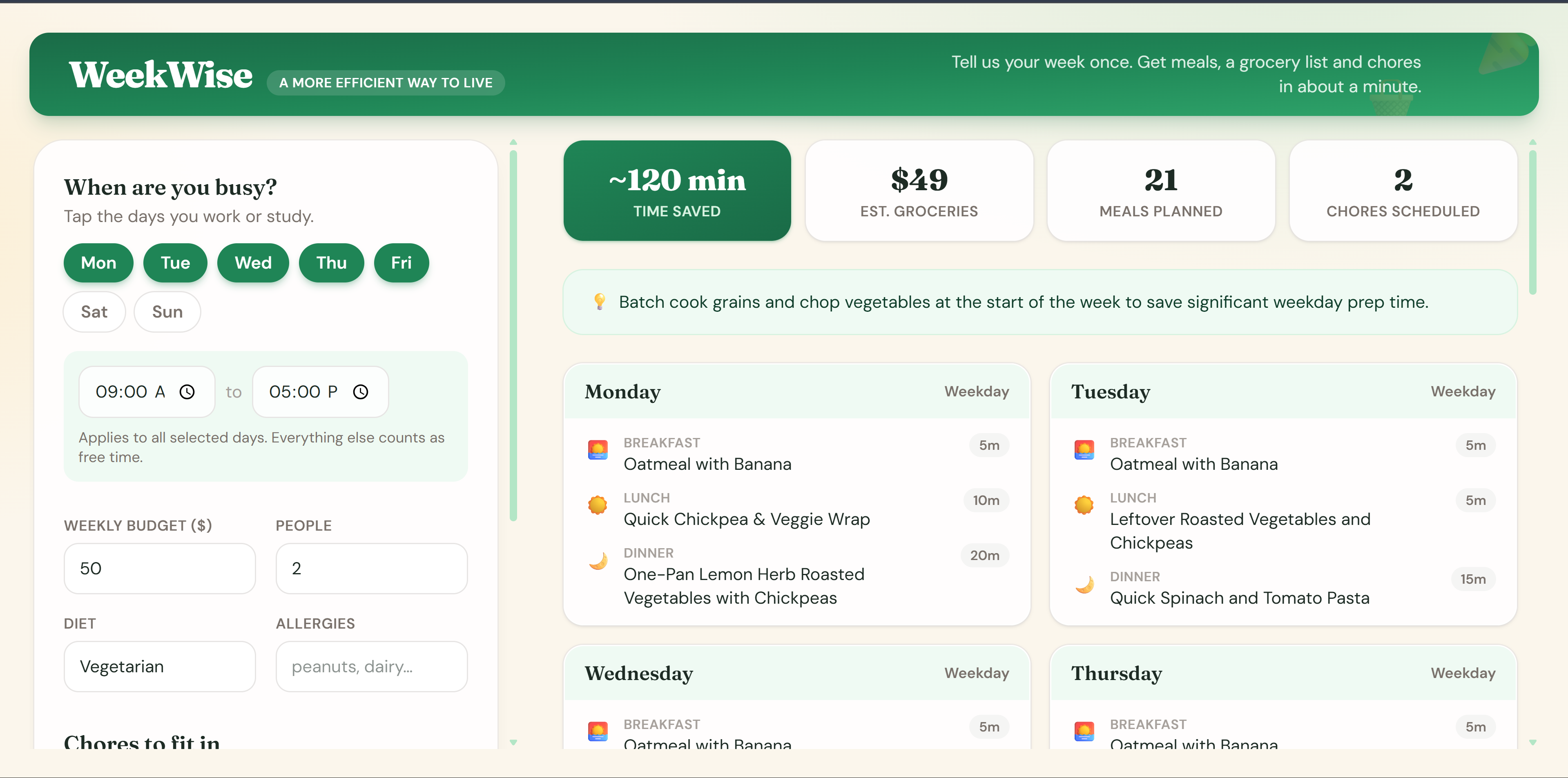
Plan your whole week in one click. WeekWise turns your schedule, budget and chores into a full week plan: meals, one combined grocery list, and chores slotted into your free time.
Built solo for the Triple H Hackathon (Tech track). Theme: a more efficient way to live.
Live demo: https://weekwise-v7f6.onrender.com
The problem
Every week, people spend an hour or more deciding what to cook, what to buy, and when to fit in chores. It is repetitive, easy to get wrong, and it eats into free time.
What WeekWise does
You tell it once:
- which days and hours you are busy
- your weekly grocery budget and household size
- your diet and allergies
- the chores you need to fit in
It returns:
- a 7-day meal plan (breakfast, lunch, dinner) with prep times
- chores scheduled only in your free time
- one combined, de-duplicated grocery list grouped by aisle, with estimated costs
- an estimated total checked against your budget
- an estimate of the planning time saved
Features
- No signup and no database. Everything stays in your browser (localStorage).
- Tick items off the grocery list, with a progress bar and budget bar.
- Copy the grocery list or print the whole plan.
- Animated, responsive UI with independent scrolling panels on desktop.
- Reliable demo: if the AI call fails or returns invalid data, a built-in sample plan is shown, with a clear notice.
- A hidden capybara somewhere in the app.
Tech stack
| Layer | Tools |
|---|---|
| Frontend | React 18, Vite, Tailwind CSS v4 |
| Backend | Node.js, Express (ES modules) |
| AI | Google Gemini via REST (swappable in server/llm.js) |
| Validation | Zod schemas for both requests and AI responses |
| Hosting | Render (one service: Express serves the built React app) |
How it works
- The React form sends your inputs to
POST /api/plan. - The server validates the input with Zod and builds a strict prompt.
- The model returns JSON, which is validated against a plan schema. On failure it retries once more, then falls back to a sample plan.
- The client renders the plan and saves it locally.
Project structure
client/                  React app (Vite + Tailwind)
  src/
    App.jsx              layout, stats, loading and results
    lib/api.js           API call
    components/
      PlanForm.jsx       input form
      WeekGrid.jsx       7-day plan cards
      GroceryList.jsx    grouped, checkable grocery list
server/                  Express API
  index.js               API routes + serves the built client
  routes/plan.js         validation, retries, fallback
  prompt.js              prompt builder
  llm.js                 the only file that talks to the model
  schema.js              Zod schemas
  samplePlan.js          fallback plan
package.json             root build/start scripts (used by Render)
Run locally
Requirements: Node.js 18+ and a Gemini API key.
# 1. Server
cd server
cp .env.example .env        # then add your GEMINI_API_KEY
npm install
npm run dev                 # http://localhost:5000

# 2. Client (in a second terminal)
cd client
npm install
npm run dev                 # open the URL Vite prints
The Vite dev server proxies /api to port 5000, so no extra setup is needed.
Environment variables
| Variable | Required | Description |
|---|---|---|
GEMINI_API_KEY |
Yes | Your Gemini API key (never commit it) |
LLM_MODEL |
No | Model name, default gemini-2.5-flash |
PORT |
No | Server port, default 5000 |
Without a key the app still works, but always shows the sample plan.
Deploy (Render)
- Build command:
npm run build - Start command:
npm start - Environment variable:
GEMINI_API_KEY
The root package.json builds the client and installs the server. In production Express serves client/dist from the same address as the API.
The free tier sleeps when idle, so the first load can take 30-60 seconds.
Limitations (being honest)
- Meals, quantities and prices are AI-generated estimates, not live store prices.
- The "time saved" figure is an estimate, not a measurement.
- The model can occasionally suggest an odd meal. Output is validated for structure, not for taste.
Next steps
- Real prices from a grocery or recipe API
- Full recipes and cooking steps
- Calendar export and shareable plans
- Swap, lock and regenerate individual meals

