Inspiration
Modern websites are designed primarily for people. When AI agents need to interact with those applications, they often have to interpret pages visually, reason about buttons and forms, and reproduce workflows that were never designed for machine interaction.
WebMCP suggests a different future: websites can expose intentional, structured capabilities directly to AI agents while continuing to provide rich interfaces for humans.
That idea inspired WebOps Commander.
We wanted to explore a question:
What would an incident-response application look like if it were designed for humans and AI agents from the beginning?
Instead of building another chatbot or allowing an agent to blindly click through an operations dashboard, WebOps Commander gives the agent structured operational capabilities through WebMCP while preserving explicit human control over consequential actions.
What it does
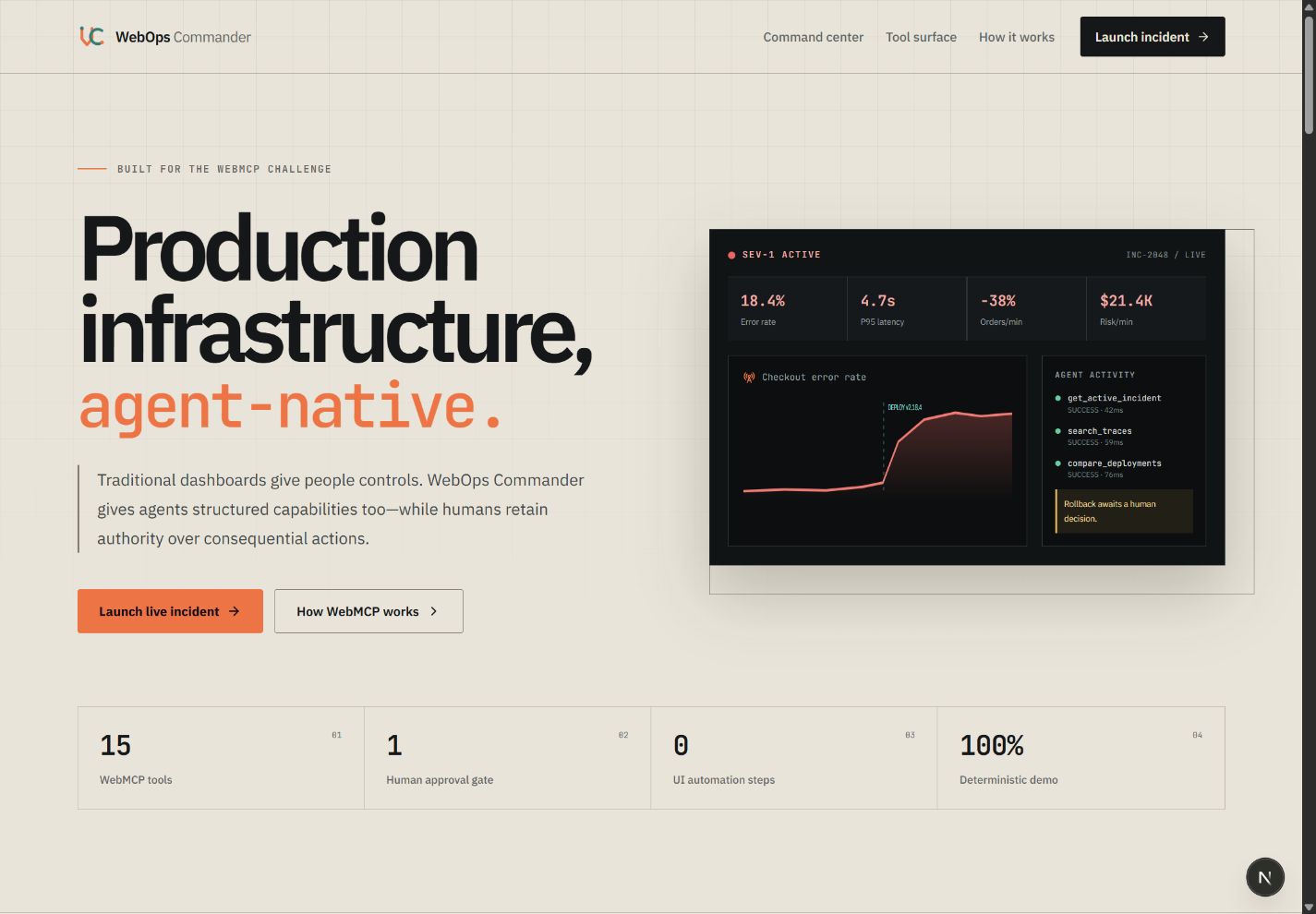
WebOps Commander is an agent-native incident-response command center built around a deterministic simulated production outage.
A fictional e-commerce platform experiences a severe checkout incident shortly after a new version of checkout-service is deployed.
The human operator sees a visual operations dashboard containing:
- live service health
- checkout error rate
- p95 latency
- order throughput
- estimated revenue impact
- service dependencies
- logs
- distributed traces
- deployment history
- incident status
- agent activity
At the same time, a compatible AI agent receives structured WebMCP tools that allow it to investigate the same system directly.
The agent can:
- inspect the active incident
- inspect service health
- query metrics
- search logs
- inspect traces
- inspect service dependencies
- inspect recent deployments
- compare releases
- search operational runbooks
- estimate customer impact
- simulate a rollback
- request a production-changing action
- wait for explicit human approval
- execute an approved rollback
- observe system recovery
- update and resolve the incident
The core workflow is:
Observe → Investigate → Correlate → Simulate → Request Approval → Human Approves → Execute → Recover
Why WebMCP?
Without WebMCP, an AI agent interacting with an operations platform may need to determine which page contains deployment information, interpret charts, find buttons, understand forms, and infer what actions are safe to perform.
That approach can be brittle.
With WebMCP, WebOps Commander intentionally exposes structured capabilities such as:
query_service_metrics
search_logs
search_traces
get_recent_deployments
compare_deployments
simulate_rollback
request_rollback
execute_approved_action
The agent does not need to guess how the user interface works.
The website tells the agent what capabilities are available, what inputs they accept, and what actions are permitted.
The human interface and agent interface operate on the same application state, so WebMCP actions are immediately visible inside the command center.
Human + Agent Collaboration
WebOps Commander is intentionally not designed around full autonomy.
Investigation is safe for the agent to perform independently.
Consequential actions are different.
For example, the agent can determine that a rollback is likely to resolve the incident and simulate its expected impact, but it cannot immediately change the simulated production environment.
Instead, it creates a pending action:
Rollback checkout-service from v2.18.4 to v2.18.3
The human sees the proposed action together with:
- the agent's reasoning
- expected recovery
- current error rate
- expected post-rollback error rate
- estimated risk
The human can then approve or reject the action.
Only an approved action can be executed.
This creates a clear separation between:
Agent investigation
Agent recommendation
Human authorization
Agent execution
Every WebMCP interaction is also recorded in the visible agent activity timeline.
The Incident
The demonstration focuses on one deliberately small but polished scenario: Checkout Meltdown.
A deployment of checkout-service v2.18.4 introduces stricter payment-token issuer validation.
Shortly afterward:
- checkout failures increase from approximately 0.6% to 18.4%
- p95 checkout latency increases from approximately 620 ms to 4.7 seconds
- completed orders fall by approximately 38%
- estimated revenue exposure reaches approximately $21.4K per simulated minute
Other services remain healthy.
Through metrics, logs, traces, deployment history, and release comparison, the agent can correlate the incident with v2.18.4.
It can then simulate a rollback to v2.18.3, request authorization, and—after human approval—execute the remediation.
The command center visually shows the system recovering.
How we are building it
WebOps Commander is intentionally scoped as a focused hackathon demonstration rather than a production observability platform.
The application uses a deterministic simulation instead of real cloud infrastructure so that every judge can reproduce the same incident without accounts, API keys, external services, or unreliable dependencies.
The planned architecture consists of:
- Next.js
- React
- TypeScript
- Tailwind CSS
- shadcn/ui
- WebMCP
- Zod
- Zustand
- Recharts
- Vitest
- Playwright
- GitHub Actions
Operational state, telemetry, logs, traces, deployments, and recovery behavior are simulated locally.
WebMCP is the primary agent interface.
The project does not require an embedded chatbot or external LLM API—the compatible AI agent interacting with the website is the agent.
Challenges
The most interesting challenge is not simply exposing functions to an AI agent.
It is deciding what an agent should be allowed to do.
Read-only investigation tools should be easy to invoke.
Simulation should be safe.
Production-changing operations should be protected.
That led us to design a small capability model with separate categories for:
- read operations
- simulations
- approval requests
- consequential actions
Another important challenge is making agent activity understandable to the human operator. WebOps Commander therefore visualizes WebMCP invocations in an audit timeline so users can see what the agent inspected, what it concluded, and what it attempted to change.
What we learned
WebMCP changes the way a web application can be designed.
Instead of treating AI agents as external automation systems that must reverse-engineer a user interface, the application can expose a deliberate machine-facing capability layer alongside its human interface.
The result is not simply easier automation.
It enables a different interaction model:
Humans provide intent and authority. Agents investigate and execute structured workflows. Websites provide the contract connecting them.
What's next
After the hackathon, WebOps Commander could be expanded to explore:
- multiple incident scenarios
- richer permission policies
- tool-level access control
- real observability integrations
- real deployment systems
- multi-agent operational workflows
- reusable WebMCP patterns for infrastructure products
For this challenge, however, the focus remains intentionally narrow:
one incident, one excellent human-agent workflow, and a clear demonstration of why WebMCP matters.
Built With
- actions
- css
- github
- next.js
- playwright
- react
- recharts
- shadcn/ui
- tailwind
- typescript
- vercel
- vitest
- webmcp
- zod
- zustand

Log in or sign up for Devpost to join the conversation.