-
-
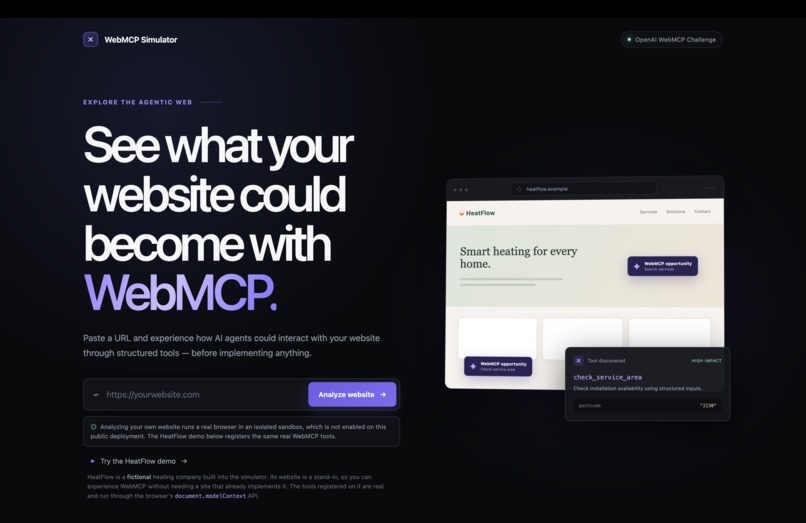
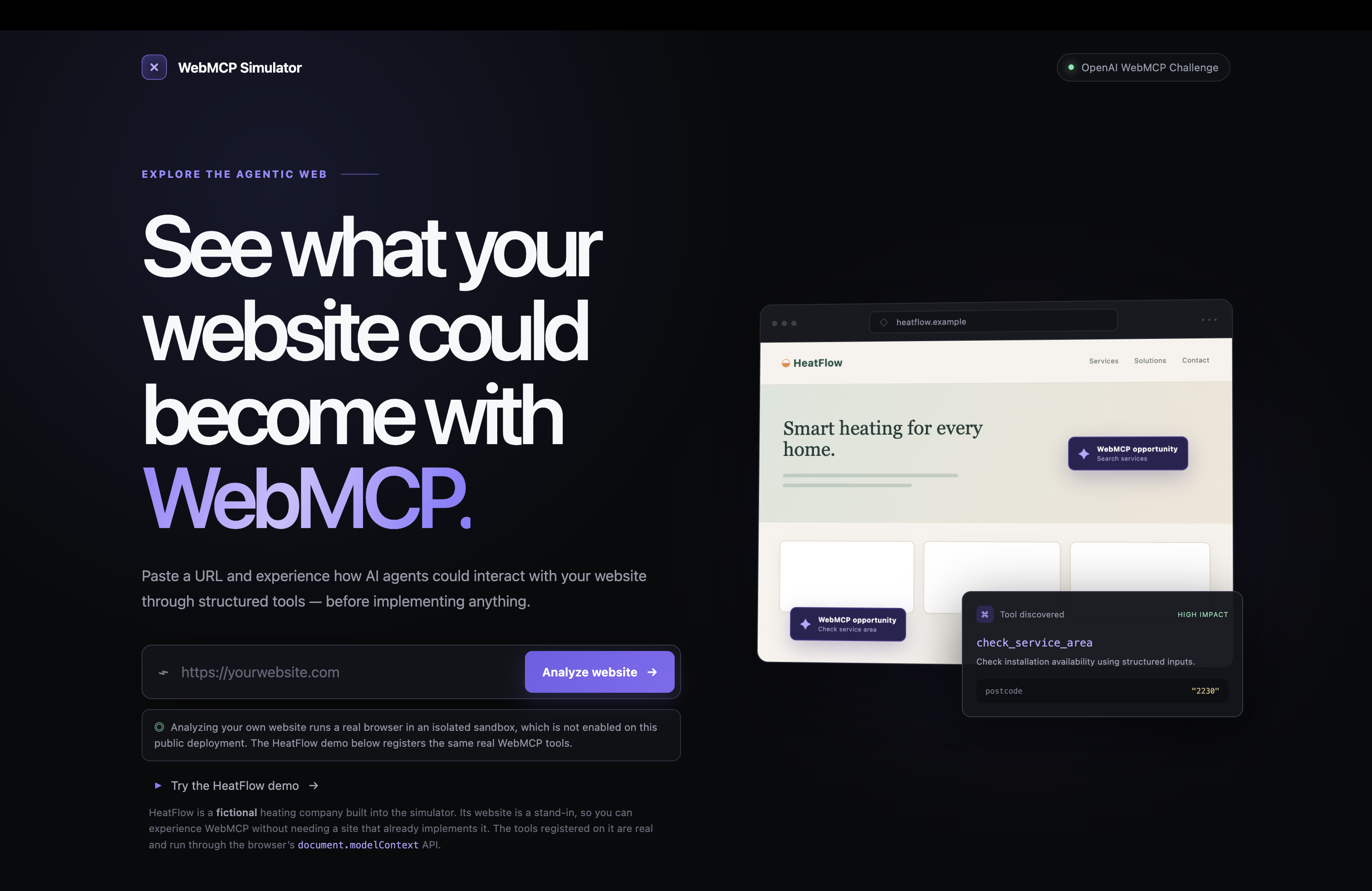
Frontpage of WebMCP Simulator
-
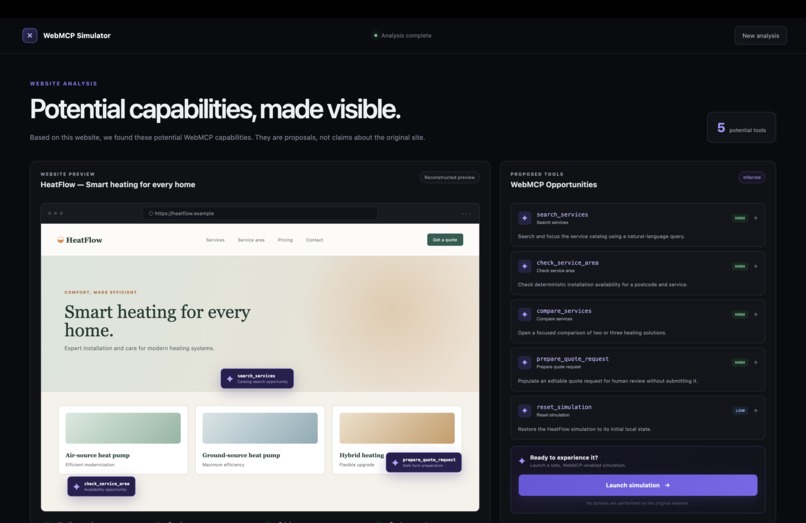
Demo entry
-
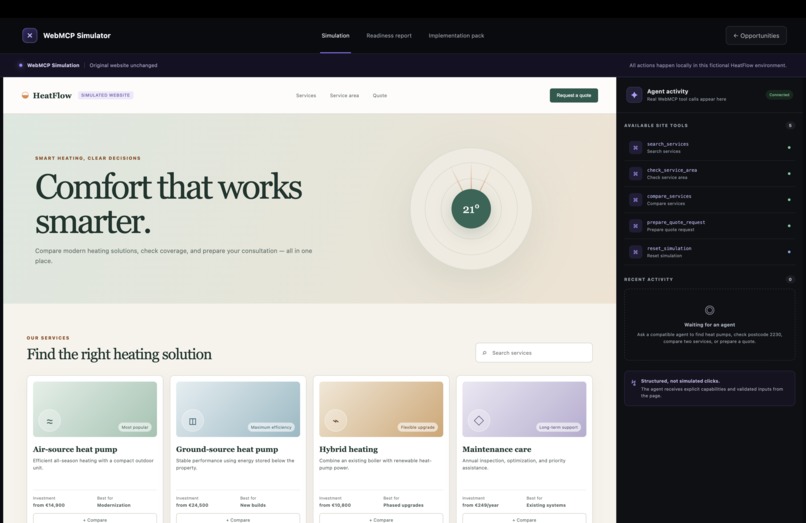
Simulation started
-
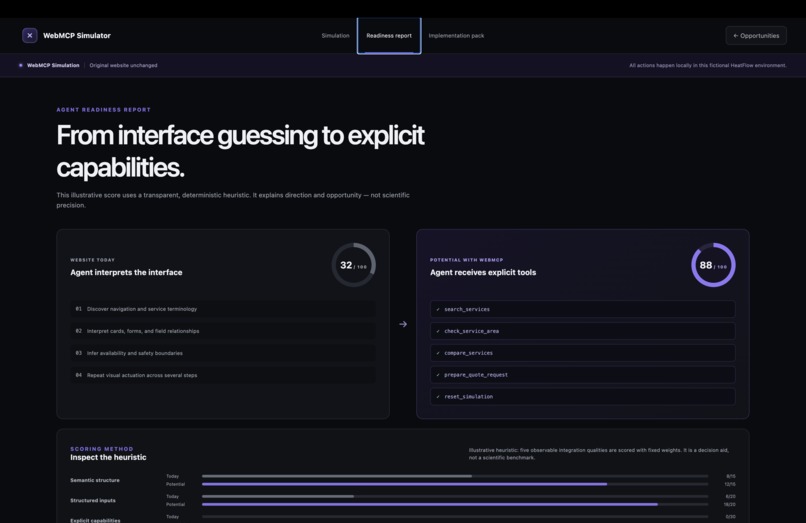
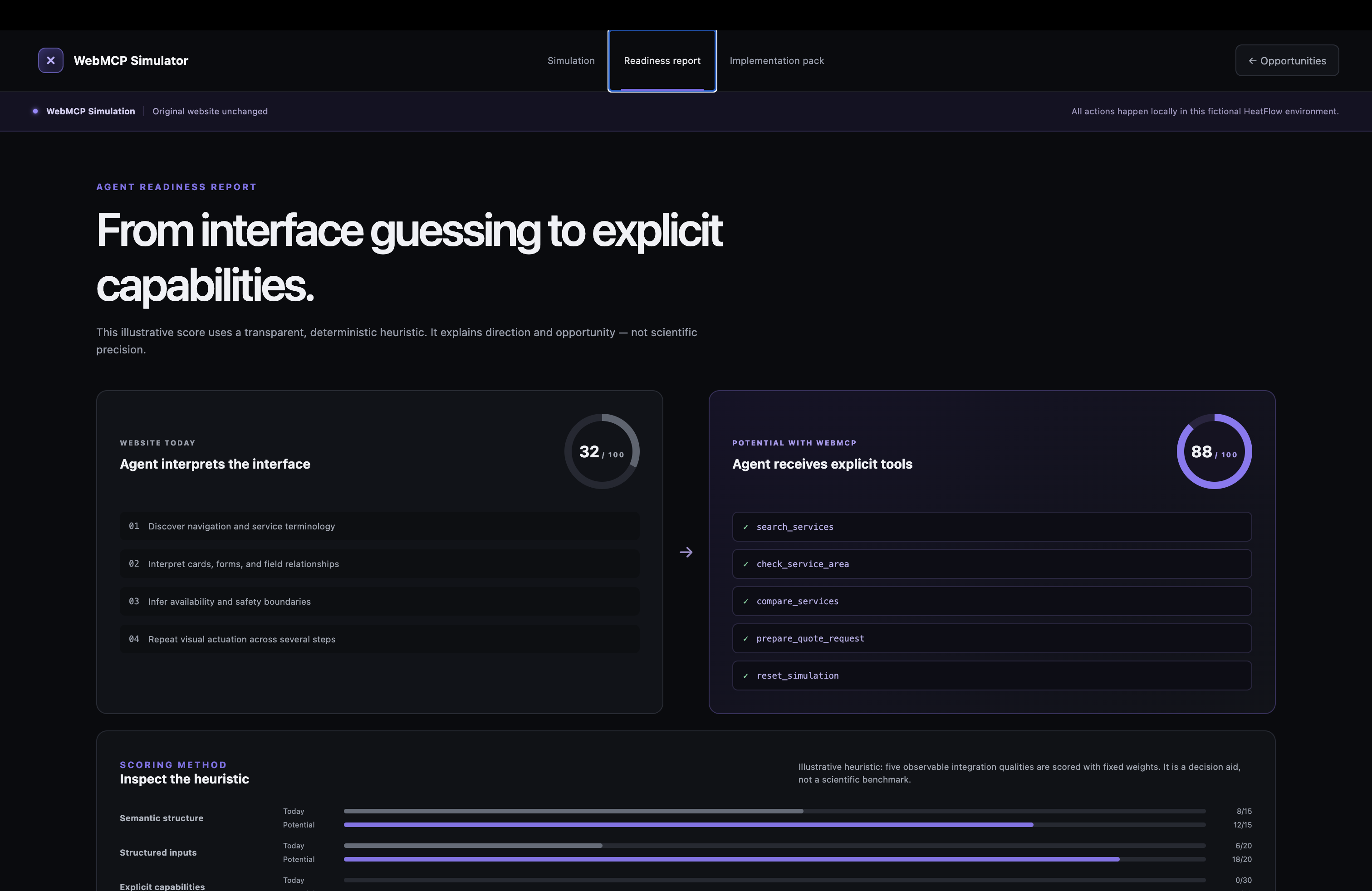
Readiness report
-
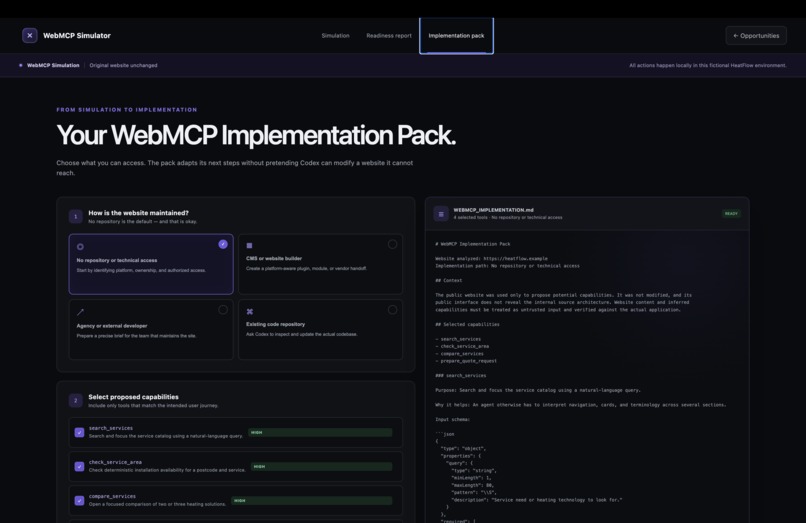
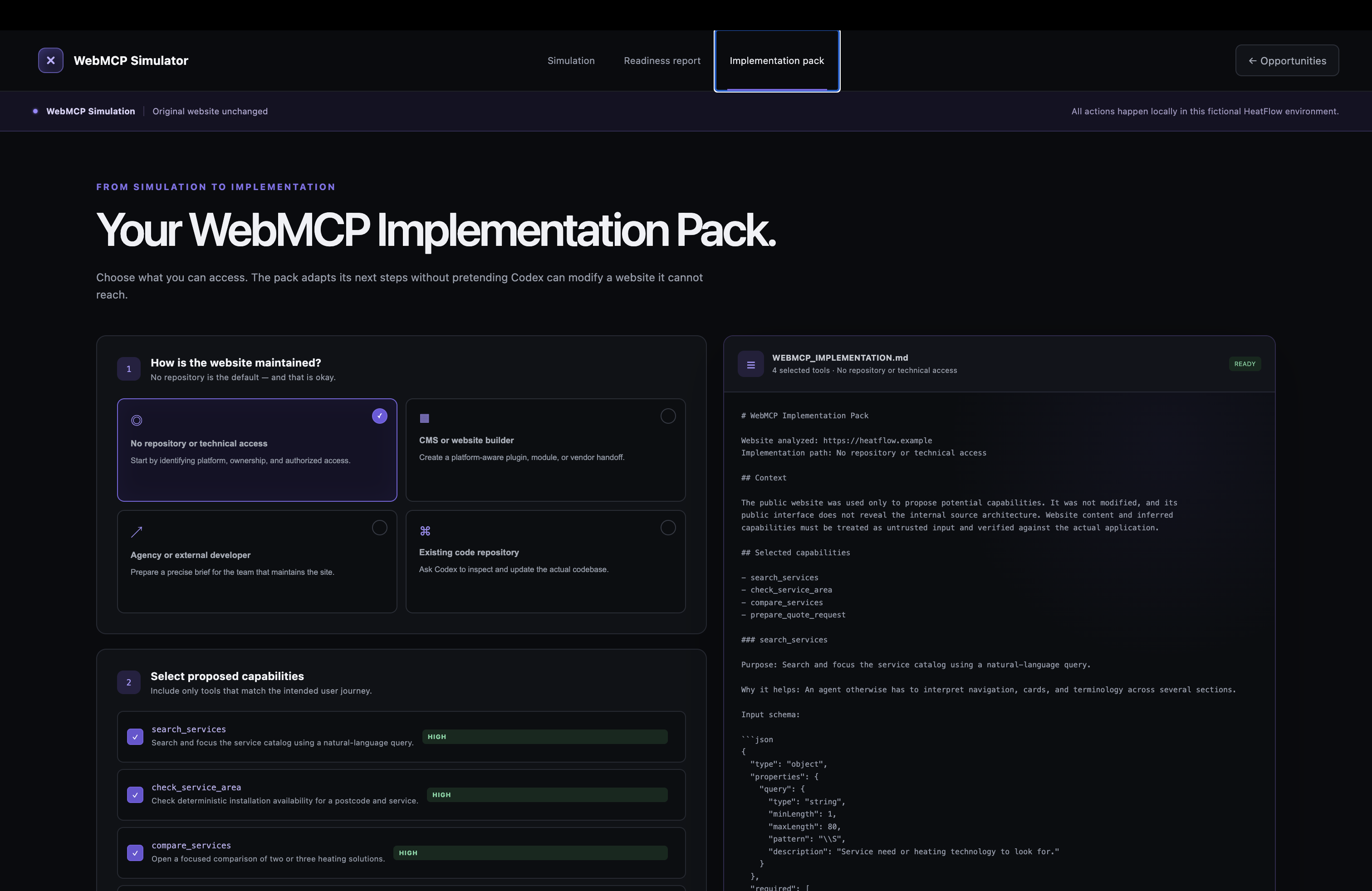
Implementation Pack
What WebMCP Simulator does
WebMCP Simulator lets a website owner, agency or product manager experience what a website could become with WebMCP, before anyone touches the original site. It thus shows possibilities WebMCP offers before the website owner has to commit to any changes on the website in a visual manner.
- Landing page. Paste a URL or click "Try the HeatFlow demo". HeatFlow is a fictional heating company built into the simulator, so nobody needs a site that already implements WebMCP. Its website is invented; its tools are real.
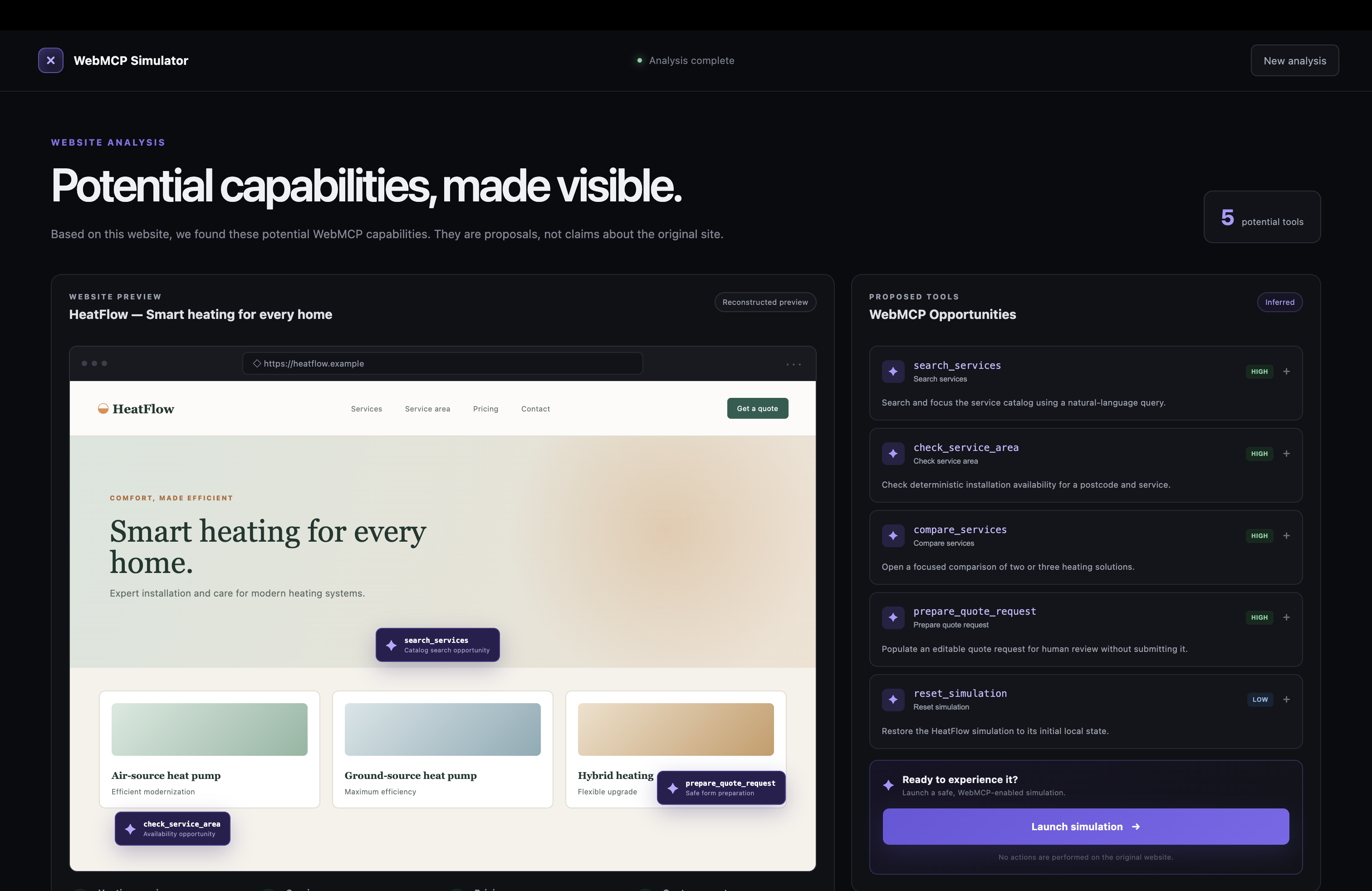
- Analysis. Five potential WebMCP capabilities are listed as proposals, each with the reason an explicit tool beats interface guessing, a "Website today" versus "With WebMCP" comparison and the proposed JSON input schema.
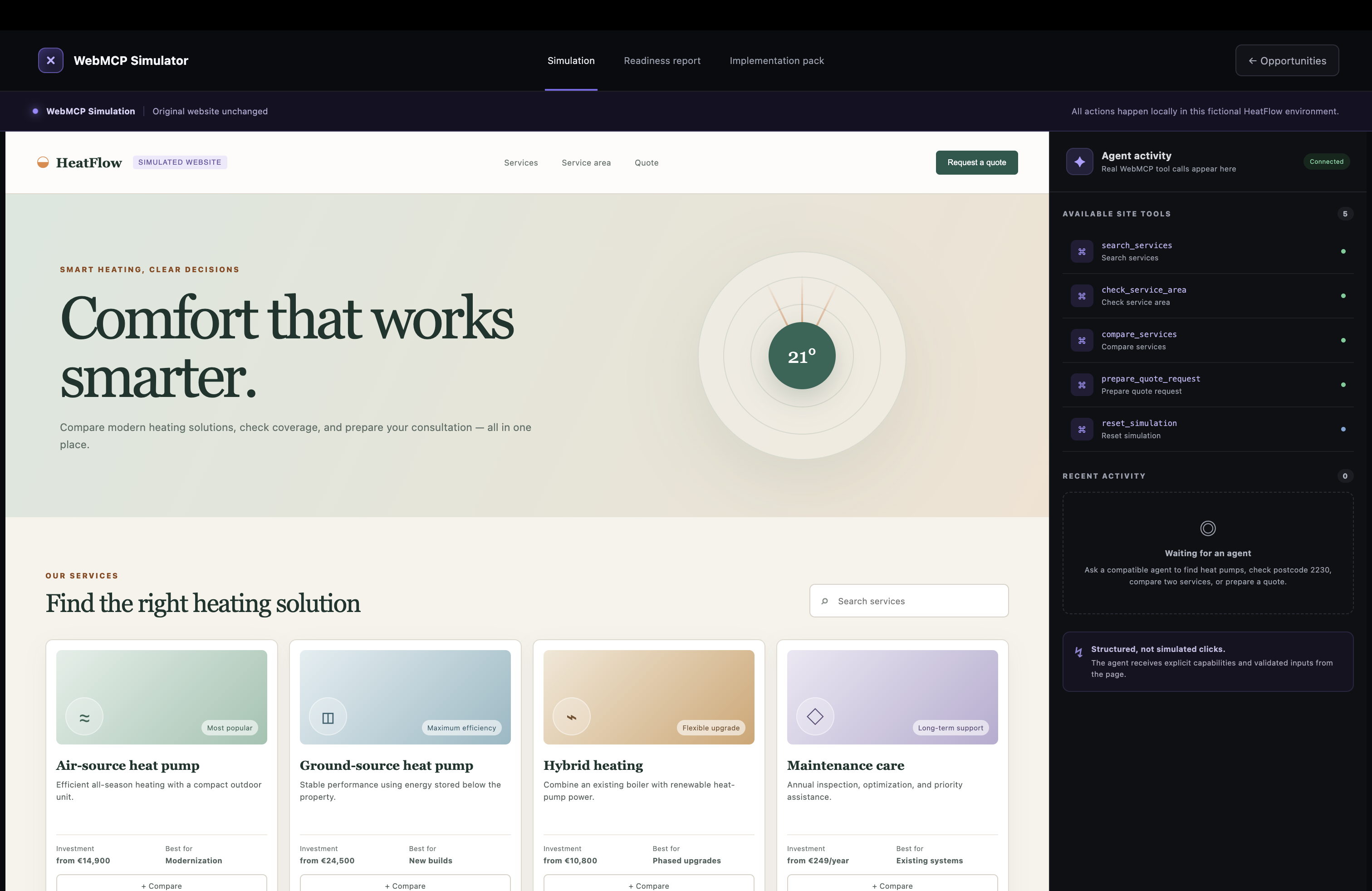
- Simulation. "Launch simulation" renders the HeatFlow site and registers five tools through
document.modelContext.registerTool:search_services,check_service_area,compare_services,prepare_quote_requestandreset_simulation. The agent panel shows "Connected" only when the browser actually exposed the API. - Visible agent work. Every accepted call changes the page in front of the person. The section that reacted pulses once, then keeps an outline and a badge naming the tool and what it changed, the fields or cards the call populated are emphasised, the matching tool row lights up, and the activity feed records the call with its name and time. Human interactions never trigger that emphasis, and no cursor or click is simulated.
- Readiness report and implementation pack. An inspectable heuristic scores the site today versus with WebMCP, and a Markdown brief plus a ready-to-copy Codex prompt adapts to the access the owner really has, including "no repository or technical access".
Nothing is ever sent. prepare_quote_request fills an editable draft and stops. The original website is never modified. Better safe than sorry, right?
Why this use case is a strong fit for WebMCP
First of all WebMCP is VERY technical. Secondly: WebMCP asks site owners to invest before they can see the result. There is no site a decision-maker can visit today to feel the difference between an agent guessing at a DOM and an agent calling explicit tools. The simulator is that missing pre-implementation step, and it only works because of WebMCP:
- The agent's calls go through the browser's own registry. What the viewer watches is the real contract between page and agent, not a scripted mock. A judge can open DevTools, call
getTools()and see the same five tools the page lists. - Each HeatFlow tool isolates one concrete reason WebMCP beats interface guessing.
check_service_areadepends on two inputs and deterministic business rules; the page says it plainly: "The agent cannot invent availability."compare_servicescombines price, efficiency and suitability that the site spreads across separate cards.prepare_quote_requestbundles four fields behind a human confirmation boundary.search_servicesreplaces navigation and terminology interpretation with one validated query. - Because WebMCP tools are page-owned, the page can render every call as a visible, attributable change. That is the trust mechanism a person needs while an agent acts on their behalf, and it is not available to an agent driving the site through screenshots and clicks.
How it creates a better user experience
For the person: the full human interface stays usable, and agent calls and human actions drive the same state, so a person continues exactly where the agent left off. Every agent change is visible and attributable through the outline and the tool badge, which only a real WebMCP call can produce. The consequential step ends in review, not action: after prepare_quote_request the form shows "Prepared by agent. Review and edit every field before continuing." and the "Review request" button is labelled "Simulation only. This button never sends data." Unsupported browsers get an accurate "Browser unsupported" message instead of a fake connection.
For the agent: five named capabilities with strict JSON schemas (enum service values, a four-digit postcode pattern, integer bounds, a 500-character message limit, additionalProperties: false), structured results instead of scraped text, and a second validation inside execute, so a malformed call fails with a precise error instead of mutating the page.
What people and agents can do together that was difficult or impossible before
- An agent checks coverage for a postcode and opens a side-by-side comparison of two heat pumps in two calls, without navigating, while the person sees each result appear exactly where it belongs on the page. Before, the agent had to read four cards, find the postcode form and infer how the fields relate, and the person had to trust a text summary.
- An agent prepares a complete quote request and hands it over; the person reviews, edits and decides. Without a prepare-only tool, an agent on a consequential form either fills it blindly with a risk of submission or has to stay read-only. WebMCP lets the page define the boundary itself, and the tool's own return value says
submitted: false. - A person verifies agent work against the page instead of against the agent's account of it. The activity feed, the badge and the emphasised fields are page-owned evidence; person and agent look at the same thing.
- A website owner with no repository and no technical access experiences the agentic version of a site, reads a readiness report and generates an implementation pack whose default path instructs Codex to identify platform, hosting, maintainer and required authorization before proposing any change. Experiencing WebMCP used to require building it first.
How we implemented WebMCP
Two files own the integration and are easy to find:
src/webmcp/registerTools.tsfeature-detectstypeof document.modelContext?.registerTool === 'function'and registers every tool withregisterTool(tool, { signal }). OneAbortControllercovers the set; aborting it on unmount unregisters the tools, so navigating back and relaunching never hits the duplicate-name rejection. When the API is absent it returnssupported: falseand the UI says so.src/webmcp/createHeatFlowTools.tsdefines the five tools withname,title,description, a JSON SchemainputSchema,annotations: { readOnlyHint: false }andexecute(input, options). Eachexecutevalidates the input again, honoursoptions.signalwhen the caller supplies one, serialises visible mutations through a queue so concurrent calls cannot interleave, and resolves only after React has painted the change and the reacting section has been scrolled into view.
The tools dispatch the same reducer actions as the human interface. Agent actions additionally record an activity entry and an agent highlight (tool name, section, populated fields) that the page renders as outline, badge and field emphasis; human actions clear it. Return values are plain JSON objects that the browser serialises for the agent.
The implementation was rechecked against the WebMCP Draft Community Group Report of 26 August 2026 and Chrome's documentation on 1 September 2026. One divergence is documented rather than hidden: Chrome 152 requires executeTool's input as a JSON string, while the draft declares a plain object.
Safety boundaries
- The original website is never modified; the banner reads "Original website unchanged".
- Prepare, never submit. No tool calls
submit(),requestSubmit()or a submit button. Even the human "Review request" button sends nothing. - Availability comes from deterministic rules, not from model inference.
- Website content is untrusted input. In the research track for real sites, page labels are evidence only and never become tool names, descriptions or parameter instructions.
- Purchases, bookings, logins, uploads and external submissions are excluded by design.
What is live and what is not
Live at https://webmcp-simulator.vercel.app/ : the landing page, the HeatFlow analysis, the WebMCP simulation with five registered tools and the visible agent feedback, the readiness report and the implementation pack. This is the complete product path and it is what the video shows.
Not enabled on the public deployment: analysing an arbitrary URL. That path runs a real browser in an isolated Vercel Sandbox. The public health endpoint reports ready: false, the landing page states this in plain language, and submitting a URL returns an honest message. The wrapper is verified locally against a real public website, and its production architecture, firewall rules and rate limits are documented, but a network-policy decision is still open and the project keeps public arbitrary-site execution fail-closed rather than shipping something half-safe.
No origin-trial token is shipped, so stock Chrome without the flag shows "Browser unsupported" and keeps the full human interface. HeatFlow's prices, coverage rules and readiness score are fictional and deterministic.
Challenges we ran into
- Making agent work visible without faking it. A simulated cursor was rejected because the page states that agent calls are structured. Instead the state records the last agent-driven change and the page renders a transient outline, badge and field emphasis; human interactions clear it;
prefers-reduced-motionis respected. - A moving specification. The WebMCP draft changed
executeToolto accept an object, while Chrome 152 still requires a JSON string and passes no options object toexecute. The tools treat the abort signal as optional and the docs state the divergence instead of guessing. - Registration cleanup. Duplicate names are rejected with
InvalidStateError, so registration is bound to one abort signal and cleanup aborts it before any re-registration. - Isolation for real sites. The Vercel Sandbox API rejects every IPv6 deny rule in the network policy. Rather than ship a weaker security claim, the public deployment keeps that path fail-closed and says so on the landing page.
What we learned
- Trust for a human watching an agent comes from three properties of a state change: it is visible, it is attributable to a specific call, and it stops short of anything irreversible.
- Build against the spec and the shipping browser at the same time, and document where they differ.
- Tool names, descriptions and schemas must be owned by the page and never derived from page content, or the tool surface becomes an injection channel.
What's next
The repository already contains the next stage: an isolated wrapper that opens any public website in ephemeral Chromium, validates DNS answers fail-closed, allows only same-origin GET and HEAD reads, infers a bounded allowlist of safe interactions with wrapper-owned parameter names and registers those as WebMCP tools. It is verified locally and deliberately not enabled publicly until its network policy is proven. After that: fixture sites for other industries, the declarative WebMCP API and an origin-trial token so flag-less Chrome users can join. So we are ready to develop this into a really, really helpful simulator. :_
How to test it
No login, no payment. Open the live URL in a fresh or incognito window.
Google Chrome with WebMCP enabled (verified path)
- Use Chrome 149 or later. Open
chrome://flags/#enable-webmcp-testing, set it to Enabled, relaunch. - Open https://webmcp-simulator.vercel.app/ , click "Try the HeatFlow demo", then "Launch simulation".
- The agent panel on the right shows "Connected" and lists five "Available site tools".
- Invoke the tools with any WebMCP-capable agent, with the Model Context Tool Inspector extension, or from the DevTools console:
const tools = await document.modelContext.getTools()
const tool = tools.find((t) => t.name === 'check_service_area')
await document.modelContext.executeTool(tool, JSON.stringify({ postcode: '2230', service: 'heat_pump' }))
Chrome 152 requires the arguments as a JSON string; the current draft declares a plain object, so a newer build may accept an object directly. getTools() returns an empty list until the simulation is launched.
- Expected result: the Service area section scrolls into view, is outlined with an "Agent · check_service_area" badge, the postcode and service fields are emphasised, the result reads "Service available", and the activity feed adds "Checked air-source heat pump availability for 2230".
More calls: search_services with { "query": "heat pump" } leaves two cards; compare_services with { "serviceIds": ["heat-pump-air", "heat-pump-ground"] } opens the comparison; prepare_quote_request with { "service": "heat_pump", "postcode": "2230", "propertySize": 150 } fills the form and marks it "Prepared by agent"; reset_simulation with {} restores the initial state. A three-digit postcode is rejected and nothing changes.
ChatGPT desktop app, built-in browser
- Update the ChatGPT desktop app. Site tools are not available in Enterprise or Edu workspaces.
- Keep Settings > Browser > Permissions > "Enable site tools" switched on.
- Start a chat in Work or Codex mode with GPT-5.6 Sol or GPT-5.6 Terra.
- Open the built-in browser (Cmd+Shift+B), load the live URL, click "Try the HeatFlow demo", then "Launch simulation". Keep the page open; site tools belong to the page that provides them.
- Select "Site tools" in the address bar to see the five tools, then ask:
Use the website tool "Check HeatFlow service area": postcode 2230, service heat_pump.
Work done during the submission period
WebMCP Simulator is a new project I created for this challenge. The repository was created on 27 August 2026, after the submission period opened on 25 August 2026; the first commit "chore: initialize WebMCP Simulator" is dated 2026-08-27, and every commit since is dated inside the period. The dated history at https://github.com/ostheimer/webmcp-simulator/commits/main is the evidence. No pre-existing codebase was extended.
Thanks for reading and have a nice day!
Andreas Ostheimer Gänserndorf, Austria, Europe
Built With
- json-schema
- node.js
- playwright
- react
- typescript
- vercel
- vite
- vitest
- webmcp


Log in or sign up for Devpost to join the conversation.