-
-
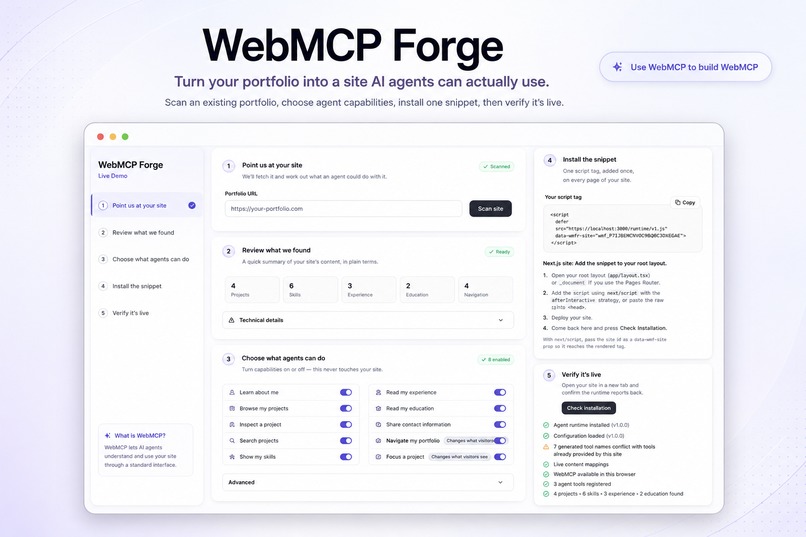
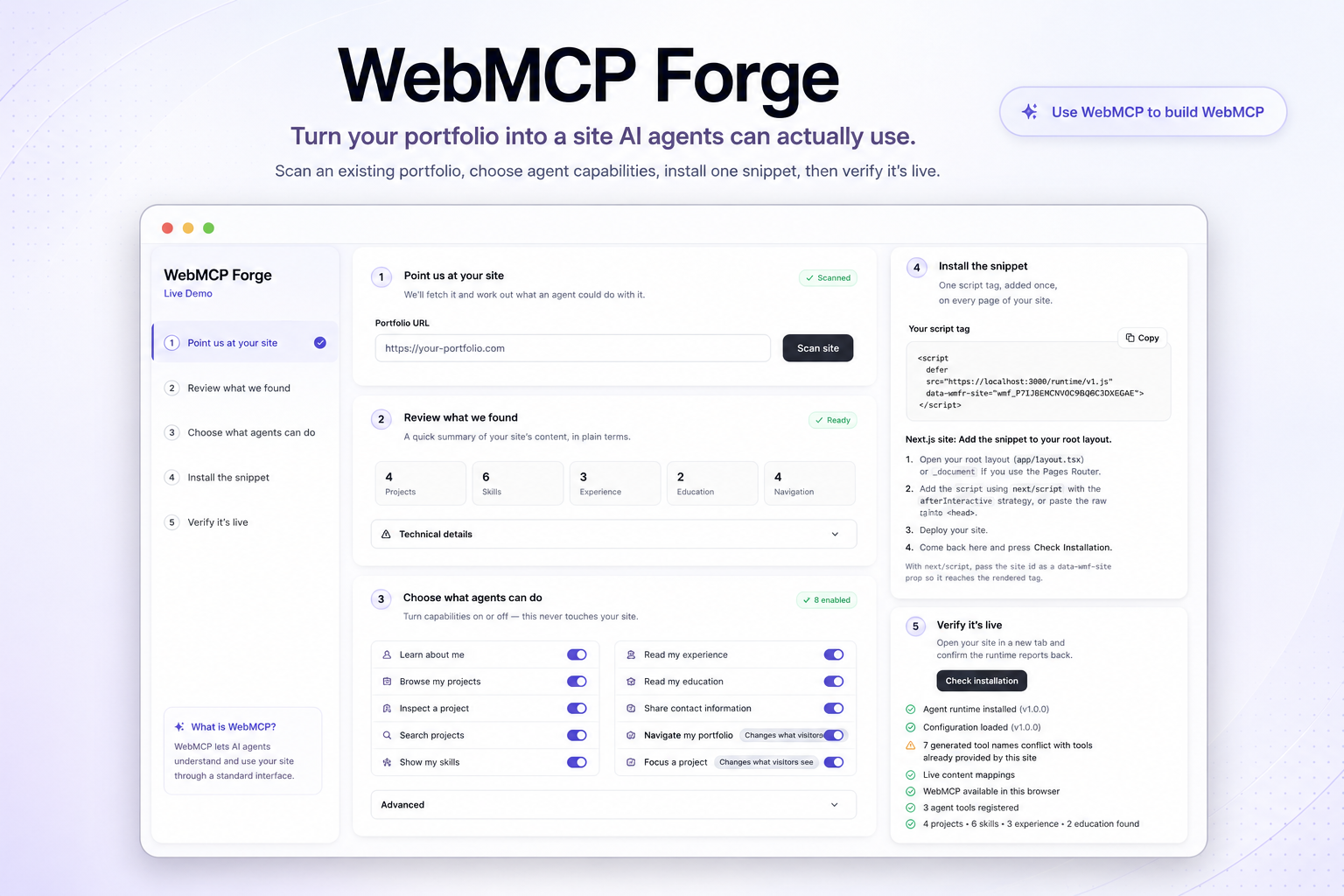
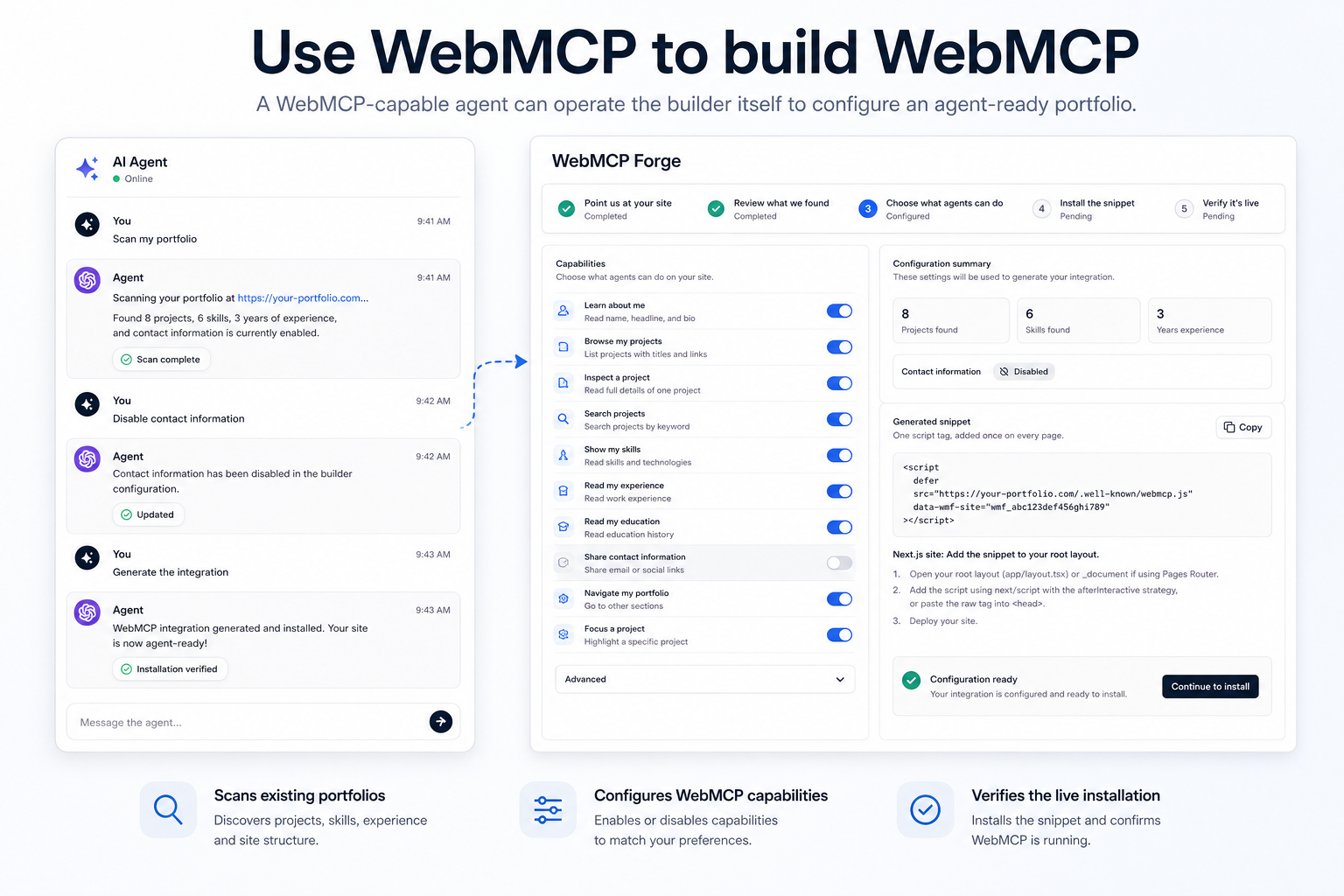
WebMCP Forge scans an existing portfolio, maps its content, lets owners choose agent capabilities, and generates one install snippet.
-
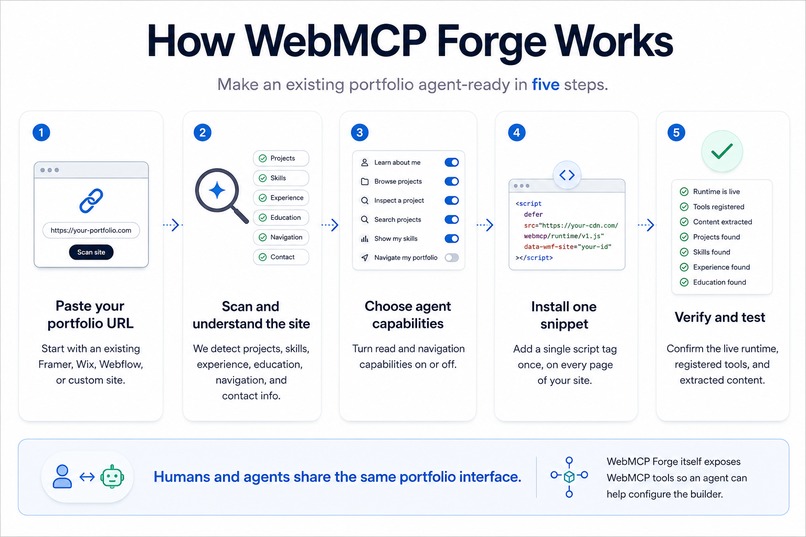
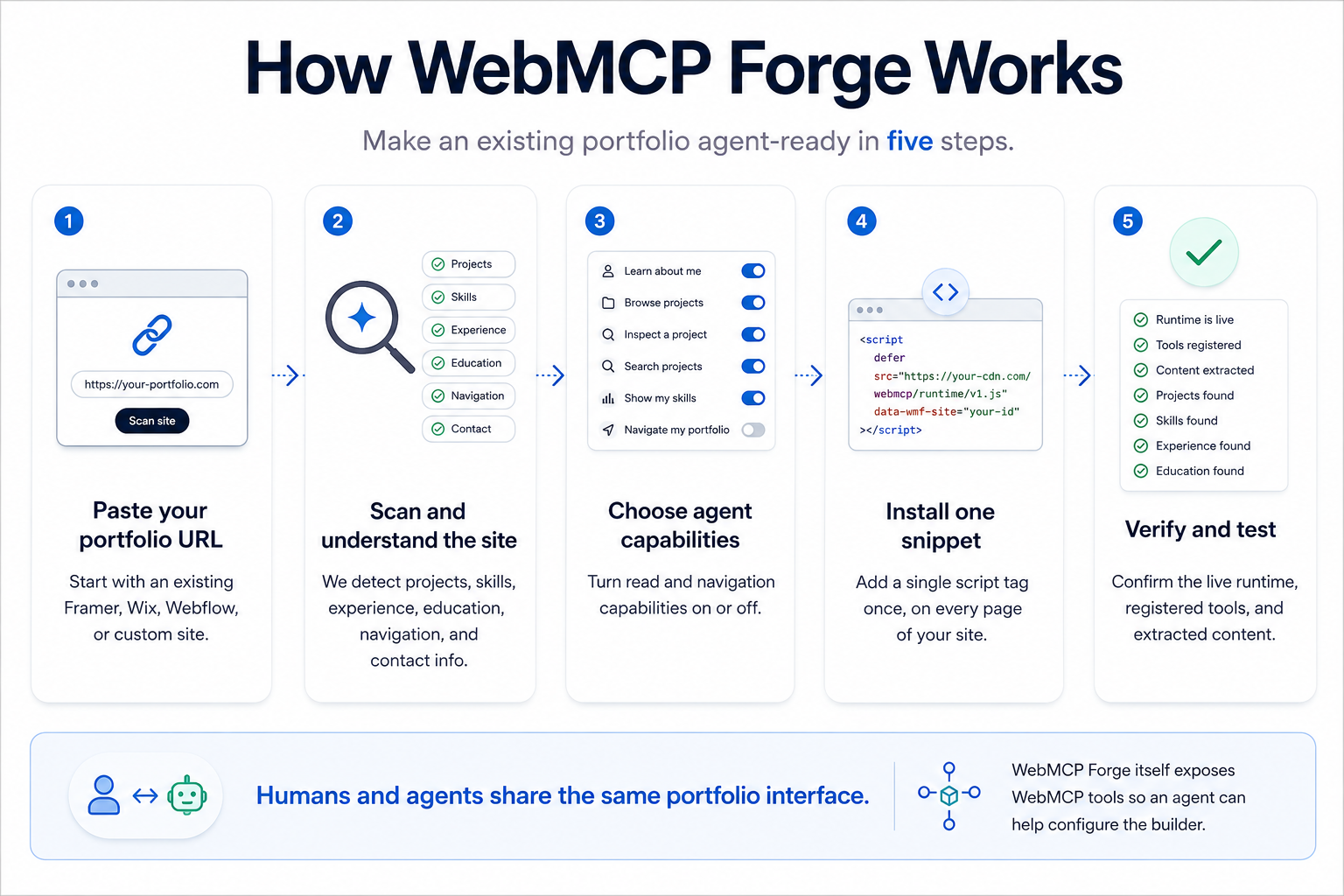
Five-step flow: paste a portfolio URL, scan the site, choose agent capabilities, install one snippet, then verify the live runtime.
-
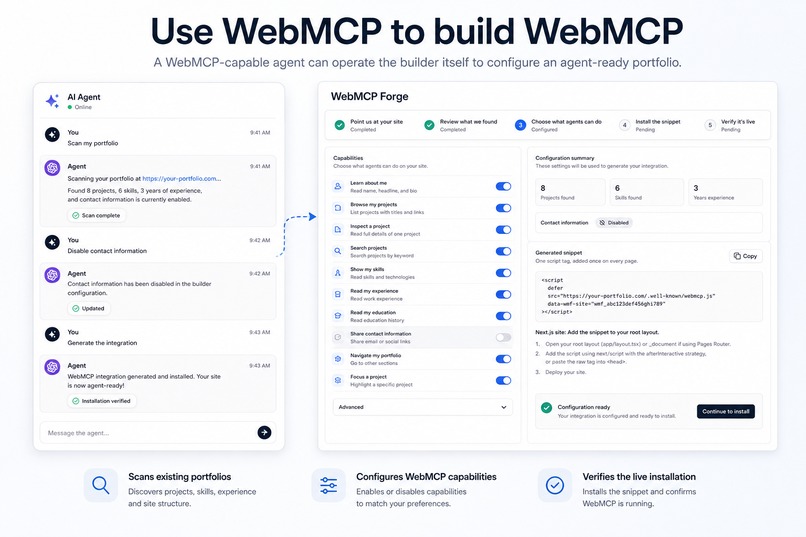
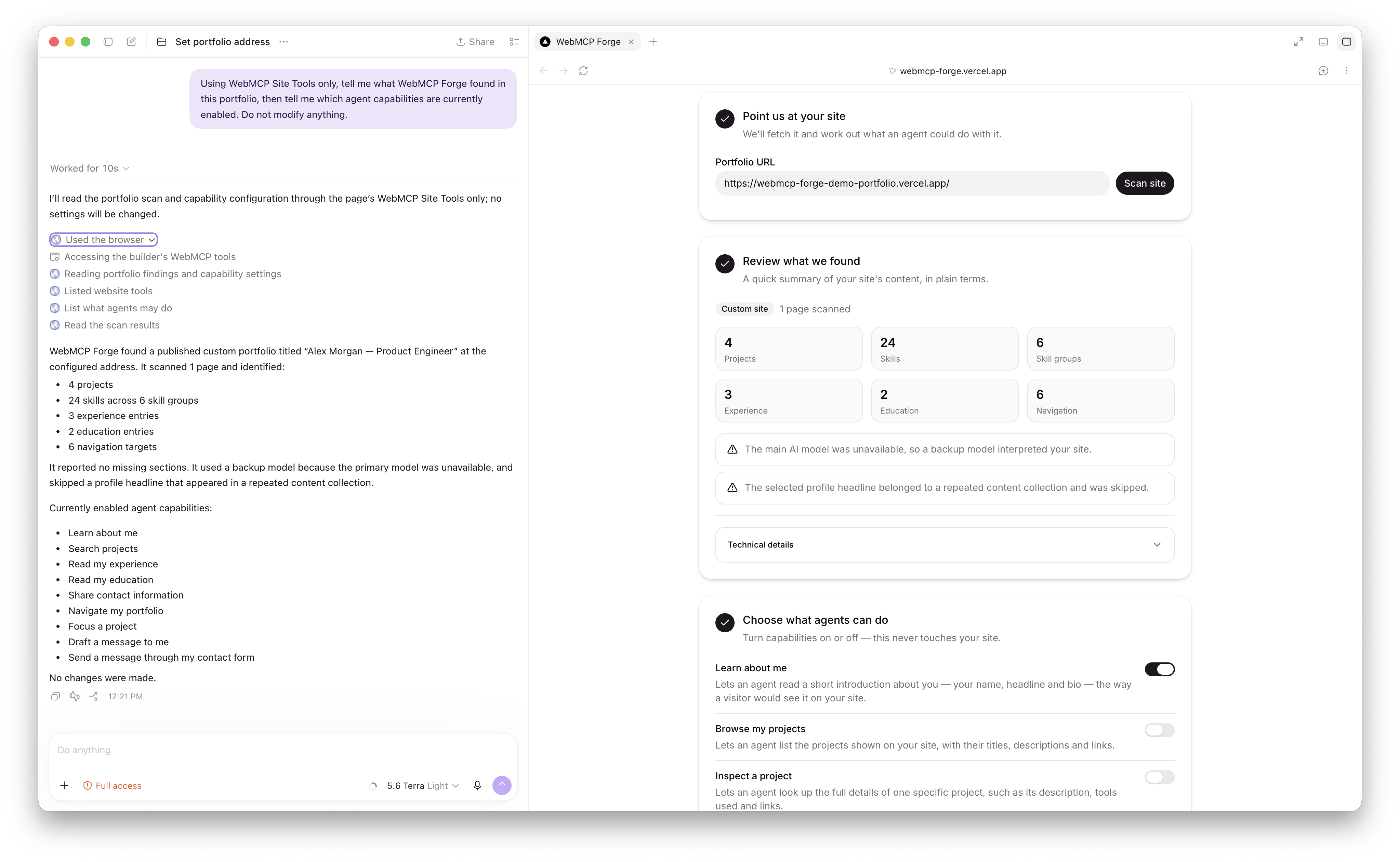
WebMCP Forge itself exposes WebMCP tools, so an AI agent can scan a portfolio, change capabilities, and generate the integration.
-
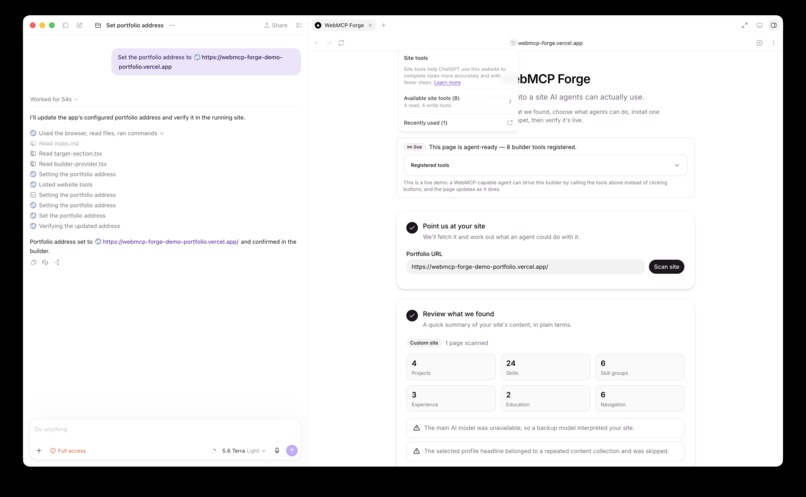
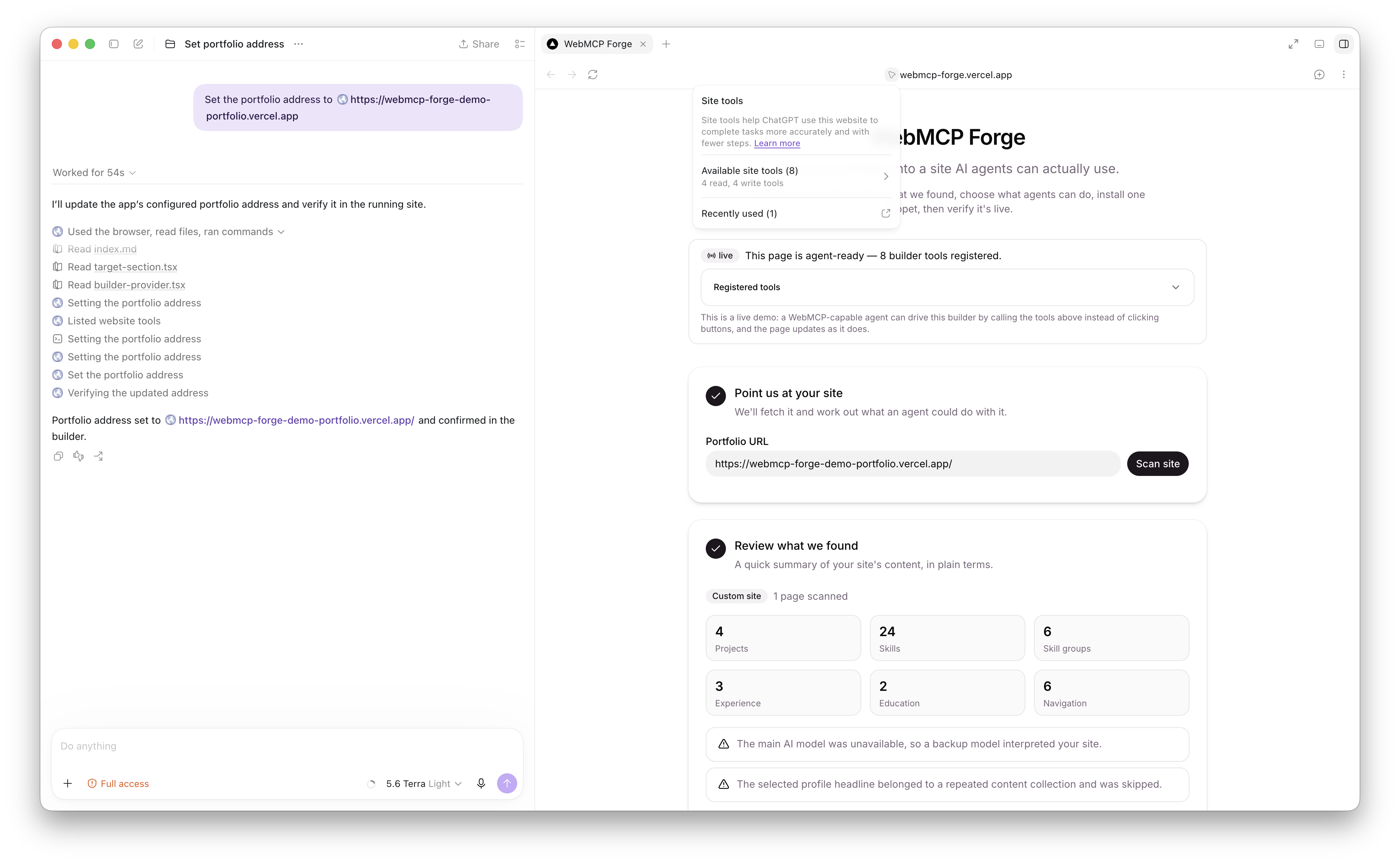
ChatGPT discovers WebMCP Forge's 8 Site Tools and uses the builder through WebMCP to update the portfolio URL live.
-
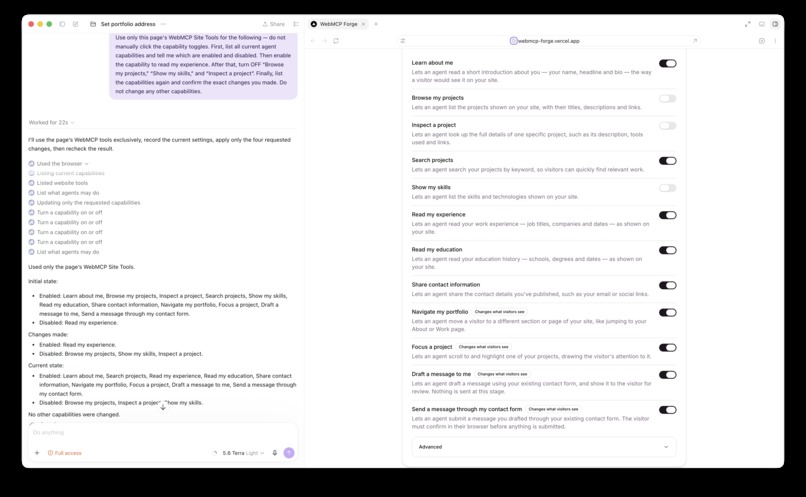
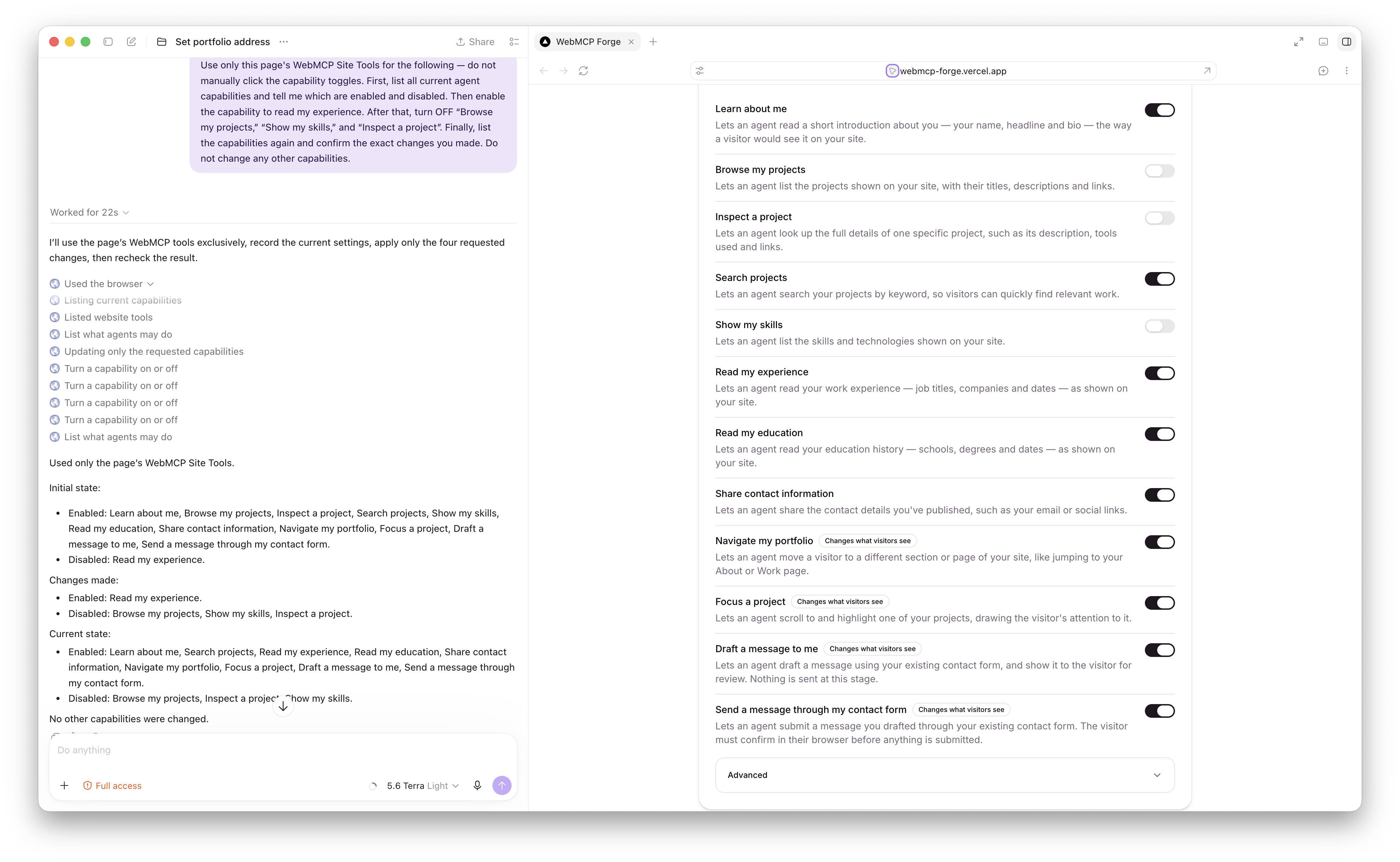
One ChatGPT request reads the current permissions, changes multiple capabilities through WebMCP tools, then verifies the updated state.
-
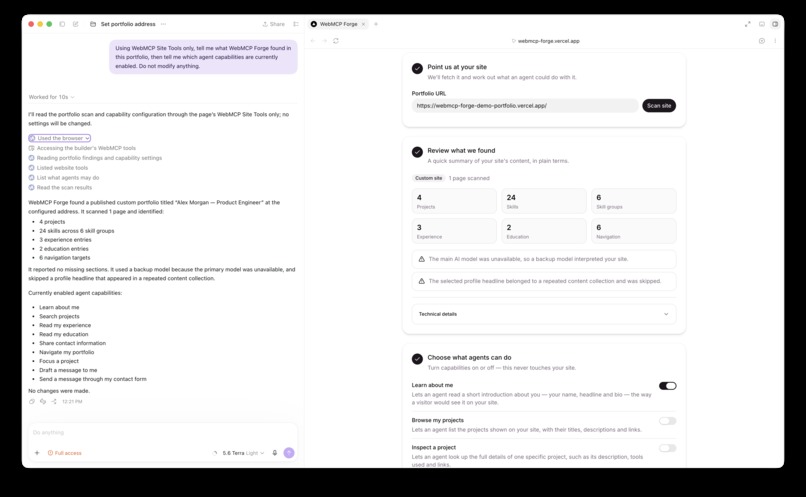
WebMCP Forge doesn't merely generate WebMCP. The Forge builder itself is an agent-operable WebMCP application.
Inspiration
WebMCP immediately stood out to me because it changes an important assumption about the web.
Most websites are designed entirely for people. An AI agent that wants to use one usually has to interpret the page, find the right controls, and interact with the interface almost like a person would. WebMCP gives a website a much cleaner option: it can explicitly describe the useful things an agent is allowed to do.
While experimenting with that idea, I realized there was still a practical problem. Adding WebMCP to an existing website is straightforward for a developer who understands the site's code, but it is a much bigger ask for someone who built a portfolio in Framer, Wix, Webflow, or another site builder.
A designer should not have to learn document.modelContext, JSON Schema, CSS selectors, or tool-calling conventions just to make a portfolio usable by an agent.
That became the idea behind WebMCP Forge:
Point it at an existing portfolio, let it understand the site, choose what agents should be able to do, install one snippet, and verify that the integration is actually live.
I chose portfolios as the first use case because they are a good example of a website that contains useful structured information but is still primarily built for human browsing. Projects, experience, skills, education, contact information, and navigation all map naturally to useful agent capabilities.
What it does
WebMCP Forge provides a guided five-step workflow for turning an existing portfolio into a WebMCP-enabled site.
1. Point it at your portfolio
The user enters the URL of an existing portfolio.
WebMCP Forge fetches the site and analyzes its structure rather than asking the user to describe how the site was built.
2. Review what was found
The scanner identifies useful portfolio content such as:
- projects
- skills
- work experience
- education
- navigation
- profile information
- contact information
The interface shows a simple summary of what was detected so the owner can verify that the site was understood correctly.
3. Choose what agents can do
The site owner decides which capabilities should be available to an agent.
For example:
- learn about me
- browse my projects
- inspect a specific project
- search my projects
- show my skills
- read my experience
- read my education
- share my published contact information
- navigate my portfolio
- focus a particular project on the page
The normal interface deliberately avoids exposing WebMCP implementation details. A portfolio owner chooses capabilities in plain language while WebMCP Forge handles the underlying tool definitions.
4. Install one snippet
WebMCP Forge generates a small script tag that can be added to the website once.
The runtime loads the site's published WebMCP configuration and registers the appropriate tools in supported browsers.
The owner does not need to regenerate the integration every time a project or skill changes. The runtime reads the current live site rather than maintaining a separate copy of the portfolio content.
5. Verify the real installation
I did not want the product to stop at "here is some generated code."
WebMCP Forge can check the actual deployed website and report whether:
- the runtime is installed
- the configuration loaded correctly
- content mappings are still valid
- WebMCP is available in the current browser
- tools were registered
- projects, skills, experience, and education can still be found on the live site
This gives the owner a concrete answer to a much more useful question:
Is my website actually agent-ready?
Why WebMCP fits this use case
A portfolio already has two audiences.
The first is a person who wants to look around the site normally.
The second can now be an agent trying to answer a question such as:
Which of this person's projects demonstrate backend development?
Without WebMCP, the agent has to derive that information from the visual website or page structure.
With WebMCP, the portfolio can expose a small set of intentional capabilities such as:
list_projects
get_project
search_projects
get_skills
get_experience
The portfolio remains the same website for a human visitor, while an agent gets a structured interface designed specifically for the task.
Some tools can also affect what the human sees. For example, focus_project can bring a requested project into view instead of only returning text to the agent.
That is the part of WebMCP I found most interesting: the agent and the person can work with the same live interface rather than having separate copies of the application.
Use WebMCP to build WebMCP
One feature I particularly wanted to include was making WebMCP Forge itself WebMCP-enabled.
A compatible agent does not have to operate the builder by guessing where its buttons and switches are.
The builder exposes its own tools for actions such as:
- setting a portfolio URL
- starting a scan
- reading the scan result
- reviewing available capabilities
- enabling or disabling a capability
- generating the installation
- checking verification status
That means a user can work with an agent to configure WebMCP for another website.
For example, the user could say:
Scan my portfolio.
Then:
Do not expose my contact information.
Then:
Generate the integration.
The corresponding WebMCP Forge interface changes as those tool calls occur.
So WebMCP is both what the product generates and part of the interface used to generate it.
How we built it
WebMCP Forge is built with Next.js, React, TypeScript, Tailwind CSS, and shadcn/ui.
The backend performs a bounded scan of a public portfolio rather than crawling the entire web.
The scanning pipeline has two stages.
Deterministic site analysis
The first stage uses normal parsing and extraction to inspect things such as:
- page metadata
- headings
- navigation links
- repeated DOM structures
- semantic HTML
- internal routes
- contact links
- likely project collections
- platform fingerprints
This gives the application a compact representation of the site before any model is involved.
Semantic interpretation
Some portfolio layouts are obvious to a person but difficult to identify from markup alone.
For those cases, Google Gemini is used to interpret the extracted structure and map it onto WebMCP Forge's known portfolio concepts.
The model does not generate arbitrary JavaScript for the user's website.
Instead, WebMCP Forge owns a fixed capability catalogue and validates the structured result before using it.
The application also has model fallback and retry handling so a scan is not tied to one model being available.
Runtime
The script installed on a portfolio is framework-independent browser JavaScript.
It can:
- load the site's published configuration
- inspect the current page
- understand the active route
- read current portfolio content
- register allowed tools through WebMCP
- expose diagnostics for verification
Normal portfolio visitors do not trigger a Gemini request when an agent calls one of these WebMCP tools.
The portfolio itself remains the source of truth.
Challenges we ran into
Portfolio websites are not standardized
The largest practical challenge was that two websites can present the same information with completely different markup.
One portfolio may have a clear /projects page and semantic <article> elements, while another may be a single dynamically rendered page with generated class names.
I did not want the system to depend entirely on model-generated guesses, so the scanner combines deterministic extraction with semantic interpretation.
Avoiding stale portfolio data
An early architectural temptation was to scan the website, copy its projects into WebMCP Forge, and have the generated tools return that stored data.
That would have made the demo easier, but it would also mean the WebMCP representation became outdated as soon as the owner changed the portfolio.
Instead, the configuration stores information about how to find the content, while the runtime reads the live site.
If the owner adds another project using the same structure, the WebMCP tools can see it without creating a new integration.
Making installation verifiable
Generating a script is not the same thing as proving the script works.
I therefore added a verification workflow that checks the installed runtime against the real deployed site and reports what is actually available.
Keeping the product understandable
WebMCP concepts make sense to developers, but they are not language I would expect a designer or portfolio owner to know.
A lot of the interface work was therefore about hiding implementation details without hiding what the user is authorizing an agent to do.
Accomplishments that we're proud of
The part I am happiest with is that the project is more than a WebMCP code generator.
The complete workflow connects:
scan → understand → configure → install → verify
and keeps the original website at the center of the system.
I am also happy that the generated tools are generalized. WebMCP Forge does not create tools such as get_sqratch_project or bake a current list of project names into the integration.
Instead, capabilities such as list_projects and get_project work against the current portfolio structure.
Another important milestone was getting WebMCP Forge's own builder tools working. It demonstrates the same idea from the opposite direction: the agent can work with a purpose-built interface rather than treating every website as an unknown collection of buttons.
Finally, the live verification flow helped turn the project from a prototype that outputs code into something that can tell a user whether the integration is really present and functioning.
What we learned
The biggest lesson for me was that making a website "agent-ready" is not the same thing as adding a chatbot.
The website already contains the domain logic and information. WebMCP gives the site a way to describe meaningful capabilities directly to an agent.
I also learned that good tool design matters more than exposing a large number of tools.
A small collection of clear capabilities such as list_projects, get_project, and navigate_site is more useful than mirroring every button and DOM element on the page.
Another important lesson was to keep the website itself as the source of truth whenever possible. A WebMCP layer should describe how an agent can work with the application, not quietly create another version of the application that has to be maintained separately.
Finally, working on the project forced me to think about the interface from three perspectives at once:
- what the website owner understands
- what the visitor sees
- what an agent needs
That was a different design problem from building a normal web application.
What's next for WebMCP Forge
The current version focuses on proving the end-to-end portfolio workflow.
There are several directions I would like to take next.
Better multi-page support
The underlying architecture already considers routes, but I would like to make the scanner more capable of understanding larger portfolios with project indexes and individual case-study pages.
Visual mapping and correction
For unusual sites, owners should eventually be able to click on part of their rendered portfolio and tell WebMCP Forge:
This is my project collection.
That would provide a simple fallback when automatic detection is uncertain.
Change monitoring and repair
The verification system can already tell whether expected content is still being found.
A natural extension would be periodic monitoring and an option to repair mappings when a portfolio is redesigned.
Deeper platform integrations
The current approach intentionally uses one portable script.
Native integrations for Framer, Webflow, and Wix could make installation even easier.
Natural-language live testing
A useful testing experience is letting a user ask normal questions such as:
Which projects use Next.js?
and then showing which WebMCP tool was selected, what arguments were passed, and what came back from the real portfolio.
Beyond portfolios
Portfolios are a focused first use case, but the underlying idea is broader.
The long-term direction for WebMCP Forge is a managed agent-readiness layer that can help existing websites expose useful, intentional capabilities without requiring every site owner to become a WebMCP developer.
Built With
- api
- cheerio
- css
- gemini
- html
- javascript
- next.js
- postgresql
- prisma
- react
- shadcn/ui
- supabase
- tailwind
- typescript
- vercel
- webmcp
- zod


Log in or sign up for Devpost to join the conversation.