-
-
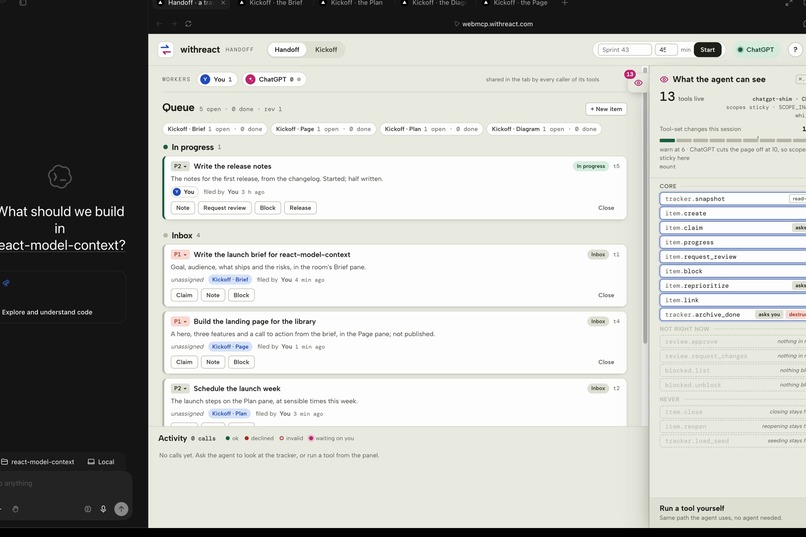
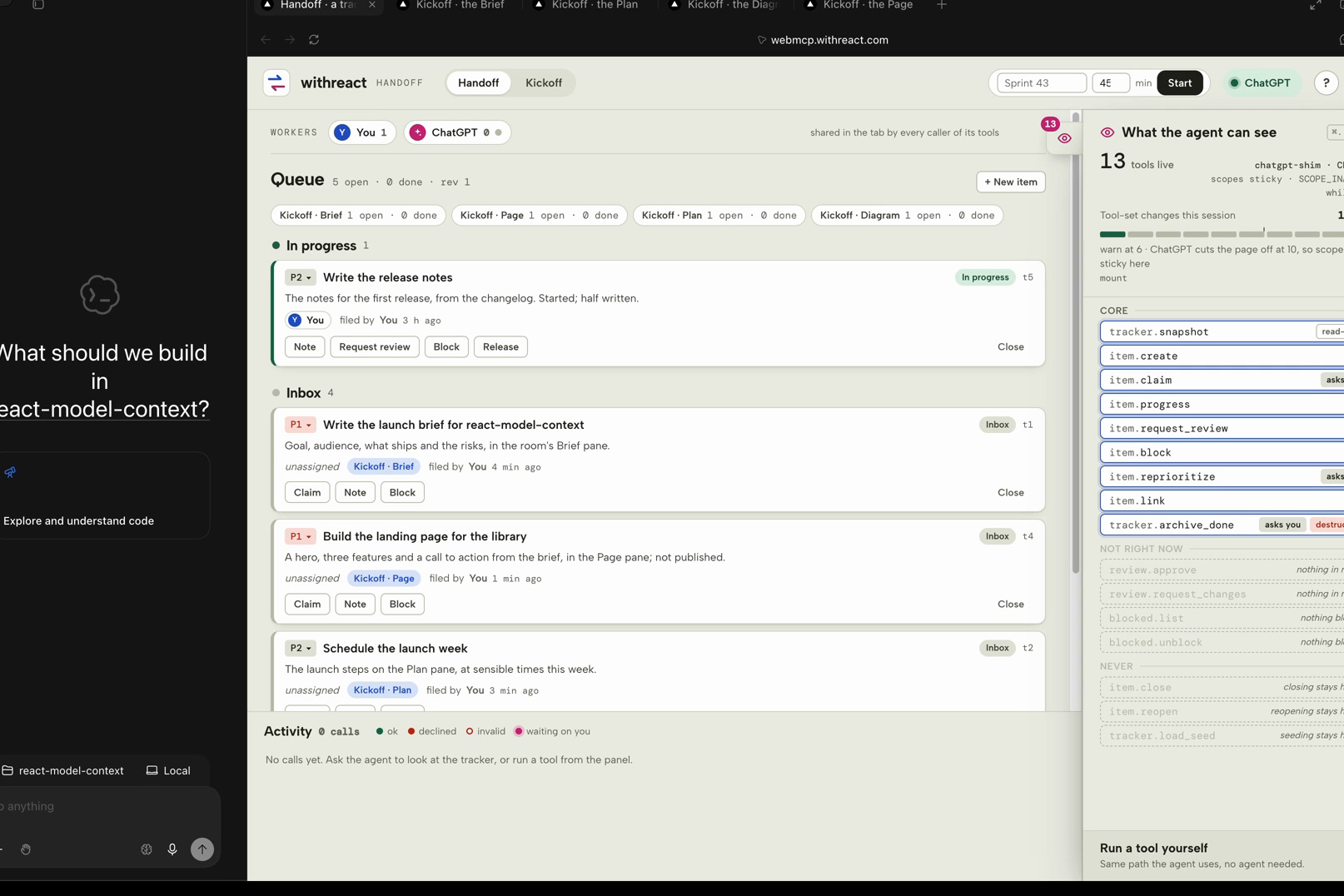
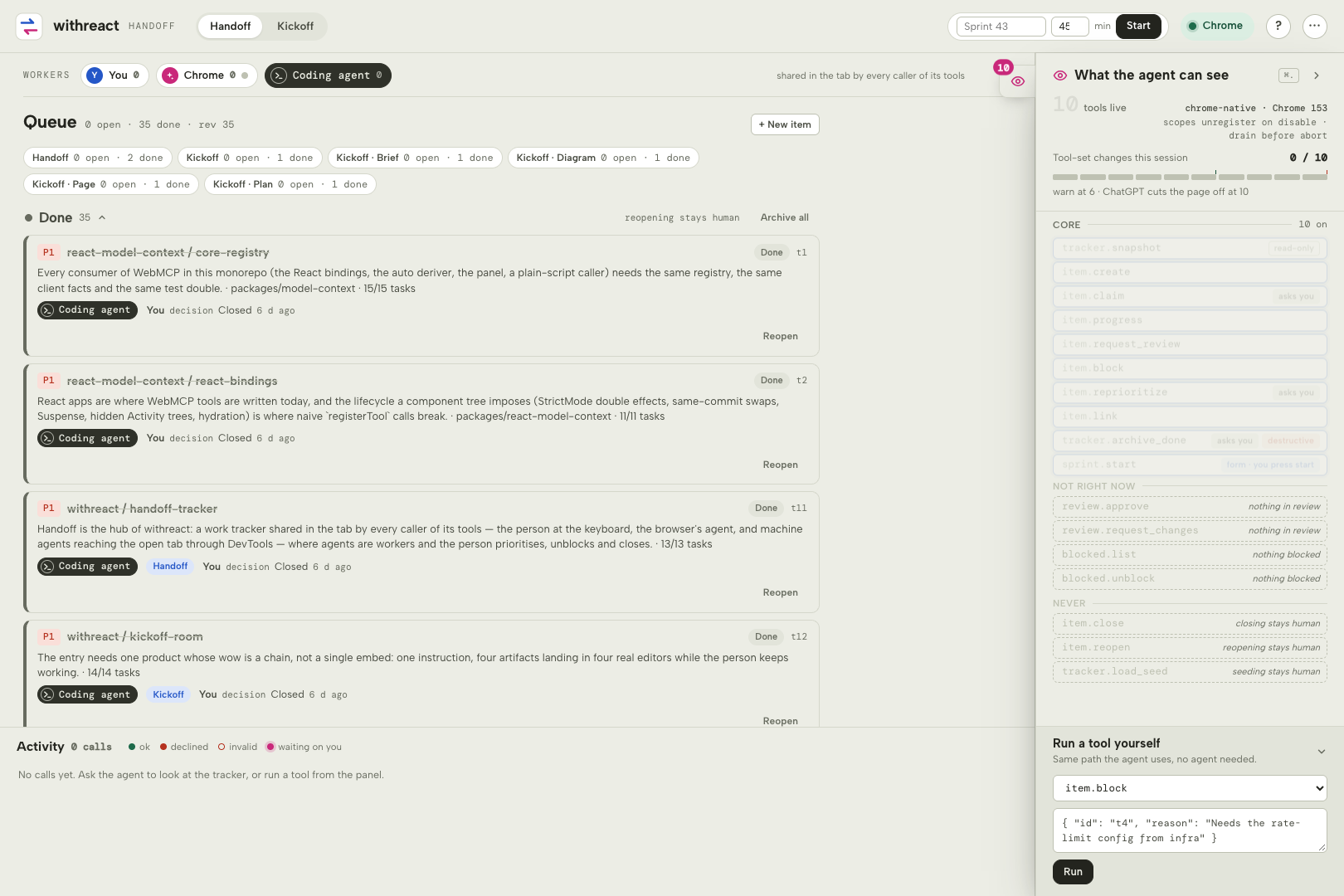
Handoff in the ChatGPT desktop app: the shared queue, with the panel listing the agent's tools, the change budget and what is withheld.
-
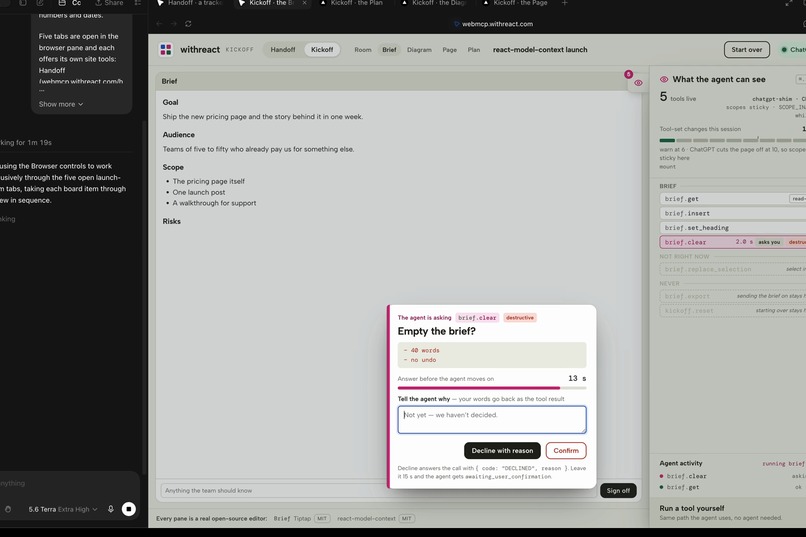
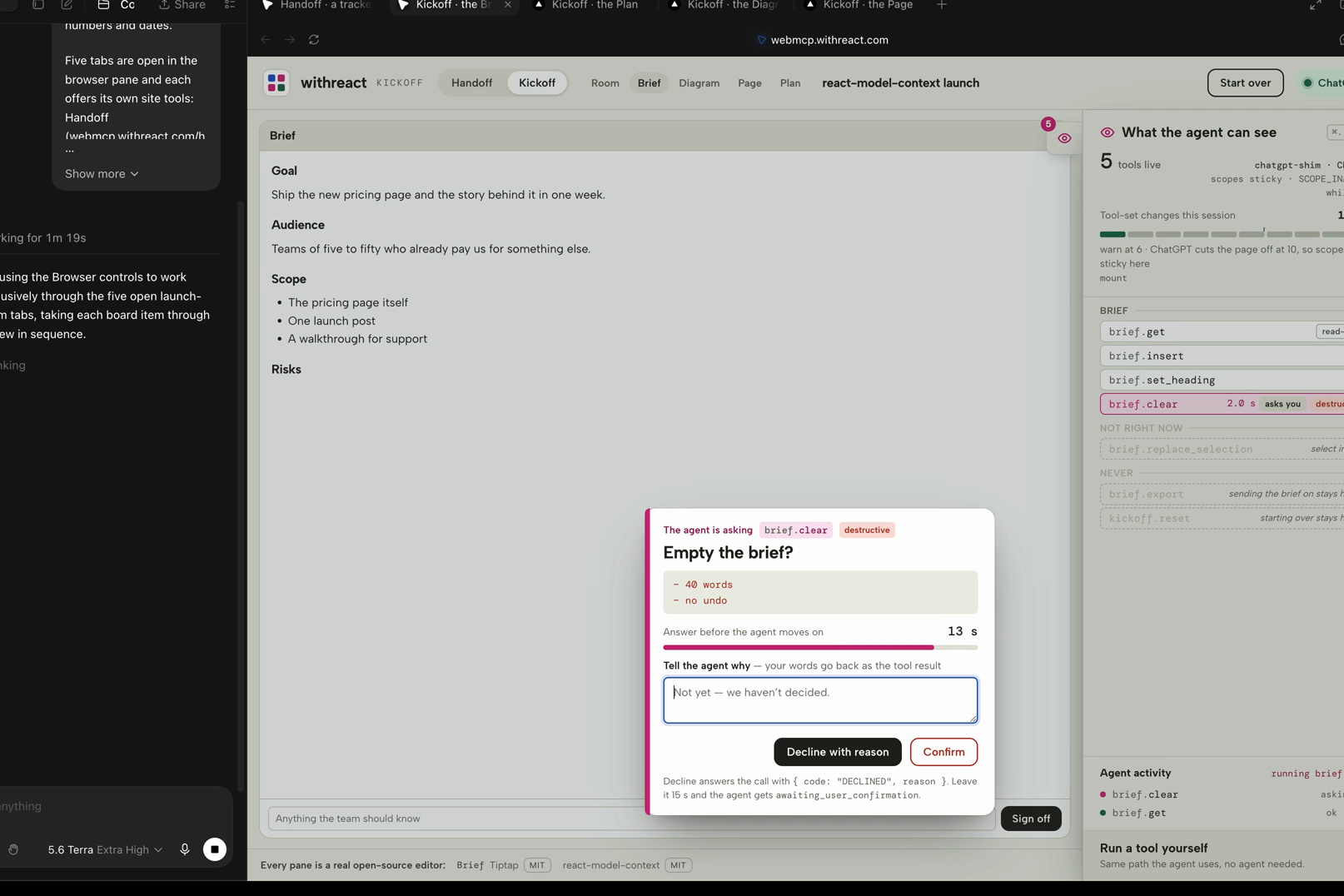
The page asks before emptying the brief: Decline with reason is the primary action, and the typed reason returns as the tool's result.
-
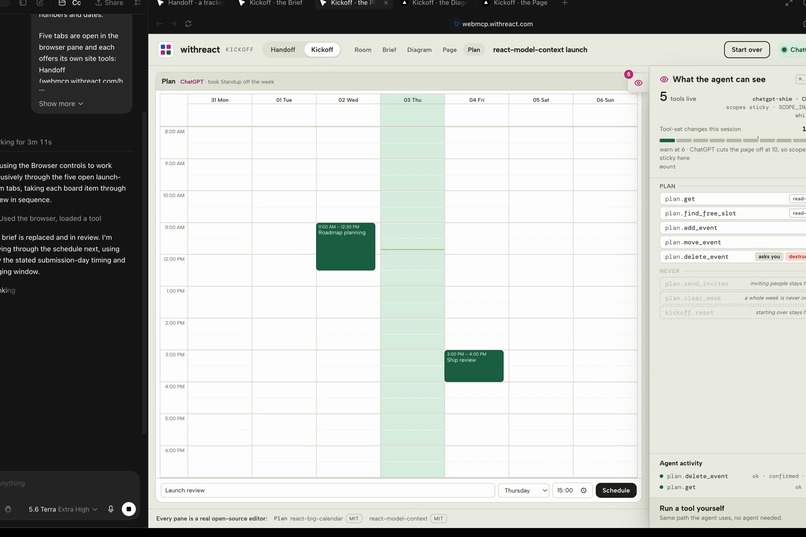
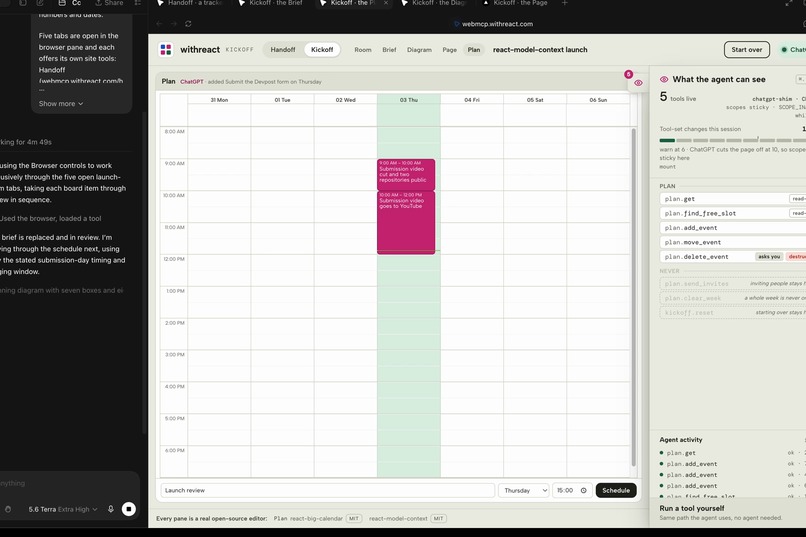
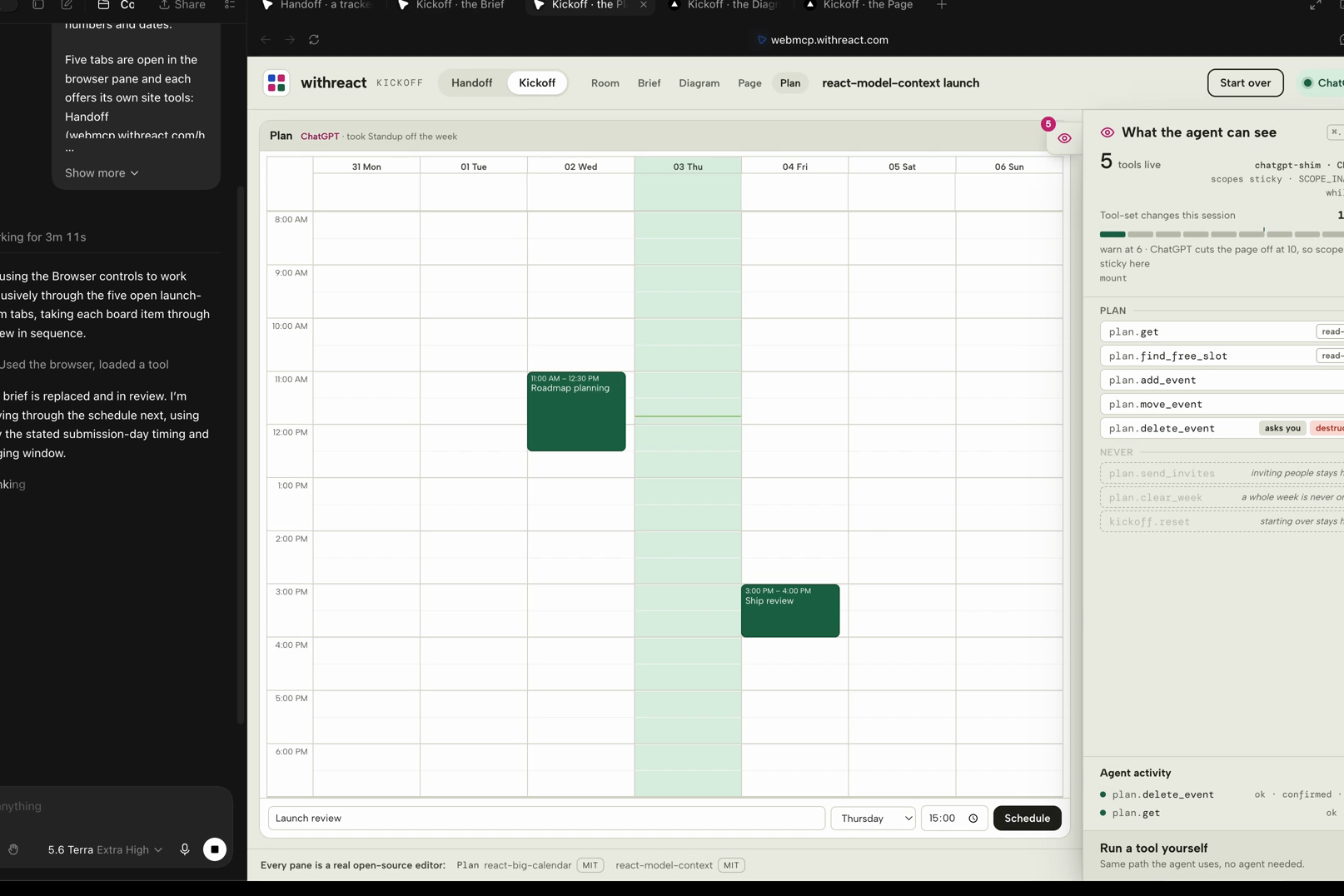
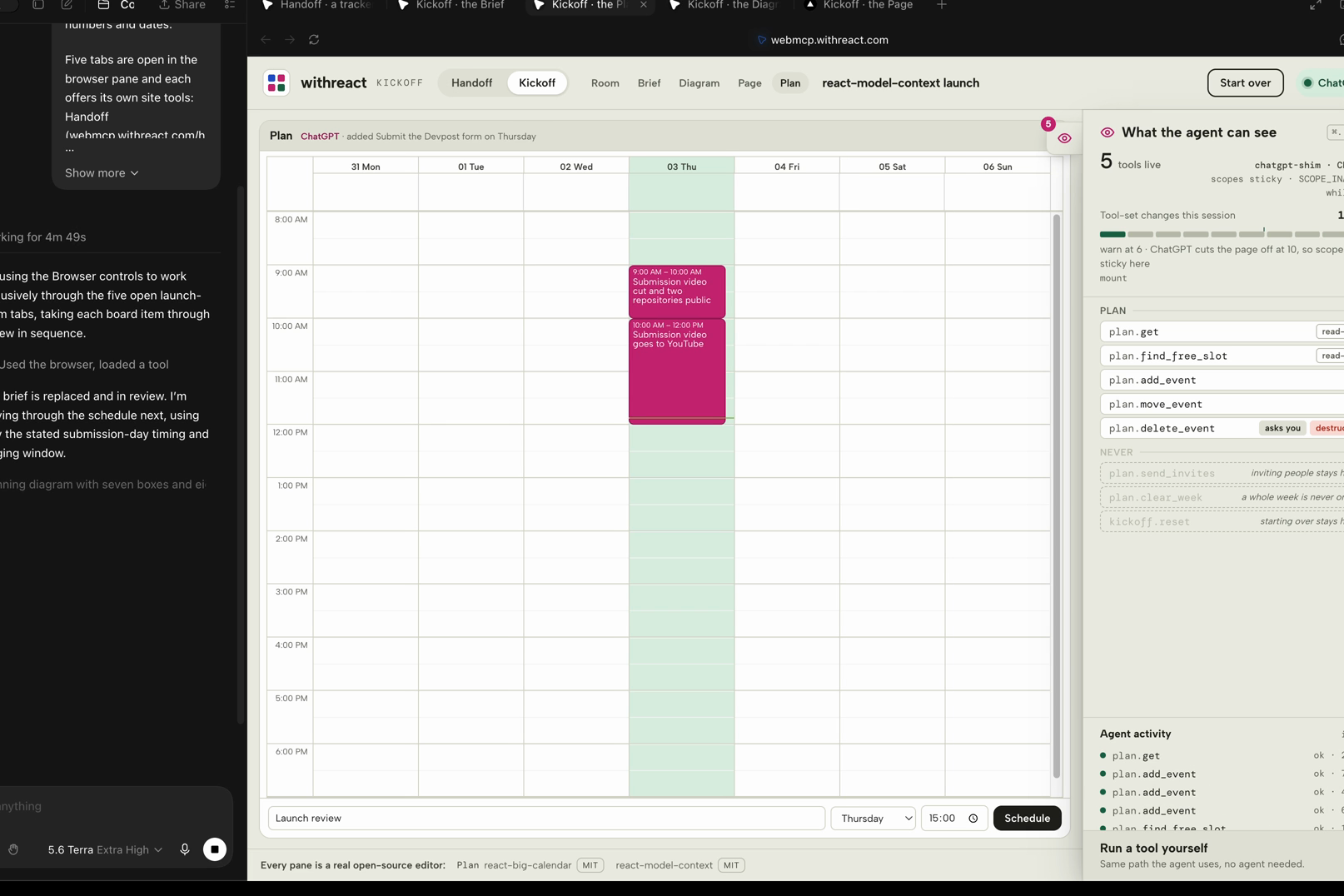
The plan: the agent books the launch week on react-big-calendar through plan.* tools, on the calendar's own tab.
-
The diagram: the agent draws the flow in Excalidraw through diagram.* tools, shapes with ids the page can name back.
-
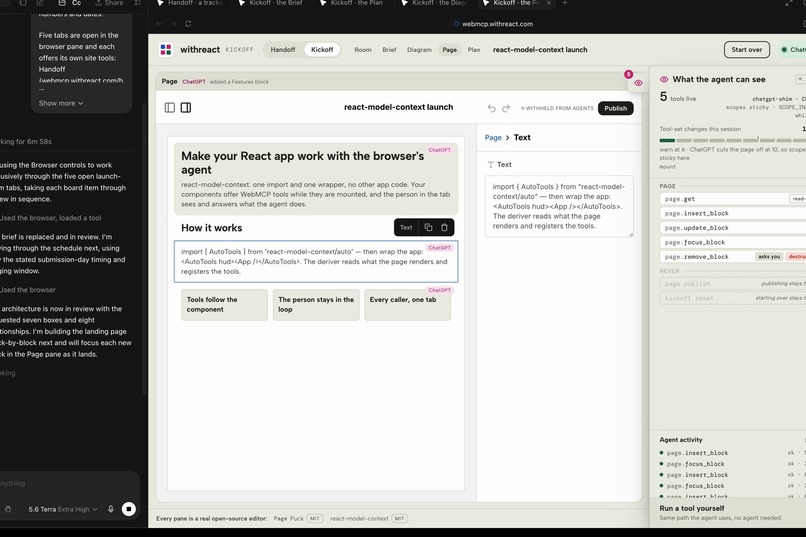
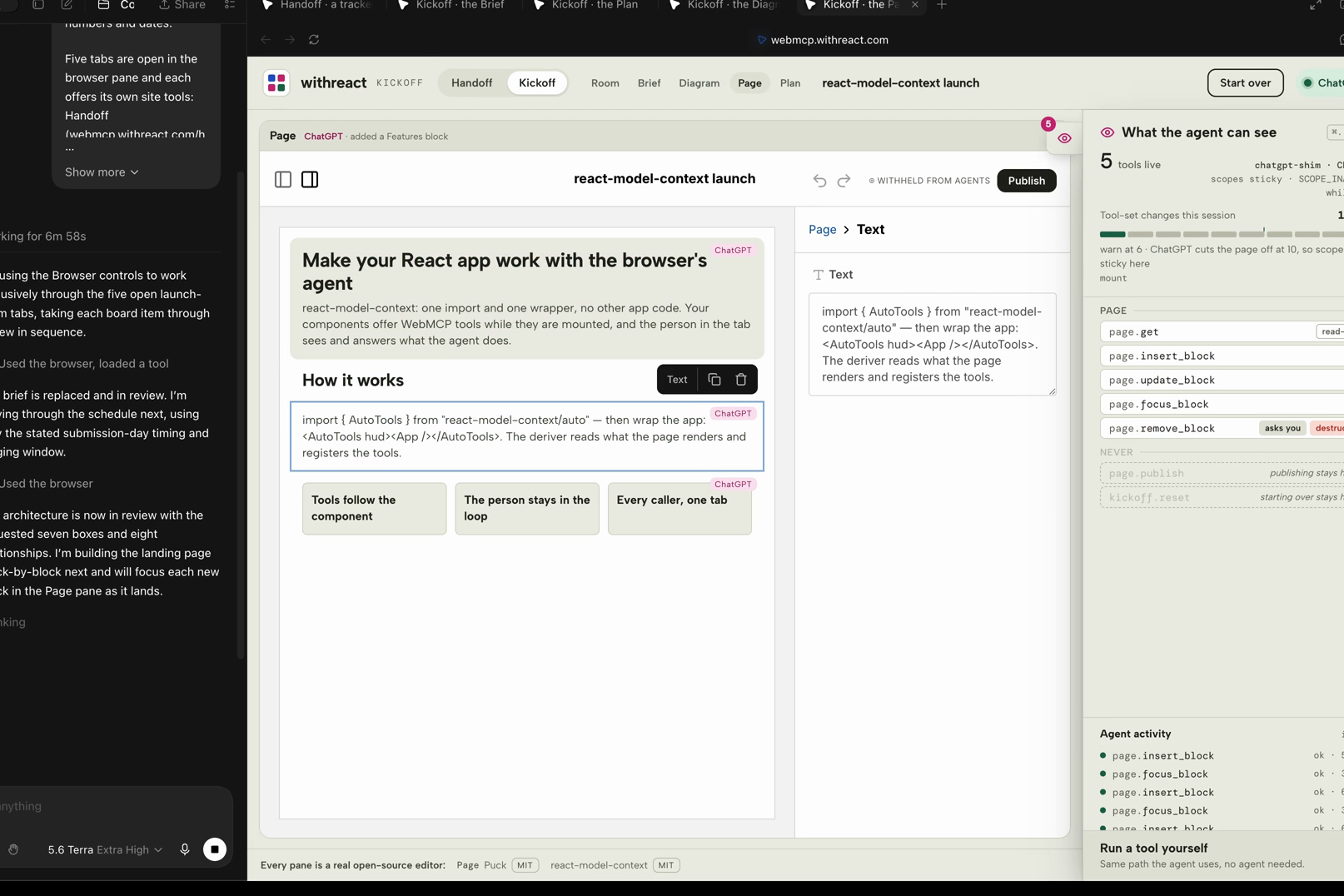
The landing page: the agent adds sections to the Puck layout through page.* tools; Publish is never registered and stays with the person.
-
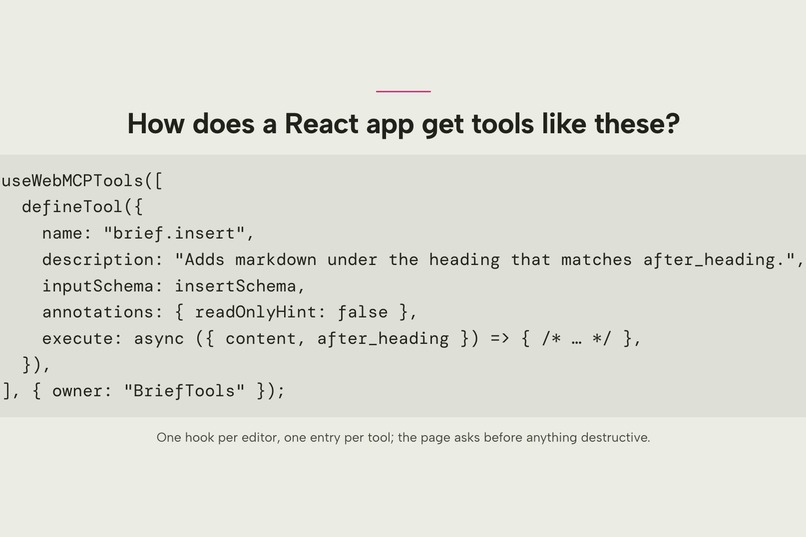
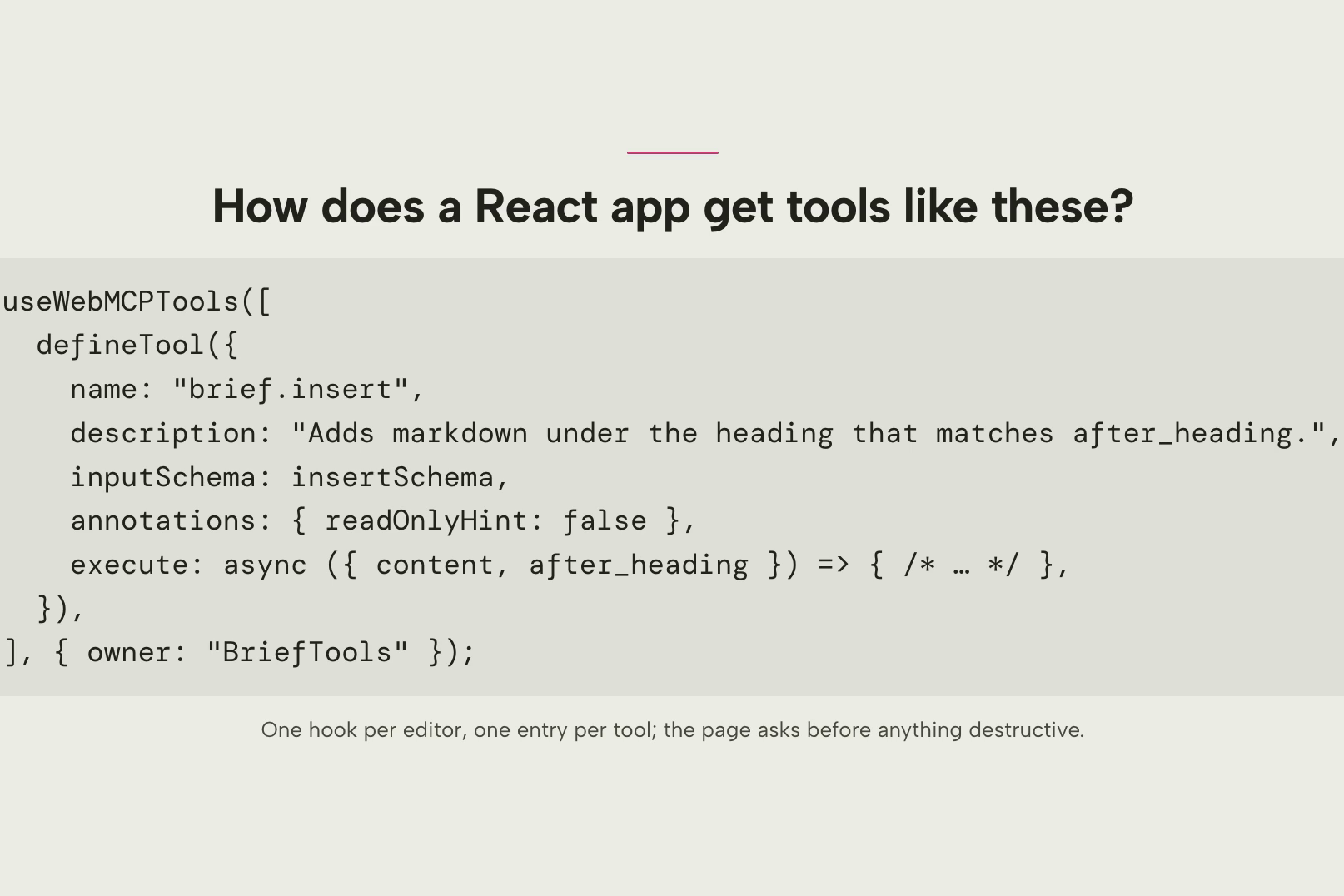
How a React app gets tools like these: one hook per editor, one entry per tool; the page asks before anything destructive.
-
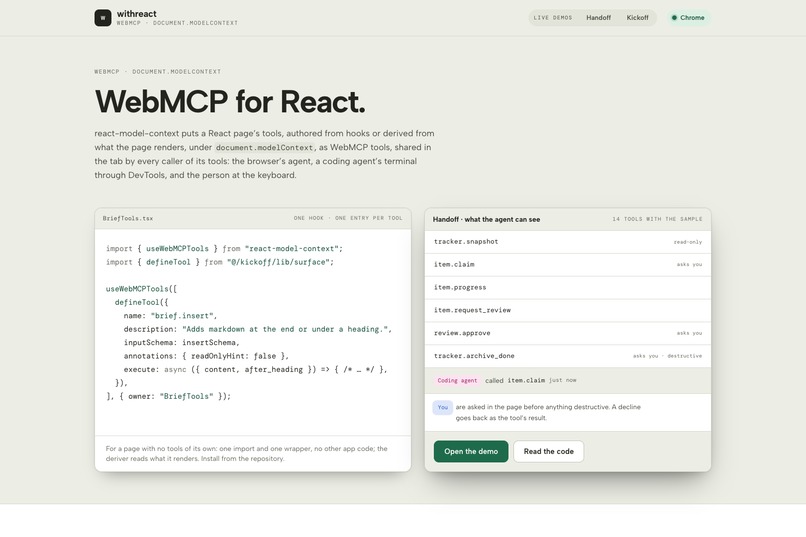
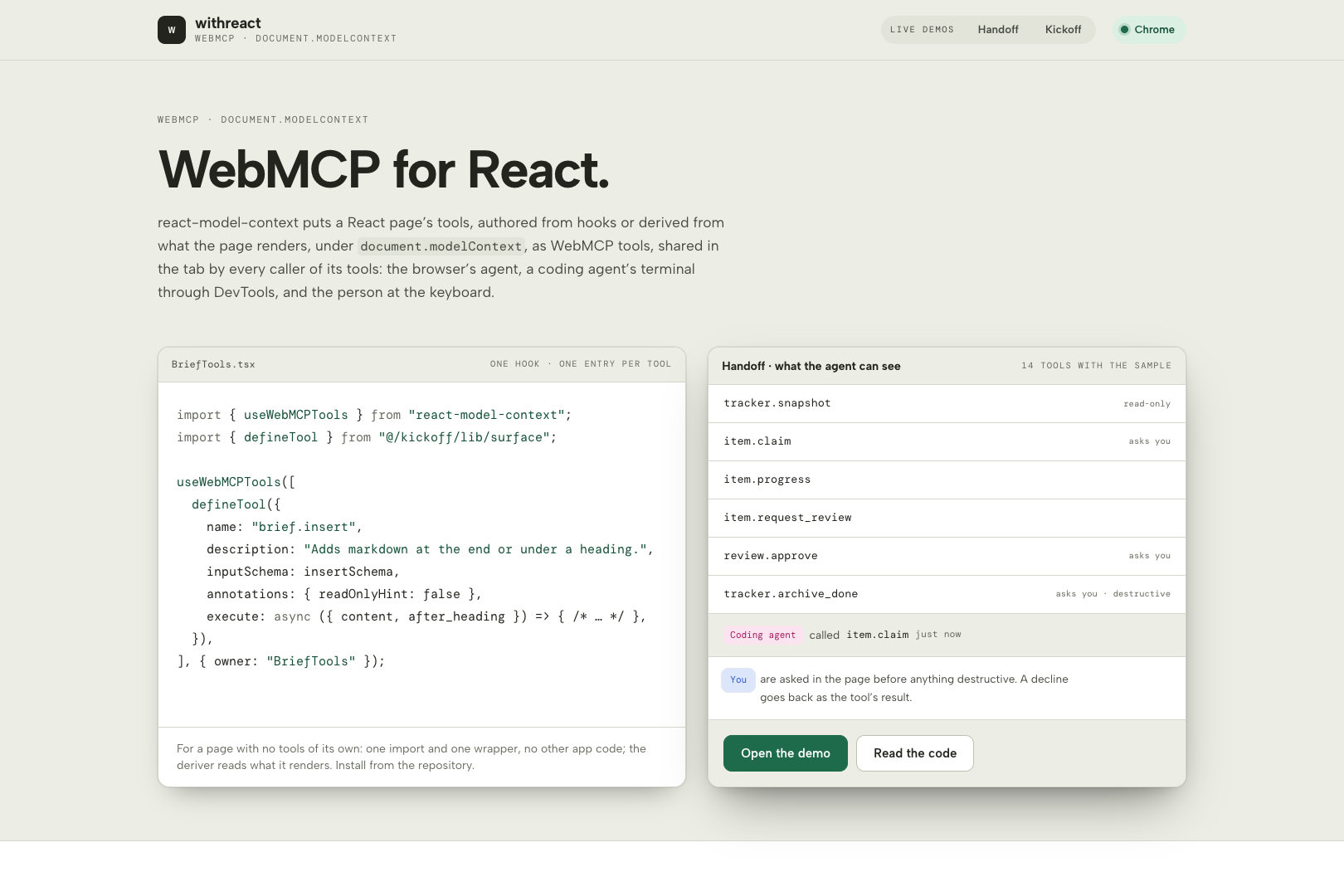
The live landing page: the entry’s name, a real tool authored from hooks, how it works, and the four packages the library ships.
-
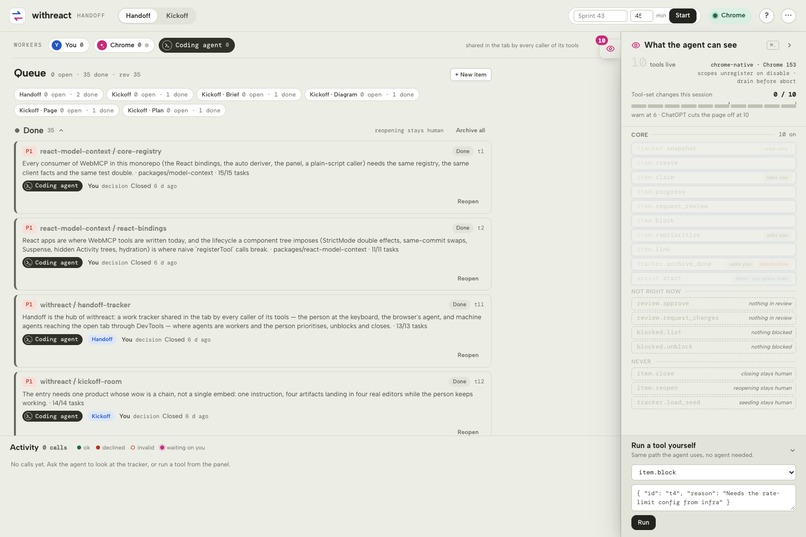
Handoff seeded with the entry's own build plan: every archived OpenSpec change from both repositories is an item in the queue.
Inspiration
Instead of asking which app to build for WebMCP, I asked how it could reach the open-source tools people already use. Tiptap, react-big-calendar, Excalidraw and Puck cannot be driven from outside the tab; a work queue and a launch room that give each of them a tool set of its own, on a React library that registers tools from hooks and, for a page with no tools, derives them from what it renders with one import and one wrapper, became the entry: Handoff and Kickoff on withreact, built on react-model-context.
Why this use case is a strong fit for WebMCP
Intent, not coordinates. Handoff (a work queue) and Kickoff (a launch room) are each shared
in the tab by every caller of its tools. item.claim({ id: "t4", as: "Coding agent" }) is one
call where the screen is four steps, and a clicking agent guesses which card is third. On
2026-09-01 the ChatGPT desktop app read the tracker, switched tab, claimed and signed the item in
one turn of 46 s (observation, below).
Policy and scope, in the page. Taking an item off a person, approving and archiving stop for a
dialog, and the typed reason returns as the tool's result — "no, because…" instead of a silent
failure the agent retries. Closing, reopening and seeding are never registered, and are listed as
withheld with a reason: three in Handoff, six in Kickoff (src/tracker/lib/catalog.ts). review.*
and blocked.* exist only while something is in review or blocked — 10 tools on an empty queue,
14 with the sample. Each Kickoff editor also has a tab of its own (/kickoff/brief, /kickoff/plan,
/kickoff/diagram, /kickoff/page) that registers that editor's tools and nothing else — 5, 6, 4
and 5 — so an agent working the launch switches to the tab whose tools it needs and the page's own
panel shows exactly those.
Four editors, one tool set. kickoff.snapshot returns all four panes in one call (4 ms in
the transcript) instead of four reads, and the room costs one tool-set change instead of
four. Tiptap, Excalidraw, Puck and react-big-calendar are not drivable from outside; brief.*,
diagram.*, page.* and plan.* are.
How it creates a better experience
The person never leaves the page. The dialog opens where they are, names who is asking and what
would change, and Decline with reason is the primary action, so the sentence they type is the
tool's result — one dialog instead of a rolled-back change. Confirm stays disabled 400 ms so a
mid-click cannot approve by accident (src/components/ConfirmDialog.tsx); read-only tools never
interrupt, and the activity drawer shows that sentence beside the call. The panel "What the agent
can see" at https://webmcp.withreact.com/handoff shows the tool count, the change budget and the withheld
list — what a person, or a judge, can check before answering. The live origin is in the WebMCP
origin trial: opening the URL is the whole setup, and the status pill reads Chrome.
What people and agents can do together that was hard or impossible before
- A queue three kinds of caller share in one tab. A coding agent claims an item and posts progress into the page a person is watching, under its own name, in two calls from its terminal, with no screenshots or coordinates.
- One instruction, four artifacts. It writes the brief, draws the diagram, adds the section and books the week while the person types in the Brief — one turn, four applications.
- A form the agent fills, the person starts.
sprint.startis a declarative<form toolname>: the agent fills it, nothing runs until the person presses Start. - The entry tracks its own construction. Handoff seeds from both repositories' archived OpenSpec changes, so the queue a judge opens is the work that built the site.
- An app with no tools gets a floor of them. One import and one wrapper, no other app code
turns a rendered React list into
list_*,add_*and one tool per page-level button.
How WebMCP was implemented
Every tool reaches document.modelContext.registerTool through one framework-free registry
(packages/model-context/src/registry.ts in react-model-context), so the browser's agent, the
terminal's agent and the page's UI land in one activity feed, not three. React hooks bind a tool's
lifetime to its component's, so the tool set scopes with the UI through toolchange; on the
ChatGPT desktop shim scoped tools stay registered and answer SCOPE_INACTIVE, because churn there
costs a page its tools. Failures come back as data (INVALID_INPUT, DECLINED with the reason,
NOT_READY); calls in flight drain before an abort, which Chrome up to 152 needs. Snapshots carry
readOnlyHint and untrustedContentHint, destructive tools consequentialHint. Both repositories
were built spec-first from 2026-08-29, inside the submission period, with dated commits and one
archived OpenSpec change per feature — git log and openspec/changes/archive/ show it.
Evidence
Measured on the live origin, 2026-09-02. Five Puppeteer drivers: Handoff 31/31 checks on
Chrome for Testing 152 and 153, Kickoff 31/31, the four editor tabs 33/33 and the diagram layout
23/23 on 152, all with zero console errors, and the same tab driven through chrome-devtools-mcp,
11/11. On Chrome, Handoff registers 10 tools empty and 14 with the sample; the whole Kickoff room
registers as one tool-set change. The drivers are in scripts/qa/; bun run qa:all against the
live origin regenerates the transcripts (the reports directory itself is not committed).
In the ChatGPT desktop app, walked by hand 2026-09-01. A session binds to that thread's own
in-app browser — the site opened as a tab there, the Browser plugin mentioned in the composer; a
window open elsewhere is not enough. With Handoff and Kickoff in two tabs, the agent switched to
the tab providing the tool and called it: t4 moved from Inbox to In progress, attributed to
ChatGPT on the card and in the workers strip, on a turn the app clocked at 46 s. Counts differ
there because its scopes are sticky — Handoff lists 13 tools constantly, Kickoff 21 — and the
change budget stayed at 1 of 10 all session. With the review lane empty, review.approve stayed
listed and answered SCOPE_INACTIVE; page.publish was never listed, and the app did not press
Publish when asked. Everything outside these two paragraphs is design, covered by the drivers and
the test suites.
Both repositories are MIT.
Challenges
- Two clients, two lifecycles. The ChatGPT desktop app reaches WebMCP through a shim with a budget of ten tool-set changes per agent turn, sticky scopes and about twenty seconds per call, while Chrome fires
toolchangeon every registration. Hooks that bind a tool to its component's lifetime would spend that budget in one room, so on the shim scoped tools stay registered and answerSCOPE_INACTIVEinstead of unregistering. - Unregistering under a call in flight. Chrome up to 152 rejects the page-side caller when a tool goes away mid-call, so the registry drains calls in flight before it aborts a registration.
- Editors are not drivable from outside. Contenteditables and canvases give an agent nothing to hold on to, so each editor got a small tool set of its own that speaks the editor's model: blocks under a heading, events on a day, shapes with ids, a section in a page layout.
What's next
Publishing the three packages to npm after judging, once the core has a name that is free there; the site already builds and vendors them as tarballs, which is how a clean clone installs the library today.
Testing instructions
Chrome 152 or later — nothing to install. Open https://webmcp.withreact.com. The live origin is in the WebMCP origin trial, so no flag is needed; the status pill in the header should read Chrome.
The ChatGPT desktop app. Open the URL in the app's in-app browser with Site tools on for the page — a session binds to that thread's own in-app browser, so open the site as a tab there and mention the Browser plugin in the composer before asking (a window open anywhere else is not enough).
Any Chrome 149 or later, off the live origin (a preview URL or localhost): enable
chrome://flags/#enable-webmcp-testing and relaunch.
The two-minute path.
- The root
/is the landing page: what react-model-context is, the one import and one wrapper, and links to both products and both repositories. Handoff at/handoff. The empty queue offers Load the build plan (this entry's own archived changes) and Load sample — press Load sample. Open What the agent can see: on Chrome, 10 tools on an empty queue and 14 with the sample (the ChatGPT desktop client lists 13 throughout, because its scopes are sticky), withitem.close,item.reopenandtracker.load_seedlisted as withheld, each with its reason. - Ask the agent: read the tracker, take the rate limiter item, and note that you reproduced it. The card moves to In progress under the agent's name, with its note on it.
- Ask it to take t1, the item you already hold. The page asks, in the page. Press Decline with reason and type one — the agent gets your words back as the tool's result.
- Ask for a sprint called Sprint 43, 45 minutes. The agent fills the form; nothing starts until you press Start.
- Kickoff at
/kickoff, Load the sample launch. One instruction — add a risk to the brief, draw the flow, add a pricing section, and book the launch review on Thursday — writes into all four panes, and you can keep typing in the Brief while it does. The panel's change- budget row moves by one, not by four. - Open an editor on its own tab —
/kickoff/page— and ask for a hero. The panel lists fivepage.*tools and no room tool; the room at/kickoffshows the block the moment you come back.
Optional, from a terminal: point chrome-devtools-mcp at a Chrome with a debugging port open
on the site, then list_webmcp_tools and execute_webmcp_tool — item.claim({ id: "t4", as: "…" })
puts a chip with that name in the workers strip of the tab you are watching.
No account, no credentials, no backend; state lives in the tab.
Built With
- bun
- chatgpt
- chrome
- chrome-devtools-mcp
- css-modules
- document.modelcontext
- excalidraw
- next.js
- openspec
- puck
- puppeteer
- react
- react-big-calendar
- react-grid-layout
- tiptap
- typescript
- vercel
- vitest
- webmcp

Log in or sign up for Devpost to join the conversation.