
Inspiration
Every design tool is a wall of menus, and every "AI design" demo is a black box that hands you a finished picture. We wanted the third thing: a person and an agent at the same canvas, where the agent does the tedious work and the person keeps the final say. WebMCP made that buildable. A page can declare exactly what an agent may do, so the agent does not have to guess at the UI, and the human's consent can be part of the protocol instead of a dialog bolted on afterwards.
What it does
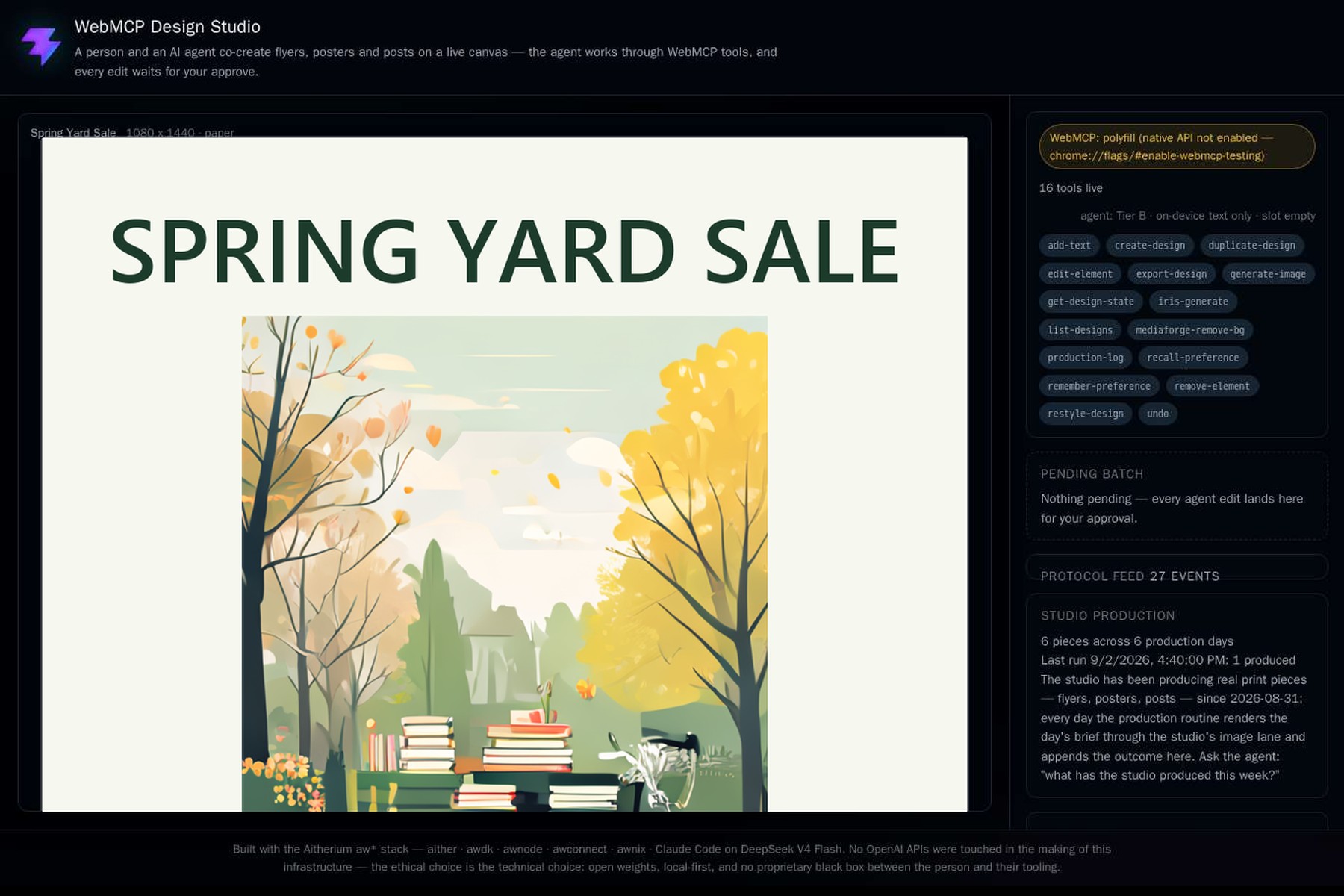
WebMCP Design Studio is a live canvas for flyers, posters and social posts. Say "make a spring yard sale flyer, Saturday 8am to 2pm, 14 Orchard Lane" and the agent creates the design, generates the artwork, sets the type and lays it out. Nothing is committed until you approve it. Every edit lands in a pending batch, approve-batch exists as a tool only while there is something to approve, undo appears with it, and a toolchange event fires as they come and go, so any agent can see the moment a human is required. Seventeen tools cover the whole loop: designs, elements, image generation on-device or through the fleet, background removal, restyling, export, memory of your preferences, and a production log that lets the agent tell you what the studio has made this week. A protocol feed shows every registration and call as it happens.
How we built it
Vite, React and TypeScript, with a fabric.js canvas. One ToolRegistry reconciles the design state onto document.modelContext when the native API is present and onto a spec-shaped polyfill when it is not, so the same tools work in ChatGPT's browser, in Chrome with the WebMCP flag, and everywhere else. The studio's own in-page agent drives the page through the same getTools and executeTool surface an external agent would, so the WebMCP surface is exercised by real traffic. The consent controls are also registered declaratively as a
, the spec's second path. Images come from an on-device WebGPU model or from Sana on our fleet through the studio's own proxy; text comes from Bonsai 27B with an automatic fallback lane. It deploys as a static site on GitHub Pages with 205 tests behind it.Challenges we ran into
Making consent a protocol object rather than a UI element took the most design work: the batch, the disappearing tools and the toolchange events had to agree exactly. The fleet side fought back too. Under load, the 27B text model crashed and the image lane timed out behind Cloudflare's 100-second cut, so we built a second text lane with automatic fallback, moved image generation onto a resident GPU path, and set honest timeouts everywhere. The demo itself was re-shot after the first cut used artwork from an unrelated production pack instead of the flyers the studio actually makes.
Accomplishments that we're proud of
The consent boundary lives in the tool surface itself, so any WebMCP agent inherits it. The app eats its own protocol. Image generation runs fully on-device when the browser can do it. And the studio is used for real work: its production log is a week of actual pieces, readable by the agent through a tool.
What we learned
Declaring capabilities changes how you design the app. Once every action was a tool with a schema, the pending batch and the approve step became obvious, and the UI got simpler rather than more crowded. We also learned that a demo built for agents is judged in the agent's environment: cross-origin, preflight and timeout behavior matter as much as the tools.
What's next for WebMCP Design Studio
Print-ready export with bleed, richer declarative tools for the whole rail, a daily production routine that keeps the log growing on its own, and the studio as a room inside the Aitherium playground, where the same agent that drafts your flyer can also hand it to your community.
Built With
- aw*stack
- awdk
- deepseek
- react-and-typescript
- vite


Log in or sign up for Devpost to join the conversation.