Inspiration
The web is usually designed as a one-size-fits-all experience. A company decides where every element belongs, which promotions deserve attention, how much information appears at once, and what “accessible” means for the average visitor. The user can sometimes switch between light and dark mode or increase the browser’s text size, but those controls barely scratch the surface of what different people actually need.
We were inspired by a simple question:
What if a website could keep its trusted content and functionality while allowing each person to decide how that content should be presented?
Someone with low vision may need larger text, stronger contrast, and fewer distracting elements. Someone with ADHD may want promotions and recommendations removed. A price-conscious shopper may want images hidden and products sorted by category and price. Another person may simply dislike the site’s visual design and want it reorganized into a calmer marketplace.
Today, these changes often require browser extensions, custom CSS, accessibility tools, or technical knowledge. MODE explores a more natural interaction: the user describes the experience they want in ordinary language, and an agent adapts the website using capabilities intentionally exposed by the developer.
MODE stands for My Own Display Experience. Its guiding principle is:
The website owns the facts and functionality. The user owns the experience.
What it does
MODE is a WebMCP-powered preference layer that lets people reshape a website by talking to an agent.
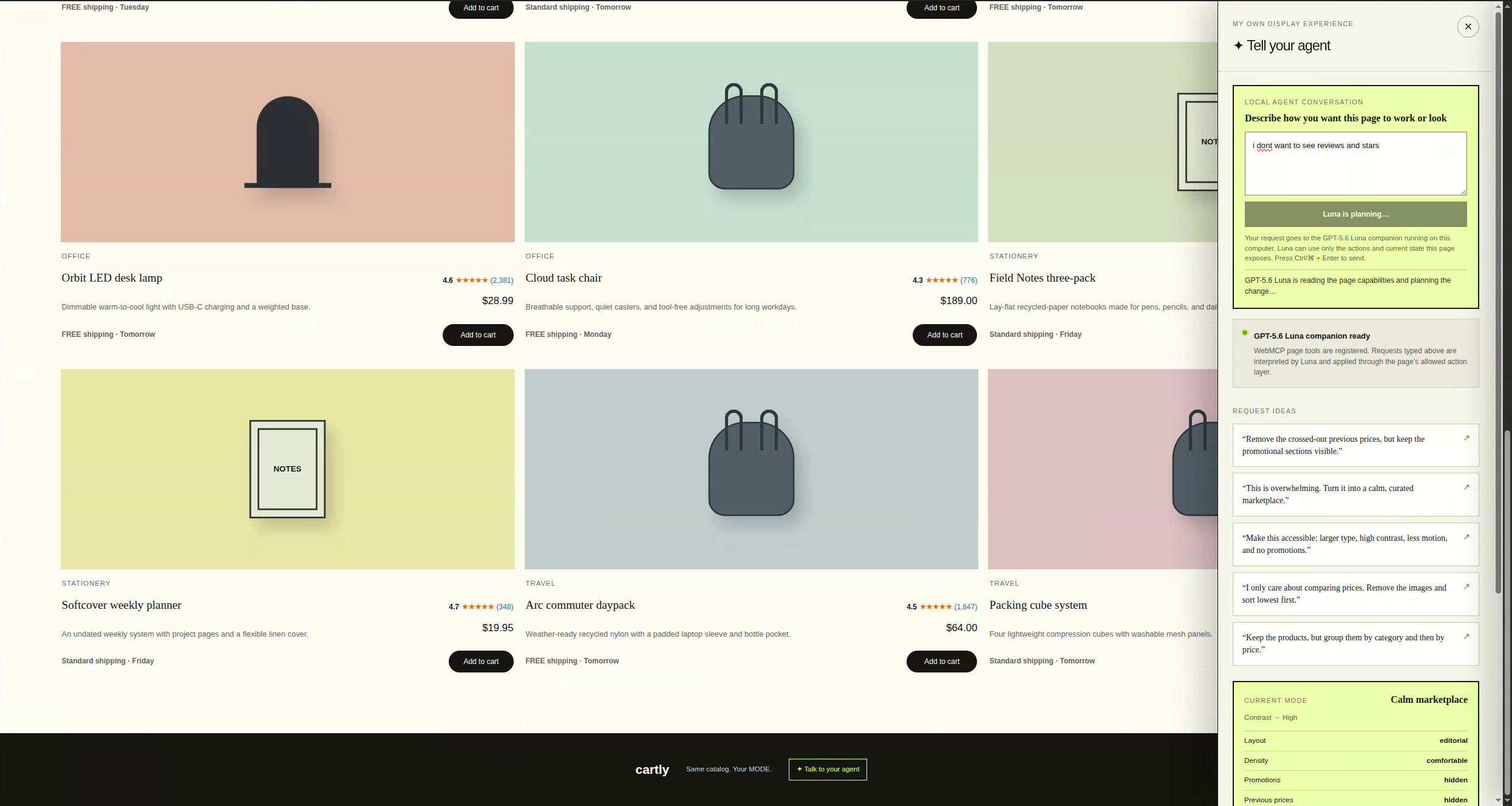
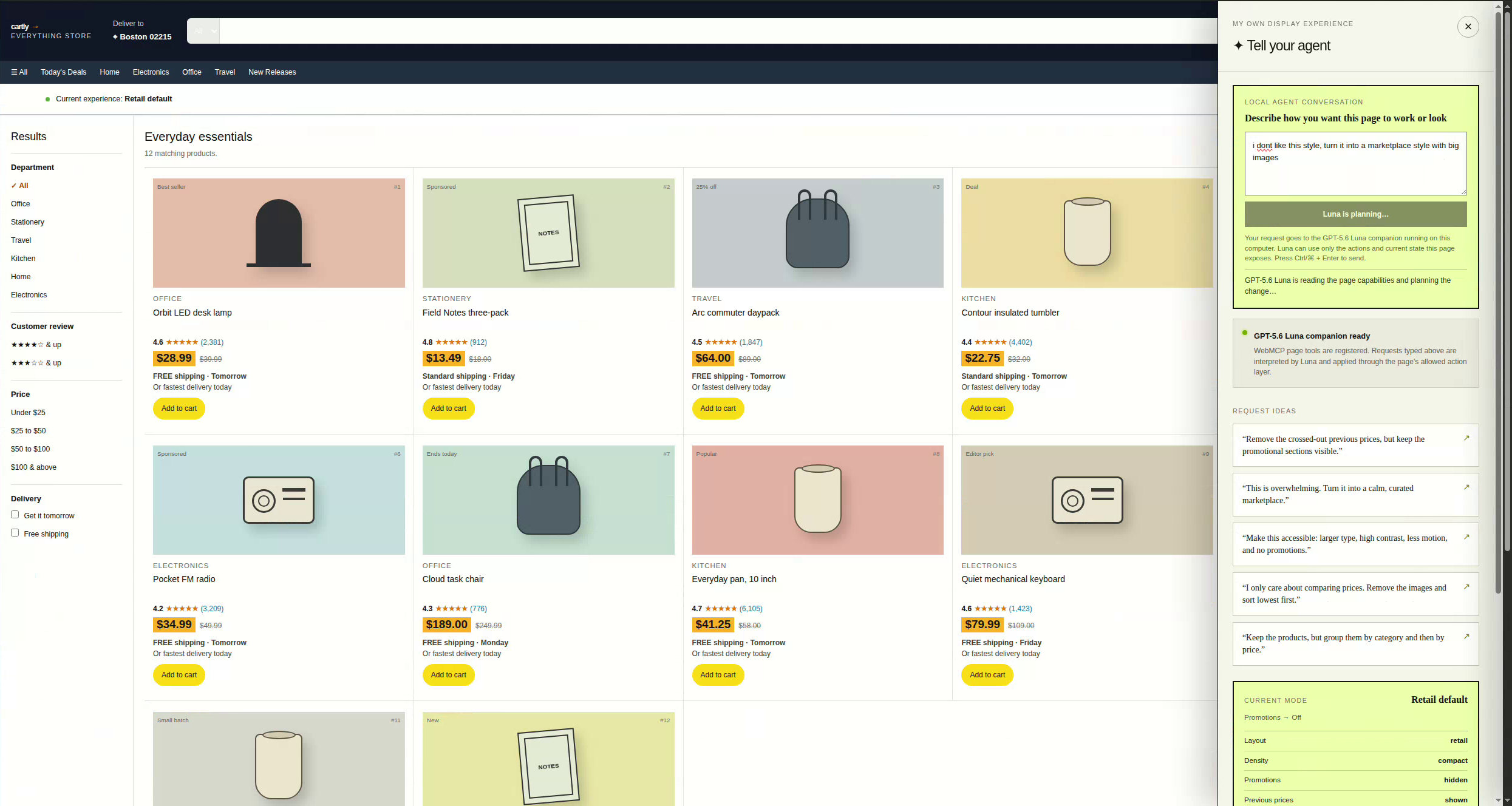
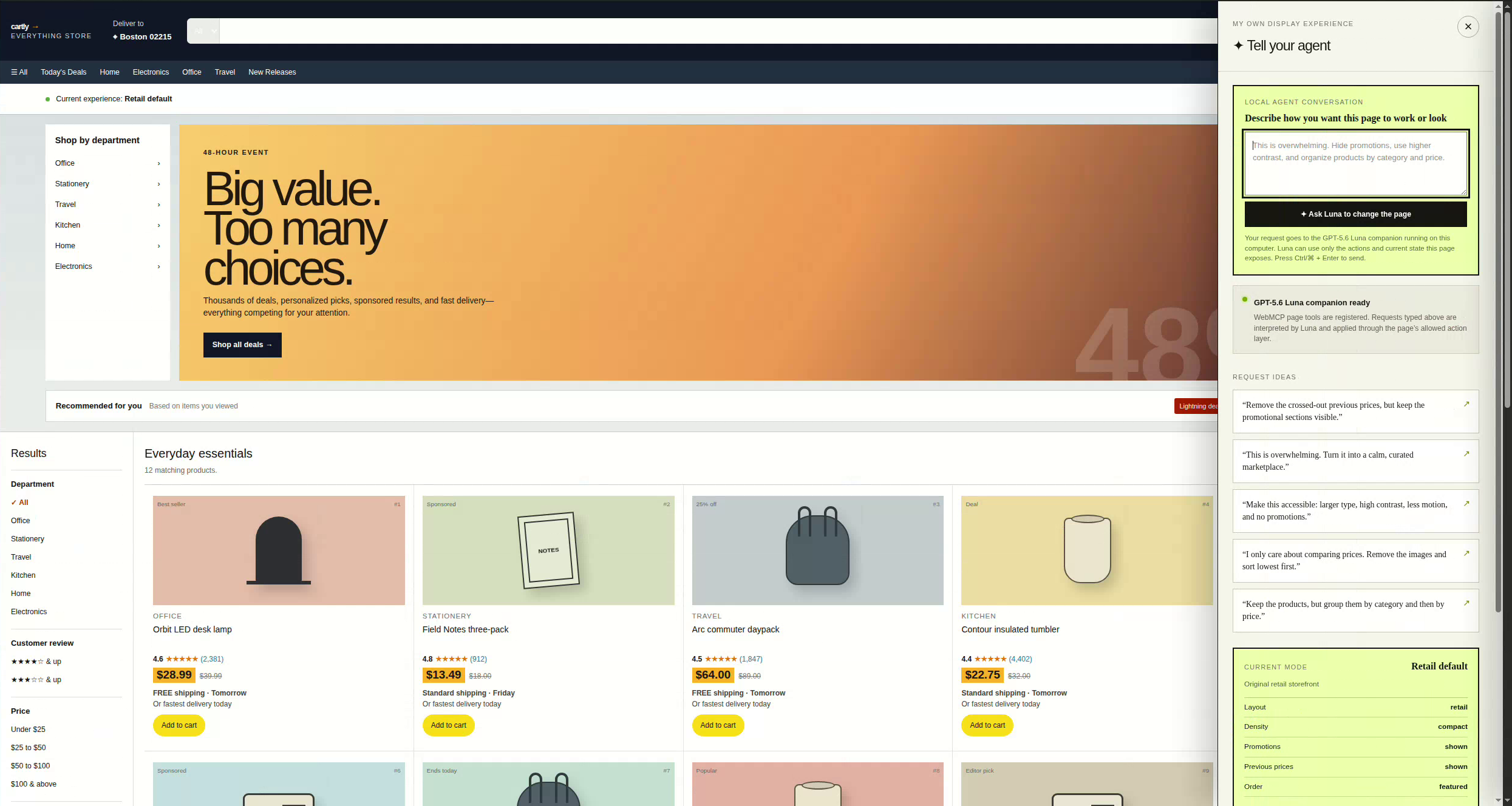
Our demonstration begins with Cartly, a fictional Amazon-style storefront. Its initial retail interface is intentionally dense: prominent promotions, crossed-out prices, sponsored products, recommendations, compact typography, multiple navigation regions, filters, product imagery, ratings, delivery information, and many elements competing for attention.
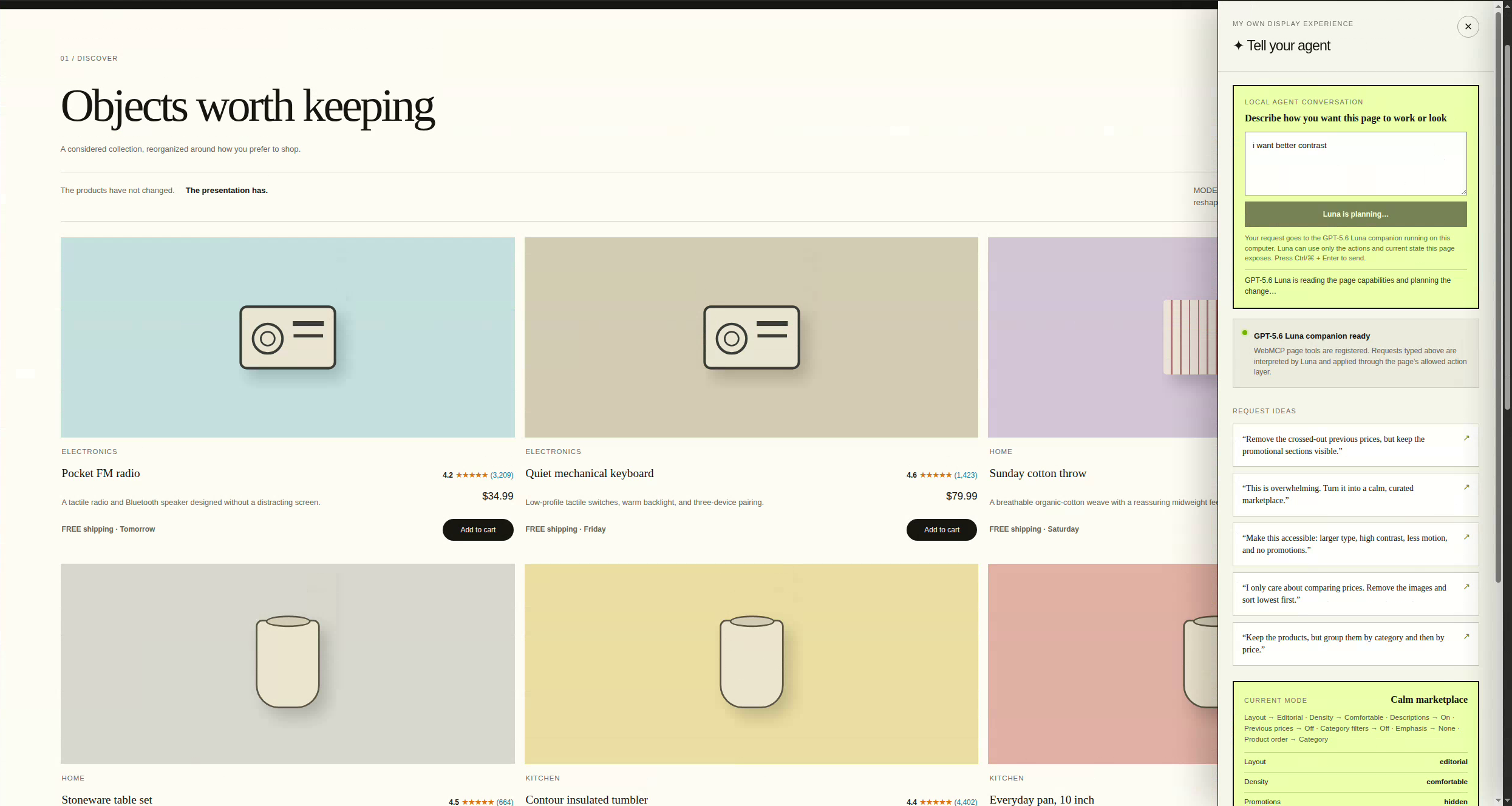
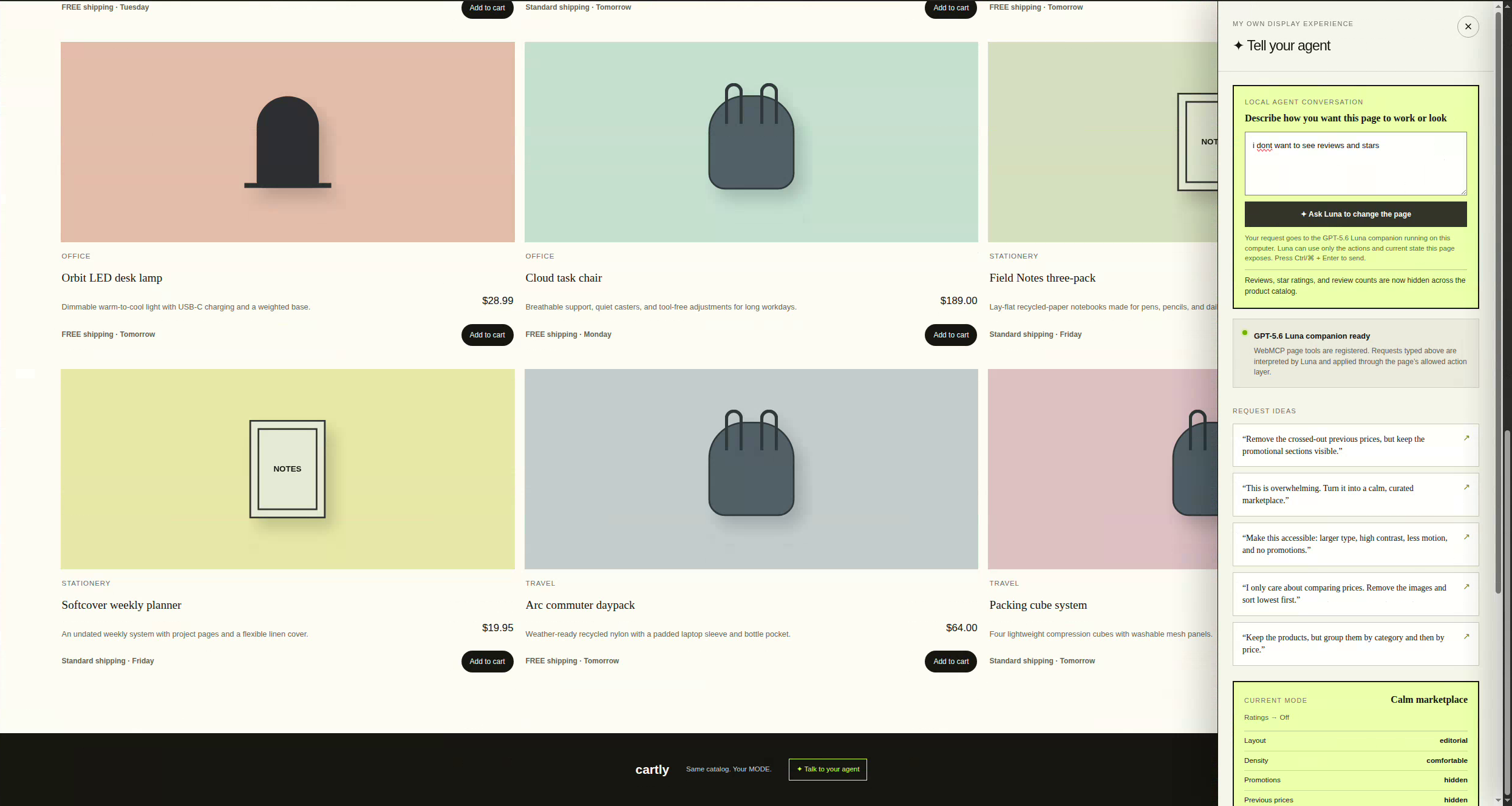
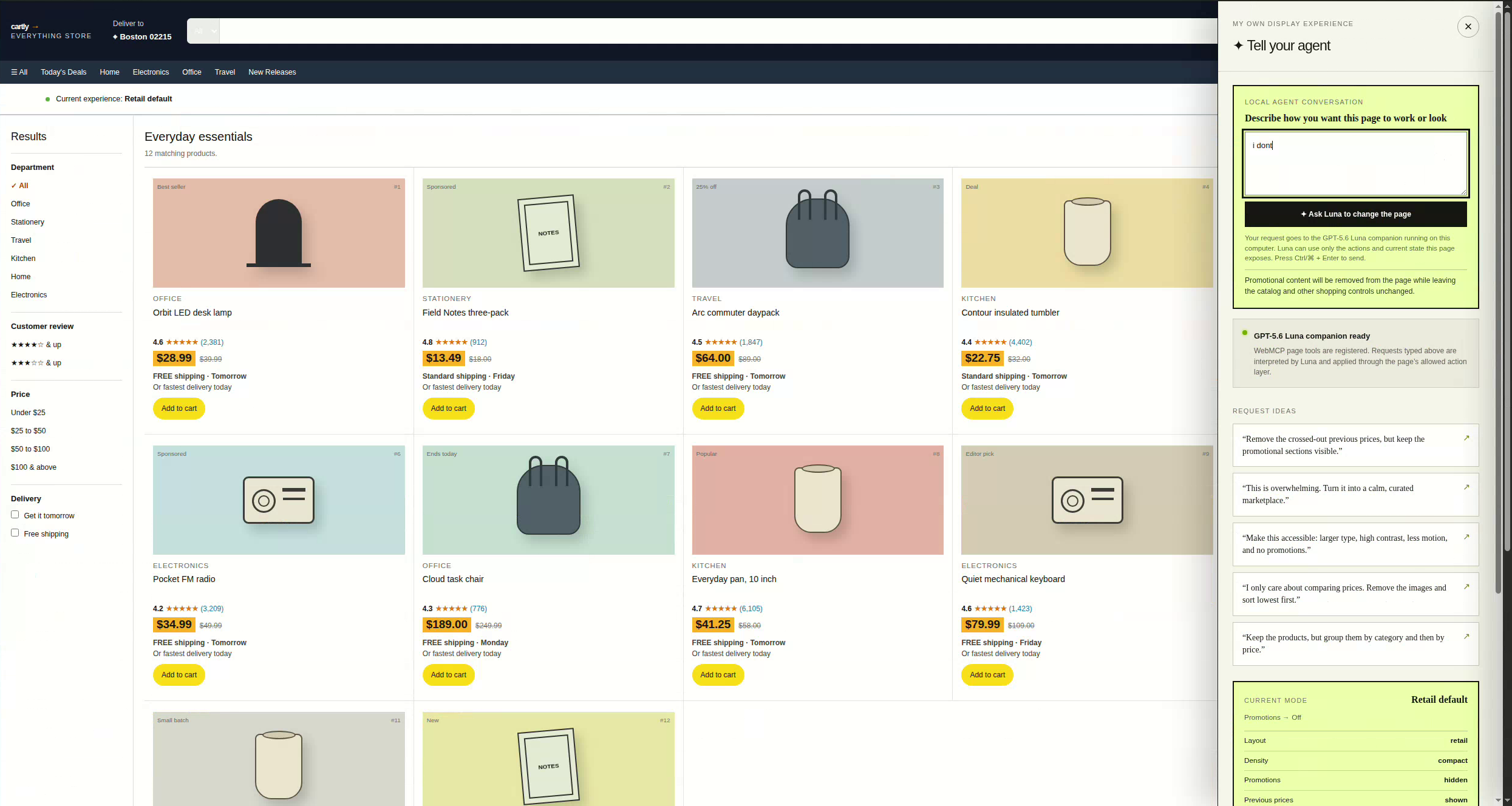
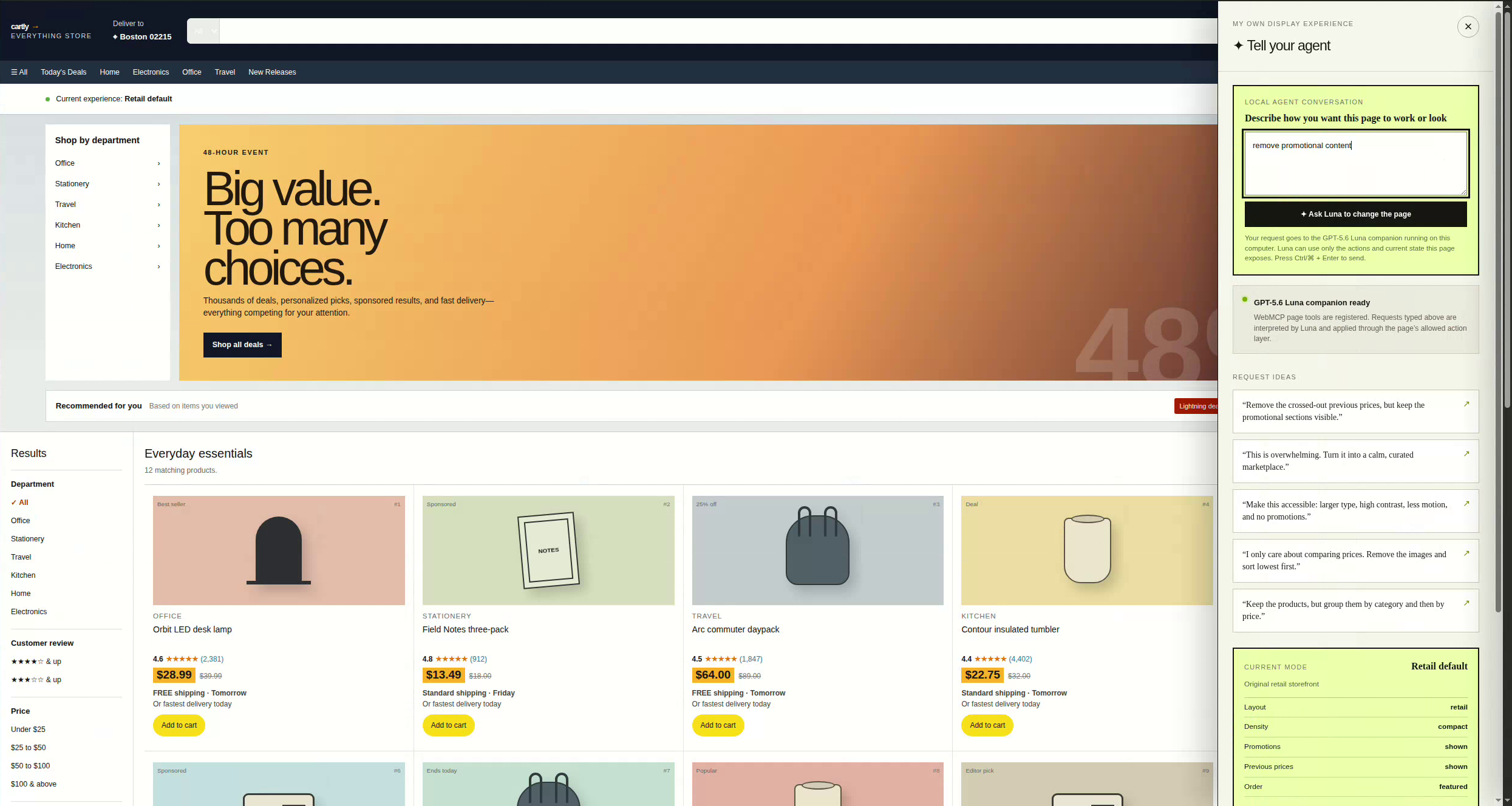
The user opens the MODE sidebar and enters a request such as:
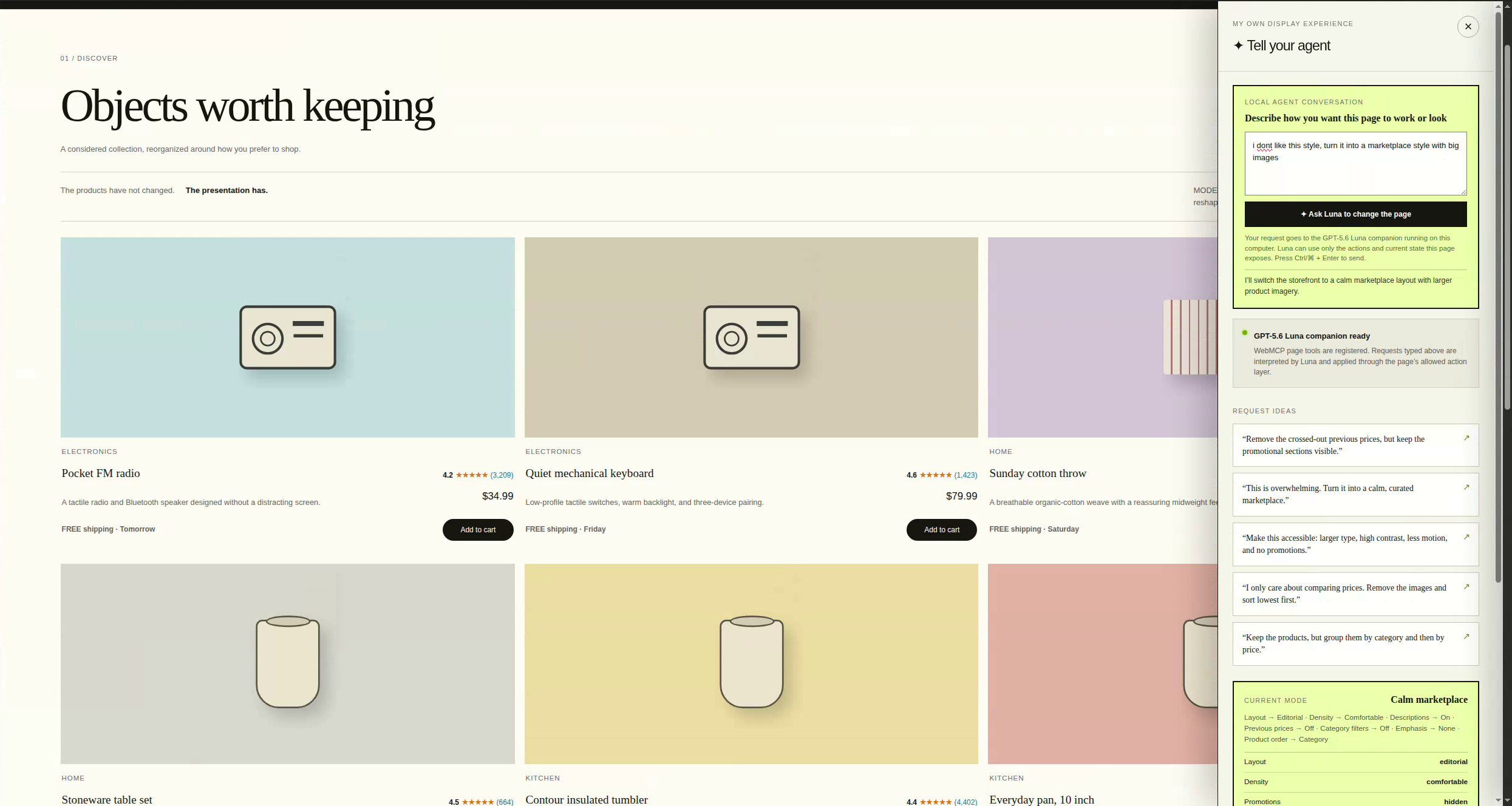
- “This page is overwhelming. Turn it into a calm, curated marketplace.”
- “Remove the crossed-out previous prices, but keep the promotional section.”
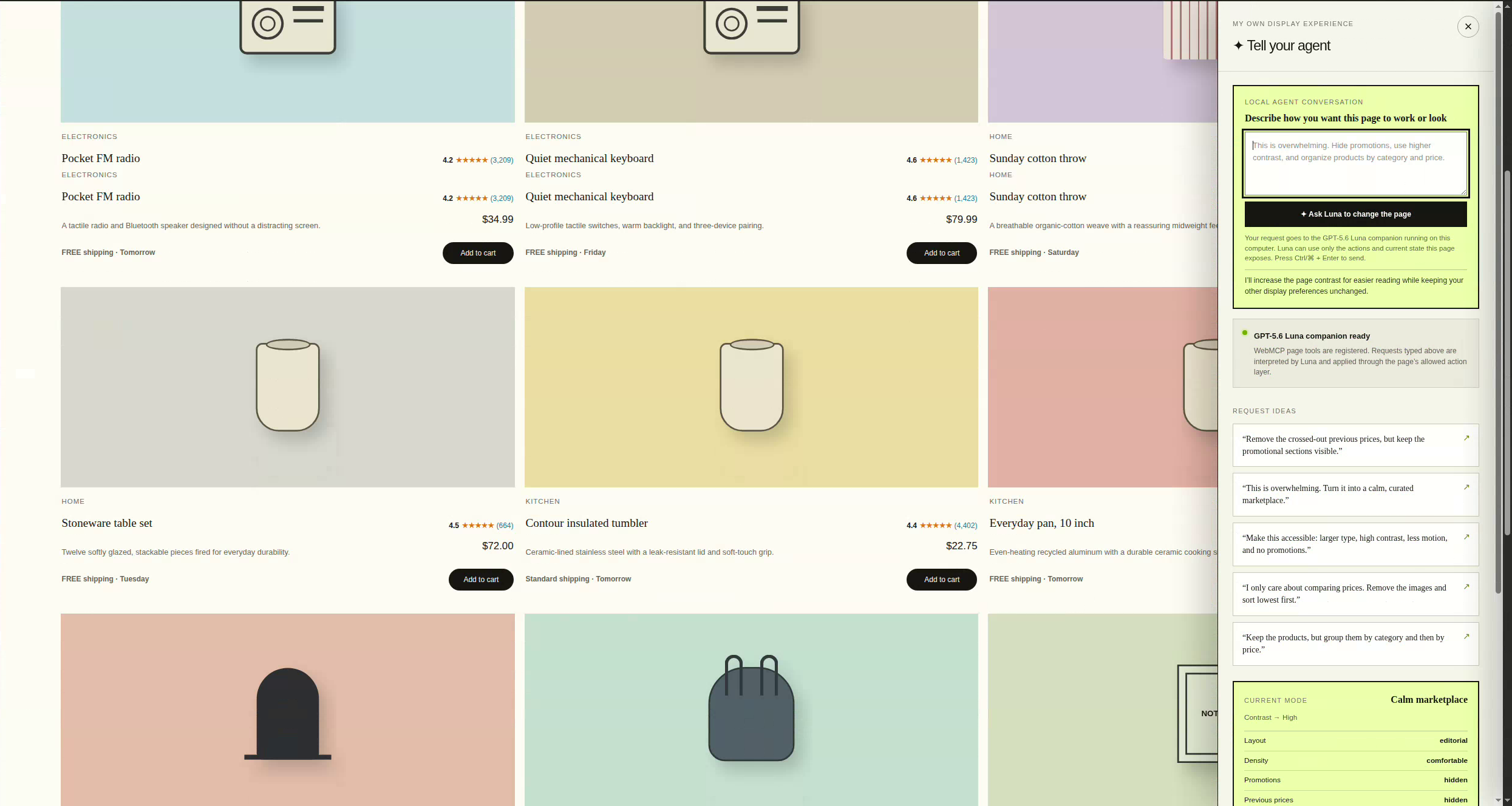
- “Make the text larger, use higher contrast, and reduce motion.”
- “I only care about comparing prices. Hide the images and sort from lowest to highest.”
- “Organize the products by category and then by price.”
- “Move the Cloud task chair before the Orbit LED desk lamp.”
- “Put the price above the title on every product card.”
An agent interprets the request, inspects the state and capabilities exposed by the page, and applies only developer-approved actions. The result appears immediately on the same website without requiring the user to approve a separate preview.
MODE can change:
- Page layout and information density
- Text size, contrast, color theme, and motion
- Visibility of promotions and sponsored content
- Visibility of product imagery, descriptions, ratings, filters, and crossed-out prices
- Product ordering
- Placement of products, sections, controls, and fields within safe structural groups
- Search terms and catalog filters
- Saved presentation profiles
- Cart contents and quantities through declared commerce actions
The demonstration is not just a static redesign. Search, department selection, product filtering, sorting, add-to-cart, cart quantities, removal, and persistence all work as real interactions.
At the same time, MODE preserves the developer’s authority over trusted information. The agent cannot invent or alter product names, prices, ratings, inventory, shipping promises, or checkout behavior. It also cannot execute undeclared actions, move elements across unsafe structural boundaries, or hide the controls needed to undo its changes.
The page exposes 237 stable semantic element targets and 19 developer-approved WebMCP actions. Each meaningful region—including individual product fields—has a stable identity. This allows the agent to distinguish between concepts that may look similar in the raw DOM, such as a crossed-out previous price and an unrelated promotional banner.
Preferences are remembered locally. Display settings, visibility overrides, and element positions are stored in first-party cookies, while named profiles and cart state are stored in local storage. A returning user therefore sees the experience they requested rather than being forced back into the original design.
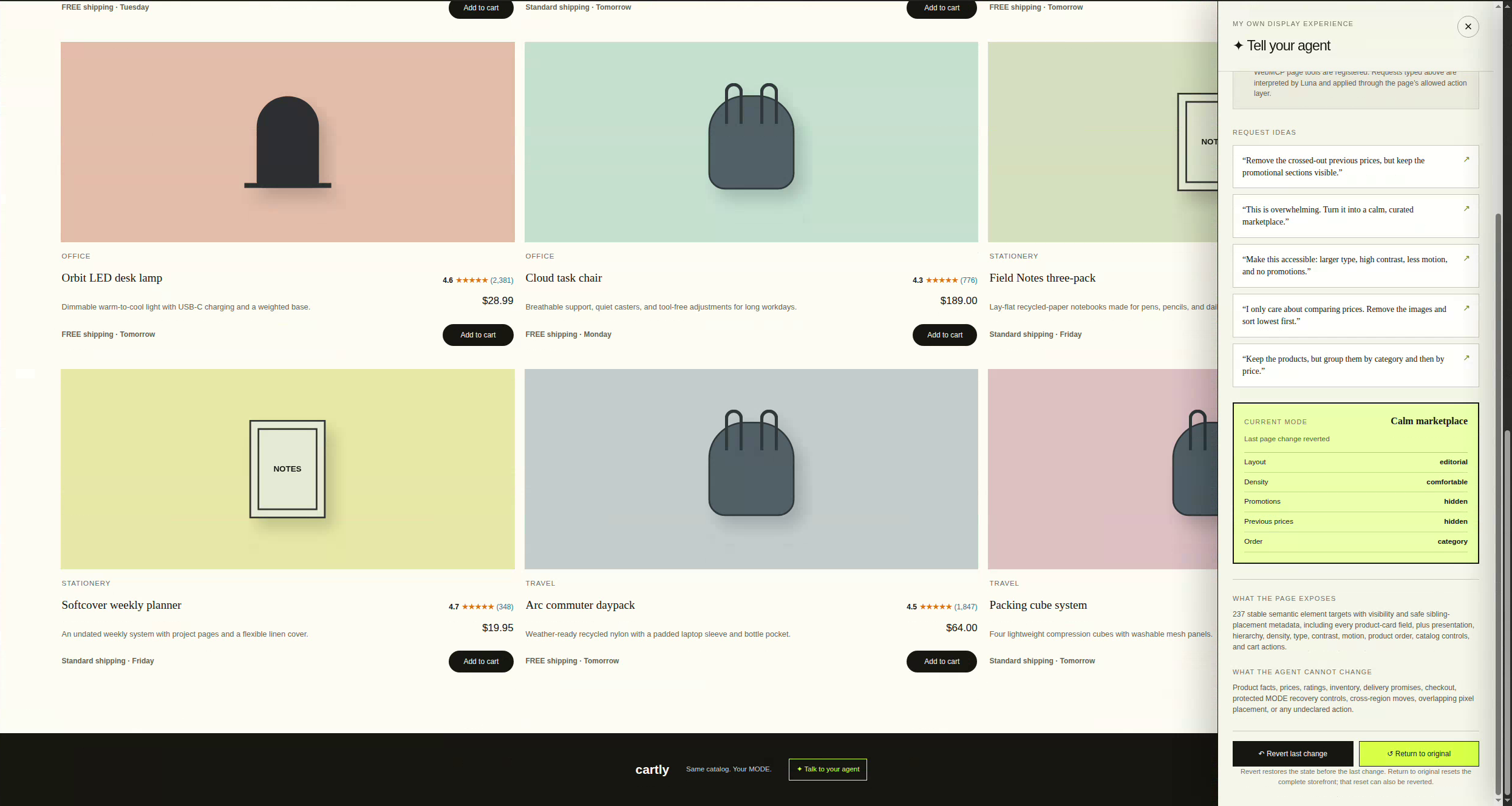
Every transformation is reversible:
- Revert last change restores the complete state before the previous agent request.
- A request containing several actions is treated as one transaction.
- Return to original restores the developer’s default storefront.
- Even the reset operation can be reverted if the user changes their mind.
How we built it
We built MODE as a React application using Vinext, Vite, TypeScript, and the OpenAI Sites-compatible project structure.
The architecture has several connected layers.
1. A functional storefront
We first built Cartly as a complete retail demonstration rather than a collection of placeholders. It includes a searchable product catalog, department navigation, ratings, price ranges, delivery filters, shipping filters, multiple sorting options, and a persistent cart.
This was important because MODE needed to demonstrate that personalization can reorganize an application without breaking its underlying functionality. The products remain the same products, search remains search, and the cart continues working regardless of how the interface is presented.
2. A developer-controlled preference model
We created a typed preference schema that defines exactly which presentation properties may change. It includes layout, density, text scale, theme, contrast, reduced motion, element visibility, product ordering, and related display preferences.
Incoming values are validated against this schema. Unknown properties and invalid values are discarded. This means the agent is not given unrestricted access to application code or arbitrary CSS. It operates within an explicit contract established by the site.
MODE also provides several complete experience presets:
- Retail default
- Calm marketplace
- Accessible shopping
- Price comparison
These presets can be applied as starting points and then refined through additional natural-language requests.
3. A semantic element manifest
One of the most important parts of MODE is its semantic page-element manifest.
Rather than asking the agent to reason from anonymous DOM nodes, generated class names, or screen coordinates, the page describes its interface using stable identifiers such as:
promotion.stagecatalog.productsproduct.cloud-task-chair.cardproduct.cloud-task-chair.titleproduct.cloud-task-chair.priceproduct.cloud-task-chair.previous-priceproduct.cloud-task-chair.add-to-cart
Each entry includes information about the element’s role, hierarchy, visibility, protection status, and whether it can be repositioned.
This semantic layer is what makes a precise request like “remove crossed-out prices” reliably different from “remove promotions.”
4. Safe element repositioning
Repositioning introduced an additional structural challenge. Allowing an agent to place any element at any coordinate would create overlapping content, inaccessible controls, broken responsive layouts, and configurations that work at only one screen size.
Instead, MODE uses developer-approved placement groups. An element can move before or after another element only when both belong to the same compatible group.
For example:
- Products can be reordered among products.
- Product fields can be reordered within their product card.
- Major page sections can be reordered within the page flow.
- Header controls can be reordered within the appropriate header region.
- A product price cannot be moved into the footer.
- Protected recovery controls cannot be moved or hidden.
The actual layout continues to use responsive CSS, while a persisted semantic order determines where movable siblings appear. This provides meaningful customization without turning the page into an unsafe free-form canvas.
5. A shared action layer
The normal interface, the local agent, and WebMCP registrations all use the same validated action layer.
This was an intentional architectural decision. We did not want one implementation for button clicks, another for the agent sidebar, and a third for WebMCP. A shared dispatcher means the same rules and protections apply regardless of how an action is requested.
The page registers tools through document.modelContext when WebMCP is available. These include actions for inspecting page elements, changing visibility, repositioning elements, transforming the storefront, applying preferences, searching and filtering the catalog, and managing the cart.
Because MODE uses progressive enhancement, the storefront remains usable even when WebMCP is unavailable. WebMCP adds agent discoverability and control; it is not required for ordinary shopping interactions.
6. A local GPT-5.6 Luna companion
For the local demonstration, the MODE sidebar sends the user’s request, the declared tool catalog, and the current public page state to a loopback-only companion service.
That companion invokes GPT-5.6 Luna through the locally signed-in Codex CLI, using the user’s ChatGPT subscription rather than an API key. Luna receives a strict response schema and can return only a bounded sequence of declared tool calls.
The browser validates those calls again before applying them. The model therefore proposes actions, but the webpage remains the final authority over what is allowed.
This local bridge solves an important demonstration problem: WebMCP exposes tools to compatible agents, but WebMCP by itself does not automatically connect a textbox embedded in a webpage to ChatGPT. The companion provides that connection for the local prototype without embedding credentials in the browser.
7. Persistence and transactional recovery
MODE stores device-local display preferences in first-party cookies. Larger application state, such as saved profiles and cart contents, uses local storage.
Before an agent request is applied, MODE captures a complete snapshot containing:
- Presentation preferences
- Element-specific visibility
- Element positions
- Search and filter state
- Sorting state
- Cart state
If Luna performs several actions for one request, MODE treats the entire sequence as a single transaction. Pressing Revert restores the state from before the conversation turn rather than undoing only the final low-level operation.
Challenges we ran into
Connecting a webpage conversation to an agent
Our first major challenge was understanding the boundary between WebMCP and an embedded conversational interface.
WebMCP allows a compatible agent to discover and call tools exposed by a webpage. It does not mean that text typed into any website textbox automatically reaches ChatGPT. We needed a separate local companion to connect the sidebar conversation to an agent while keeping the WebMCP tools available to compatible browser clients.
We addressed this by building a loopback-only Codex CLI bridge for the demonstration and clearly separating it from a future public runtime architecture.
Exposing the whole page without exposing raw implementation details
Initially, broad controls such as “hide promotions” were not precise enough. When the user asked to remove a crossed-out price, the agent could choose an action that removed an unrelated promotional section.
The solution was not simply to send the model more HTML. Raw DOM exposure would have produced more tokens, more ambiguity, and a brittle dependency on the exact component structure.
Instead, we built a semantic manifest with stable identities for all meaningful elements, including every field in every product card. This gave the agent a page vocabulary that matches the concepts users naturally mention.
Repositioning elements safely
Element repositioning sounds simple until responsive layout, accessibility, persistence, and undo behavior are involved.
Absolute coordinates would have been easy to prototype but difficult to make robust. We instead developed placement groups, sibling-relative operations, deterministic ordering, and responsive layout rules. This required carefully defining which elements are structurally compatible and ensuring that reordered product fields remained readable across different presentation modes.
Making natural-language requests precise
Users rarely speak in the names used by an internal schema. They say “old prices,” “the crossed-out number,” “that promotional stuff,” or “put similar things together.”
The agent needs enough current state and semantic metadata to map those phrases to exact elements and actions. We improved this by including visibility, movability, hierarchy, placement groups, current ordering, labels, and descriptions in the page state presented to Luna.
Preserving reversibility across multi-action requests
A single sentence may require several changes. For example, “Make this accessible” could increase text size, enable high contrast, reduce motion, hide promotions, and increase spacing.
If each action had been added independently to the undo history, the user would have needed to press Revert several times. We created transaction-level snapshots so that one conversation turn behaves like one coherent change.
Maintaining a polished interface while everything could move
As more elements became configurable, we encountered familiar UI problems: text becoming too small, prices escaping their containers, list layouts inheriting grid assumptions, and elements losing alignment after reordering.
Solving these issues required testing the complete transformation rather than validating only the preference state. A configuration is not successful simply because the correct values were stored; the resulting page must remain visually coherent and usable.
Browser compatibility and progressive enhancement
WebMCP availability varies by browser and environment. A public link alone could not guarantee that every visitor would have a compatible WebMCP host.
We designed the storefront so normal functionality does not depend on WebMCP. The embedded local-agent flow demonstrates the conversational concept, while compatible WebMCP clients can independently discover the same declared tools.
Accomplishments that we're proud of
We are especially proud that MODE demonstrates a substantial difference between “before” and “after” without replacing the underlying website.
The same functional storefront can become:
- A calmer curated marketplace
- A high-contrast accessible shopping experience
- A compact price-comparison tool
- A category-organized catalog
- A custom layout assembled through conversation
We are also proud of the boundaries built into the system. MODE is not a prompt that asks a model to rewrite the page however it wants. It is a developer-controlled capability system with validation, semantic element identities, protected controls, safe placement groups, and transactional recovery.
Additional accomplishments include:
- Exposing 237 semantic page targets
- Implementing 19 bounded WebMCP actions
- Supporting precise visibility controls down to individual product fields
- Supporting conversational element repositioning
- Persisting display preferences without requiring an account
- Making every transformation reversible
- Building functional search, filters, sorting, and cart behavior
- Using one validated action layer for the UI, local agent, and WebMCP
- Connecting the local demo to GPT-5.6 Luna without placing an API key in the webpage
- Keeping the storefront usable when no agent or WebMCP host is available
Most importantly, MODE makes personalization understandable to an ordinary user. The user does not need to know about schemas, selectors, accessibility settings, or CSS. They can simply say what is wrong with the current experience and describe what would work better.
What we learned
We learned that exposing a website to an agent is fundamentally an interface-design problem, not just a model-integration problem.
A model can only act precisely when the application gives it a clear vocabulary. “Everything in the DOM” is not the same as “everything the user understands.” Semantic targets, descriptions, hierarchy, allowed relationships, and current state are more valuable than a large unstructured dump of page markup.
We also learned that constraints improve the experience. Restricting the agent to declared actions makes requests more predictable, preserves application integrity, and creates a clear division of responsibility:
- The developer defines facts, functionality, and safety boundaries.
- The agent translates intent into permitted operations.
- The user controls presentation and can always recover.
Another important lesson was that personalization must be persistent and reversible. A temporary transformation feels like a demonstration. A remembered preference feels like the website genuinely respects the user. At the same time, personalization without a reliable escape route can create a new accessibility problem, so Revert and Return to Original must remain protected and visible.
We learned that structural repositioning is more useful than unconstrained pixel movement. Most users do not actually want to specify coordinates; they want to say “put the price before the title,” “show products before promotions,” or “group these by category.” Semantic relative placement maps much more naturally to those requests and remains responsive.
Finally, we learned that WebMCP and an embedded agent conversation are complementary but distinct pieces. WebMCP provides a standardized way for agents to discover and operate website capabilities. A website-owned textbox still needs an agent runtime behind it. Understanding that boundary helped us design the project as a progressive system rather than coupling the storefront to one browser or one execution path.
What's next for WebMCP-Challenge
The current MODE prototype proves the interaction model locally. Our next step is to turn it into a reusable, production-oriented preference layer that other websites can adopt.
A hosted agent runtime
The local Codex CLI bridge is ideal for demonstrating MODE with a user’s ChatGPT subscription, but it is not a public multi-user backend. A future version would use an authenticated hosted agent runtime with rate limits, privacy controls, observability, and per-site authorization.
A reusable MODE SDK
We want developers to be able to add MODE by declaring:
- Their preference schema
- Their semantic element manifest
- Their approved actions
- Their protected controls
- Their safe placement relationships
- Their default and recommended experience profiles
The SDK would handle WebMCP registration, persistence, transactions, validation, and recovery.
Automatic semantic instrumentation
Manually defining hundreds of semantic targets provides precision, but it requires effort. We want to explore tooling that can propose a manifest from an application’s component tree and accessibility information, while leaving the developer responsible for reviewing and approving the resulting capabilities.
More websites and application categories
Retail is a strong demonstration because it contains dense information, promotions, comparisons, and repeated product structures. We would next test MODE on:
- News and media websites
- Government-service portals
- Healthcare information systems
- Education platforms
- Travel-booking interfaces
- Financial dashboards
- Workplace productivity tools
Each category would help refine the boundary between content authority and presentation control.
Portable user preference profiles
Eventually, a user should not need to repeat the same accessibility and presentation requests on every compatible website. MODE could support a portable profile such as “larger text, high contrast, low motion, no promotional interruptions, and important actions first,” which each site maps into its own approved capabilities.
The profile would express intent without giving one site permission to modify another site or exposing unnecessary personal information.
Better explanations and previews
Future versions could show a concise explanation of what the agent changed, highlight affected regions without obscuring the page, and let users compare their current MODE with the original experience. These explanations should remain optional so they do not become another interruption.
A broader WebMCP design pattern
Beyond MODE itself, we believe the project points toward a broader pattern for agent-compatible websites:
- Expose semantic capabilities rather than raw implementation details.
- Describe the current state precisely.
- Validate every proposed action in the application.
- Protect recovery and critical functions.
- Treat natural-language requests as reversible transactions.
- Preserve normal functionality when no agent is present.
Our long-term vision is a web where accessibility and personalization are not limited to a fixed settings menu. With MODE and WebMCP, users can describe the experience they need, websites can define safe ways to provide it, and agents can bridge the gap between the two.
Built With
- codex
- gpt
- webmcp

Log in or sign up for Devpost to join the conversation.