-
-
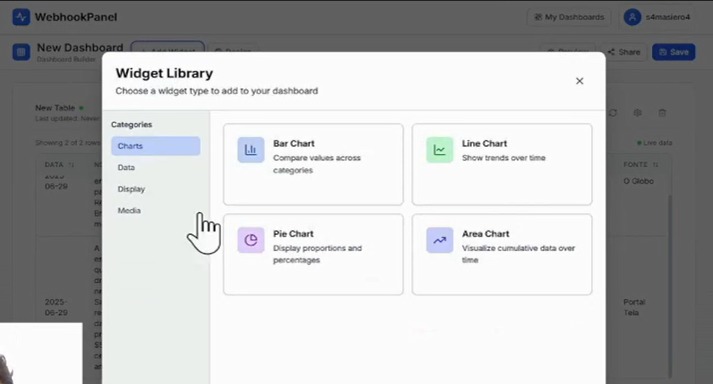
Widget library to visualize your webhook data (make/n8n)
-
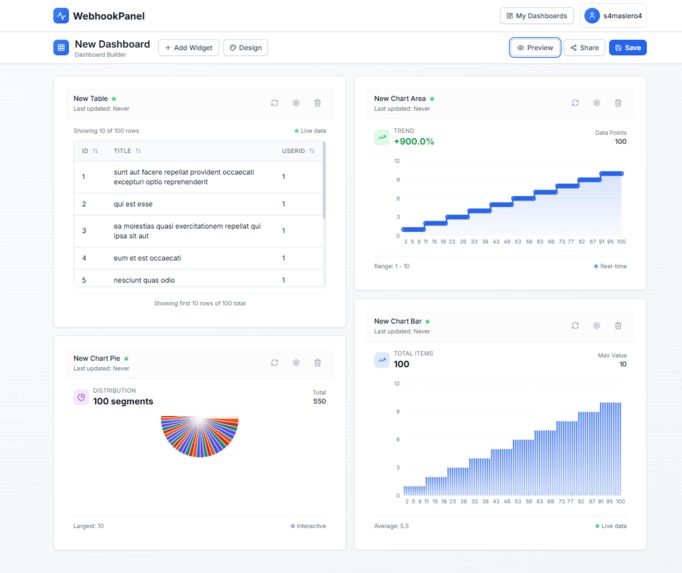
Complete dashboard customization to receive your Make.com and n8n automations


Inspiration
The inspiration for WebhookPanel came from observing that small businesses and freelancers use tools like Make.com and n8n for automations but struggle to visualize data in an intuitive and professional way. Tools like Power BI or Retool are too complex for this audience. WebhookPanel was created to fill this gap with simple, accessible visual dashboards focused on delivering fast results without requiring technical knowledge.
What it does
WebhookPanel allows users to create custom dashboards with visual widgets (charts, tables, galleries, animated KPIs, etc.) powered by webhooks from services like Make.com or n8n. Using a drag-and-drop interface, users can set up visualizations without writing code, even when working with structured data like JSON.
How we built it
We built WebhookPanel with a focus on modularity and flexibility for various automation use cases. The drag-and-drop interface was developed with an emphasis on usability and real-time feedback, including widget previews during configuration.
Challenges we ran into
The main challenges were:
- Handling unstandardized data coming from webhooks (e.g., malformed JSON).
- Making technical configurations (such as field mapping) accessible to non-technical users.
Accomplishments that we're proud of
- Creating an interface that allows building complete dashboards in under 5 minutes.
- Developing unique widgets like interactive galleries and animated KPIs.
- Ensuring high performance even with multiple webhooks updating simultaneously.
- Coming up with new ideas for the project's future, as shown in the video — such as adding a “forms” widget to trigger automations, and a white-label dashboard option for freelancers to earn more from their automation services.
What we learned
We learned that simplicity requires a lot of technical planning. It's essential to abstract complexity without sacrificing flexibility.
What's next for WebhookPanel
Next steps include:
- Launching a “secure public mode” for password-protected dashboard sharing.
- Developing new interactive widgets and niche-specific templates (e-commerce, leads, inventory).
- Expanding visual customization options.
Built With
- bolt

Log in or sign up for Devpost to join the conversation.