Inspiration
The inspiration for Autoweb came from the belief that the traditional web browsing experience is fundamentally inefficient. We spend countless hours on repetitive tasks—copying data, filling forms, and comparing information across tabs. We saw an opportunity to transform the browser from a passive content viewer into a proactive, intelligent partner. The vision was to create a seamless AI Copilot that could understand natural language commands and execute complex workflows, effectively giving every user a personal assistant for the web. We chose to build exclusively with the Google Gemini API to leverage its powerful reasoning and multi-modal capabilities from the start.
What it does
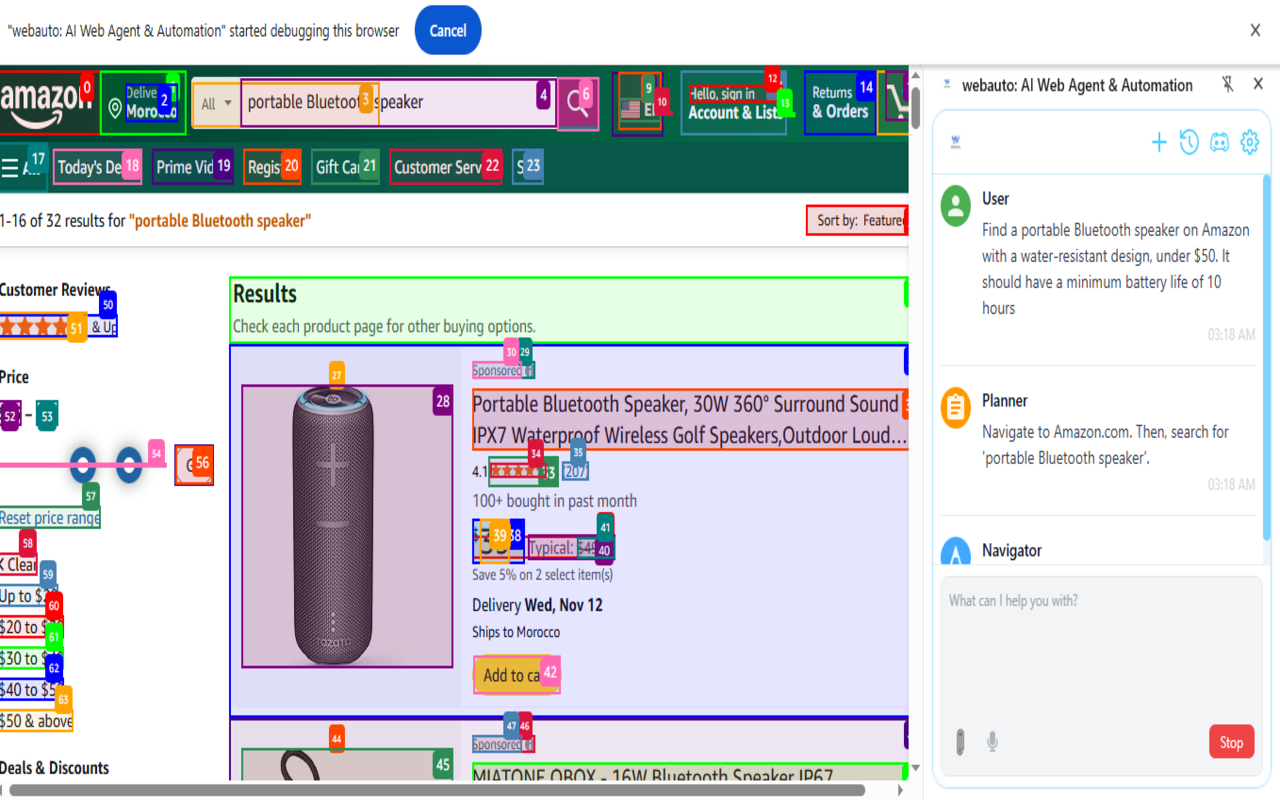
Autoweb is an open-source Chrome extension that automates web tasks using AI. You simply tell it what you want to do in plain English, and it takes over. Its core functionality is driven by a multi-agent system that works directly within your browser: The Planner Agent: Analyces your high-level goal and creates a logical, step-by-step plan. The Navigator Agent: Executes the plan by interacting with web pages—clicking buttons, typing text, and extracting information. This allows users to perform complex tasks with a single command, such as: Data Scraping: "Go to TechCrunch and extract the titles and links of the top 10 articles." Research Automation: "Find three laptops on Amazon under $1000 with at least 16GB of RAM and put their names, prices, and ratings in a table." Form Filling: "Navigate to this event registration page and sign me up with my details."
How we built it
Autoweb is built on a modern, scalable, and type-safe technology stack, organized within a Monorepo managed by pnpm and Turborepo. Frontend: The user interface (the side panel and settings page) is built with React and TypeScript, ensuring a robust and maintainable codebase. We used Vite as our build tool for its incredible speed and developer experience. Styling: Tailwind CSS was used for its utility-first approach, allowing us to rapidly build a clean and responsive UI. Core Logic: The extension's "brain" is its direct integration with the Google Gemini API. All operations run locally in the browser's service worker. User data, like the API key and conversation history, is stored securely in Chrome's local storage.
Challenges we ran into
Our biggest challenge was a classic case of over-ambition. Initially, we tried to build support for a multitude of LLM providers (OpenAI, Anthropic, Azure, etc.). This led to a massive increase in complexity, resulting in an unmanageable codebase with over 52 blocking TypeScript errors. Development ground to a halt as we spent all our time debugging a system that was too complicated for its own good. After finally getting the code to build, we immediately hit a critical runtime error (cleanupLegacyValidatorSettings is not a function), which taught us that a successful build is only half the battle.
Accomplishments that we're proud of
Taming Complexity: Our proudest accomplishment was making the tough decision to refactor the entire project to focus solely on the Gemini API. This strategic simplification eliminated all 52+ build errors in one go and made the project viable again. It was a powerful lesson in agile development and the value of a focused scope. Building a Functional Multi-Agent System in a Browser: Creating a reliable Planner/Navigator system that can reason, act, and self-correct based on live web content is technically challenging. Getting this to work smoothly within the constraints of a Chrome extension is an achievement we're very proud of. A Truly Free and Private Tool: We successfully built a powerful automation tool that remains 100% free and open-source, respecting user privacy by processing everything locally.
What we learned
The Power of Focus and Simplification: This was our number one lesson. Trying to support everything at once is a recipe for failure. By narrowing our focus to a single, high-quality API, we were able to build a better, more stable product faster. A Modern Stack Pays Off: Using TypeScript, Vite, and a well-structured Monorepo was invaluable. While TypeScript highlighted the initial complexity with its errors, it also gave us the confidence to refactor a large codebase without breaking everything. Runtime is a Different Beast: A successful build doesn't guarantee a working product. We learned the importance of end-to-end testing and being prepared for unexpected runtime issues, especially those related to legacy code or the extension's lifecycle.
What's next for Autoweb
We're just getting started! Our roadmap is focused on making Autoweb even smarter and more user-friendly: Enhanced Agent Capabilities: Improving the Planner's reasoning and the Navigator's ability to handle dynamic, complex websites (like those built with React/Vue). Long-Term Memory: Giving Autoweb the ability to remember information and preferences across different sessions to perform more personalized tasks. Community-Driven Prompt Library: Building a feature that allows users to save and share their most effective automation prompts and workflows with the community.
Built With
- architecture:
- css
- languages:-typescript-frameworks-&-libraries:-react-apis:-google-gemini-api-platform:-chrome-browser-extension-build-tools:-vite
- pnpm
- styling:
- tailwind
- turborepo

Log in or sign up for Devpost to join the conversation.