-
-
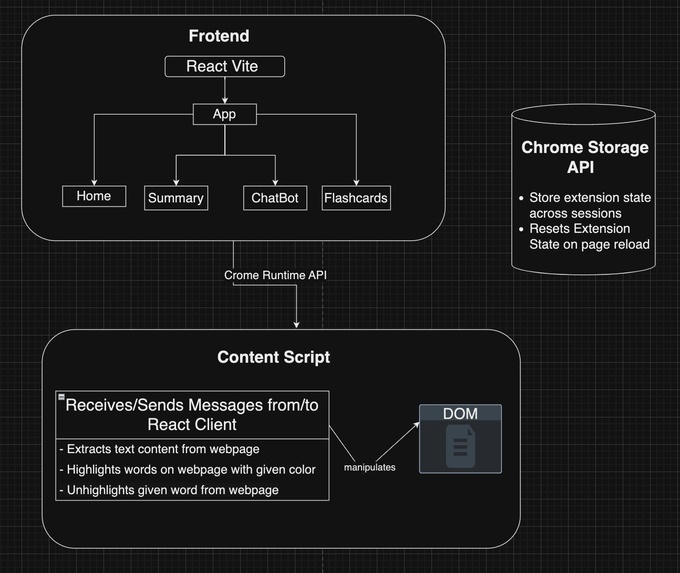
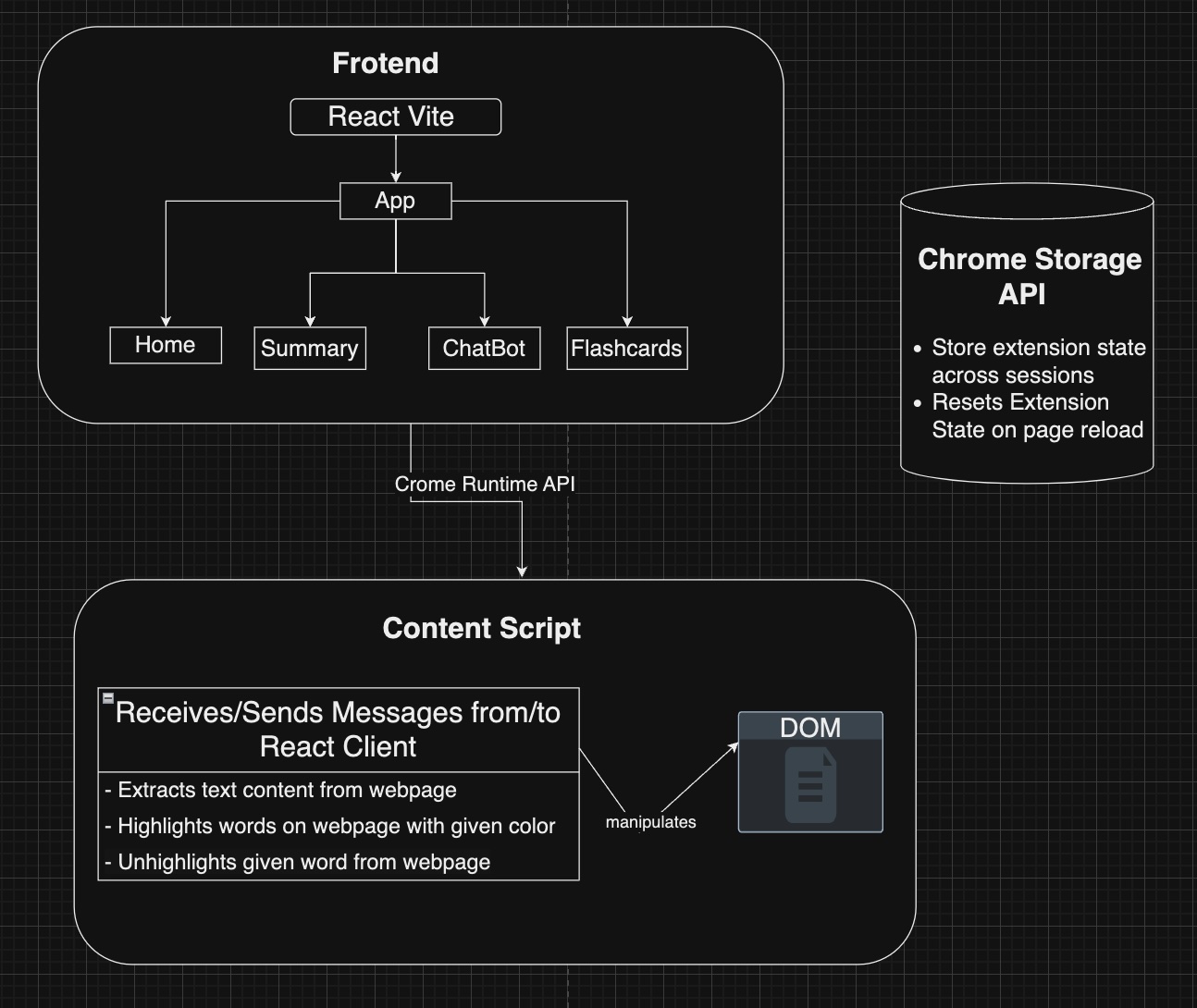
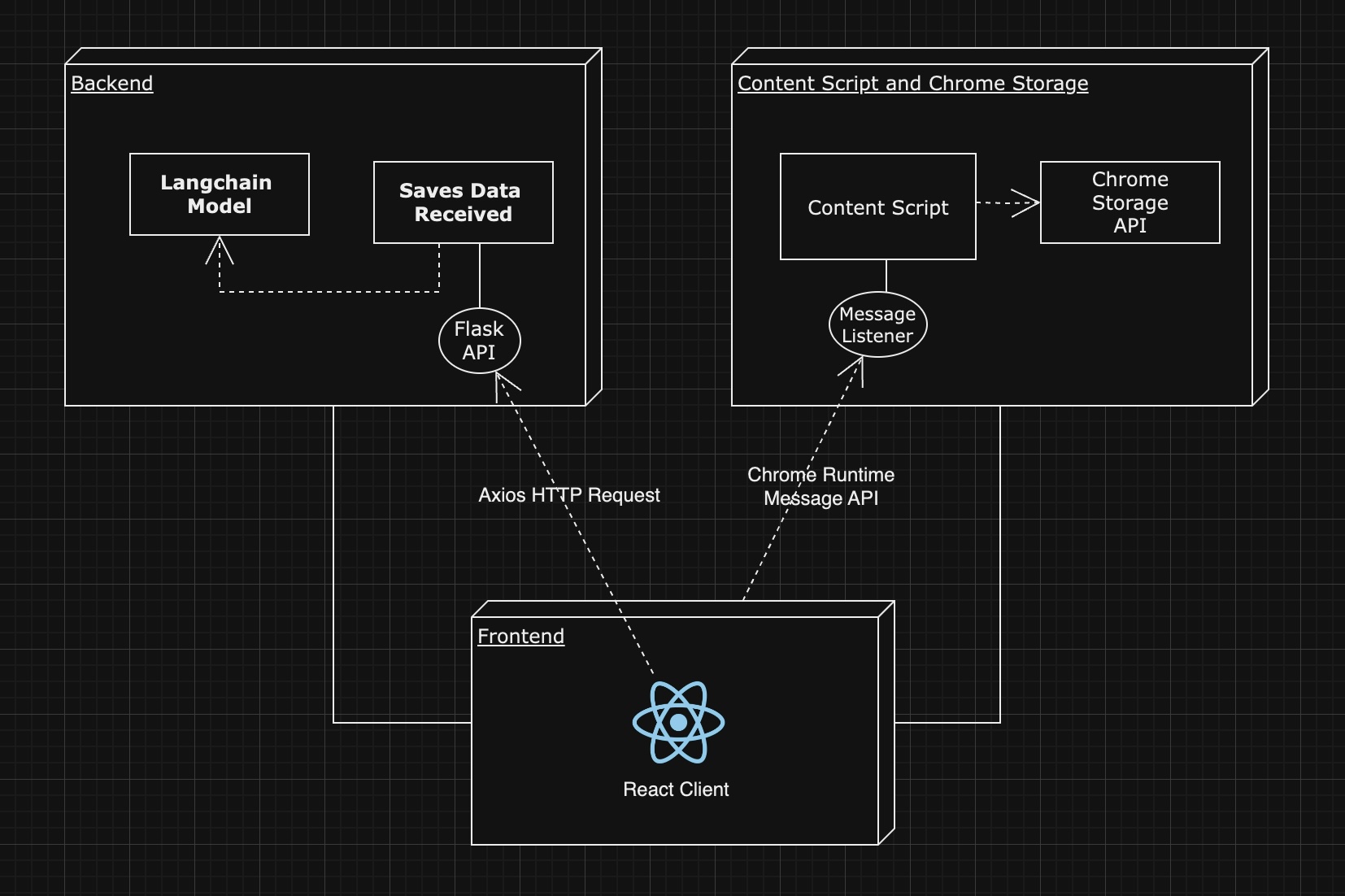
Client Architecture
-
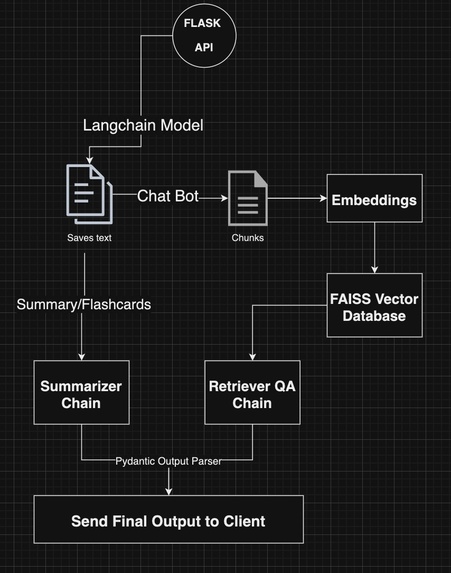
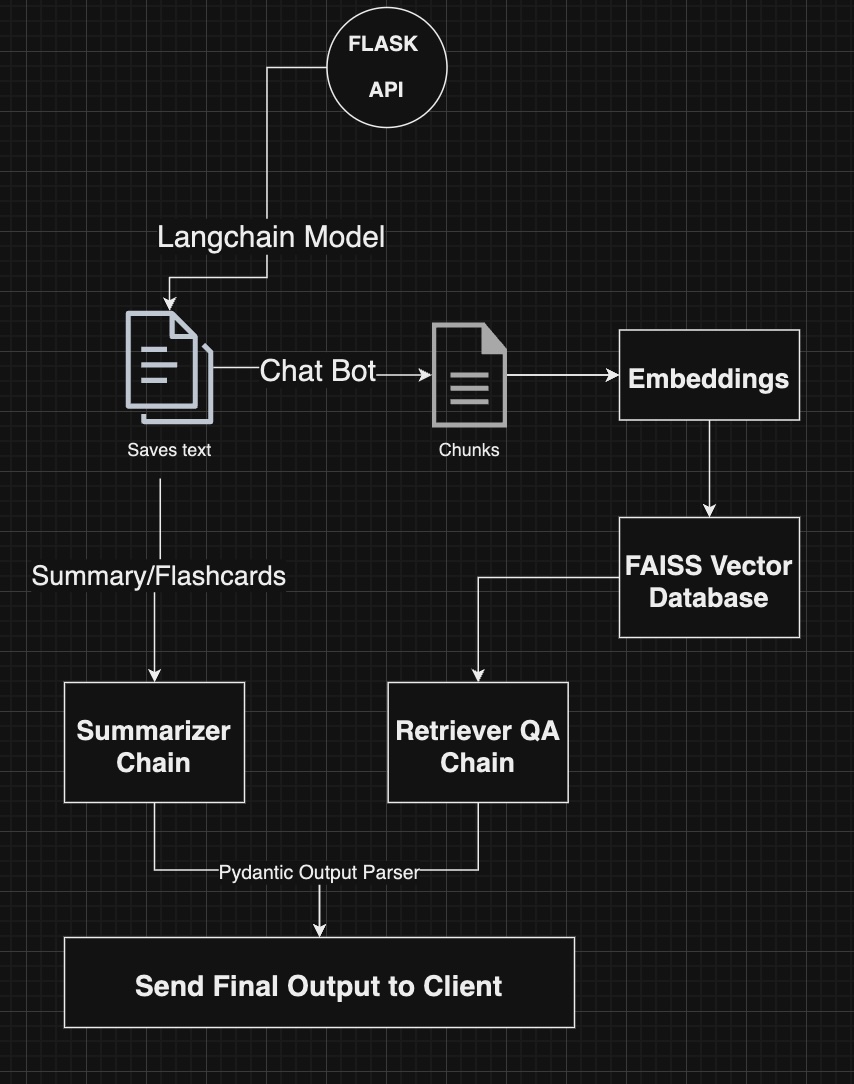
Server Architecture
-
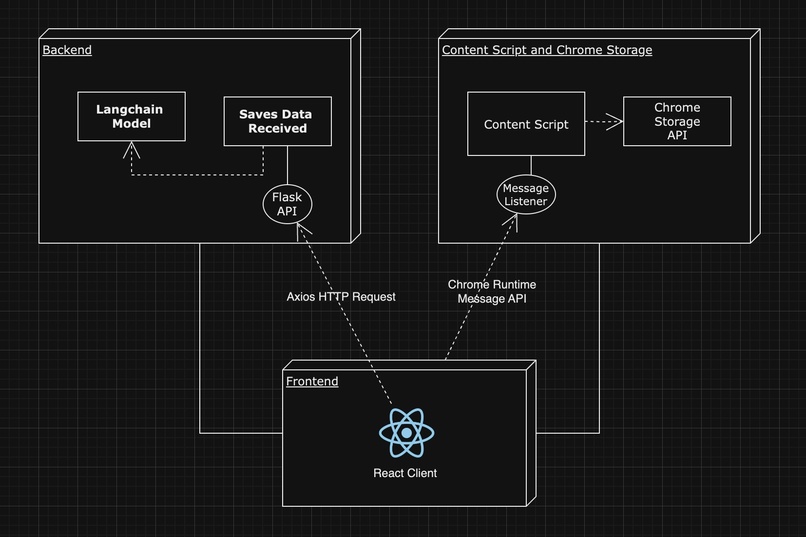
Overall Architecture
Inspiration
The inspiration behind "WebAssist" stemmed from our own frustrations and those of our peers when navigating through excessively long webpages filled with dense text. For someone who often needs to conduct thorough research, the process of sifting through these walls of text ends up being incredibly draining and time-consuming. It became evident that this inefficiency was not only affecting us but also our classmates, who struggled to extract relevant information for academic purposes due to the sheer volume of content. Additionally, making inferences from the content and identifying the most relevant parts to copy and paste into a smart assistant like ChatGPT before typing in queries was a cumbersome task. This process was further complicated by the context window limit of such assistants, which often meant having to repeatedly sift through text and condense it manually.
Witnessing these challenges, we envisioned this conveniently integratable tool into the average student's browsing experience that could alleviate this burden by providing a rich variety of services to optimize the web surfing experience. This tool will not only benefit students but also professionals, avid readers, and anyone who seeks to make their online reading more efficient and productive. Through this project, we aim to transform the way we interact with information on the web, making it more accessible and manageable.
What it does
As soon as you navigate to any webpage, the extension is ready to offer its suite of powerful features. With a single click on the extension's icon in the Chrome toolbar, a user-friendly menu pops up, presenting all available options in a clean and intuitive layout. This menu is designed to provide quick access to the extension's functionality without interrupting your browsing experience. All features are just one click away. This seamless integration ensures that the extension is always at your fingertips, ready to enhance your interaction with online content. From the main menu of the popup, you can choose to:
1. Generate Summary
The first feature of this extension is the "Generate Summary" functionality. This tool enables users to quickly obtain a concise summary of any webpage. By clicking on the "Generate Summary" button, the extension presents an input field where the user can even select an approximate llimit for the number of words the summary adds up to. This is to cater to everyone's level of need for a comprehensive collection of points. After the user submits this information, the extension extracts the key points from the content and presents them in a neatly formatted summary. This is particularly useful for researchers, students, and professionals who need to quickly grasp the main ideas without reading through the entire text. The summary is generated using a sophisticated backend service that processes the content and delivers a coherent overview, saving users a significant amount of time. There is also an option to copy all text as well as the option to convert the generated text to speech.
2. Generate Flashcards
The "Generate Flashcards" feature is designed to enhance learning and retention. Users can click on the "Generate Flashcards" button to transform the key points of a webpage into interactive flashcards. Each flashcard presents a crucial piece of information, making it easier for users to study and review the content. This feature is ideal for students preparing for exams, professionals learning new material, or anyone looking to reinforce their understanding of a topic. The flashcards are generated in a user-friendly format that facilitates effective memorization and recall. They also feature an interactive UI to bring out a visually vivid experience right beside the relevant webpage.
3. Ask Me a Question
With the inbuilt chatbot feature, users can interact with the content in a more engaging and dynamic way. By typing a question related to the webpage’s content into the provided input field, users can receive detailed answers and explanations. This feature leverages the power of natural language processing and LangChain to understand the user's query and fetch relevant information from the webpage. It is particularly beneficial for those who need specific details or clarifications on a topic, providing a smart and intuitive way to interact with the content. You can even ask general queries about the content of the webpage. There is also an option to copy all text as well as the option to convert the generated text to speech.
4. Multi Highlight
The "Multi Highlight" feature allows users to highlight multiple words or phrases on a webpage simultaneously. Users can enter the words they want to highlight, and the extension will automatically mark all occurrences of these words with different colors. This feature helps users quickly identify and focus on important terms or concepts scattered throughout the text. It is especially useful for researchers, students, and professionals who need to track specific information within a large body of text. The multi-color highlighting makes it easy to distinguish between different types of information at a glance. The interactive UI also features a user-friendly way to unhighlight any existing word by simply clicking on the word in the popup of the extension.
How we built it
Building this Chrome extension involved a seamless integration of frontend and backend technologies, leveraging the power of Chrome's extension APIs, React for the frontend interface, Flask for the backend server, OpenAI to generate embeddings from the webpage’s data for the RAG(Retrieval Augmented Generation) implementation and to tap into the capabilities of their most powerful model gpt-4, FAISS for efficient storage and retrieval of vectorized data, and LangChain which served as an optimal orchestration framework for the logical construction of our business logic.
- Frontend: Chrome Extension Setup and React App
1. Manifest File
The manifest.json file is the blueprint of our Chrome extension. It defines the extension's settings, permissions, and the scripts that should be run.
- Settings and Permissions: We specified the required permissions:
activeTab,scripting,storage. - Content Scripts: We included
content.jsandcontent.cssto be injected into every webpage the user visits.
2. Content Scripts Since our content scripts run in the context of web pages, they have a separate isolated runtime environment but can access the DOM of the page they're injected into.
content.js: This script listens for messages from the React frontend and performs actions like highlighting text, unhighlighting text, and retrieving the webpage's text content. It also manages Chrome's local storage to keep track of highlighted words and other state information.
- Initialization: On new sessions, it resets the extension's state and initializes the list of available colors for highlighting.
- Message Listener: It listens for messages from the React app and responds by performing the required actions on the webpage's DOM. It listens for either the highlight request message, or the message to signal that the textual content from the DOM of the current webpage must be sent to the React app, as this information is only accessible within the context of the content script.
- Highlighting Functionality: It uses regular expressions to find and highlight specific words on the webpage, applying styles defined in
content.css. - Chrome Local Storage: This is used to persist the state of the extension across different sessions and tabs. The state includes highlighted words, available colors, and input values for the chatbot and summarizer. This ensures that clicking out of the extension does not cause all the generated text, flashcards, or words highlighted to be undone. The user can simply open the extension again and resume the same session. The moment the user navigates to a new page, the state is reset to adapt to that specific page.
content.css: Defines the styles for the highlighted text in various colors.
3. React App The React app forms the user interface of the extension, which users interact with through the popup window when they click the extension icon.
- App Structure: The app is structured with the components: Home, ChatBot, Flashcards, MultiHighlight, Summary.
- Router Setup: Using React Router, different components are rendered based on the respective route.
Utils: Utility functions are defined in
utils.jsto interact with the Chrome extension APIs. These include sending messages to the content script and managing the local storage.- getWebPageContent: Sends a message to the content script to retrieve the text content of the current webpage.
- sendMsg: Sends a message to the content script to perform actions like highlighting and unhighlighting text.
- saveStateToStorage and loadStateFromStorage: Manage state persistence using Chrome's local storage.
- speak: Utilizes the Web Speech API to read aloud the text content, utilized in the summary and chatbot routes.
Components:
- Button: A reusable button component with hover and click effects, used on the homepage.
- TextDisplay: Displays text with a typewriter animation, includes options to read aloud and copy to clipboard.
- Flashcard: Displays flashcards and allows navigation between them. Uses Math to display a progress bar which dynamically updates depending on number of points indentified by the LangChain model
- Navbar: A simple navigation bar with a home button rendered on all routes.
- Backend: Flask Server and LangChain Model
1. Flask Server Setup The Flask server is set up to handle requests from the frontend and perform the necessary actions using the LangChain model.
- run.py: The entry point of the Flask server that initializes the application.
- app/init.py: Sets up the Flask application with CORS and routes.
- app/routes.py: Defines the routes and the corresponding actions for summarizing text, generating flashcards, answering questions, and extracting important lines.
2. LangChain Model The LangChain model is used for our natural language processing tasks.
- app/langchain_model.py:
- Load Environment Variables: Loads API keys and other configuration from environment variables.
- LLM Initialization: Initializes the language model with the OpenAI API key.
- Document Loading: Loads the document from
data.txtusing LangChain’s TextLoader. - Summarization: Uses a prompt template we engineered to generate a summary of the text.
- Flashcards: Extracts key points from the text to create flashcards and utilizes LangChain’s pydantic output parser to curate the response in the form of a list that is traversed by javaScript logic in our Front End to dynamically render each flashcard.
- Chatbot: Uses a Recursive Character Text Splitter to chunk the document and FAISS for embeddings and retrieval. The RetrievalQA chain is then used to answer questions based on the document. RAG optimizes this workflow.
- Overall Workflow
1. User Interaction When a user interacts with the extension (e.g., clicking the extension icon, entering input in the popup), the following sequence of actions is triggered:
2. Frontend to Content Script
The React app sends a message to the content script using chrome.tabs.sendMessage. The content script listens for these messages and performs actions such as retrieving webpage text, highlighting text, or unhighlighting text.
3. Content Script to Backend For actions that require backend processing (e.g., summarization, flashcard generation, question answering), the content script sends a message to the React app. The React app then makes an HTTP request to the Flask backend with the necessary data.
4. Backend Processing The Flask backend processes the request using the LangChain model. For example, if the user requests a summary, the backend loads the document, generates a summary using the LLM chain, and returns the summary to the React app.
5. Display Results The React app receives the response from the backend and updates the UI to display the results. For example, it displays the generated summary, flashcards, or the answer to the user's question.
6. State Management Throughout this process, the extension's state is managed using Chrome's local storage. This ensures that the state is persisted across sessions and tabs, providing a seamless user experience. This is also used to ensure that the user does not attempt to highlight the same work more than once.
- LangChain and RAG Implementation
LangChain Model:
- The LangChain model leverages the OpenAI GPT-4 model for various NLP tasks.
- It uses prompt templates to generate summaries, extract key points for flashcards, identify important lines, and answer questions.
Retrieval-Augmented Generation (RAG):
- For question answering, we use a Retrieval-Augmented Generation approach.
- The document is split into chunks, and embeddings are generated using OpenAI, stored and managed using FAISS.
- The RetrievalQA chain retrieves the most relevant chunks and generates a coherent answer based on the retrieved information.
Challenges we ran into
- Communication Between React App and Content Script
One of the significant challenges we faced was finding an effective way to communicate between the React app and the environment of the content script. The content script runs in a separate isolated runtime environment, which initially made it impossible to directly access the DOM of the webpage from our React components. Overcoming this required a deep understanding of Chrome's messaging system and how to leverage chrome.tabs.sendMessage to facilitate communication between these two environments.
- Parsing LangChain Model Output
Another challenge was handling the output from the LangChain model. The model's output needed to be parsed into a format that could be easily interpreted by the front end, particularly as a list for features like flashcards. Crafting effective prompt templates and using LangChain’s pydantic output parser required significant experimentation and refinement to ensure the outputs were correctly structured and usable within our React components.
- Efficient State Management
Managing state effectively across multiple sessions and tabs posed another challenge. Ensuring that Chrome's local storage was correctly utilized to persist state, such as highlighted words and user inputs, required careful design and testing. This was essential to provide a seamless user experience where users could resume their tasks without losing any progress.
- Handling Large Text Data
Dealing with large volumes of text data from webpages was also challenging. Implementing efficient methods for text extraction, summarization, and question answering while maintaining performance was critical. The use of FAISS for efficient storage and retrieval of vectorized data and the RAG approach helped in optimizing this process, but required substantial tuning and optimization.
- UI/UX Design
Creating an intuitive and responsive user interface that integrates smoothly with the Chrome extension environment was another area that required careful consideration. Ensuring that the UI components were easy to use and provided a seamless experience across different browser tabs and sessions was a complex task that involved multiple iterations and user feedback.
Accomplishments that we're proud of
- Integration of Frontend and Backend Technologies
One of the key learnings from this project was the seamless integration of frontend and backend technologies. We leveraged:
- Chrome Extension APIs: Understanding how to effectively use these APIs to build a robust and interactive extension.
- React: Developing a dynamic user interface that interacts smoothly with the Chrome extension environment.
- Flask: Setting up a backend server to handle complex processing tasks and communicate with the frontend.
- Leveraging Chrome's Extension APIs
- Content Scripts: Learning how to use content scripts to interact with web pages, manipulate the DOM, and manage local storage.
- Messaging System: Implementing a reliable messaging system between the React app and the content scripts to perform various actions.
- Local Storage: Effectively using Chrome's local storage to persist state across sessions and tabs, ensuring a smooth user experience.
- Advanced Natural Language Processing
- OpenAI GPT-4: Utilizing the capabilities of GPT-4 for various NLP tasks such as summarization, flashcard generation, and question answering.
- LangChain Framework: Using LangChain for orchestrating our NLP workflows, making it easier to build complex processing chains.
- Prompt Engineering: Crafting effective prompt templates to generate accurate and useful outputs from the language model.
- Efficient Data Handling
- FAISS: Learning to use FAISS for efficient storage and retrieval of vectorized data, which is crucial for our RAG implementation.
- RAG Implementation: Implementing a Retrieval-Augmented Generation approach to enhance the accuracy and relevance of the responses generated by our model.
- User Experience Design
- Interactive UI: Designing an intuitive and responsive user interface that enhances user interaction with the extension.
- State Management: Ensuring that the state is managed effectively across sessions and tabs to provide a seamless user experience.
What's next for WebAssist
The future of this extension is bright, with several exciting features and enhancements planned to further improve user experience and functionality:
- Highlight Important Parts of the Webpage
Given that we are already extensively utilizing the DOM, it would be practical to implement a feature that automatically highlights the most important parts of a webpage. This would involve using advanced algorithms and natural language processing to identify and emphasize key sections, making it even easier for users to find and focus on critical information without manually searching through the text.
- Enhanced AI Integration
To provide even more intelligent interactions, we plan to integrate more advanced AI models. This would enable more accurate summarizations, smarter flashcard generation, and more detailed and contextually relevant answers to user queries. The goal is to create an even more responsive and insightful assistant that can handle more complex questions and provide deeper insights.
- Cross-Browser Support
Expanding the extension's availability to other major browsers, such as Firefox and Edge, is also on our roadmap. This will allow a broader audience to benefit from the features of the extension, ensuring that more users can experience the convenience and efficiency it offers, regardless of their preferred browser.
- User Feedback and Customization
We plan to introduce features that allow users to provide feedback directly through the extension. Additionally, we aim to offer more customization options so users can tailor the extension's functionality to their specific needs.


Log in or sign up for Devpost to join the conversation.