🧠 Web2Social — Turning Webpages into Social-Ready Content
Built for Google Chrome AI Hackathon 2025

💡 Inspiration
I personally got to know about the Google Chrome AI Challenge only 16 hours before the submission deadline — but that sparked the idea behind Web2Social.
Every day, I see amazing blogs, hackathon projects, and technical write-ups go unnoticed because they never make it to social media. That short timeframe inspired me to build something fast, practical, and meaningful — a Chrome AI extension that could instantly turn those hidden gems into social-ready stories.
If knowledge can be transformed into scroll-stopping social content, it can reach everyone — not just those who read long-form blogs.
🌍 Problem Statement
High-quality technical content — such as blogs, research papers, hackathon projects, competition recaps, and product release notes — often fails to reach the wider audience it deserves.
While creators share valuable insights, the content usually lives in long-form articles or documentation that few people read. Meanwhile, audiences are spending hours doomscrolling social media, where short-form and engaging content dominates.
However:
- Rewriting a technical blog into multiple platform-appropriate posts is time-consuming.
- Each social platform has a unique tone, length, and audience style.
- As a result, great ideas stay undiscovered, limiting knowledge sharing and visibility.
💡 Insight
“If developers, creators, and startups could automatically transform their blogs, hackathon summaries, and release notes into platform-ready social media content, their knowledge could spread faster and reach more people.”
🚀 Solution — Web2Social
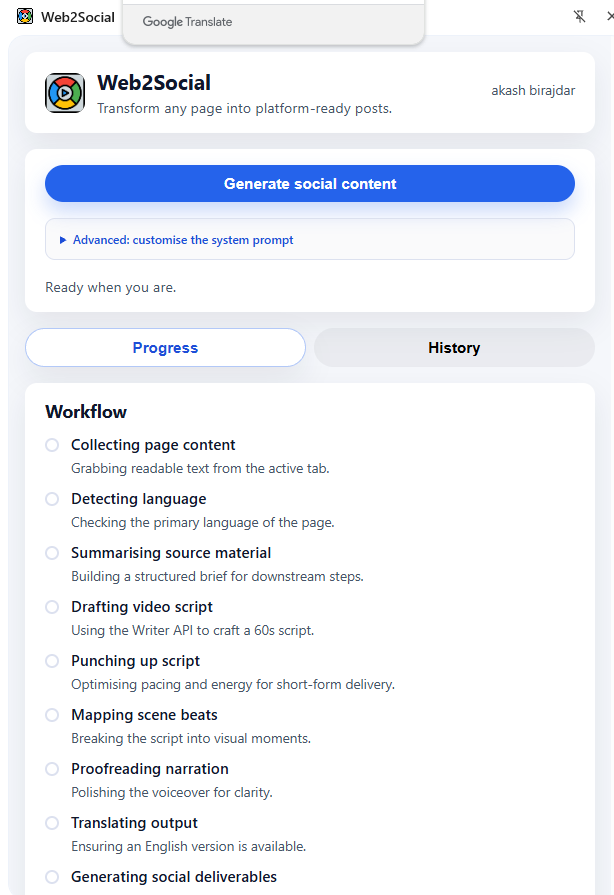
Web2Social is a Chrome Extension powered by Gemini Nano, Chrome’s on-device AI model. It transforms any webpage into ready-to-post social content for all major platforms — with just one click.
🪄 What It Does
- Reads the currently open webpage (blog, article, project, release note).
- Uses Chrome’s on-device AI APIs to summarize, rewrite, and generate social content.
Creates optimized, structured posts for:
- 🩳 YouTube Shorts
- 🎵 TikTok
- 🧵 X (Twitter)
Works fully offline — your data never leaves your device.
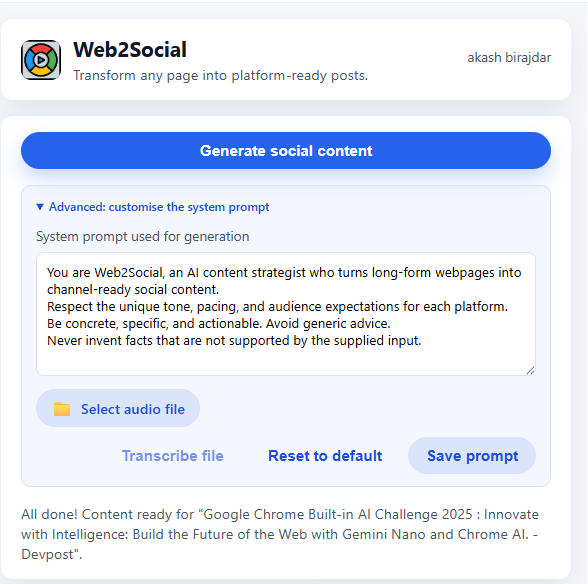
Supports multimodal prompting — you can type or upload audio to modify the AI system prompt.
✨ Key Features
| Feature | Description |
|---|---|
| 🧩 AI-Powered Repurposing | Converts long-form text into short-form social media content. |
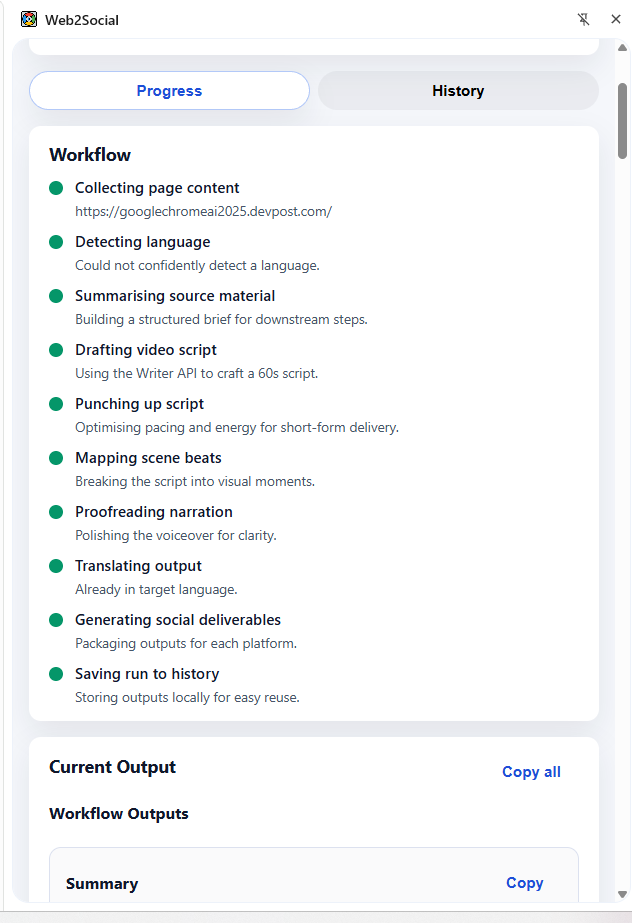
| 🧠 Multi-Stage AI Pipeline | Summarization → Script Writing → Rewriting → Proofreading → Scene Planning → Translation. |
| 🗣️ Multimodal Input | Update system prompts by typing or uploading an audio file (auto-transcribed to text). |
| 🧾 Structured JSON Outputs | Every AI response follows schema validation for reliable results. |
| 🔒 Privacy-First | Runs on-device using Chrome’s globalThis.ai APIs. |
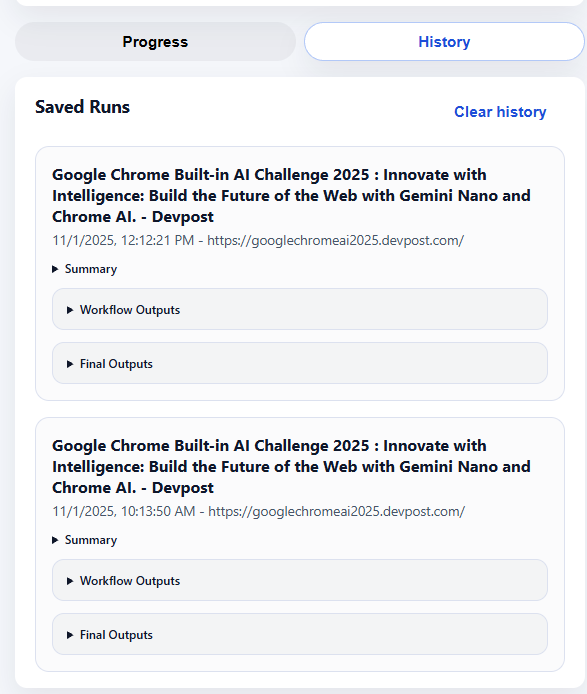
| 💾 Session History | Automatically stores your last 5 generations for reuse. |
| ⚙️ Customizable Prompts | Edit the system prompt directly or transcribe a voice note for creative control. |
⚙️ Setup & Installation
Follow these steps to install and run Web2Social locally.
🧠 Prerequisites
Web2Social uses experimental Chrome AI APIs that are currently only available in Chrome Canary.
✅ Step 1: Install Chrome Canary
Download and install from: 👉 https://www.google.com/chrome/canary/
✅ Step 2: Enable Required Flags
Open a new tab and go to:
chrome://flags/
Then enable the following flags:
#enable-experimental-web-platform-features
#optimization-guide-on-device-model
#prompt-api-for-gemini-nano
#prompt-api-for-gemini-nano-multimodal-input
#summarization-api-for-gemini-nano
#writer-api-for-gemini-nano
#rewriter-api-for-gemini-nano
#proofreader-api-for-gemini-nano
After enabling them, restart Chrome Canary.
💡 These flags activate the on-device Gemini Nano APIs (Prompt, Summarizer, Writer, Rewriter, Proofreader) and multimodal prompt support.
🪜 Installation Steps
- Clone or download the project:
   git clone https://github.com/your-username/web2social.git
   cd web2social
- Open Extensions Settings:
chrome://extensions/
Enable Developer Mode (top-right corner).
Load the Extension: Click “Load unpacked” and select the
web2social/folder (wheremanifest.jsonis).Pin the Extension: Click the puzzle icon → Pin Web2Social for quick access.
▶️ Usage
- Open any webpage, blog, or Devpost project.
- Click the Web2Social extension icon.
- The side panel opens automatically.
- Click “Generate Social Content.”
- Web2Social:
- Extracts webpage text.
- Runs through the AI pipeline.
Displays results for each platform.
- You can:
Edit the system prompt directly.
Upload an audio prompt.
Copy or save results.
🧠 Chrome AI APIs Used
| API Name | Purpose | Where It’s Used | Why It’s Needed |
|---|---|---|---|
| 🧾 Summarizer API | Extracts main ideas and key takeaways from the webpage text. | src/ai/summarizer.js |
Converts long-form content into digestible summaries. |
| ✍️ Writer API | Generates structured scripts or narratives. | src/ai/writer.js |
Creates initial drafts suitable for video narration or short-form storytelling. |
| 🪶 Rewriter API | Refines tone, structure, and engagement style. | src/ai/rewriter.js |
Adapts the text to platform tone (funny, professional, casual). |
| 🔤 Proofreader API | Corrects grammar, punctuation, and phrasing. | src/ai/proofreader.js |
Ensures polished, high-quality posts ready for publishing. |
| 🌍 Translator API | Translates scripts into target languages if needed. | src/ai/translator.js |
Enables multilingual social content generation. |
| 🈸 Language Detector API | Detects the original language of webpage text. | src/ai/languageDetector.js |
Selects the right AI model and ensures proper translation. |
| 🎙️ Prompt API | Converts user audio into a custom AI system prompt (multimodal). | src/ai/promptMic.js + src/ai/speechToText.js |
Lets users speak their custom prompt and have it transcribed automatically. |
🧩 Why Multiple AI APIs
Each API plays a specific role in Web2Social’s multi-layered AI pipeline, ensuring high-quality and platform-appropriate content:
- Summarizer API condenses long-form pages.
- Writer API structures key ideas into narrative or video-friendly scripts.
- Rewriter API ensures the content’s tone fits the intended platform (casual for TikTok, professional for LinkedIn, etc.).
- Proofreader API polishes grammar, flow, and readability.
- Translator API makes content multilingual.
- Language Detector API automatically sets source and target language preferences.
- Prompt API adds multimodal creativity — users can tweak the AI’s behavior or tone via typed or spoken input.
🗣️ Multimodal System Prompt Feature
Web2Social allows users to customize the AI’s “system prompt” — the instruction guiding how the model writes.
Users can:
- 🧾 Type a custom prompt directly in the panel.
- 🎤 Upload an audio file — Web2Social uses on-device speech-to-text to transcribe it into a prompt.
This makes the system multimodal, letting users mix voice and text input seamlessly.
Example:
You record: “Make the posts more humorous and include developer jokes.” Web2Social transcribes that, updates the system prompt, and regenerates all outputs accordingly.
🧭 Workflow Overview
[ User opens a webpage ]
        ↓
[ content.js extracts visible text ]
        ↓
[ AI pipeline executes: ]
   ├── Summarizer API → extract key points
   ├── Writer API → draft script
   ├── Rewriter API → improve tone/style
   ├── Proofreader API → fix grammar
   ├── Scene Planner → break into beats
   ├── Translator API → localize if needed
        ↓
[ Social generators create platform posts ]
        ↓
[ Results shown in side panel → user can copy/share/save ]
🧱 Project Structure
web2social/
├── manifest.json           # Chrome Extension Manifest (v3)
├── assets/                 # Icons
└── src/
    ├── background.js       # Service worker (side panel logic)
    ├── content.js          # Extracts text from current webpage
    ├── panel.html          # Side panel UI
    ├── panel.css           # UI styling
    ├── panel.js            # Orchestrates workflow & history
    └── ai/
        ├── summarizer.js
        ├── writer.js
        ├── rewriter.js
        ├── proofreader.js
        ├── translator.js
        ├── languageDetector.js
        ├── speechToText.js
        ├── promptMic.js
        ├── sessions.js
        ├── support.js
        ├── scenePlanner.js
        ├── social/
        │   ├── common.js
        │   ├── index.js
        │   ├── facebook.js
        │   ├── instagram.js
        │   ├── linkedin.js
        │   ├── pinterest.js
        │   ├── reddit.js
        │   ├── tikTok.js
        │   ├── xThread.js
        │   ├── youtubeShort.js
⚙️ Technical Details
- AI Runtime: Chrome
globalThis.ainamespace (Gemini Nano). - Session Handling:
sessions.jscaches model instances for speed. - Schema Enforcement:
requestJsonFromModel()ensures valid structured responses. - Fallback Logic:
buildFallbackPayload()incommon.jsguarantees usable output even if AI calls fail. - Data Persistence: Chrome
storage.localfor recent history. - UI: HTML5, CSS3, Vanilla JS — lightweight, responsive panel.
- Security: 100% on-device; no network requests during AI processing.
🧭 Example Use Case
Scenario: A team submits a project to the Google Chrome AI Hackathon 2025 and wants to promote it online.
- They open their Devpost project page in Chrome.
- Click “Generate Social Content” in the Web2Social side panel.
- Instantly get:
- A YouTube Shorts script summarizing the idea.
- A 3-tweet X thread.
- A professional LinkedIn announcement.
- A friendly Facebook post and discussion prompt.
- A Reddit post ready for community sharing.
All posts match each platform’s audience and tone automatically.
📈 Impact
- Increases reach of technical and educational content.
- Saves hours spent manually rewriting posts for different platforms.
- Enables developers, educators, startups, and creators to amplify their work.
- Demonstrates how Chrome’s on-device AI can empower real-world productivity tools.
🏁 Conclusion
Web2Social bridges the gap between long-form knowledge and short-form reach. By transforming blogs, hackathon projects, and release notes into social-ready content — powered entirely by Chrome’s on-device AI APIs — it empowers creators to share ideas faster, smarter, and more broadly.
“The future of sharing knowledge is short, smart, and AI-assisted — right inside your browser.”


Log in or sign up for Devpost to join the conversation.