-
-
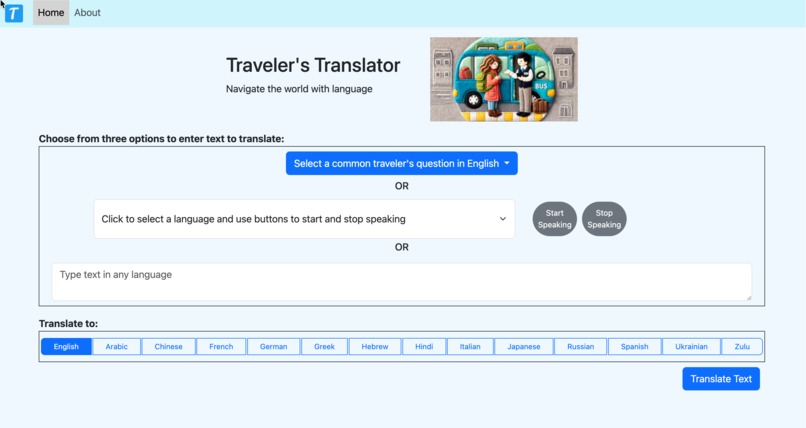
Home Page: Three Options to Enter Text to be Translated
Inspiration.
I enjoy traveling in foreign countries and listening the locals speak. I spend time trying to learn to speak a language before I travel. My husband works with people where English is a second language and I made this application thinking it could help him in his job. I'm looking forward to using this application next time I travel abroad.
What it does:
The application allows you to type in text in any language and get it translated to one of fourteen languages. If you're a traveler and you have a "common traveler question" expressed in English, you can just select that it will enter the question text for you. This saves on typing. You can also speak to the application and let AI speech recognition create the text to translate for you. Finally you can just type text in any language into the input box that captures the language to be translated. Regardless of how you input the text to be translated, Azure Translation service will automatically detect the language used.
How we built it:
This application is built with a Flask backend and HTML/CSS/JS front end. The application is responsive and works well on a phone. It uses the Azure AI Speech API and the Azure AI Translator API. The app is deployed as an app service on Azure.
A Flask server provides the middleware to manage the page service and the API calls to Azure.
Speech recognition is implemented by using the browser MediaRecorder to record what is said. The audio data is converted to a blob which is uploaded to the Flask server. The Flask server converts the input form the browser to a WAV format. The WAV formatted audio is submitted to the Speech service to generate text and then returned to the application and loaded into the input.
Challenges we ran into:
For the Translator functionality, I called the Azure TranslatorAPI directly from Flask with no problems. For the speech synthesis, I used the Microsoft Python SDK.
I ran into some problems with speech synthesis. The audio output is in WAV format and returned as a blob to produce audio on the browser. The Azure SDK created WAV data, but didn't put the WAV header on the data. It took me a while to figure that out and create a function to add the WAV header. Now I know to look for RIFF and WAVE to verify audio data is in a WAV format. I got a lot of help and feedback form the Microsoft community on questions arising from this.
I ran into some problems with producing speech on Azure web server, i.e. using the speech recognition API. This is because the web server doesn't have audio libraries. My code worked great locally, but not deployed to Azure. I found that could collect the audio in to a blob on the browser and send that for translation to text, but I decided to save coding that feature for later. The weak point in using Speech Synthesis with the Azure app service is that only the files /home/site/wwwroot and its subfolders are persisted. Therefore to load the ffmpeg library that includes ffprobe (needed for speech recognition), I have to manually install the ffmpeg library after each application update. I tried installing it under the /home/site/wwwroot and adding it's location to the path, but I was unable to do that.
Accomplishments that we're proud of:
I like using this app. I'll add more languages. It's fun to get a quick translation and then hear it spoken. This could be a good learning tool. I'm a fan of the Duolingo app, where they teach language though listening and repetition rather than learning how to conjugate verbs. I really enjoy listening to foreign speech.
What we learned:
I learned how to set up resources like AI services in Azure. I also learned how to work through problems like the WAV data without a header so I understand better how to send and receive audio across the web. This learning will apply to transferring many different file formats across the web.
I enjoy working with AI APIs and SDKs. The speech and translation APIs were different than that standard AI APIs that deal with content creation.
GitHub Copilot in Visual Studio Code:
I used GitHub Copilot in VS Code and the web application at https://copilot.microsoft.com/. Both of these tools helped in working through problems in the code and better understanding exactly what I was trying to build. It was really nice to ask Copilot in VS Code to find errors in HTML, CSS and JavaScript. Sometimes the browser allows you to run with errors in these languages, such as unclosed tags in HTML. Fortunately Copilot caught these errors and more. Copilot also helped me document the Flask app.
What's next for Web Speech Generation with Language Translation:
I'd like to work on the UI and solve the problem of automating deployment of ffmepg to an Azure web service.
Speech recognition makes it easier to use the application on a phone. My daughter, who's a Software Engineer and global traveler, gave me a thumbs up on this application and that meant a lot.
You can read more about this application in the website's About page. The code is available in GitHub and is open source. I hope others can benefit from it: Traveler's Translator Code
Code Creation
All of this code was created during the last month. I had no prior experience with the speech or translation API. I have deployed front end apps to Azure before, but this is the first time I've deployed a Python Flask server. Copilot was helpful in all aspects of this endeavor.

Log in or sign up for Devpost to join the conversation.