web-sights
Inspiration
Accessibility is something I always strive for when making sure an idea of mine comes to fruition. From keeping tabs on people in social gatherings, to the type of craft I want produced, and how I want my computer science project to turn out, I have to consider every possible situational outcome. In connection to neurodiversity, I took a course this semester that gave insight to the communities built to support individuals on the spectrum. These organizations assist to overcome job hunting difficulties and tackle daily life barriers, just to name a few services. I wanted to highlight ways we can welcome accessibility to the websites we often use.
What it does
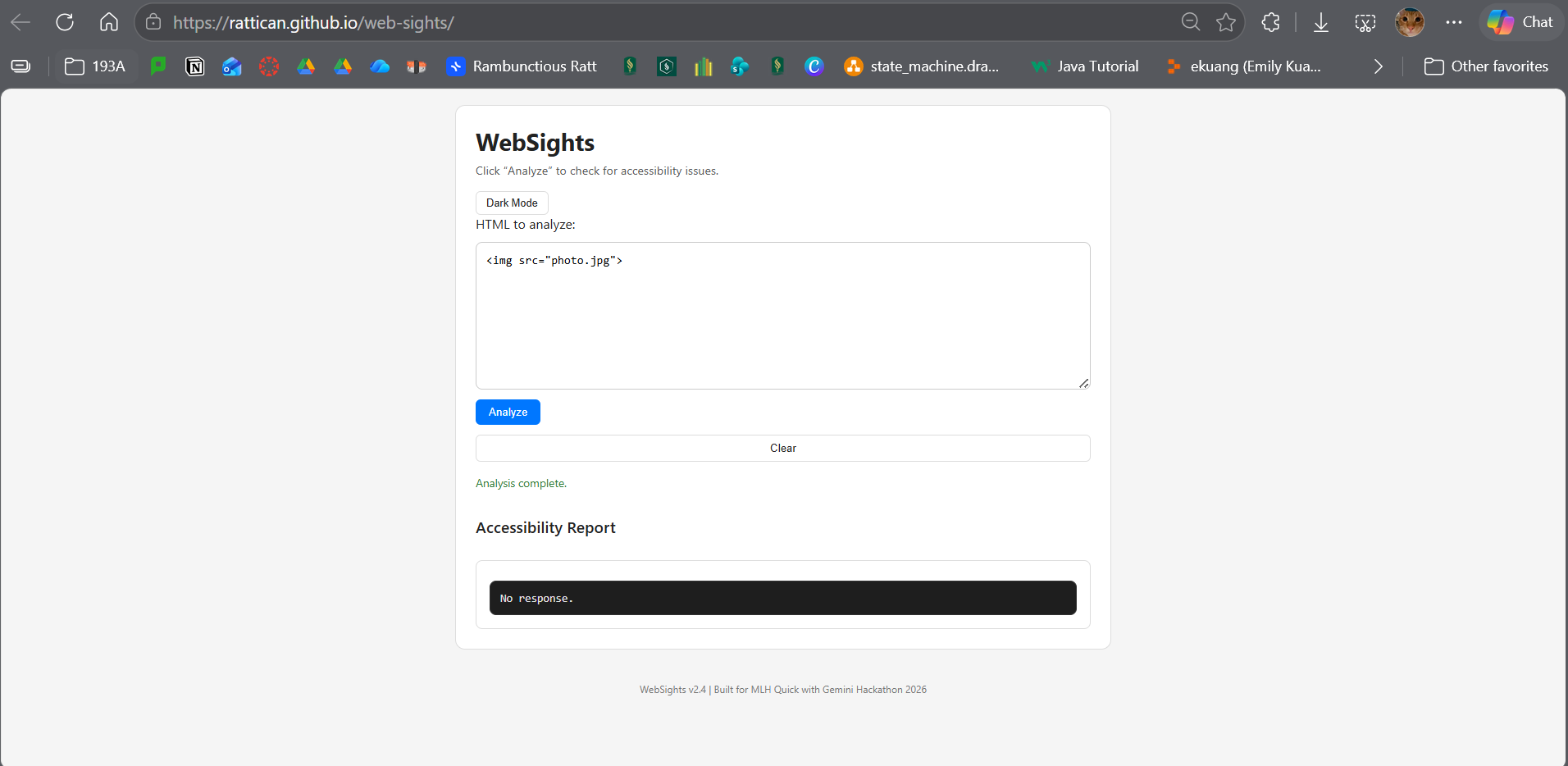
Users paste an HTML or URL link into the web app, where Gemini analyzes the input for improvements in accessibility and potential fixes. Detection is compared to WCAG-related issues and provides fixes that can make the website more user-friendly. The goal is to help developers quickly identify missing alt text, poor contrast, incorrect heading structure, unlabeled form elements, and other common accessibility pitfalls.
How we built it
- Frontend: HTML, CSS, and vanilla JavaScript
- Design: A clean, minimal UI with light/dark mode and auto‑resizing input
- AI Integration: Implemented a client‑side request flow using Google’s Gemini Web API
- Deployment: Hosted on GitHub Pages for easy access and testing The app prepares a structured prompt, sends it to Gemini, and displays the model’s response in a readable format. ## Challenges we ran into Ultimately, it was the API itself that caused the roadblock to being unable to fully implement the project. There are three different Gemini API families (Vertex AI, AI Studio Server Keys, and AI Studio Web Keys), each with different endpoints, permissions, and limitations. Despite correct implementation, the Web API key repeatedly returned empty responses or 404 errors due to undocumented endpoint restrictions. This meant the AI analysis component couldn’t fully activate in time for the hackathon. Even so, the UI, workflow, and integration logic are fully implemented. The only missing piece is Google’s side of the pipeline. ## Accomplishments that we're proud of
- Built a clean, accessible UI from scratch
- Designed workflow that mimics real accessibility checking tools
- Implemented full client‑side AI request pipeline
- Debugged multiple API configurations and learned how Google’s Web AI system behaves
- Deployed polished project on GitHub Pages ## What we learned Even without full model output, the project's intentions were the main experience and technical foundation to keeping me moving forward. I found that Google's Gemini API was far more complex than expected and how there's still so much more for me to learn as we evolve with AI. Debugging AI integrations definitely requires an immense amount of patience and document digging. Still, I learned how to design a tool that encourages others to think about inclusivity. ## What's next for Web Accessibility Checker
- Finalize Gemini integration
- Add color coding visual indicators to generated prompts
- Support URL fetching
- Include copy-to-clipboard and export options
- Expand checks to include keyboard navigation and other WCAG-related accessibility issues Long-term goal is to allow WebSights to become the lightweight, dev-friendly accessibility assistant, made for every kind of site.

Log in or sign up for Devpost to join the conversation.