-
-
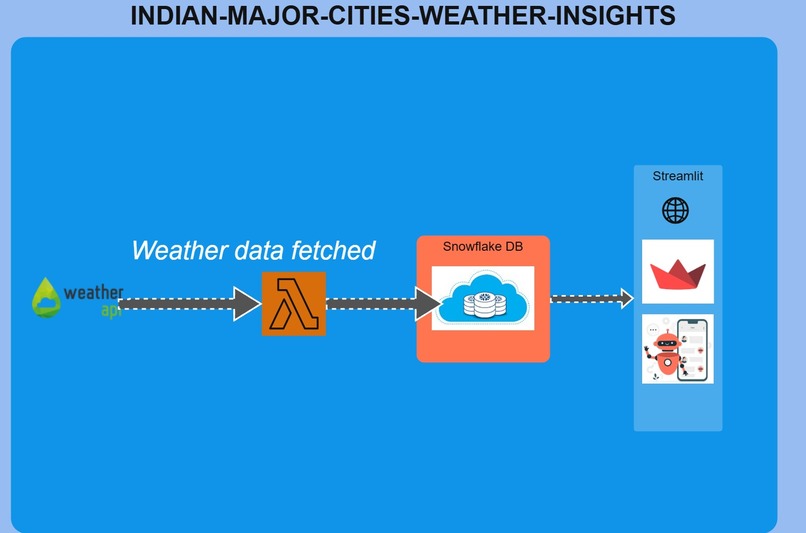
Architecture
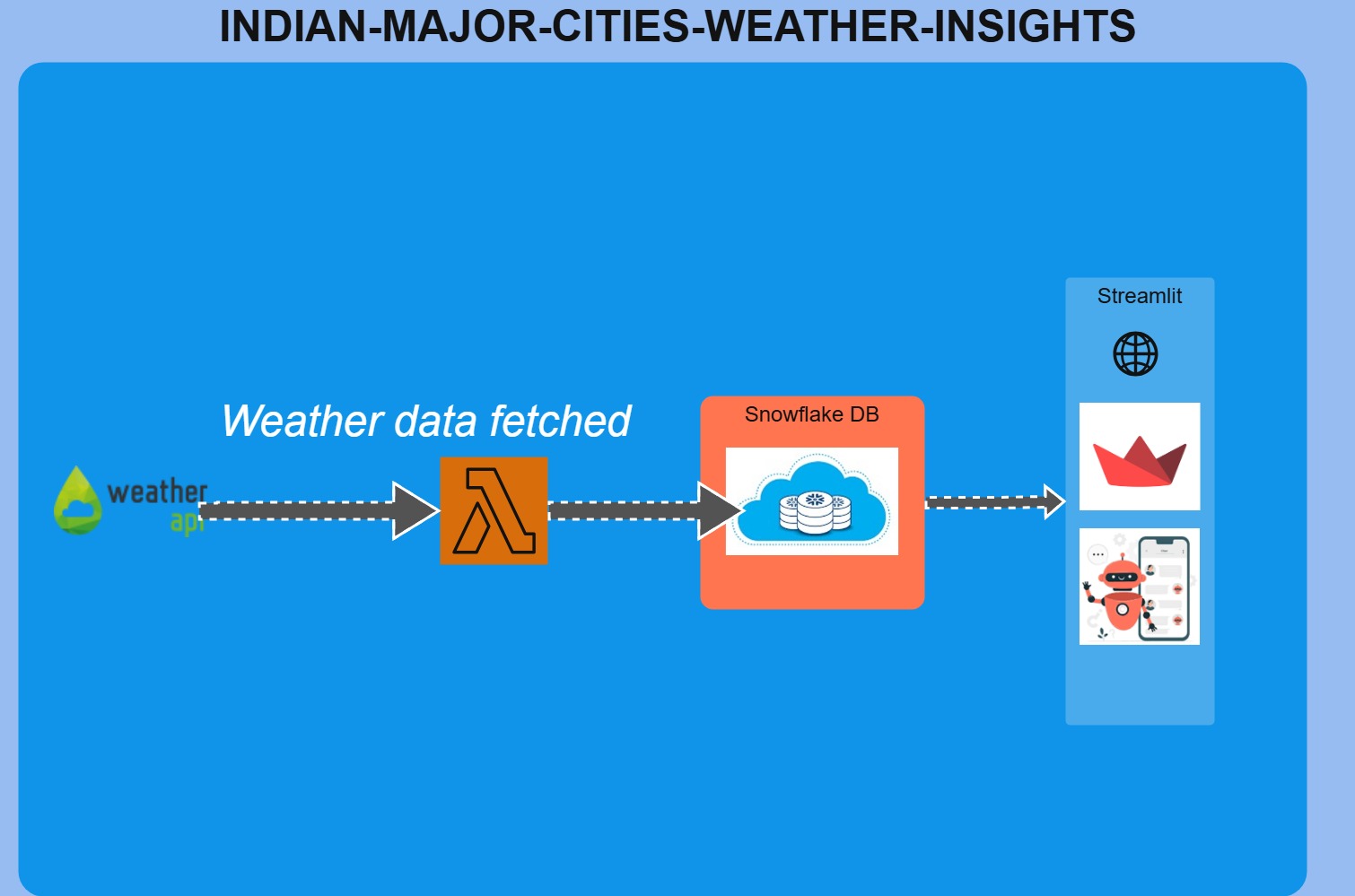
AWS_Lambda_Hackathon
Overview
This project provides a scalable, serverless weather insights dashboard for major Indian cities, leveraging AWS Lambda, Snowflake, and Streamlit. It fetches real-time weather data, stores it in a Snowflake data warehouse, and visualizes it interactively for end users.
Architecture
- Weather API: External weather data is fetched periodically (e.g., hourly) from a third-party API.
- AWS Lambda (ETL): A Lambda function (named
snowstreamin regionus-west-2) is triggered to fetch, clean, and load weather data into Snowflake. The Streamlit app can trigger this Lambda function on demand. - Snowflake: Stores all weather data in a structured table for historical and analytical queries.
- Streamlit App: Provides a web dashboard for querying and visualizing weather data by city/location, including temperature, humidity, wind speed, and trends over time.
Features
- Trigger Lambda from UI: The dashboard button triggers the AWS Lambda function to fetch and push the latest data to Snowflake.
- Event Bridge Scheduler: The lambda function is triggered hourly through the schedule.
- Secure Credentials: All Snowflake and AWS credentials are managed via Streamlit secrets and session state.
- Location-based Filtering: Users can filter and visualize weather data by
LOCATION_NAME. - Rich Visualizations: Interactive charts for temperature, humidity, wind speed, and time trends using Plotly.
- Recommendations: AI-driven suggestions for improving air quality in Indian cities.
File Structure
Home.py: Main entry point, sets up navigation and app config.pages/Architecture.py: Shows the architecture diagram and explains the data flow.pages/Realtime_Weather_Across_India.py: Main dashboard for weather data, Lambda trigger, and visualizations.src/: Contains images and architecture diagram assets.
How to Run
Link: https://weather-fetch-with-lambda.streamlit.app/
- Install requirements:
pip install -r requirements.txt - Set up your
secrets.tomlwith Snowflake and AWS credentials. - Run the app:
streamlit run Home.py
Inspiration
This project was inspired by the need for real-time, scalable, and actionable weather insights for Indian cities, leveraging modern cloud and data technologies. The goal was to empower citizens, researchers, and policymakers with up-to-date weather and air quality data, and to demonstrate the power of serverless architectures for public good.
What it does
- Fetches real-time weather data for major Indian cities using external APIs.
- Triggers an AWS Lambda function to process and push the latest data into a Snowflake data warehouse.
- Provides a Streamlit dashboard for interactive visualization, filtering, and analysis of weather data by location.
How we built it
- Backend: AWS Lambda (Python) for ETL, triggered from the Event Bridge Scheduler/Streamlit UI.
- Data Warehouse: Snowflake for scalable, secure storage and analytics.
- Frontend: Streamlit for the dashboard, with Plotly for interactive charts.
- Integration: Secure credential management via Streamlit secrets and session state. All components are loosely coupled and cloud-native.
Challenges we ran into
- Integrating secure, on-demand Lambda triggers from the Streamlit UI.
- Ensuring seamless data flow and schema consistency between Lambda, Snowflake, and the dashboard.
- Handling API rate limits and data quality issues from external weather sources.
- Making the dashboard both powerful and user-friendly for a wide audience.
Accomplishments that we're proud of
- End-to-end automation: One-click data refresh from API to dashboard.
- Robust, scalable, and serverless architecture.
- Clean, interactive, and insightful visualizations for weather and AQI data.
- Collaboration between developers Darshan and Mahantesh to deliver a full-stack solution.
What we learned
- Best practices for integrating AWS Lambda, Snowflake, and Streamlit.
- Secure handling of cloud credentials in a public-facing app.
- Building user-centric dashboards with advanced filtering and visualization.
- The importance of clear architecture and modular code for maintainability.
What's next for Weather Forecast
- Add predictive analytics and machine learning for weather and AQI forecasting.
- Integrate more data sources (satellite, IoT sensors, etc.).
- Enable user alerts and notifications for severe weather or pollution events.
- Expand to cover more cities and regions, and support additional languages.
- Deploy as a managed SaaS solution for organizations and governments.
Developed with ❤️ by Darshan and Mahantesh.
Built With
- amazon-web-services
- lamda
- streamlit
- weatherapi

Log in or sign up for Devpost to join the conversation.