-
-
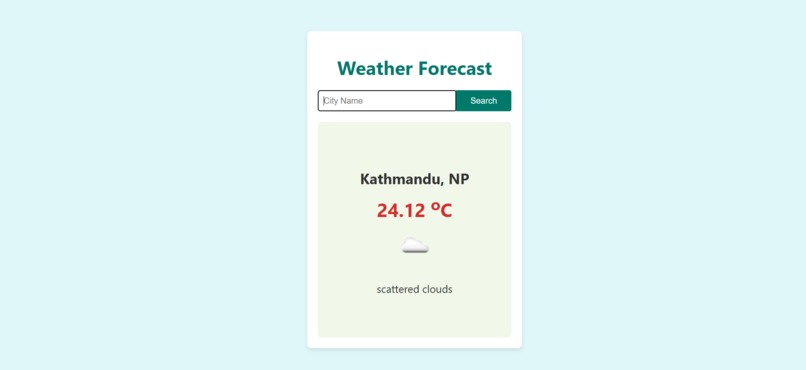
A sleek and user-friendly weather forecast application displaying the current weather of Kathmandu, Nepal.

Weather Forecast
Inspiration
The idea for this project came from my personal need for quick and reliable weather updates. I wanted to create something simple yet effective that could help users make informed decisions about their day, whether they are planning an outing or just checking if they need an umbrella. Building this app was also a great way for me to explore practical API integration with React.
What it does
The Weather Forecast app allows users to input a city name and retrieve real-time weather information. It displays:
- Temperature in Celsius
- Weather description (e.g., scattered clouds)
- Weather icon matching the current conditions
- City name with its country code
If a user enters an invalid city name or if the API fails, the app provides clear feedback to avoid confusion. I also added a loading animation to enhance the experience while the app fetches data.
How I built it
- Frontend: React for building the UI and managing component states.
- API: OpenWeatherMap API to fetch weather data.
- Styling: HTML and CSS for layout and design.
I used React’s state management to handle user input and API responses, ensuring smooth interaction. Conditional rendering allowed me to dynamically show content based on the weather data or potential errors.
Challenges I ran into
- Handling API errors: I had to ensure the app provided proper feedback when a city wasn’t found or the API call failed.
- UI design: Getting the design to look clean and responsive on different devices took some effort and refinement.
Accomplishments that I’m proud of
- Successfully integrating the OpenWeatherMap API and handling responses smoothly.
- Building a responsive and easy-to-use UI with React.
- Implementing proper error handling and feedback mechanisms to improve the user experience.
What I learned
- Gained hands-on experience working with APIs and managing asynchronous data in React.
- Improved my skills in error handling and creating user-friendly feedback systems.
- Enhanced my knowledge of UI/UX design principles, focusing on simplicity and responsiveness.
What's next for Weather Forecast
- Add a 5-day weather forecast to provide future weather trends.
- Implement unit conversion between Celsius and Fahrenheit.
- Use geolocation services to automatically detect the user’s location.
- Further optimize for mobile devices and ensure accessibility for all users.

Log in or sign up for Devpost to join the conversation.