-
-
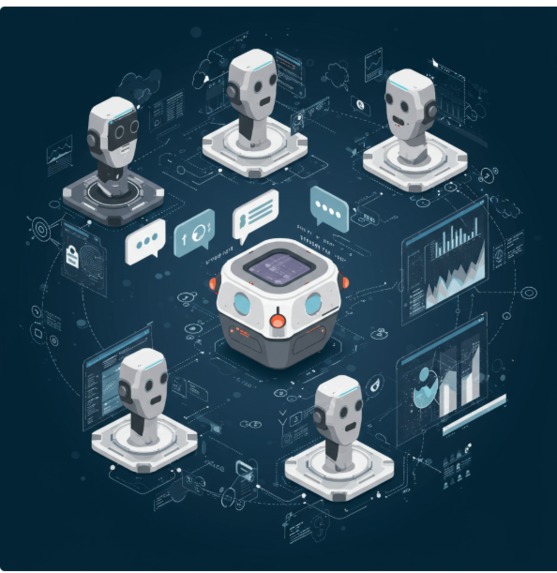
All-in-one assistant for weather, travel tips, AI answers & more, powered by Google Gemini & OpenWeatherMap in real-time!
-
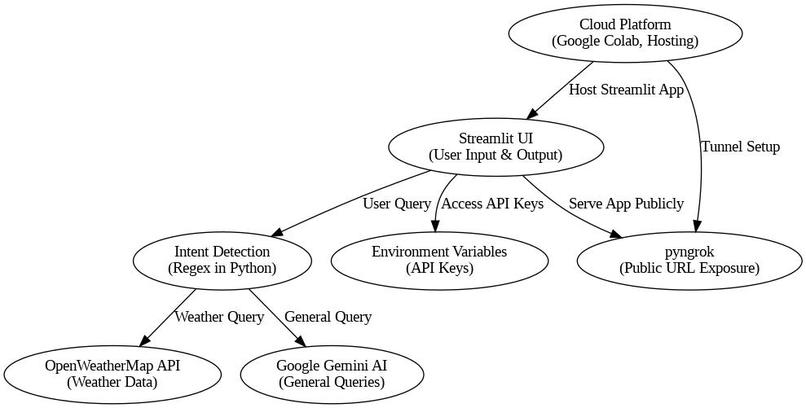
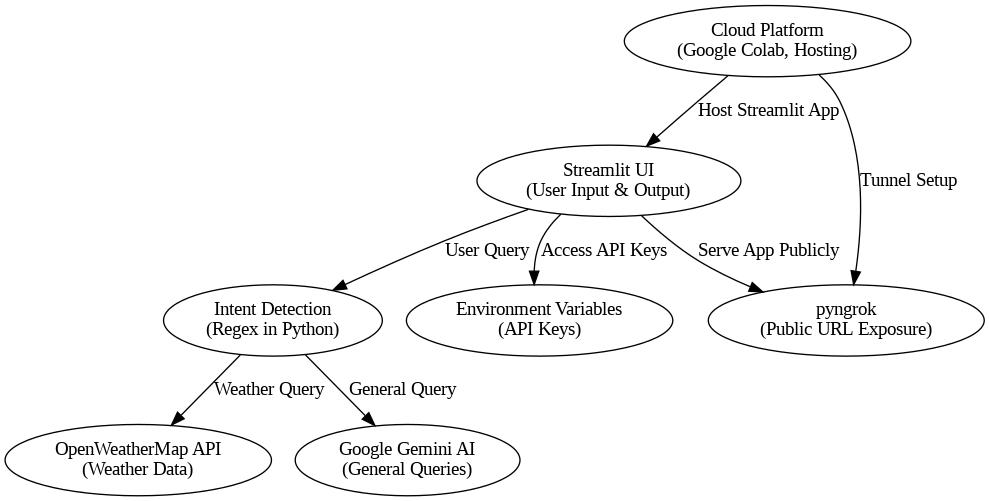
architecture_diagram in jpg

Inspiration
🚀 Inspiration We were inspired by the idea of creating an AI assistant that could intelligently interpret and respond to real-world conditions, starting with weather. Weather impacts daily decisions, safety, travel, and planning—and we wanted to build an agent system that could not only report the weather but reason about it, delegate tasks across agents, and offer contextual advice.
With the release of Google’s Agent Development Kit (ADK) and the power of Gemini, we saw a perfect opportunity to build an intelligent, multi-agent system using real-time data and cloud tools.
What it does
✅ What It Does Our project is an AI-powered multi-agent Weather Assistant built using Google’s Agent Development Kit (ADK). It allows users to have natural, conversational interactions to get weather updates and related insights. Here's what it can do:
🌍 Understand and Respond to Location-Based Questions Users can ask: “What’s the weather like in London?” “How about New York?” “Will it rain tomorrow in Tokyo?”
The agent extracts the location, uses a weather tool to fetch live data from a weather API (e.g., OpenWeatherMap), and responds conversationally.
🧠 Multi-Agent Intelligence The assistant is powered by multiple specialized agents:
Query Interpreter Agent – Understands user intent and extracts city names or dates.
Weather Tool Agent – Fetches weather data using real-time API calls.
Response Agent – Formats the response using natural language (with Gemini).
(Optional) Memory Agent – Remembers the last location or compares past queries.
🔄 Handles Follow-Up Questions Maintains context within a conversation: User: “What’s the weather like in Berlin?” User: “And tomorrow?” The assistant uses memory to link follow-ups back to previous queries.
🌐 Real-Time Data Integration Queries external APIs like OpenWeatherMap to retrieve:
Current temperature
Conditions (e.g., rain, clouds)
Wind speed, humidity
Forecast data for upcoming days
🛡️ Safe, Modular & Extendable Built with ADK’s modular agent design and safety callbacks.
Can be extended to support alerts, clothing advice, air quality, or even multi-modal output.
How I built it
🧱 How We Built It We built a multi-agent weather assistant using:
ADK to create modular agents (e.g., a query handler, a weather fetcher, and a response formatter).
Gemini via the google-generativeai SDK for natural language understanding.
A custom Weather Tool that queries the OpenWeatherMap API.
Session memory to let the agent remember past locations and compare them.
Google Colab for prototyping, and Google Cloud Storage (optional) for state persistence.
Challenges I ran into
🚧 Challenges I Ran Into Building a multi-agent weather assistant using the Agent Development Kit (ADK) and integrating external services came with a number of real-world challenges. Here are the key hurdles I faced:
🔑 1. API Key Management Managing and securely storing the Google API key for Gemini and weather API credentials (like OpenWeatherMap) was tricky in environments like Colab.
Accidental placeholder keys caused repeated INVALID_ARGUMENT errors until I verified every config step.
🧵 2. Agent Coordination & Asynchronous Design Since agents operate asynchronously, debugging their interactions—especially event sequencing and delegation—was complex.
I had to learn how to trace event streams to detect failures in delegation or misfired callbacks.
💬 3. Follow-Up Query Context Handling conversational queries like “How about Paris?” required me to build and persist session-level memory.
Without memory, the agent lost context and responded with irrelevant or incorrect information.
I explored multiple session strategies (e.g., in-memory, token-passing) to solve this.
🛠️ 4. Tool Integration Failures Integrating external weather APIs required strict handling of:
Missing location data
Incorrect city names
API rate limits or downtime
I implemented fallback responses and safety guards to keep the conversation graceful even when external calls failed.
🧪 5. Testing Multi-Agent Flows Unlike single-model agents, testing a system with three or more interdependent agents demanded deeper logging and simulation.
I created minimal prompts to test each agent in isolation before combining them into the full workflow.
📦 6. Limited Documentation for ADK ADK is still evolving, and while tutorials help, many deeper integration patterns had to be figured out through experimentation, reading source code, and adapting from Google’s examples.
Accomplishments that I'm proud of
🎉 Accomplishments That I'm Proud Of Successfully built a multi-agent Weather Bot that leverages Google’s Gemini model combined with external weather APIs, demonstrating the power of intelligent agent collaboration.
Implemented asynchronous agent workflows with smooth message passing, enabling follow-up conversations that maintain context across multiple turns.
Designed and integrated specialized sub-agents to handle greetings, weather data retrieval, and error handling, improving modularity and maintainability.
Handled real-world API challenges gracefully, including invalid inputs and failed calls, ensuring the bot provides user-friendly fallback responses.
Leveraged persistent session memory to maintain conversation context, enhancing user experience with relevant and coherent answers in multi-turn dialogues.
Explored and utilized the latest Agent Development Kit (ADK) features effectively, despite limited documentation, by diving into examples and Google’s tutorials.
Created a reusable and extendable codebase that can serve as a foundation for more advanced AI assistant projects or hackathon entries.
What I learned
How to build multi-agent systems using ADK, callbacks, and delegation.
How to integrate real-time external APIs into agents using tools.
The importance of designing for fallbacks, agent failure recovery, and safe defaults.
How to manage session state and context in AI-powered interactions.
The value of agent specialization—assigning roles like “weather fetcher” or “response generator” made the architecture more robust and testable.
What's next for Weather Companion Bot
What’s Next for Weather Companion Bot Expand Multi-Agent Collaboration: Add more specialized agents for tasks like air quality updates, weather alerts, and personalized recommendations based on user preferences.
Integrate More Data Sources: Incorporate additional weather APIs and live satellite data to improve accuracy and provide richer insights.
Enhance Natural Language Understanding: Utilize advanced models and fine-tuning to better understand complex queries and handle ambiguous or multi-part questions.
Add Voice Interaction: Enable voice input and output to make the bot accessible on smart devices and mobile platforms.
Implement User Profiles and Preferences: Store user preferences for locations, units (Celsius/Fahrenheit), and alert thresholds to provide tailored weather updates.
Improve Safety and Privacy: Implement robust guardrails to ensure data privacy and avoid misinformation, using callbacks and monitoring.
Deploy on Multiple Channels: Expand beyond Colab into web apps, chat platforms (Slack, Discord), or mobile apps for broader accessibility.
Built With
- google-colab
- python

Log in or sign up for Devpost to join the conversation.