-
-
PathTrack: Smart Passenger Counter"
Inspiration
The inspiration for creating a Passenger Counter App stemmed from a desire to develop a simple yet practical application that could be used in various scenarios. Whether it's counting passengers in public transport or keeping track of attendees in an event, the goal was to create an efficient and user-friendly tool.
What it does
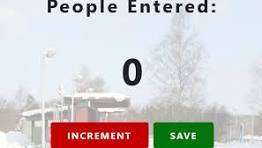
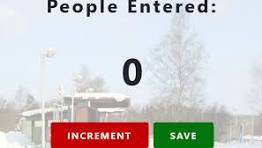
It counts the current Number of passengers Entered.
How we built it
I started by designing a minimalistic HTML structure to represent the passenger counter app. The layout included sections for displaying the current count and interactive buttons for incrementing and decrementing the count. I focused on creating a clean and responsive design using CSS. The styles were kept simple to maintain clarity and readability, ensuring a pleasant user experience. The core functionality of the passenger counter app was implemented in JavaScript. I used DOM manipulation to update the count dynamically when the user clicks the increment or decrement buttons.
Challenges we ran into
One of the major challenges I encountered was handling asynchronous operations in JavaScript while fetching and updating weather data. Understanding promises and async/await was crucial for ensuring a smooth flow of data and preventing any unexpected behavior. Additionally, ensuring cross-browser compatibility and creating a responsive design posed some initial difficulties. However, these challenges provided valuable learning experiences and ultimately contributed to the improvement of the overall project
Accomplishments that we're proud of
I learned about the importance of structuring code and maintaining code cleanliness for better readability and future modifications. -Error Handling -Responsive design
- Dynamic Creation -Dom Manipulation ## What we learned building this Passenger app was an enriching journey that deepened my understanding of web development concepts. It allowed me to apply theoretical knowledge to a practical scenario, resulting in a functional and visually appealing passenger application. ## What's next for Passenger App Persistent Storage:
Implement a mechanism to store the passenger count data persistently. This could involve using browser storage mechanisms like localStorage or integrating with a server/database if the application needs to store data across sessions. User Authentication: If the app evolves into a more complex system, consider adding user authentication to track counts per user. This can be crucial for scenarios where multiple individuals may be using the app independently. Data Visualization: Enhance the user interface by incorporating data visualization. Graphs or charts can provide a visual representation of passenger count trends over time, making the app more insightful. Settings and Configuration: Allow users to customize the app according to their needs. This could include features such as choosing different themes, setting count limits, or configuring sound notifications. Responsive Design for Mobile: Optimize the app for mobile devices to ensure a seamless user experience on smartphones and tablets. Responsive design considerations may involve adjusting button sizes, layout, and overall styling.


Log in or sign up for Devpost to join the conversation.