Inspiration
Budgeting apps explain the past. Brokerage apps show the present. Financial planners focus on the future.
Wealth Dashboard connects all three—and helps users understand what to prioritize next.
The project began as deeply personal software.
An entrepreneur used Claude to build a system for managing his own household finances, investment decisions, and long-term life plan. It was already being used in daily life, so it contained practical knowledge that is often missing from conventional personal-finance tools.
However, the original version only worked for its creator. Personal assumptions were embedded throughout the project, setup required direct editing of files, and another person could not safely initialize, operate, or recover the system.
During OpenAI Build Week, a software engineer with five years of professional experience used Codex and GPT-5.6 to transform that personal tool into a reusable project that another person can set up and operate from a clean environment—including a new voice-first AI financial-planner interview built on the OpenAI Realtime API.
What it does
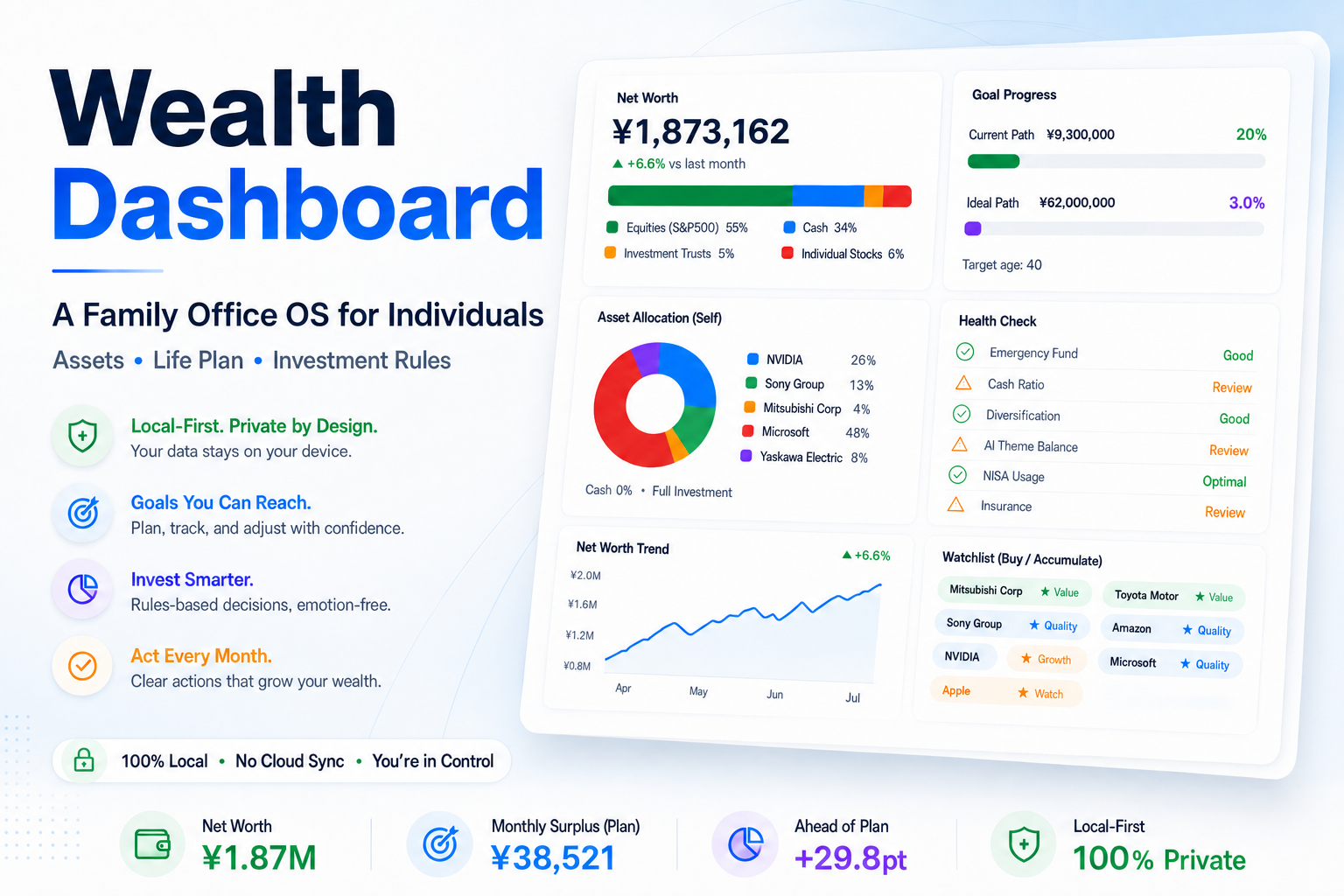
Wealth Dashboard is a local-first family-office OS for individuals.
It brings together information that is normally scattered across budgeting apps, brokerage accounts, spreadsheets, and financial-planning tools—and it starts not with forms, but with a conversation.
The AI FP interview
A user opens a local web page, gives explicit consent for external processing, and talks with a Japanese-speaking AI financial planner by voice or text.
There is no fixed questionnaire. The AI follows the life the user describes—marriage, housing, children, career, and retirement—and asks follow-up questions naturally.
Users can start from zero or select one of four fictional quick-start personas and discuss only what is different.
At the end, there is a single final review in which every value is labeled with its provenance:
- the user's own answer;
- an approximation;
- the AI's interpretation;
- a standard-cost estimate;
- a calculated result;
- or unset.
Nothing is saved until the user explicitly confirms.
The dashboard
The dashboard shows:
- current net worth and asset allocation;
- progress toward savings and long-term wealth goals;
- emergency-fund, housing, education, and retirement planning;
- liabilities and future large expenses;
- a portfolio health check with
good,review, andactionstatuses; - personal investment performance compared with the S&P 500 and inflation;
- cash-flow-adjusted returns calculated using the Modified Dietz method;
- valuation-based watchlists based on user-defined fair-value rules;
- and a prioritized list of actions to review during the current month.
A separate life-plan page projects financial assets under three scenarios and includes:
- full annual cash-flow tables;
- education costs after public subsidies;
- and a retirement check.
The system does not execute trades, access brokerage accounts, or place orders. It organizes information and evaluates it against explicit rules while leaving every financial decision to the user.
How it works
The financial calculations are deterministic and auditable rather than generated by a black-box AI.
User data is stored in:
- a local Excel ledger;
- versioned JSON configuration using schema v3;
- and a local SQLite store for interview drafts.
Python scripts calculate:
- asset allocation;
- goal progress;
- life-plan scenarios;
- portfolio health checks;
- investment performance;
- and watchlist conditions.
The scripts then generate local HTML dashboards.
Auditable investment-performance calculations
Investment performance is computed using the Modified Dietz method, so returns exclude the effect of deposits:
[
R_{MD}
\frac{V_E - V_B - \sum_i F_i} {V_B + \sum_i w_i F_i}, \qquad w_i = \frac{T - t_i}{T} ]
Here, (F_i) represents external cash flows—including both ad-hoc purchases and recurring contributions—and (w_i) weights each flow according to how long it was present during the measurement period.
Voice and text interview
The interview layer runs on the OpenAI Realtime API using:
gpt-realtime-2.1;- and
gpt-4o-mini-transcribefor transcription.
The standard API key remains on the local server and is never sent to the browser. The browser receives only a short-lived Realtime connection secret.
Raw audio is never stored. The system stores only the normalized text, drafts, reviews, and confirmation records needed to resume and audit the interview.
The AI can only:
- edit interview drafts;
- and run estimation tools.
It cannot write directly to:
- the JSON configuration;
- the Excel ledger;
- or other confirmed personal records.
Settings are committed atomically only when:
- the final review matches the latest draft revision;
- the user explicitly confirms the review;
- and an automatic backup has been created.
Codex-guided setup and operation
Codex is the setup and operations layer.
A user can open the repository in Codex and say:
Set up this wealth dashboard from a clean environment.
Guided by AGENTS.md and the included $wealth-dashboard-operator skill, Codex:
- prepares the dependencies;
- creates an empty personal-data area;
- asks the user to store their OpenAI API key through a masked terminal prompt, without pasting it into chat;
- re-verifies the environment;
- and opens the interview page.
For daily operation, plain-language requests such as:
Add 5 shares of Apple bought at 180 dollars.
are converted into supported CLI commands:
.venv/bin/python wealth.py set-holding \
  --ticker AAPL \
  --name Apple \
  --shares 5 \
  --cost 180 \
  --currency USD
