
Pitch Deck: https://canva.link/vix03kkwc6jl2bi
Inspiration
CinemaScout was inspired by the challenges filmmakers face when planning shots inside unfamiliar or difficult-to-access locations. Traditional location scouting requires travel, repeated site visits, manual measurements, and extensive coordination before a director can confidently decide where to place a camera.
Our team wanted to explore a more spatial and interactive approach. Instead of reviewing a location through photographs or a standard 3D viewer, filmmakers should be able to step inside a reconstructed environment, explore it at real-world scale, test different camera positions, and communicate their creative decisions to the rest of the production team.
CinemaScout combines immersive spatial computing, 3D Gaussian Splatting, virtual cinematography tools, and AI-assisted shot planning to turn a scanned location into an interactive pre-production workspace.
What it does
CinemaScout allows filmmakers to explore a digitally reconstructed location and plan shots before visiting the physical set.
Inside the immersive Unity application, users can:
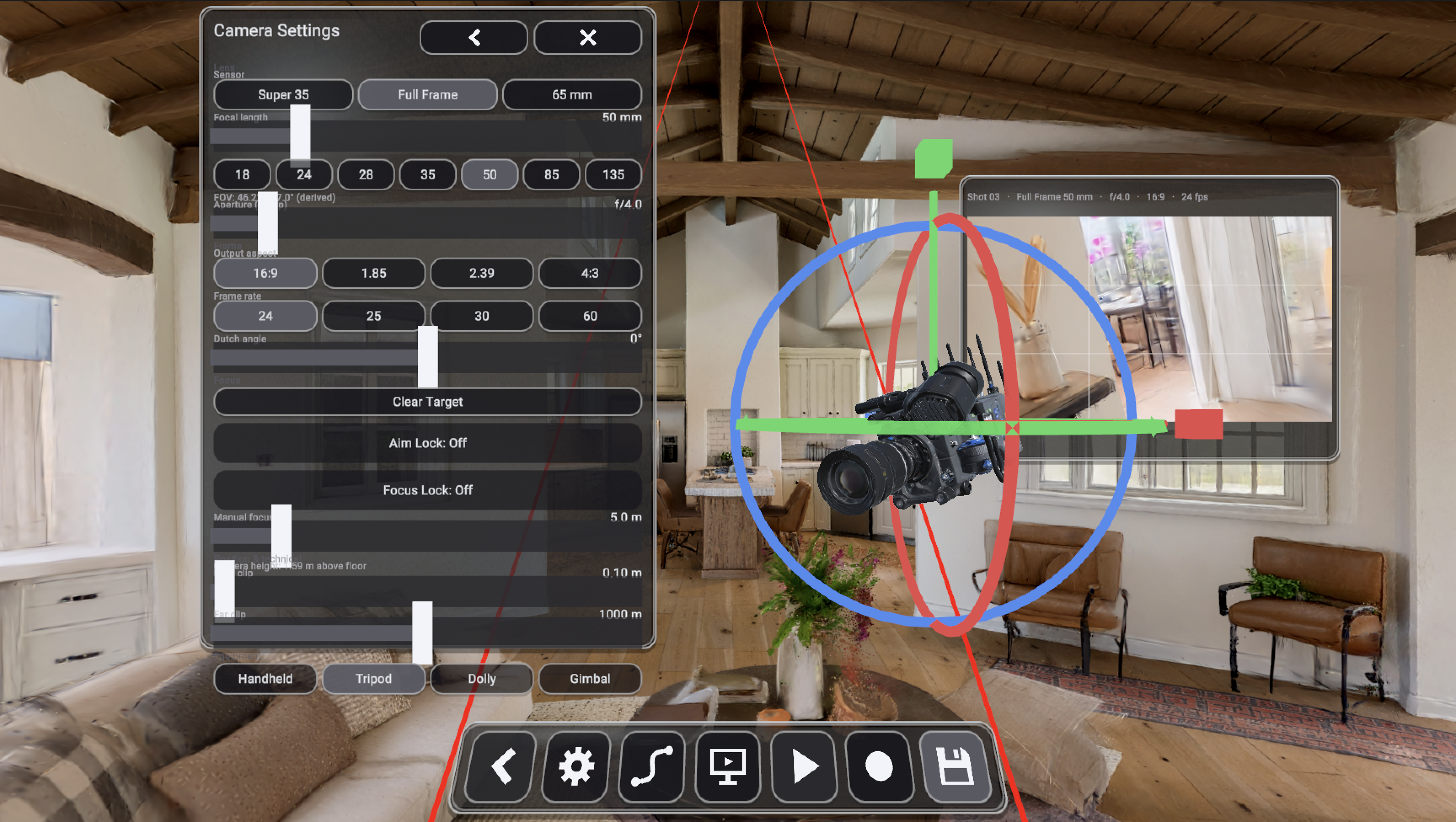
Walk through a 3D Gaussian Splat reconstruction of a real environment. Position a virtual cinema camera anywhere in the scene. Experiment with focal length, field of view, aspect ratio, camera height, and clipping settings. Preview how a shot will appear from different viewpoints. save and review potential camera positions. Use CinemaScout’s AI assistant to receive shot recommendations based on the filmmaker’s creative intent. Communicate selected viewpoints and shot information through a spatial Mission Control interface.
The Unity environment acts as the immersive filmmaking workspace, while the WebSpatial interface acts as the project’s command center. Together, they allow filmmakers to move between creative exploration, AI-assisted decision-making, and shot organization.
How we built it
CinemaScout was developed as a spatial filmmaking system consisting of an immersive Unity application and a WebSpatial Mission Control interface.
The immersive experience was built in Unity using:
A Gaussian Splatting renderer to display photorealistic reconstructed environments. Unity’s XR and OpenXR tools for immersive navigation and interaction. PICO’s Unity Integration SDK for deployment and testing within the PICO ecosystem. A virtual physical camera system for controlling cinematography settings such as focal length, field of view, sensor size, aspect ratio, camera height, and clipping planes. Custom interaction tools for placing, previewing, saving, and revisiting camera viewpoints.
We also created a WebSpatial interface that allows CinemaScout to function as more than a standalone VR application. The interface serves as a spatial Mission Control dashboard where users can review scene information, organize recommended shots, compare viewpoints, and coordinate the filmmaking workflow.
The AI component interprets the filmmaker’s requested mood, subject, or shot objective and recommends suitable cinematography choices. Rather than replacing the filmmaker, the AI acts as a creative scouting assistant that helps users discover viewpoints they may not immediately consider.
Challenges we ran into
One of our biggest challenges was combining several rapidly evolving technologies into a single workflow. Gaussian Splatting, Unity XR, PICO tools, WebSpatial, virtual cinematography, and AI-assisted recommendations each introduced different technical requirements.
Rendering a detailed Gaussian Splat environment in an immersive application also required careful performance optimization. We had to balance visual quality with the frame rate needed for a comfortable spatial experience.
Accomplishments that we're proud of
One of our biggest accomplishments was successfully rendering and controlling a virtual camera inside a VR headset.
We created a camera that moves smoothly along a predefined spline path through the reconstructed environment, allowing users to preview cinematic tracking shots from within the headset. Users can experience the planned camera movement spatially instead of viewing it only through a traditional desktop screen.
We also made the camera settings adjustable, allowing filmmakers to experiment with properties such as focal length, field of view, aspect ratio, camera height, and other cinematography parameters while exploring the scene.
Bringing spline-based camera movement, real-time camera controls, Gaussian Splat rendering, and immersive headset playback together was a major technical milestone for our team. It demonstrated that CinemaScout could work as a practical virtual cinematography and shot-planning tool rather than simply being a 3D environment viewer.
What we learned
We learned that spatial computing is most valuable when it improves an existing human workflow rather than simply presenting content in three dimensions.
For filmmakers, the value of CinemaScout is not only the realism of the reconstructed environment. Its value comes from allowing users to make decisions inside that environment.
From a technical perspective, we gained experience integrating Gaussian Splatting, XR interaction, physical camera systems, PICO development tools, WebSpatial interfaces, and AI services. We also learned the importance of designing modular systems so that different team members can work on the immersive environment, camera tools, AI features, and spatial dashboard without blocking one another.
What's next for CinemaScout
Our next goal is to develop CinemaScout into a complete collaborative pre-production platform.
Future features include:
Generating more context-aware shot recommendations based on scene geometry, lighting, subject position, and cinematic style. Allowing the AI agent to create and position suggested virtual cameras directly inside the scene.


Log in or sign up for Devpost to join the conversation.