-
-
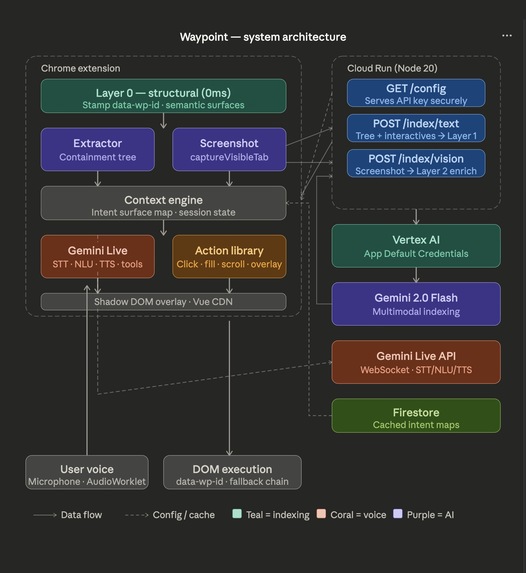
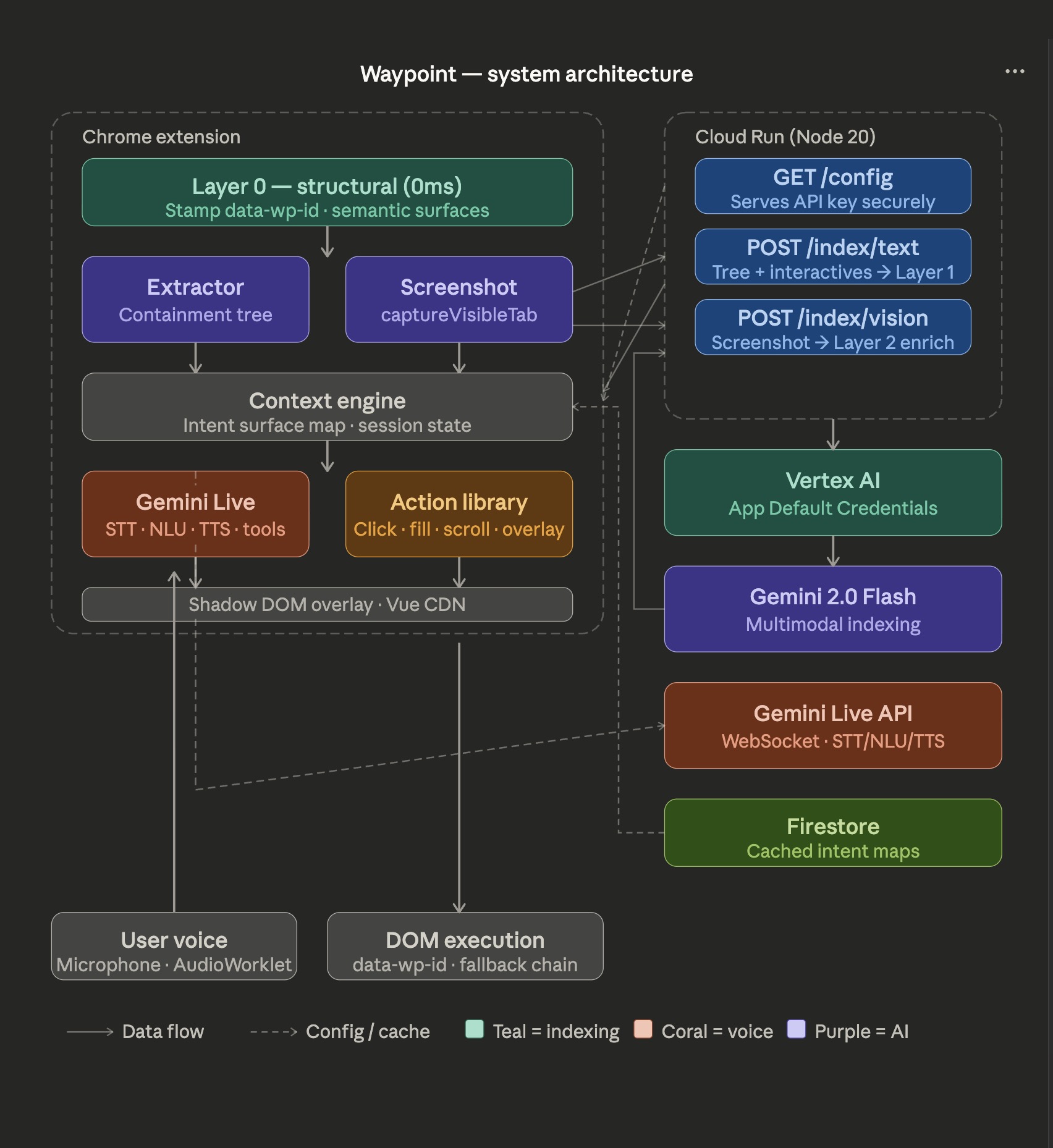
Waypoint Architecture diagram
What inspired Waypoint
I've watched people struggle with the web in ways most of us never think about.
Tab navigation — the web's primary accessibility fallback — requires a user to move through every interactive element on a page sequentially, hoping the developer implemented focus order correctly, hoping ARIA labels exist, hoping the site was built with them in mind. Most weren't.
The problem isn't that accessibility tools don't exist. Screen readers, voice control software, browser extensions — they're all out there. The problem is they're all action-first. They require the user to know what the interface calls the thing they want. "Click sign in." "Tab to search." The user has to learn the UI's vocabulary.
I wanted to flip that. What if the interface learned the user's vocabulary instead?
That's Waypoint. You say where you want to go. The system figures out how to get you there.
How I built it
Waypoint is built around three primitives: DISCOVER → DOCUMENT → ACTIVATE.
DISCOVER — indexing the page
When a user clicks "Index", Waypoint runs a three-layer indexing pipeline:
Layer 0 runs instantly on the client with no AI. Every interactive element — every <a>, <button>, <input> — gets stamped with a unique data-wp-id attribute. Semantic HTML elements get bare-bones intent surfaces immediately. Voice works against these in milliseconds.
Layer 1 sends a lean containment tree to a Cloud Run backend, which calls Gemini 2.0 Flash via Vertex AI. The tree captures every DOM node above a minimum size threshold — its tag, text, size, position, z-index, and children — as a pure hierarchical structure. Crucially, elements with position: fixed or position: absolute are flagged as likely universal controls. Gemini groups elements into named intent surfaces, writes natural language trigger phrases, and classifies the page.
Layer 2 sends a screenshot alongside the Layer 1 surface map to Gemini's multimodal endpoint. Its job is narrower: find what the DOM analysis missed. Icon-only buttons. Visual carousels. Hero CTAs identified purely by their visual prominence.
Each layer merges into the previous using data-wp-id as the deduplication key. The result is an Intent Surface Map — a structured document of everything a user could meaningfully want to do on this page.
DOCUMENT — the intent surface map
{
  "pageType": "ecommerce",
  "purpose": "Browse and purchase products",
  "surfaces": [
    {
      "id": "nav-main",
      "type": "WAYFINDING",
      "label": "Main Navigation",
      "triggers": ["nav", "menu", "navigation", "go to"],
      "action": { "type": "SCROLL_TO", "target": "[data-wp-id=\"a3f7\"]" }
    },
    {
      "id": "btn-cart",
      "type": "CONTROLS",
      "label": "Add to Cart",
      "triggers": ["buy", "add to cart", "purchase"],
      "action": { "type": "CLICK", "target": "[data-wp-id=\"c9d2\"]" }
    }
  ]
}
Four surface types cover every meaningful thing a page can offer: WAYFINDING (where can I go), PURPOSE (what is this page for), CONTROLS (what can I do), CONTEXT (what needs my attention now).
ACTIVATE — Gemini Live as the voice brain
This is the architectural bet that makes Waypoint different from every other voice navigation tool.
Gemini Live handles speech-to-text, natural language understanding, text-to-speech, and conversation state in a single bidirectional WebSocket. No separate STT service. No NLP pipeline. No TTS API. One connection. Everything.
The microphone stream goes through an AudioWorklet that converts Float32 samples to Int16 PCM at 16kHz. Buffers are base64-encoded and sent continuously to the WebSocket. Gemini streams back PCM16 audio at 24kHz.
Critically, Gemini doesn't return text that needs parsing — it returns structured tool calls:
activate_surface({ surfaceId: "nav-main" })
scroll_page({ direction: "down" })
enter_click_mode()
The extension executes these against the live DOM. Natural language understanding stays in the model. DOM interaction stays in the extension. Clean separation.
At session start, Gemini receives the full Intent Surface Map as its context. Every surface, every trigger, every action. The conversation is grounded in the actual page from the first word.
The challenges
The data-wp-id bridge. The hardest implementation detail in the system. Stamps don't survive page reloads or SPA navigation. Every cache hit requires refreshSurfaceTargets() to re-walk the DOM and re-match surfaces to fresh stamps using text, id, and class scoring. Getting this wrong means surfaces silently point at the wrong elements.
Dynamic pages. Modals, infinite scroll, SPA route changes — the intent map goes stale. A MutationObserver watches for significant changes and triggers async reindexes. The tricky part is defining "significant" — too sensitive and you're reindexing constantly, too loose and you miss modals.
Coverage guarantees. Gemini is creative. Left unconstrained it would group and summarize elements rather than map every single one. The Layer 1 prompt includes an explicit constraint: every element in the interactives list must become a surface. This single prompt engineering decision was the difference between 60% and 100% coverage.
Latency perception. A 1-2 second index on page load is acceptable. A 1-2 second delay on a voice command is not. The architecture separates these completely — indexing pays the latency cost once, all command execution resolves locally. But Gemini Live's response time for tool calls still varies. The solution is narration: "on it", "got it", "one moment" — the system talking fills the gap and makes latency feel like thinking rather than waiting.
What I learned
The web's accessibility problem is not a technology problem. The technology has existed for years. It's an architecture problem — every tool built to date has been built on top of the assumption that the interface is fixed and the user must adapt.
Waypoint is built on the opposite assumption. The interface is unknown and arbitrary. The user's intent is the constant. The system's job is to bridge the two.
Gemini's multimodal capability — genuinely understanding both structure and visual appearance simultaneously — is what makes that bridge possible at scale. Not just on sites built accessibly. On every site. Any page. Without developer cooperation.
That's what changed. That's why now.
Built with
- Gemini 2.0 Flash — multimodal page indexing
- Gemini Live API — real-time voice: STT, NLU, TTS, tool calls
- Vertex AI — secure Gemini access via Application Default Credentials
- Google Cloud Run — stateless Node.js backend
- Firestore — cached intent maps
- Chrome Extensions Manifest V3 — content scripts, service worker, shadow DOM overlay
- Google GenAI SDK / ADK — agent orchestration
- Vue.js (CDN) — overlay UI
- Web Audio API / AudioWorklet — PCM microphone processing
Built With
- cloudrun
- gemini
- vertexai

Log in or sign up for Devpost to join the conversation.