-
-
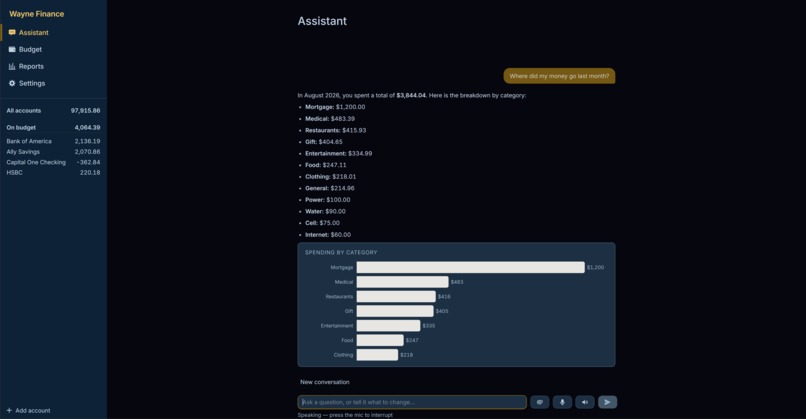
our project
-
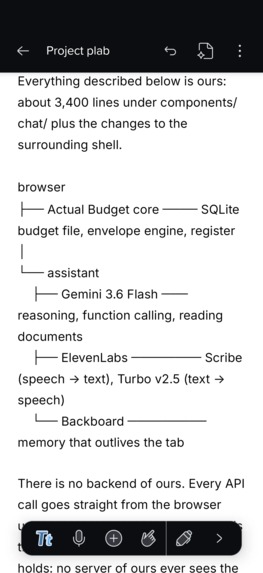
notability planning
IGNORE THE VIDEO IT IS BUGGED. WE HAVE A REAL VIDEO
https://youtu.be/IQBZbRpAkek [https://youtu.be/IQBZbRpAkek]https://youtu.be/IQBZbRpAkek
Inspiration
Every budgeting app we've used is a very good filing cabinet. It shows you what happened, colors the overspending red, and then waits for you to do something about it. The work — recategorizing the same coffee shop for the fourth time, moving $40 from Dining to Gas, typing in the receipt in your pocket — is still entirely yours.
We wanted to find out what happens when the assistant can actually reach into the budget instead of narrating it. Not a chatbot bolted onto a sidebar that tells you what you already know, but something you can hand a receipt to and say, "deal with this".
What it does
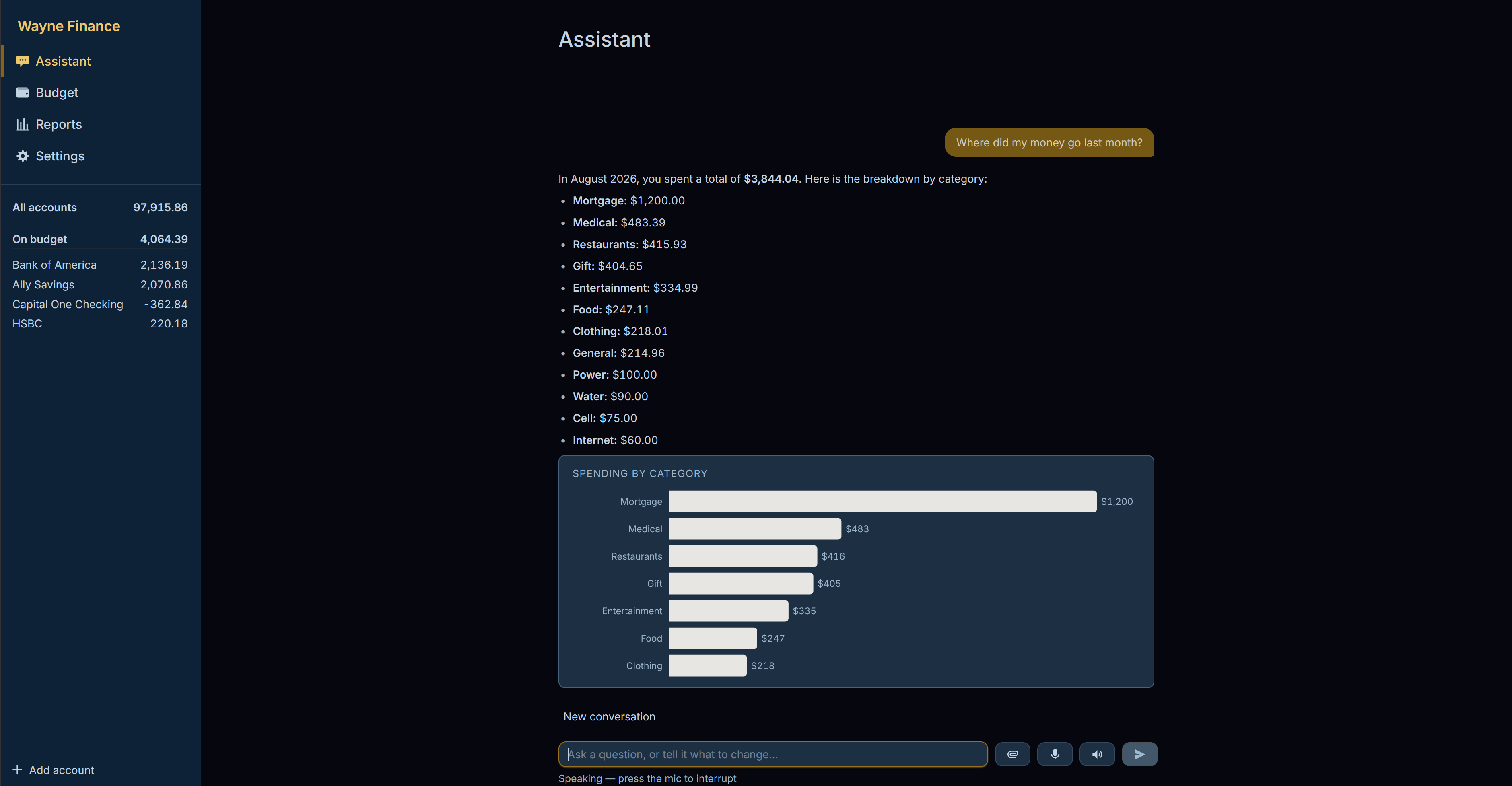
Wayne Finance is a personal budgeting app with an assistant that acts on your real data.
It answers from your actual budget. Ask "how much did I spend on groceries last month" or "am I on track" and it queries your transactions rather than guessing. Every figure it gives you came from a lookup, never from the model's imagination.
It changes things. "Budget $300 for groceries", "move $50 from Dining to Gas", "cover my overspending", "categories my Kroger transactions" — it does them. Every change land in the app's normal undo stack, and the reply carries an Undo button, so nothing it does is a one-way door.
It reads documents. Drop in a receipt photo or a bank statement PDF and it pulls out the transactions — date, merchant, amount — files them under categories that actually exist in your budget and tags them so you can find them later. A 14-row statement imports in one go, with the deposit kept positive.
It listens and talks. Press the mic and ask out loud; the reply is spoken back. You can interrupt it mid-sentence.
It remembers you. Tell it you're saving for a car by June, and it still knows next time you open the app, even on a different day.
It notices things first. Before you ask anything, it shows what changed: categories over budget, spending running above your own recent average, bills due that your accounts can't cover.
Your budget file never leaves your device. There is no backend of ours in the middle — the app talks to the APIs directly from your browser.
How we built it
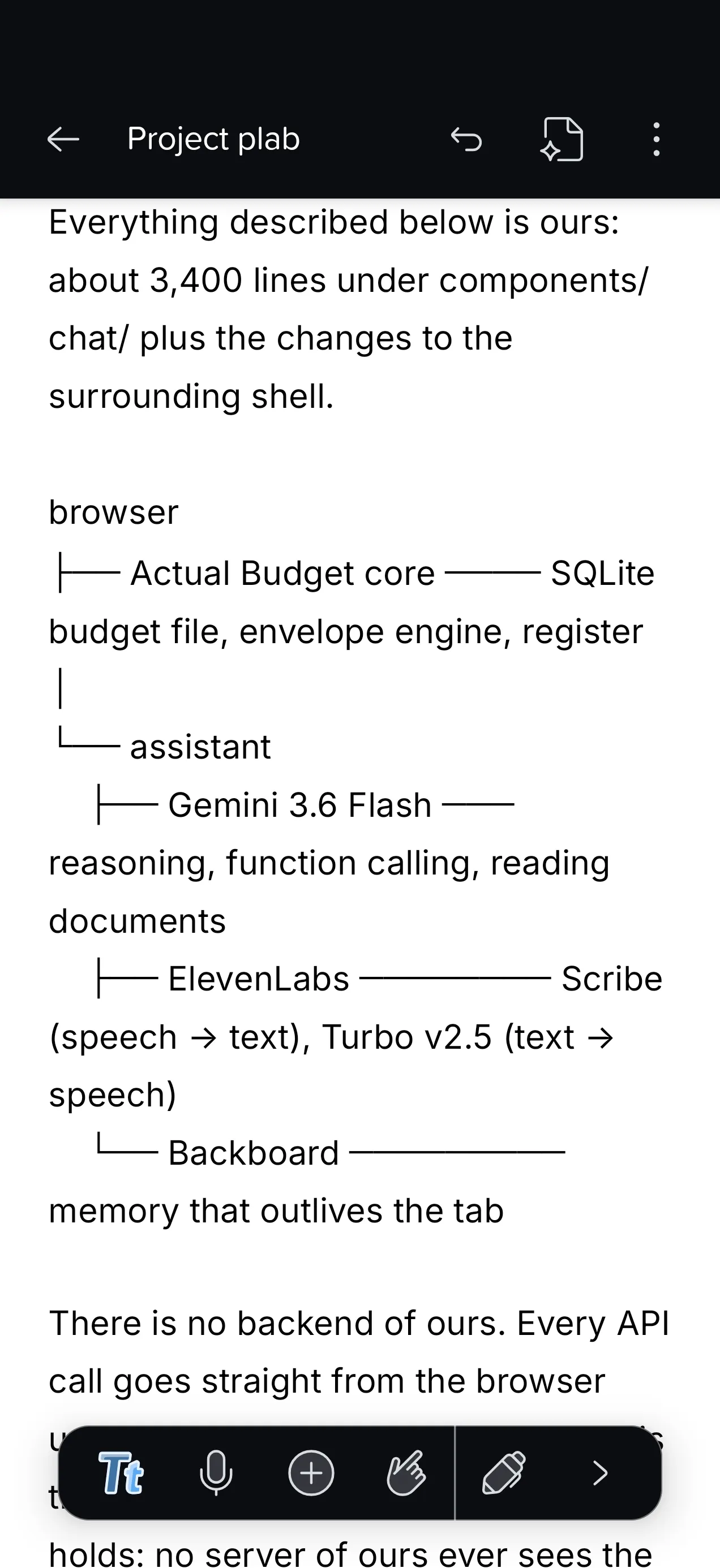
The base. We started from Actual Budget, an open-source (MIT) local-first envelope budgeting app, so the money side was real from hour one — a proper SQLite budget file, envelope math's, a transaction register. Everything described above is what we built on top of it: roughly 3,000 lines across the assistant, plus the changes to make the surrounding app fit.
The agent. Gemini 3.6 Flash with 15 function-calling tools — 11 that read the budget and 4 that change it. The tools run against the real database in the browser, so the model never sees a number we made up, and we never show a number the model made up.
Documents. Gemini is multimodal, so receipts and statements go to it as inline image or PDF data straight from the browser. A separate write tool resolves the account by name, reuses or creates the payee, and files everything through the app's normal handlers so the whole import is a single undo.
Voice. ElevenLabs both ways — Scribe for speech-to-text from the mic, Turbo v2.5 for the spoken reply. Replies are stripped of markdown first, so it doesn't read punctuation out loud.
Memory. Backboard stores durable facts about you. Before answering, the app searches your memories for anything relevant and hands them to Gemini as context; when you state something lasting, the model writes it back through a tool. Only what you say about yourself is stored — never your transactions.
Shipping it. Deployed on a Vultr instance behind nginx with a Let's Encrypt certificate, on a knightfall.wiki domain from GoDaddy Registry. HTTPS isn't cosmetic here: microphone capture and the SharedArrayBuffer the budget engine needs both require a secure context. A system timer watches GitHub and rebuilds on the server when the branch moves, which keeps the API keys on the box instead of in a CI secret store. It also installs as a PWA, so it runs full screen on Android.
Challenges we ran into
The assistant kept asking what day it was. Early on, any question with a relative date — "last month" — sent it into a loop until it gave up. The system prompt claimed today's date would be supplied, and nothing ever supplied it, so the model was calling tools that happen to return dates (upcoming bills, forecasts) to reverse-engineer the current date before it could even start. Stating the date outright took it from four-to-six rounds, often failing, down to one.
Planning questions ran out of lookups. "How long until I can afford a $12,000 car?" needed income and spending for each month — two lookups per month — and hit the ceiling before it could answer, throwing away everything it had gathered. We added one tool that returns income, spending and net per month in a single call, and made running out of lookups produce an answer from what was already collected instead of an error. Eight calls and a failure became three calls and a real answer.
Long replies painted over each other. A forty-item list rendered straight through the button below it. The conversation is a flex column, so a tall reply was being compressed below the height its text needed — a 675px box holding 1,100px of text — and the overflow drew outside its own box instead of scrolling.
The installed app would never have updated. The service worker was set to wait for a refresh prompt that nothing in the app ever showed, so it would have served whichever version a phone saw first, forever. In a browser tab you can force a reload; installed as a PWA there's no address bar to do it from. We'd have been demoing a stale build and wondering why our fixes weren't there.
Receipts were re-uploaded on every message. Attachments stayed in the conversation history, so every follow-up question re-sent and re-billed the same image. Bounding them to recent messages cut follow-up requests by about 70%.
Accomplishments that we're proud of
It actually does things. The gap between an assistant that describes your budget and one that changes it is most of the value, and that's the part we got working — safely, with every action undoable.
It tells the truth when it can't do something. Early on it would claim to have filed a receipt under "Groceries" in a budget whose category is "Food", and the transaction would quietly land uncategorized. Now the tool reports back what it couldn't match and the assistant says so. For a finance app, an assistant that confidently misreports is worse than one that admits a gap.
We shipped it properly. It's live on its own domain with HTTPS, installs on a phone, and redeploys itself from a git push. Not a localhost demo.
We tested it like software. Contrast measured across the interface rather than eyeballed; touch targets measured against a 40px floor; request payloads measured before and after. Several of the bugs above were found by checking, not by noticing.
What we learned
Most "the model is being dumb" moments were our prompt being wrong. The date loop, the tool-budget exhaustion, and an early bug where telling it a fact triggered an eight-tool investigation instead of it simply listening — all three were us instructing it badly, not the model failing.
Letting an AI write to a database is a UX problem before it's a technical one. Confirming every action makes it tedious; confirming nothing makes it frightening. Routing everything through an undo stack and showing an Undo button next to what changed turned out to be the answer.
Verify, don't assume. We "confirmed" the app icons were updated by checking image dimensions — and the old ones happened to be exactly the same size, so the check passed on stale files. Looking at the images took five seconds and would have caught it immediately.
Tool design shapes how good the answers are. The same question failed or succeeded depending on whether the right tool existed, far more than on prompt wording.
What's next for Wayne Finance
Bank connections. The document import proves the pattern; pulling transactions automatically is the obvious next step. We'd planned to use Capital One's Nessie API for this, but it was down for the weekend.
Scheduled check-ins. The insight engine already spots overspending and bills you can't cover. It should be able to tell you on payday rather than waiting for you to open the app.
Let it propose plans, not just answer. It can tell you a car will take fourteen months. It should be able to offer the three changes that would make it nine and apply them if you agree.
Sharper memory. Right now, it remembers what you tell it. It should notice patterns you haven't articulated — that you always overspend the week after payday, for instance.


Log in or sign up for Devpost to join the conversation.