Inspiration
Head Hall is one of the hardest buildings to navigate at the University of New Brunswick (UNB). It has multiple wings, confusing stairwells and room numbers that don't follow an obvious pattern. GPS doesn't work indoors, and most buildings don't have usable digital floor plans. I wanted a way to map a building with nothing but a phone and a single walk through it.
What it does
Wayline has two parts:
- The iOS recorder. You walk the building once. ARKit tracks your path, LiDAR scans the walls, and you tag rooms, stairs, elevators and exits as you pass them. When you tag a room, Vision reads the room number straight off the sign. The walk is saved as a single file.
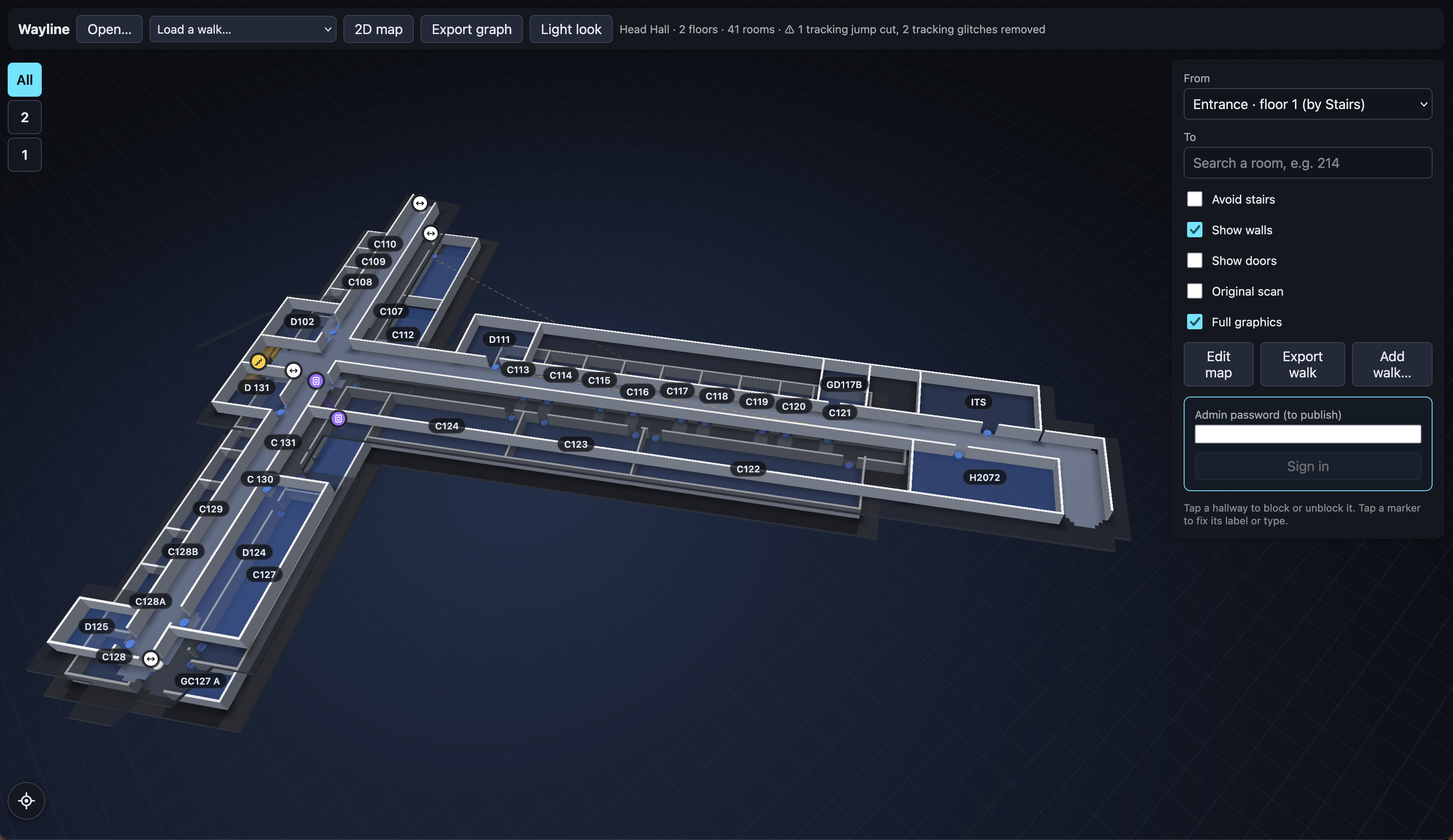
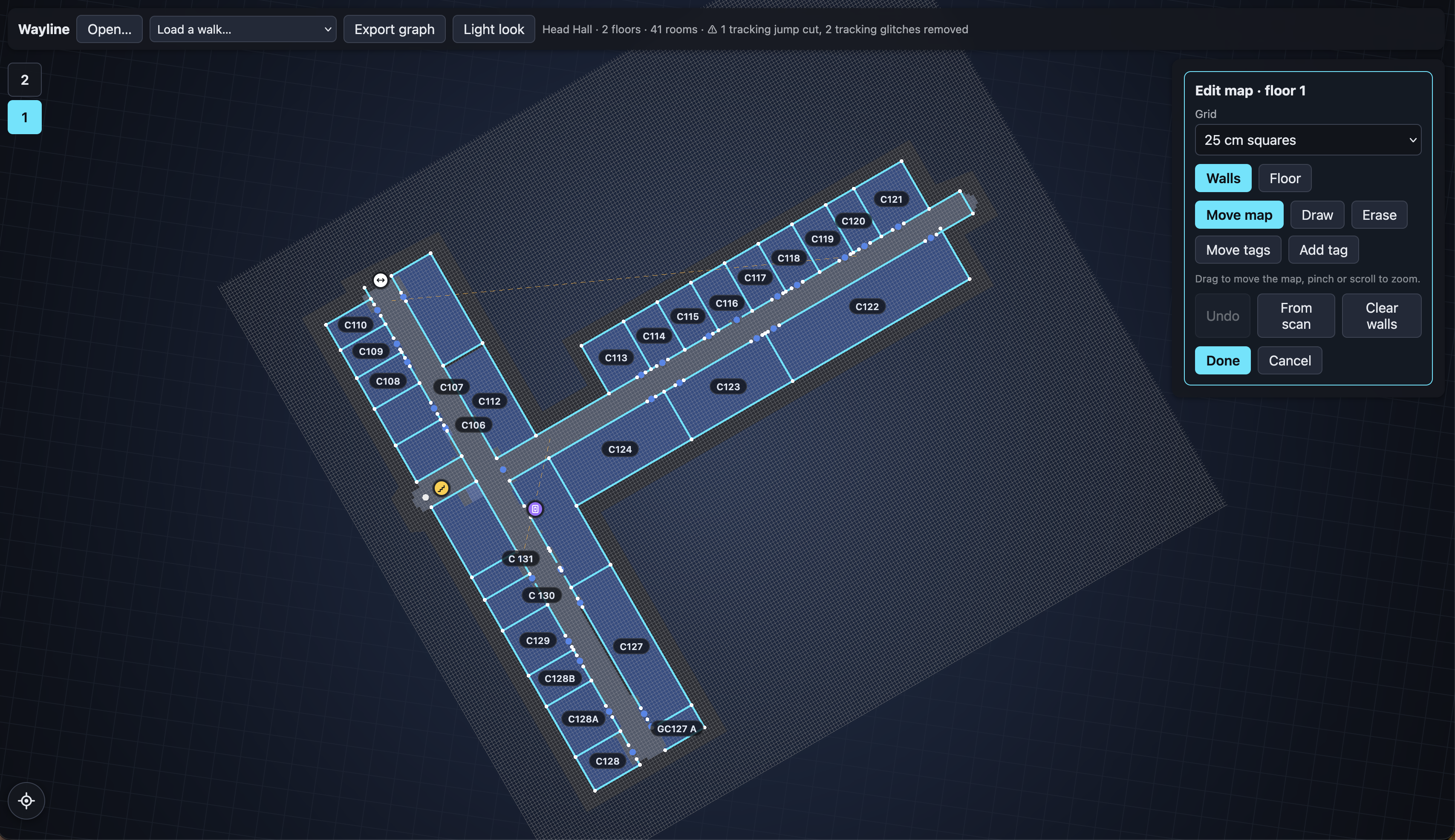
- The web app. It turns that walk into a multi-floor 3D map of the building. You search for a room such as "Room 214" and get the shortest route drawn through the building, with turn-by-turn directions. As you walk, a marker follows you along the route, including up and down stairs. There's an Avoid stairs option for accessible routes, and an admin can hand-edit walls and hallways on a snap-to-grid editor. It runs in the phone's browser, so users only need to open a link.
How I built it
- iOS: Swift and SwiftUI, with ARKit world tracking and its classified scene mesh (LiDAR), CoreMotion for magnetic north and Vision text recognition for room signs. When a walk finishes, only mesh faces classified as wall, door or window are kept, reduced to one point per 25 cm. There are no third-party packages.
- Web: TypeScript, React, Vite and Three.js, with Supabase (Postgres, storage and auth, called through plain
fetch) and hosting on Vercel. - Walls: A Hough transform fits straight wall lines on each floor. It cuts a doorway wherever the walked path crosses a wall, ignores walls of rooms seen through open doors and fills gaps that nothing else explains, which is usually glass.
- Drift correction: Walls that face the same way should keep the same angle. If their angles slowly rotate over a walk, that rotation is the phone's heading drifting, so the whole walk is replayed with the drift removed. The walls then set the building's main grid, and hallways are straightened onto it.
- Graph building: Floors are detected from height changes, with no manual tagging. Each floor's path is cleaned up (small gaps bridged, tracking jumps cut), simplified with Ramer–Douglas–Peucker and snapped so that walking the same hallway twice reuses it and crossings become junctions. Floor changes become stair or elevator links.
- Routing: A hand-written Dijkstra, with stairs marked as not accessible and a penalty on elevators. Directions come from the angles between path segments.
- Live navigation: Dead reckoning in the browser, with no GPS or beacons. It counts steps from the accelerometer and moves the marker one stride at a time. The compass confirms each turn, and every confirmed corner snaps the marker back into place, cancelling drift. The stride length re-learns itself as you walk. On stairs, it counts steps to move you up the flight and onto the next floor.
- All graph and routing logic is unit tested with Vitest, and every tunable threshold lives in one config file.
Challenges I ran into
Turning noisy LiDAR into clean walls. This took the most work by far. Raw scans had holes wherever there was glass, picked up walls of rooms seen through open doors and stacked duplicate walls on top of each other. Automatic reconstruction could never be right every time, so I kept it as the first step and built on top of it: drift correction, snapping to the building's grid and a manual editor for anything the scan still got wrong.
Live navigation. The marker kept freezing at corners in one part of Head Hall. The cause turned out to be that the building's added wing sits about 22° off from the rest, which broke the compass check. Stairs caused tracking jumps too, which led to the step-counting approach for floor changes.
Phone performance. The 3D map kept dropping mid-trip on an iPhone, so I built a lighter render mode and fixed a label-decluttering bug that was restyling the page 682 times a second. Then I discovered the earlier "crashes" were really the dev server reloading, and turned full graphics back on.
Accomplishments that I'm proud of
I built the whole thing solo, from the idea to the iOS app and the web app, in 14 hours with an all-nighter. The full pipeline works end to end on a real building. One walk through Head Hall becomes a searchable 3D map with turn-by-turn directions and a marker that follows you as you walk, so it feels like indoor GPS rather than a static map. I'm especially proud of using the walls to correct the phone's own compass drift.
What I learned
- Sensor data is never clean, so the key is finding something you can trust. Walls and corners don't move, so I used them to correct everything that does.
- Automatic reconstruction gets you most of the way. A good editing tool on top is what makes the result reliable.
- Representing a building as a graph made multi-floor routing, stair avoidance and rerouting simple.
What's next for Wayline
- Map the rest of Head Hall so UNB students, staff and visitors can find their way around it easily.
- Generate maps directly from existing floor plans, so a building can be mapped without walking every hallway first.
- Use the phone's barometer to detect floor changes more reliably.
Built With
- arkit
- javascript
- json
- lidar
- react
- supabase
- swift
- swiftui
- three.js
- typescript
- vercel
- vite
- xcode


Log in or sign up for Devpost to join the conversation.