-
-
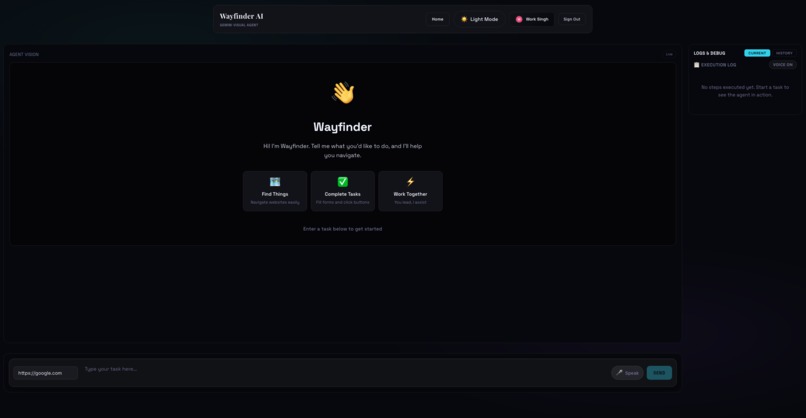
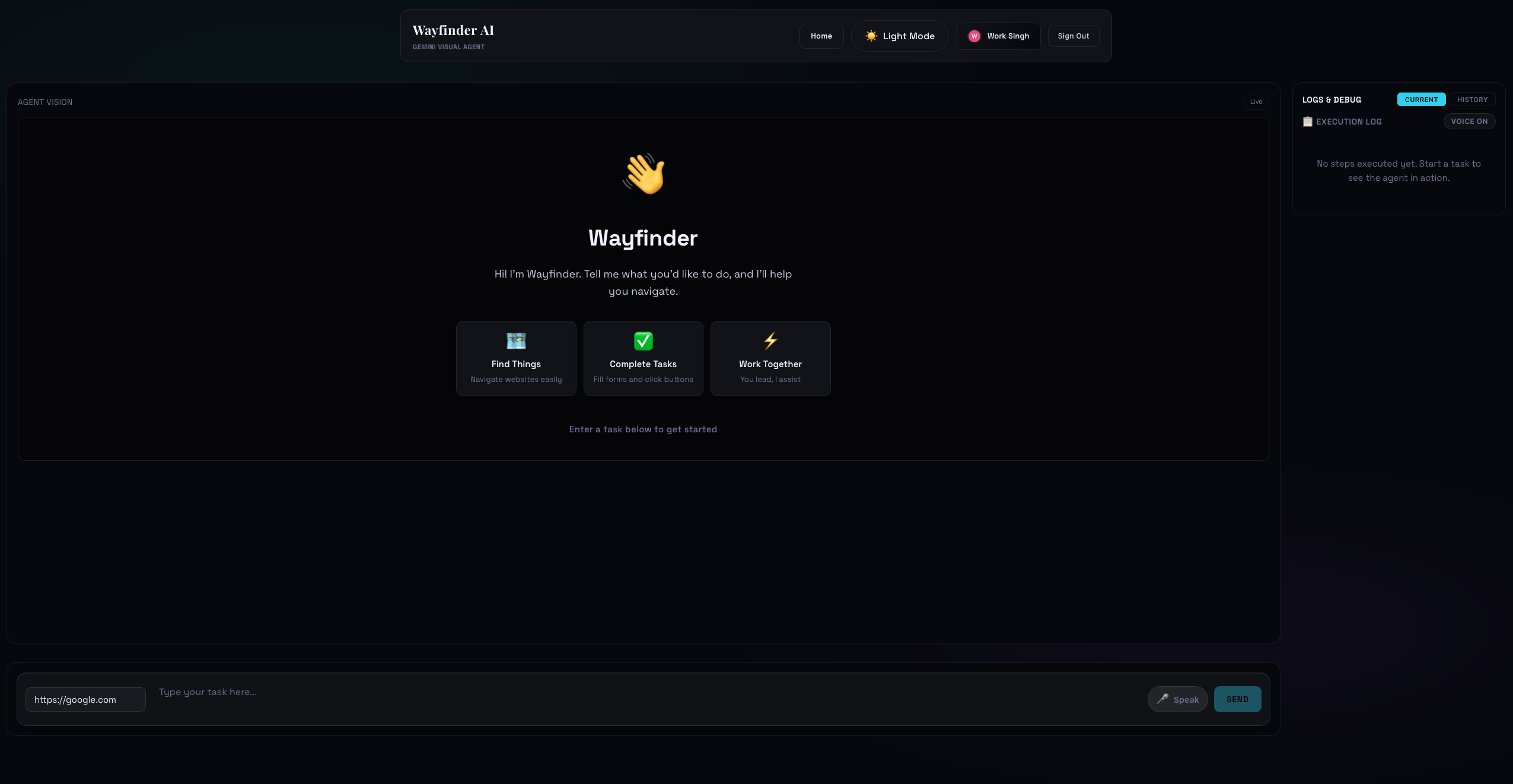
UI Wayfinder
-
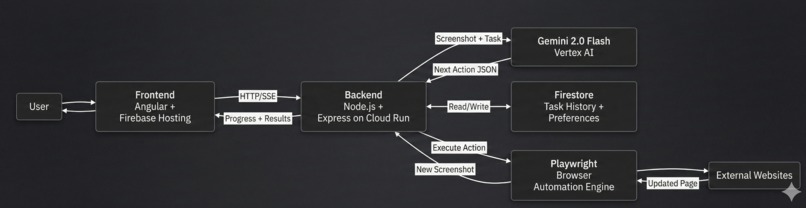
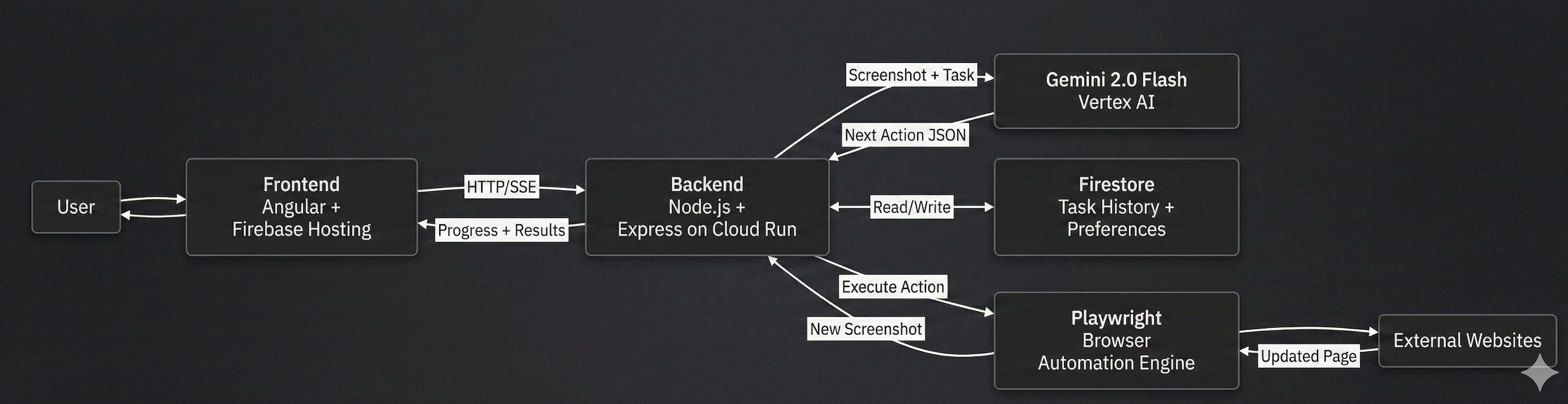
System Flow User task → backend sends screenshot + Gemini → Gemini returns next action → browser executes → results stream back in real time
Wayfinder AI: Visual UI Navigator
The Problem
Traditional web automation breaks the moment a website redesigns. CSS selectors change. APIs get deprecated. Screen scraping becomes brittle. You end up maintaining a sprawl of hardcoded rules for each site.
But humans don't use CSS selectors. We look at a website and understand what to do. We see a button, read the label, and click it. We adapt when the design changes.
AI can do that too.
What I Built
Wayfinder AI watches over your shoulder. You give it a goal. It takes a screenshot, "looks" at what's on screen using Gemini 2.0 Flash's vision, decides what button to click or what to type, and does it. Then it takes another screenshot, looks again, and keeps going until the task is done.
How It Works
You describe a task in plain language. The agent takes a screenshot, sees what elements are on the page using computer vision, understands what you want, and figures out which element to interact with. Then it executes and repeats.
No CSS selectors. No API dependencies. No brittle hardcoded rules. Just: "here's what's on the screen" → "here's what I need to do" → "this is the right action."
Deployment Reality Check
I wanted this running 24/7, so I pushed it to Google Cloud Run. That meant thinking about concurrency.
What happens when two users hit the API at the exact same time? Both are trying to control the browser pool, and suddenly the session state gets corrupted. I built a custom task queue that serializes requests per user—each user's tasks line up and execute one at a time, preventing collisions.
The Cost Problem
Gemini API hits aren't free, and neither are the browser instances. I'm paying per request. So I implemented screenshot compression, request deduplication, and exponential backoff to keep costs under control without sacrificing reliability.
The Frontend: Watching It Work
I built the UI in Angular 17 because I wanted to stream screenshots in real-time without waiting for the entire task to finish. Each time the backend takes a screenshot, it sends it as base64 and the frontend displays it live.
I also added voice narration using the Web Speech API. The agent literally narrates what it's doing: "clicking search box... typing the query... pressing enter... waiting for results..."
This was the feature that surprised me most. When users heard the agent describe what it was doing, they immediately trusted it more. It went from "magic box doing stuff" to "I'm working with an assistant."
Tech Stack
- Frontend: Angular 17, RxJS for reactive updates, Web Speech API for voice
- Backend: Node.js/Express, deployed on Google Cloud Run
- Browser Automation: Playwright (headless Chromium)
- AI Vision: Vertex AI Gemini 2.0 Flash for visual reasoning
- Infrastructure: Firebase (Auth, Firestore for session persistence, Hosting for the frontend)
- Monorepo: Nx for managing shared TypeScript config across apps
What I'm Proud Of
✅ It actually works end-to-end. Most hackathon projects are demos. This is deployed and running. I can share a link, give it a task, and it does it.
✅ I went beyond the happy path. Real websites are complicated. I spent time on error recovery, session cleanup, timeout handling, and graceful degradation. Boring, but necessary.
✅ The UX is built on observation. Instead of asking the user to trust a black box, I made the process visible: live screenshots, execution logs, voice narration. Users feel in control because they can watch.
✅ Visual grounding beats text description. Sending screenshots with labeled elements to Gemini is 10x more reliable than trying to describe a webpage in prose. Gemini "gets it" immediately.
Challenges We Ran Into
The Concurrency Nightmare Two users, one browser pool, total chaos. The browser state would get corrupted, sessions would cross-contaminate, and I'd see errors like "clicked the wrong button on the wrong website." I realized I needed to queue requests per user, ensuring one task completes before the next one starts. This was frustrating to debug because the error logs didn't point to concurrency—it just looked like the agent was doing random things.
Websites Don't Play by the Rules Real websites aren't test suites. Elements load unpredictably. Some use custom shadow DOM (buttons hidden inside web components). Some are infinite scrolls that load content on demand. Some are React/Angular SPAs that fire fake navigation events when nothing actually happens.
I spent a full day debugging why the agent would click the right button and then crash with "navigation timeout." Turns out the website was firing a beforeunload event just to track user interaction—no actual navigation. I had to build smarter detection logic.
Cost vs. Speed Every screenshot = API call = money. Every browser instance = server resources. I kept seeing my cost estimate spike, so I learned to optimize aggressively: compress images to 60%, deduplicate requests, implement exponential backoff, and gracefully degrade when rate-limited.
The Security Tightrope Firebase auth, CORS, token refresh, session expiry, middleware ordering—these aren't glamorous, but they're critical. A botched middleware order meant tokens got validated after being used, creating a window for session hijacking. That took two hours of production debugging to catch.
Lessons Learned
The real problem isn't generating answers. It's maintaining state, preventing race conditions, managing browser lifetimes, and cleaning up sessions. Most bugs weren't in the AI—they were boring orchestration issues that took hours to debug.
People trust systems they can see. The moment I added the live screenshot viewer and execution log, users stopped assuming the worst. They could watch the agent work, see what it was thinking, and immediately understand if something went wrong.
Tiny UX details matter more than advertised. I swapped setTimeout(1500) for actual "wait until the page is stable" logic. That shaved seconds off every task. Users feel the speed difference even if the numbers say "3 seconds faster."
Voice is a multiplier. Adding narration didn't add features. It added presence. Suddenly the agent felt like a collaborator instead of a tool.
What's Next
- Better element detection (OCR for text-heavy sites, computer vision for layout understanding)
- Session replays and shareable recordings
- More conversational voice personality
- Multi-tab coordination (comparing prices across multiple sites, for example)
- Plugin system so users can add custom tools
- Deeper analytics to understand where the agent gets stuck
First hackathon. Built with Gemini 2.0 Flash, Playwright, Angular, Firebase, Cloud Run, and lots of coffee ☕
Built With
- angular.js
- docker
- firebase
- github
- google-cloud-build
- googlecloudrun
- node.js
- nx
- playwright
- speech-to-text
- text-to-speech
- typescript
- vertex-ai

Log in or sign up for Devpost to join the conversation.