💡 Inspiration
In high school, our classrooms had smart boards that cost a fortune and still got in the way. When one froze or needed an update, the lesson stopped while someone tried to debug it. Every board needed its own mix of software, and most schools can't afford one in every room, or at all.
So we asked: what if the interactive part didn't need a special screen? A projector, a small computer and a webcam can turn any wall into an interactive board. We wanted it to feel like Tony Stark's holographic workbench with JARVIS: reach out and move the lesson with your hands. Teachers get one device for everything they present. Students get 3D models and video, not just notes on a board.
🕹️ What it does
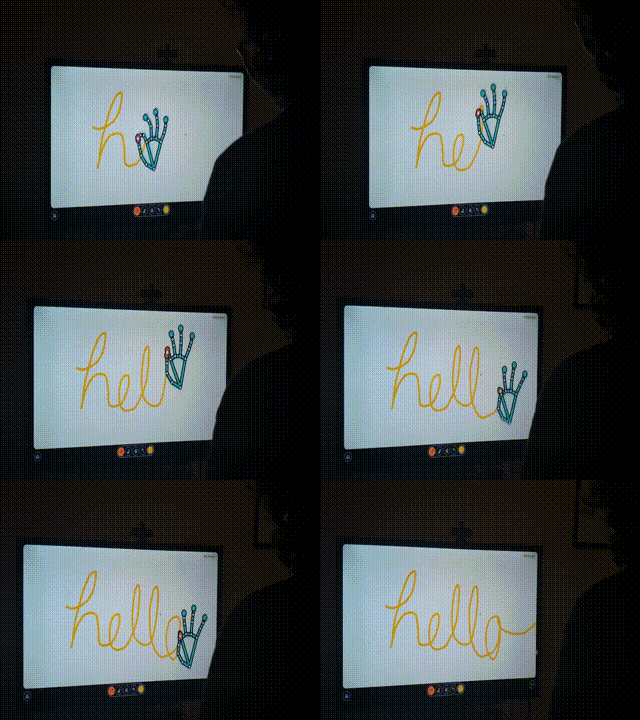
WaveBoard is an all-in-one teaching projector. A Jetson Orin Nano, a USB webcam and any projector become a workspace you control with your hands, with no touch screen, pen or headset.
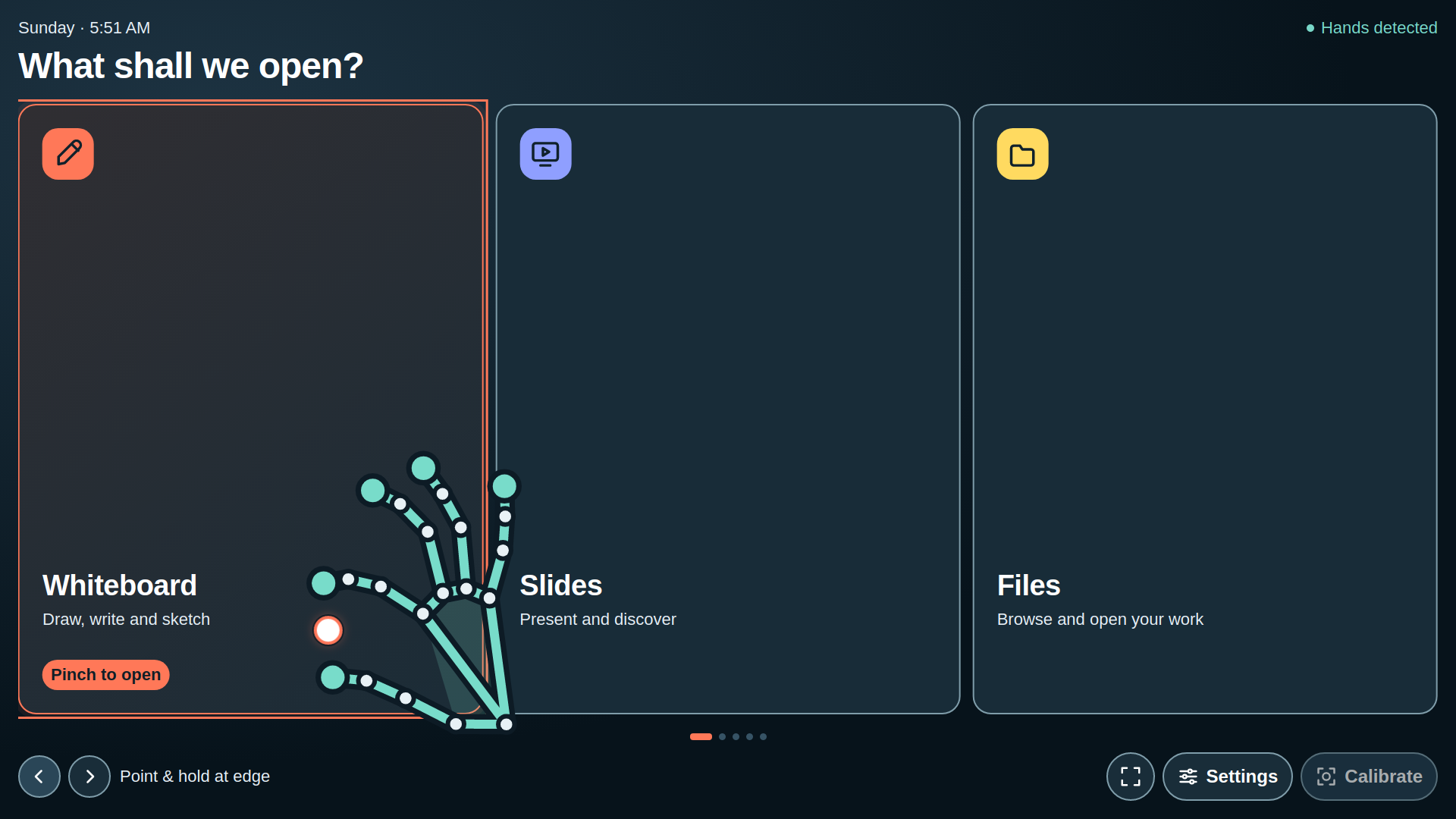
- Your hands are the mouse. The camera tracks your hand and draws its skeleton over the projection, with a cursor between your thumb and index finger. A quick pinch taps a button. Pinch and move to draw, drag or scroll. Swipe an open palm to change slides. Every menu, dialog and setting works by hand, and there's an on-screen keyboard for search.
- Draw: a whiteboard with pens, highlighter, eraser and undo, saved as an image.
- 3D: open GLB, glTF, OBJ and STL models and turn them with your hand.
- Slides: present PowerPoint and PDF files.
- Video: play, pause and scrub through videos.
- Files: open lessons from the device or a USB stick.
- Projector mode: lines up your hand with what's on the wall. Point at four targets to calibrate, or let the camera find markers in the corners of the projection.
It's made for real classrooms. Text and buttons stay readable on cheap 480p projectors. It runs fully offline, with no internet, account or subscription. Camera images never leave the device and are never recorded.
💻 How we built it
- Hand tracking (Python, OpenCV, NumPy, MediaPipe): MediaPipe's hand landmarker finds 21 points on each hand. Our gesture layer turns them into finger states, pinches and swipes, smooths every joint with a One Euro filter, and maps the camera view onto the projected screen. Camera capture and AI inference run on separate threads and keep only the newest frame, so lag never piles up. Between AI frames, sparse optical flow keeps the hand moving smoothly.
- The workspace (HTML, CSS, JavaScript, Three.js): a touch-first interface designed for projectors. It runs inside a PyQt5 / Qt WebEngine desktop window, so there's no web hosting, browser or server. The interface calls Python directly through Qt's WebChannel. The hand tracker sends its data to the app through a process pipe, so no network port is ever opened. LibreOffice and Poppler turn PowerPoint and PDF files into slides.
- Setup: one install script prepares everything on JetPack 6 and adds WaveBoard to the Applications menu.
‼️ Challenges we ran into
- Speed. Our first version read the camera, ran the AI and drew the screen in one loop, and it crawled at about 6 FPS. We split capture from inference, kept only the newest frame, filled the gaps with optical flow, and stopped searching for a second hand when only one presenter is there.
- Jitter vs. lag. Raw hand points shake, and heavy smoothing feels sluggish. A One Euro filter, plus pinch thresholds with hysteresis and debouncing, made taps land where you aim without flickering.
- Reading real hands. Our first finger-detection rules failed on real hands. We rebuilt them and checked them against real MediaPipe hand photos.
- Matching the camera to the projection. The camera sees everything mirrored, at an angle and at a different scale than the screen. That's why we built Projector mode, with hand calibration and corner markers.
- The browser got in the way. Browsers ignored hand input for some actions, snap browsers failed to start on JetPack 6, and local servers fought over ports. In the end we moved everything into one offline desktop app with no servers at all.
- Teamwork at speed. We built the workspace and the hand tracker in parallel, then merged them into one product.
🏆 Accomplishments that we're proud of
- You can run a whole lesson with just your hands: open slides, draw, spin a 3D model and play a video.
- It's built from parts that cost a fraction of a smart board, and it turns any wall into an interactive surface.
- It installs with one command and works completely offline and privately.
- Over 120 automated Python tests, plus browser tests, cover the gestures, tracking and interface.
🦾 What we learned
Real-time computer vision on edge hardware, and how much of "accuracy" is really filtering and timing. We also learned calibration and perspective mapping, how to design for hands and projectors instead of a mouse, and how to package a desktop app for NVIDIA's ARM-based JetPack.
🤖 What's next for WaveBoard
- Testing in real classrooms, and tuning speed and accuracy on the Jetson at presenting distance
- GPU (TensorRT) acceleration for the hand model
- Two-hand gestures to zoom and rotate 3D models
- Letting students take turns at the board
- One enclosure with the projector, Jetson and camera that a school can just plug in
Built With
python, opencv, numpy, mediapipe, pyqt5, qt-webengine, javascript, html5, css3, three.js, nvidia-jetson-orin-nano, jetpack, ubuntu, libreoffice, poppler


Log in or sign up for Devpost to join the conversation.